<!DOCTYPE html>
    <html lang="vi" xmlns="http://www.w3.org/1999/xhtml" prefix="og: http://ogp.me/ns#">
    <head>
<title>Phát Thành Đạt &#039;&#039;Đu trend&#039;&#039; vẽ tranh bằng trí tuệ nhân tạo chỉ trong 30s</title>
<meta name="description" content="&#039;&#039;Đu trend&#039;&#039; vẽ tranh bằng trí tuệ nhân tạo chỉ trong 30s - Savefile - Tin Tức -...">
<meta name="author" content="Phát Thành Đạt - Dịch vụ sửa chữa máy tính hóc môn">
<meta name="copyright" content="Phát Thành Đạt - Dịch vụ sửa chữa máy tính hóc môn [info@phatthanhdat.com]">
<meta name="generator" content="NukeViet v4.5">
<meta name="facebook-domain-verification" content="nv4brgbtr5jrhsej2o63m6qx7nz5ek">
<meta http-equiv="Content-Type" content="text/html; charset=utf-8">
<meta property="og:title" content="&#039;&#039;Đu trend&#039;&#039; vẽ tranh bằng trí tuệ nhân tạo chỉ trong 30s">
<meta property="og:type" content="website">
<meta property="og:description" content="Savefile - Tin Tức - https&#x3A;&#x002F;&#x002F;phatthanhdat.com&#x002F;index.php&#x002F;savefile&#x002F;ai-tri-tue-nhan-tao&#x002F;du-trend-ve-tranh-bang-tri-tue-nhan-tao-chi-trong-30s-154.html">
<meta property="og:site_name" content="Phát Thành Đạt - Dịch vụ sửa chữa máy tính hóc môn">
<meta property="og:url" content="https://phatthanhdat.com/index.php/savefile/ai-tri-tue-nhan-tao/du-trend-ve-tranh-bang-tri-tue-nhan-tao-chi-trong-30s-154.html">
<link rel="shortcut icon" href="https://phatthanhdat.com/uploads/about/logonho.png">
<link rel="canonical" href="https://phatthanhdat.com/index.php/savefile/ai-tri-tue-nhan-tao/du-trend-ve-tranh-bang-tri-tue-nhan-tao-chi-trong-30s-154.html">
<link rel="alternate" href="https://phatthanhdat.com/index.php/rss/" title="Tin Tức" type="application/rss+xml">
<link rel="alternate" href="https://phatthanhdat.com/index.php/rss/quan-tri-mang/" title="Tin Tức - Quản Trị Mạng" type="application/rss+xml">
<link rel="alternate" href="https://phatthanhdat.com/index.php/rss/windows-server/" title="Tin Tức - Windows Server" type="application/rss+xml">
<link rel="alternate" href="https://phatthanhdat.com/index.php/rss/active-windows/" title="Tin Tức - Active Windows" type="application/rss+xml">
<link rel="alternate" href="https://phatthanhdat.com/index.php/rss/mang-may-tinh/" title="Tin Tức - Mạng Máy Tính" type="application/rss+xml">
<link rel="alternate" href="https://phatthanhdat.com/index.php/rss/quan-tri-mail-server/" title="Tin Tức - Quản Trị Mail Server" type="application/rss+xml">
<link rel="alternate" href="https://phatthanhdat.com/index.php/rss/y-nghia-cuoc-song/" title="Tin Tức - Ý nghĩa cuộc sống" type="application/rss+xml">
<link rel="alternate" href="https://phatthanhdat.com/index.php/rss/tien-ich/" title="Tin Tức - Tiện Ích" type="application/rss+xml">
<link rel="alternate" href="https://phatthanhdat.com/index.php/rss/facebook-add/" title="Tin Tức - Facebook Add" type="application/rss+xml">
<link rel="alternate" href="https://phatthanhdat.com/index.php/rss/nong-tren-mang/" title="Tin Tức - Nóng Trên Mạng" type="application/rss+xml">
<link rel="alternate" href="https://phatthanhdat.com/index.php/rss/covid-19/" title="Tin Tức - Covid 19" type="application/rss+xml">
<link rel="alternate" href="https://phatthanhdat.com/index.php/rss/hoc-duong/" title="Tin Tức - Học Đường" type="application/rss+xml">
<link rel="alternate" href="https://phatthanhdat.com/index.php/rss/tin-tuc-thi-truong/" title="Tin Tức - Tin Tức Thị Trường" type="application/rss+xml">
<link rel="alternate" href="https://phatthanhdat.com/index.php/rss/code-hay/" title="Tin Tức - Code hay" type="application/rss+xml">
<link rel="alternate" href="https://phatthanhdat.com/index.php/rss/kho-hang/" title="Tin Tức - Kho Hàng" type="application/rss+xml">
<link rel="alternate" href="https://phatthanhdat.com/index.php/rss/ai-tri-tue-nhan-tao/" title="Tin Tức - AI Trí Tuệ Nhân Tạo" type="application/rss+xml">
<link rel="alternate" href="https://phatthanhdat.com/index.php/rss/do-hoa/" title="Tin Tức - Đồ Hoạ" type="application/rss+xml">
<link rel="stylesheet" href="https://phatthanhdat.com/assets/css/font-awesome.min.css">
<link rel="stylesheet" href="https://phatthanhdat.com/themes/default/css/bootstrap.non-responsive.css">
<link rel="stylesheet" href="https://phatthanhdat.com/themes/default/css/style.css">
<link rel="stylesheet" href="https://phatthanhdat.com/themes/default/css/style.non-responsive.css">
<link rel="StyleSheet" href="https://phatthanhdat.com/themes/default/css/news.css">
<link rel="stylesheet" href="https://phatthanhdat.com/themes/default/css/custom.css">
<style type="text/css">
	body{background: #fff;}
</style>
<!-- Google Tag Manager -->
<!-- End Google Tag Manager -->

<!-- Facebook Pixel Code -->
<noscript><img height="1" width="1" style="display:none"
src="https://www.facebook.com/tr?id=219812430112623&ev=PageView&noscript=1"
/></noscript>
<!-- End Facebook Pixel Code -->
<!-- Messenger Plugin chat Code -->
    <div id="fb-root"></div>

    <!-- Your Plugin chat code -->
    <div id="fb-customer-chat" class="fb-customerchat">
    </div>
<script>(function(i,s,o,g,r,a,m){i['GoogleAnalyticsObject']=r;i[r]=i[r]||function(){
(i[r].q=i[r].q||[]).push(arguments)},i[r].l=1*new Date();a=s.createElement(o),
m=s.getElementsByTagName(o)[0];a.async=1;a.src=g;m.parentNode.insertBefore(a,m)
})(window,document,'script','https://www.google-analytics.com/analytics.js','ga');
ga('create', 'UA-133543348-1', '.phatthanhdat.com');
ga('send', 'pageview');
</script>
</head>
    <body>
<div class="zalo-chat-widget" data-oaid="1354977264109400055" data-welcome-message="R&#7845;t vui khi &#273;&#432;&#7907;c h&#7895; tr&#7907; b&#7841;n!" data-autopopup="0" data-width="" data-height=""></div>
<amp-ad width="100vw" height="320"
     type="adsense"
     data-ad-client="ca-pub-3722185033130810"
     data-ad-slot="5396409404"
     data-auto-format="rspv"
     data-full-width="">
  <div overflow=""></div>
</amp-ad>
<!-- Google Tag Manager (noscript) -->
<noscript><iframe src="https://www.googletagmanager.com/ns.html?id=GTM-KRZZ2CK"
height="0" width="0" style="display:none;visibility:hidden"></iframe></noscript>
<!-- End Google Tag Manager (noscript) -->
<div class="gcse-searchbox-only"></div>
<div id="print">
	<div id="hd_print">
		<h2 class="pull-left">Phát Thành Đạt - Dịch vụ sửa chữa máy tính hóc môn</h2>
		<p class="pull-right"><a title="Phát Thành Đạt - Dịch vụ sửa chữa máy tính hóc môn" href="https://phatthanhdat.com/">https://phatthanhdat.com</a></p>
	</div>
	<div class="clear"></div>
	<hr />
	<div id="content">
		<h1>&#039;&#039;Đu trend&#039;&#039; vẽ tranh bằng trí tuệ nhân tạo chỉ trong 30s</h1>
		<ul class="list-inline">
			<li>Thứ sáu - 03/03/2023 09:41</li>
			<li class="hidden-print txtrequired"><em class="fa fa-print">&nbsp;</em><a title="In ra" href="javascript:;" onclick="window.print()">In ra</a></li>
			<li class="hidden-print txtrequired"><em class="fa fa-power-off">&nbsp;</em><a title="Đóng cửa sổ này" href="javascript:;" onclick="window.close()">Đóng cửa sổ này</a></li>
		</ul>
		<div class="clear"></div>
		<div id="hometext">
			Dạo gần đây mọi người đang đón nhận một xu hướng công nghệ mới đó chính là vẽ tranh bằng AI (trí tuệ nhân tạo). Chỉ cần gõ ra vài từ khóa, AI có thể vẽ cho bạn những bức tranh nghệ thuật không thua kém gì các artist đâu nha!
		</div>
		<div id="bodytext" class="clearfix">
			<p>Trí tuệ nhân tạo đã được bắt đầu áp dụng vào lĩnh vực hội họa từ khá lâu. Mới đây, vào ngày 30/8, giới họa sĩ vô cùng bức xúc khi bức tranh của AI đã giành giải nhất của thi nghệ thuật.&nbsp;</p>

<p>Và tuyệt tác đó được tạo nên bởi hệ thống trí tuệ nhân tạo tên là Midjourney. Người dùng chỉ cần đưa ra mô tả và dữ liệu đầu vào bằng văn bản,&nbsp;<a href="https://www.midjourney.com/home/">Midjourney</a>&nbsp;sẽ xây dựng nên những bức tranh vẽ tuyệt vời với phong cách nghệ thuật khác nhau.</p>

<p>Nghe có vẻ phức tạp nhưng thực chất, chính bạn cũng có thể trải nghiệm vẽ tranh nghệ thuật bằng Midjourney đó. Hãy để colorME hướng dẫn nhé!<br />
&nbsp;</p>

<div class="image-center"><img alt="1" height="670" src="https://phatthanhdat.com/uploads/news/2023_03/1.png" width="1000" /></div>

<p><br />
<strong>Bước 1: Truy cập trang web midjourney.com</strong><br />
&nbsp;</p>

<div class="image-center"><img alt="2" height="1000" src="https://phatthanhdat.com/uploads/news/2023_03/2.png" width="1000" /></div>

<h2 dir="ltr"><strong>Bước 2: Chọn vào Join the beta</strong></h2>

<div dir="ltr">
<div class="image-center"><img alt="3" height="1000" src="https://phatthanhdat.com/uploads/news/2023_03/3.png" width="1000" /></div>
</div>

<div dir="ltr">
<h2 dir="ltr"><strong>Bước 3: Vào kênh discord của MidJourney</strong></h2>

<p>Nếu chưa có tài khoản Discord thì bạn hãy đăng kí nhé.</p>

<div class="image-center"><img alt="4" height="1000" src="https://phatthanhdat.com/uploads/news/2023_03/4.png" width="1000" /></div>

<p>&nbsp;</p>

<h2><strong>Bước 4: Chọn vào một kênh newbies bất kì để được thử miễn phí</strong></h2>

<div class="image-center"><img alt="5" height="1000" src="https://phatthanhdat.com/uploads/news/2023_03/5.png" width="1000" /></div>

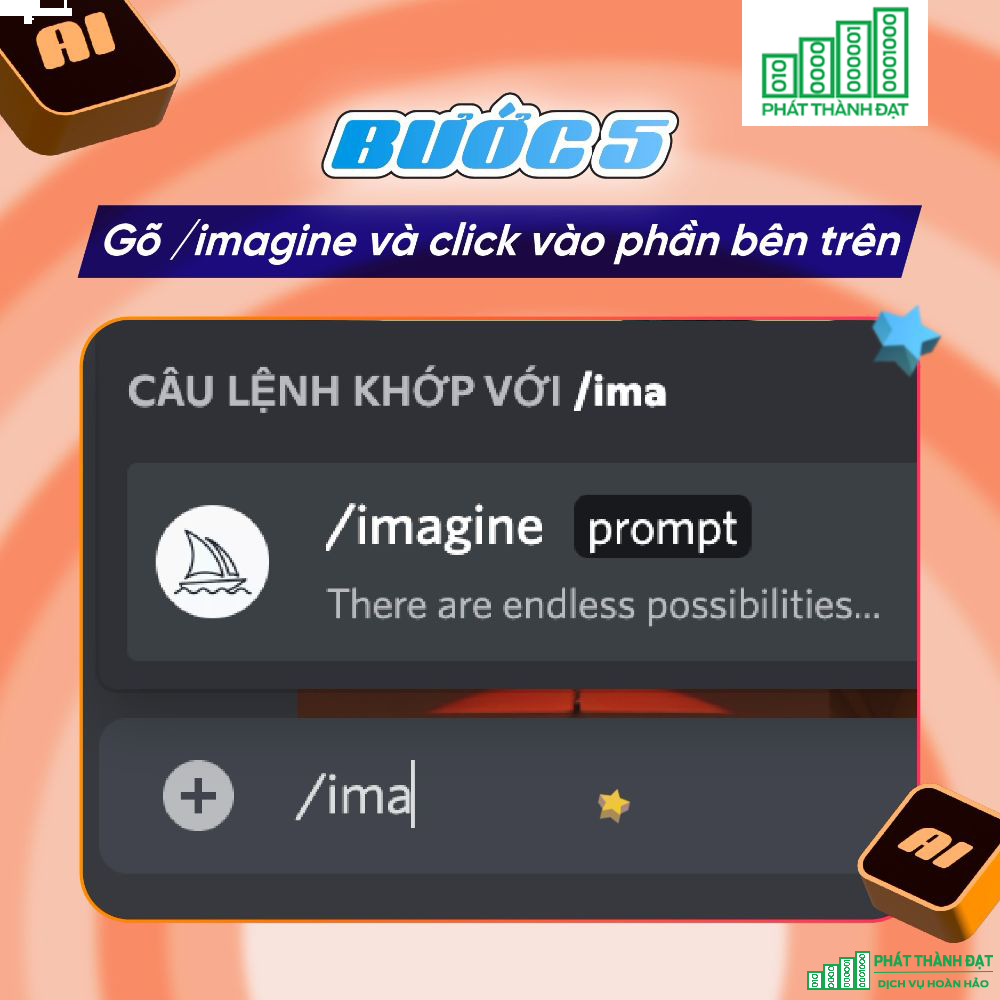
<h2><strong>Bước 5: Gõ /imagine và click vào phần bên trên</strong><br />
&nbsp;</h2>

<div class="image-center"><img alt="6" height="1000" src="https://phatthanhdat.com/uploads/news/2023_03/6.png" width="1000" /></div>

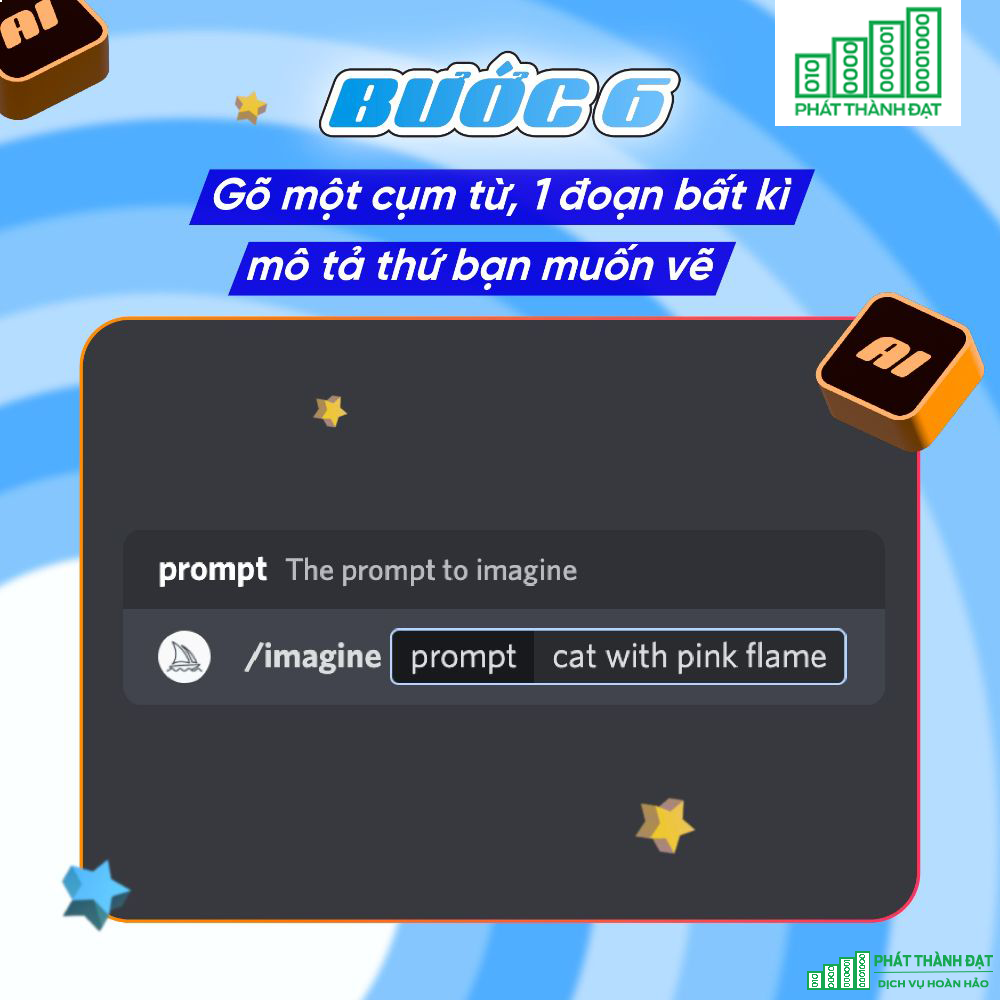
<h2><strong>Bước 6: Gõ một cụm từ, 1 đoạn bất kì mô tả thứ bạn muốn vẽ</strong></h2>

<p>Các từ khóa này có thể là các sự vật, sự việc, phong cách vẽ, chữ viết, mục đích vẽ,...<br />
&nbsp;</p>

<div class="image-center"><img alt="7" height="1000" src="https://phatthanhdat.com/uploads/news/2023_03/7.png" width="1000" /></div>

<h2 dir="ltr"><strong>Bước 7: Enter và đợi kết quả hoàn thành</strong></h2>

<p>Các bức tranh sẽ được vẽ theo nhiều phong cách khác nhau, thường sẽ được vẽ dưới dạng&nbsp;<a href="https://colorme.vn/blog/hoc-digital-painting-la-hoc-nhung-gi">Digital Painting</a>. Nếu bạn có một nhu cầu cụ thể về phong cách hội họa thì bạn có thể gõ từ khóa đó khi order AI vẽ.<br />
&nbsp;</p>

<div class="image-center"><img alt="8" height="1000" src="https://phatthanhdat.com/uploads/news/2023_03/8.png" width="1000" /></div>

<h2 dir="ltr"><strong>Bước 8: Chọn các lệnh để chỉnh sửa</strong></h2>

<p dir="ltr">Khi xuất hiện ra 4 option tranh mẫu, bạn có thể chọn biểu tượng mũi tên quay tròn nếu muốn làm lại, chọn U nếu muốn vẽ chi tiết hơn và chọn V nếu muốn tiếp tục triển khai ý tưởng theo mẫu đó. Các option sẽ được xếp theo thứ tự 1234 (tính từ trái sang phải, từ trên xuống dưới)<br />
&nbsp;</p>

<div class="image-center"><img alt="9" height="1000" src="https://phatthanhdat.com/uploads/news/2023_03/9.png" width="1000" /></div>

<h2 dir="ltr"><strong>Bước 9: Tiếp tục cho đến khi có được sản phẩm cuối cùng</strong></h2>

<p>Giờ thì bạn đã có thể lưu lại thành phẩm rồi.<br />
&nbsp;</p>

<h2 dir="ltr"><strong>TỔNG KẾT</strong></h2>

<p dir="ltr">Từ chính những tác phẩm trên, ta có thể thấy được tiềm năng vô hạn của trí tuệ nhân tạo. Không chỉ có nghệ thuật, trong tương lai con người và công nghệ AI có thể sẽ đồng hành và phát triển cùng nhau ở nhiều lĩnh vực khác. Hy vọng sau khi đọc bài viết, bạn đã biết cách để tự tạo nên một tác phẩm nghệ thuật với Midjourney.&nbsp;</p>
</div>
		</div>
				<div id="author">
						<p>
				<strong>Tác giả:</strong>
				<a href="https://phatthanhdat.com/index.php/author/luuhongphuc/">luuhongphuc</a>
			</p>
		</div>
	</div>
	<div id="footer" class="clearfix">
		<div id="url">
			<strong>URL của bản tin này: </strong><a href="https://phatthanhdat.com/index.php/savefile/ai-tri-tue-nhan-tao/du-trend-ve-tranh-bang-tri-tue-nhan-tao-chi-trong-30s-154.html" title="&#039;&#039;Đu trend&#039;&#039; vẽ tranh bằng trí tuệ nhân tạo chỉ trong 30s">https://phatthanhdat.com/index.php/savefile/ai-tri-tue-nhan-tao/du-trend-ve-tranh-bang-tri-tue-nhan-tao-chi-trong-30s-154.html</a>

		</div>
		<div class="clear"></div>
		<div class="copyright">
			&copy; Phát Thành Đạt - Dịch vụ sửa chữa máy tính hóc môn
		</div>
		<div id="contact">
			<a href="mailto:info@phatthanhdat.com">info@phatthanhdat.com</a>
		</div>
	</div>
</div>
        <div id="timeoutsess" class="chromeframe">
            Bạn đã không sử dụng Site, <a onclick="timeoutsesscancel();" href="https://phatthanhdat.com/#">Bấm vào đây để duy trì trạng thái đăng nhập</a>. Thời gian chờ: <span id="secField"> 60 </span> giây
        </div>
        <div id="openidResult" class="nv-alert" style="display:none"></div>
        <div id="openidBt" data-result="" data-redirect=""></div>
<script src="https://phatthanhdat.com/assets/js/jquery/jquery.min.js"></script>
<script>var nv_base_siteurl="/",nv_lang_data="vi",nv_lang_interface="vi",nv_name_variable="nv",nv_fc_variable="op",nv_lang_variable="language",nv_module_name="news",nv_func_name="savefile",nv_is_user=0, nv_my_ofs=-4,nv_my_abbr="EDT",nv_cookie_prefix="nv4",nv_check_pass_mstime=1738000,nv_area_admin=0,nv_safemode=0,theme_responsive=0,nv_recaptcha_ver=2,nv_recaptcha_sitekey="",nv_recaptcha_type="image",XSSsanitize=1;</script>
<script src="https://phatthanhdat.com/assets/js/language/vi.js"></script>
<script src="https://phatthanhdat.com/assets/js/DOMPurify/purify3.js"></script>
<script src="https://phatthanhdat.com/assets/js/global.js"></script>
<script src="https://phatthanhdat.com/assets/js/site.js"></script>
<script src="https://phatthanhdat.com/themes/default/js/news.js"></script>
<script src="https://phatthanhdat.com/themes/default/js/main.js"></script>
<script src="https://phatthanhdat.com/themes/default/js/custom.js"></script>
<script type="application/ld+json">
        {
            "@context": "https://schema.org",
            "@type": "Organization",
            "url": "https://phatthanhdat.com",
            "logo": "https://phatthanhdat.com/uploads/about/logonho.png"
        }
        </script>
<script async custom-element="amp-ad" src="https://cdn.ampproject.org/v0/amp-ad-0.1.js"></script>
<script>
     (adsbygoogle = window.adsbygoogle || []).push({});
</script>
<script>(function(w,d,s,l,i){w[l]=w[l]||[];w[l].push({'gtm.start':
new Date().getTime(),event:'gtm.js'});var f=d.getElementsByTagName(s)[0],
j=d.createElement(s),dl=l!='dataLayer'?'&l='+l:'';j.async=true;j.src=
'https://www.googletagmanager.com/gtm.js?id='+i+dl;f.parentNode.insertBefore(j,f);
})(window,document,'script','dataLayer','GTM-KRZZ2CK');</script>
<script>
!function(f,b,e,v,n,t,s)
{if(f.fbq)return;n=f.fbq=function(){n.callMethod?
n.callMethod.apply(n,arguments):n.queue.push(arguments)};
if(!f._fbq)f._fbq=n;n.push=n;n.loaded=!0;n.version='2.0';
n.queue=[];t=b.createElement(e);t.async=!0;
t.src=v;s=b.getElementsByTagName(e)[0];
s.parentNode.insertBefore(t,s)}(window, document,'script',
'https://connect.facebook.net/en_US/fbevents.js');
fbq('init', '219812430112623');
fbq('track', 'PageView');
</script>
<script async src="https://pagead2.googlesyndication.com/pagead/js/adsbygoogle.js?client=ca-pub-3722185033130810" crossorigin="anonymous"></script>
<script>
      var chatbox = document.getElementById('fb-customer-chat');
      chatbox.setAttribute("page_id", "244380242794992");
      chatbox.setAttribute("attribution", "biz_inbox");

      window.fbAsyncInit = function() {
        FB.init({
          xfbml            : true,
          version          : 'v11.0'
        });
      };

      (function(d, s, id) {
        var js, fjs = d.getElementsByTagName(s)[0];
        if (d.getElementById(id)) return;
        js = d.createElement(s); js.id = id;
        js.src = 'https://connect.facebook.net/vi_VN/sdk/xfbml.customerchat.js';
        fjs.parentNode.insertBefore(js, fjs);
      }(document, 'script', 'facebook-jssdk'));
    </script>
<script src="https://sp.zalo.me/plugins/sdk.js"></script>
<script>
     (adsbygoogle = window.adsbygoogle || []).push({});
</script>
<script src="https://phatthanhdat.com/themes/default/js/bootstrap.min.js"></script>
</body>
</html>