<!DOCTYPE html>
    <html lang="vi" xmlns="http://www.w3.org/1999/xhtml" prefix="og: http://ogp.me/ns#">
    <head>
<title>Phát Thành Đạt Fix lỗi thường gặp trên Zimbra Email Server</title>
<meta name="description" content="Fix lỗi thường gặp trên Zimbra Email Server - Savefile - Tin Tức -...">
<meta name="author" content="Phát Thành Đạt - Dịch vụ sửa chữa máy tính hóc môn">
<meta name="copyright" content="Phát Thành Đạt - Dịch vụ sửa chữa máy tính hóc môn [info@phatthanhdat.com]">
<meta name="generator" content="NukeViet v4.5">
<meta name="facebook-domain-verification" content="nv4brgbtr5jrhsej2o63m6qx7nz5ek">
<meta http-equiv="Content-Type" content="text/html; charset=utf-8">
<meta property="og:title" content="Fix lỗi thường gặp trên Zimbra Email Server">
<meta property="og:type" content="website">
<meta property="og:description" content="Savefile - Tin Tức - https&#x3A;&#x002F;&#x002F;phatthanhdat.com&#x002F;index.php&#x002F;savefile&#x002F;quan-tri-mail-server&#x002F;fix-loi-thuong-gap-tren-zimbra-email-server-43.html">
<meta property="og:site_name" content="Phát Thành Đạt - Dịch vụ sửa chữa máy tính hóc môn">
<meta property="og:url" content="https://phatthanhdat.com/index.php/savefile/quan-tri-mail-server/fix-loi-thuong-gap-tren-zimbra-email-server-43.html">
<link rel="shortcut icon" href="https://phatthanhdat.com/uploads/about/logonho.png">
<link rel="canonical" href="https://phatthanhdat.com/index.php/savefile/quan-tri-mail-server/fix-loi-thuong-gap-tren-zimbra-email-server-43.html">
<link rel="alternate" href="https://phatthanhdat.com/index.php/rss/" title="Tin Tức" type="application/rss+xml">
<link rel="alternate" href="https://phatthanhdat.com/index.php/rss/quan-tri-mang/" title="Tin Tức - Quản Trị Mạng" type="application/rss+xml">
<link rel="alternate" href="https://phatthanhdat.com/index.php/rss/windows-server/" title="Tin Tức - Windows Server" type="application/rss+xml">
<link rel="alternate" href="https://phatthanhdat.com/index.php/rss/active-windows/" title="Tin Tức - Active Windows" type="application/rss+xml">
<link rel="alternate" href="https://phatthanhdat.com/index.php/rss/mang-may-tinh/" title="Tin Tức - Mạng Máy Tính" type="application/rss+xml">
<link rel="alternate" href="https://phatthanhdat.com/index.php/rss/quan-tri-mail-server/" title="Tin Tức - Quản Trị Mail Server" type="application/rss+xml">
<link rel="alternate" href="https://phatthanhdat.com/index.php/rss/y-nghia-cuoc-song/" title="Tin Tức - Ý nghĩa cuộc sống" type="application/rss+xml">
<link rel="alternate" href="https://phatthanhdat.com/index.php/rss/tien-ich/" title="Tin Tức - Tiện Ích" type="application/rss+xml">
<link rel="alternate" href="https://phatthanhdat.com/index.php/rss/facebook-add/" title="Tin Tức - Facebook Add" type="application/rss+xml">
<link rel="alternate" href="https://phatthanhdat.com/index.php/rss/nong-tren-mang/" title="Tin Tức - Nóng Trên Mạng" type="application/rss+xml">
<link rel="alternate" href="https://phatthanhdat.com/index.php/rss/covid-19/" title="Tin Tức - Covid 19" type="application/rss+xml">
<link rel="alternate" href="https://phatthanhdat.com/index.php/rss/hoc-duong/" title="Tin Tức - Học Đường" type="application/rss+xml">
<link rel="alternate" href="https://phatthanhdat.com/index.php/rss/tin-tuc-thi-truong/" title="Tin Tức - Tin Tức Thị Trường" type="application/rss+xml">
<link rel="alternate" href="https://phatthanhdat.com/index.php/rss/code-hay/" title="Tin Tức - Code hay" type="application/rss+xml">
<link rel="alternate" href="https://phatthanhdat.com/index.php/rss/kho-hang/" title="Tin Tức - Kho Hàng" type="application/rss+xml">
<link rel="alternate" href="https://phatthanhdat.com/index.php/rss/ai-tri-tue-nhan-tao/" title="Tin Tức - AI Trí Tuệ Nhân Tạo" type="application/rss+xml">
<link rel="alternate" href="https://phatthanhdat.com/index.php/rss/do-hoa/" title="Tin Tức - Đồ Hoạ" type="application/rss+xml">
<link rel="stylesheet" href="https://phatthanhdat.com/assets/css/font-awesome.min.css">
<link rel="stylesheet" href="https://phatthanhdat.com/themes/default/css/bootstrap.non-responsive.css">
<link rel="stylesheet" href="https://phatthanhdat.com/themes/default/css/style.css">
<link rel="stylesheet" href="https://phatthanhdat.com/themes/default/css/style.non-responsive.css">
<link rel="StyleSheet" href="https://phatthanhdat.com/themes/default/css/news.css">
<link rel="stylesheet" href="https://phatthanhdat.com/themes/default/css/custom.css">
<style type="text/css">
	body{background: #fff;}
</style>
<!-- Google Tag Manager -->
<!-- End Google Tag Manager -->

<!-- Facebook Pixel Code -->
<noscript><img height="1" width="1" style="display:none"
src="https://www.facebook.com/tr?id=219812430112623&ev=PageView&noscript=1"
/></noscript>
<!-- End Facebook Pixel Code -->
<!-- Messenger Plugin chat Code -->
    <div id="fb-root"></div>

    <!-- Your Plugin chat code -->
    <div id="fb-customer-chat" class="fb-customerchat">
    </div>
<script>(function(i,s,o,g,r,a,m){i['GoogleAnalyticsObject']=r;i[r]=i[r]||function(){
(i[r].q=i[r].q||[]).push(arguments)},i[r].l=1*new Date();a=s.createElement(o),
m=s.getElementsByTagName(o)[0];a.async=1;a.src=g;m.parentNode.insertBefore(a,m)
})(window,document,'script','https://www.google-analytics.com/analytics.js','ga');
ga('create', 'UA-133543348-1', '.phatthanhdat.com');
ga('send', 'pageview');
</script>
</head>
    <body>
<div class="zalo-chat-widget" data-oaid="1354977264109400055" data-welcome-message="R&#7845;t vui khi &#273;&#432;&#7907;c h&#7895; tr&#7907; b&#7841;n!" data-autopopup="0" data-width="" data-height=""></div>
<amp-ad width="100vw" height="320"
     type="adsense"
     data-ad-client="ca-pub-3722185033130810"
     data-ad-slot="5396409404"
     data-auto-format="rspv"
     data-full-width="">
  <div overflow=""></div>
</amp-ad>
<!-- Google Tag Manager (noscript) -->
<noscript><iframe src="https://www.googletagmanager.com/ns.html?id=GTM-KRZZ2CK"
height="0" width="0" style="display:none;visibility:hidden"></iframe></noscript>
<!-- End Google Tag Manager (noscript) -->
<div class="gcse-searchbox-only"></div>
<div id="print">
	<div id="hd_print">
		<h2 class="pull-left">Phát Thành Đạt - Dịch vụ sửa chữa máy tính hóc môn</h2>
		<p class="pull-right"><a title="Phát Thành Đạt - Dịch vụ sửa chữa máy tính hóc môn" href="https://phatthanhdat.com/">https://phatthanhdat.com</a></p>
	</div>
	<div class="clear"></div>
	<hr />
	<div id="content">
		<h1>Fix lỗi thường gặp trên Zimbra Email Server</h1>
		<ul class="list-inline">
			<li>Chủ nhật - 30/05/2021 01:21</li>
			<li class="hidden-print txtrequired"><em class="fa fa-print">&nbsp;</em><a title="In ra" href="javascript:;" onclick="window.print()">In ra</a></li>
			<li class="hidden-print txtrequired"><em class="fa fa-power-off">&nbsp;</em><a title="Đóng cửa sổ này" href="javascript:;" onclick="window.close()">Đóng cửa sổ này</a></li>
		</ul>
		<div class="clear"></div>
		<div id="hometext">
			<p>Fix lỗi​​&nbsp;thường gặp trên Zimbra​​&nbsp;Email Server</p>

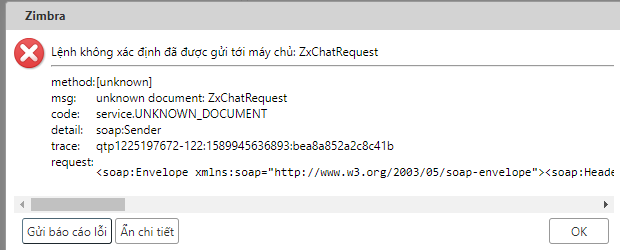
<p>1./ Unknown command sent to server. ZxChatRequest</p>

<p>Nếu bị​​&nbsp;lỗi này sẽ​​&nbsp;không hiển thị​​&nbsp;được cửa sổ​​&nbsp;chat</p>

<p>msg: unknown document: ZxChatRequest code: service.UNKNOWN_DOCUMENT​​&nbsp;detail: soap:Sender trace: qtp1225197672-113:1589945617767:bea8a852a2c8c41b</p>
		</div>
		<div id="bodytext" class="clearfix">
			<p>Fix lỗi​​&nbsp;thường gặp trên Zimbra​​&nbsp;Email Server</p>

<p>1./ Unknown command sent to server. ZxChatRequest</p>

<p>Nếu bị​​&nbsp;lỗi này sẽ​​&nbsp;không hiển thị​​&nbsp;được cửa sổ​​&nbsp;chat</p>

<p>msg: unknown document: ZxChatRequest code: service.UNKNOWN_DOCUMENT​​&nbsp;detail: soap:Sender trace: qtp1225197672-113:1589945617767:bea8a852a2c8c41b</p>

<p><img alt="" height="250" src="https://phatthanhdat.com/uploads/news/2021_05/image-20210530122311-1.png" width="620" /></p>

<p>&nbsp;</p>

<p><a href="https://forums.zimbra.org/viewtopic.php?t=67565" target="_top" title="">https://forums.zimbra.org/viewtopic.php?t=67565</a></p>

<p>Xử​​&nbsp;lý:</p>

<p>mv /opt/zimbra/lib/ext/openchat/zal.jar /tmp<br />
cp -rp /opt/zimbra/lib/ext/zimbradrive/zal.jar /opt/zimbra/lib/ext/openchat/zal.jar<br />
su - zimbra<br />
zmmailboxdctl restart</p>

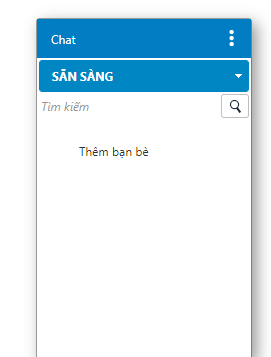
<p>Sau khi xử​​&nbsp;lý</p>

<p><img alt="" height="357" src="https://phatthanhdat.com/uploads/news/2021_05/image-20210530122311-2.png" width="271" /></p>

<p>2./ Xử​​&nbsp;lý lỗi không truy cập được webadmin Zimbra trên chrome</p>

<p>because the website uses HSTS. Network errors and attacks are usually temporary, so this page will probably work later. zimbra chrome</p>

<p><a href="https://www.thesslstore.com/blog/clear-hsts-settings-chrome-firefox/" target="_top" title="">https://www.thesslstore.com/blog/clear-hsts-settings-chrome-firefox/</a></p>

<p>Truy cập link</p>

<p><a href="https://phatthanhdat.com/chrome://net-internals/#hsts" target="_top" title="">chrome://net-internals/#hsts</a></p>

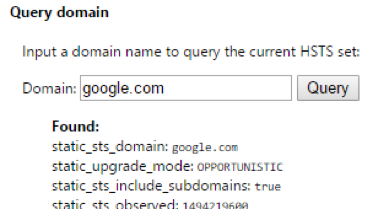
<p>This is Chrome’s UI for managing your browser’s local HSTS settings.</p>

<p>First, to confirm the domain’s HSTS settings are recorded by Chrome, type the hostname into the&nbsp;Query Domain&nbsp;section at the bottom of the​​&nbsp;page. Click Query.If the Query box returns&nbsp;Found&nbsp;with settings information below, the domain’s HSTS settings are saved in your browser.</p>

<p><img alt="" height="209" src="https://phatthanhdat.com/uploads/news/2021_05/image-20210530122311-3.png" width="389" /></p>

<p>Note that this is a very sensitive search. Only enter the hostname, such as&nbsp;www.example.com&nbsp;or&nbsp;example.com&nbsp;without a​​&nbsp;protocol or path.</p>

<p>Type the same hostname into the&nbsp;Delete domain&nbsp;section and click</p>

<p>Your browser will no longer force an HTTPS connection for that site! You can test if its working properly by refreshing or navigating to the page.</p>

<p>Note that depending on the​​&nbsp;HSTS settings provided by the site, you may need to specify the proper subdomain. For example, the HSTS settings for&nbsp;staging.yoursite.com&nbsp;may be separate from&nbsp;yoursite.com&nbsp;so you may need to repeat the steps as appropriate.</p>

<p>Phương án khác có thể tạo ssl free với let’s encrypt cho Email server Zimbra</p>

<p>3./​​&nbsp;Xử lý lỗi​​&nbsp;Can&#039;t connect to TCP port 10024 on ::1 &#91;Cannot assign requested address&#93;\n&nbsp;​​&nbsp;at line 64 in file /opt/zimbra/common/lib/perl5/Net/Server/Proto/TCP.pm</p>

<p>https://rizkiana.id/cant-connect-to-tcp-port-10024-on-1-cannot-assign-requested-address-zimbra/</p>

<p> </p>

<p># vim /opt/zimbra/conf/amavisd.conf.in</p>

<p>&nbsp;</p>

<p>&nbsp;​​&nbsp;​​&nbsp;​​​​&nbsp;Add following this line between line inet_socket</p>

<p>&nbsp;</p>

<p>$inet_socket_bind = &#039;127.0.0.1&#039;;</p>

<p> </p>

<p>$inet_socket_bind = &#039;127.0.0.1&#039;;</p>

<p>&nbsp;</p>

<p>&nbsp;​​&nbsp;​​&nbsp;​​​​&nbsp;Save and restart service amavis zimbra</p>

<p>&nbsp;</p>

<p># su - zimbra</p>

<p>$ zmamavisdctl restart</p>

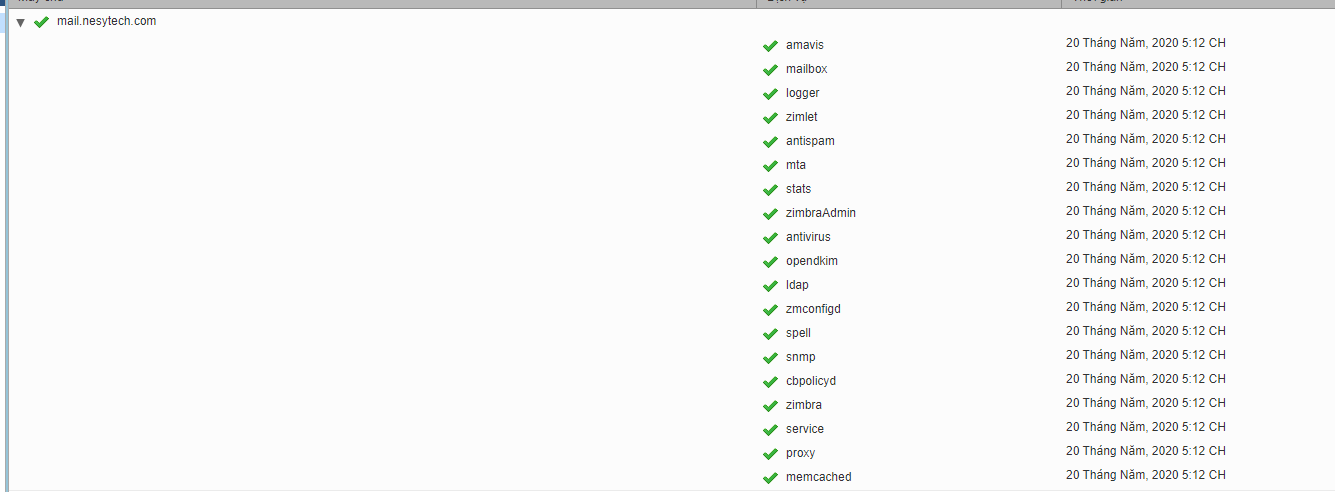
<p>Thần thánh vô cùng vì sau khi fix xong lỗi này các​​&nbsp;service như:​​&nbsp;antivirus, amavis, antispam​​&nbsp;đã hoạt động lại</p>

<p><img alt="" height="492" src="https://phatthanhdat.com/uploads/news/2021_05/image-20210530122311-4.png" width="1335" /></p>

<p>&nbsp;</p>

<p>4./​​&nbsp;Xử lý​​&nbsp;Lỗi</p>

<p>zimbra@mail:/root$ zmprov gcf zimbraMTARestriction zimbraMtaRestriction: reject_invalid_helo_hostname</p>

<p>Không thể​​&nbsp;connect đến outlook lost connection after ehlo from unknown outlook zimbra</p>

<p>&nbsp;</p>

<p>zimbra@mail:/root$&nbsp;​​&nbsp;postconf -n | grep helo</p>

<p>smtp_helo_name = $myhostname</p>

<p>smtpd_helo_required = yes</p>

<p>smtpd_recipient_restrictions = check_policy_service inet:localhost:10031, reject_non_fqdn_recipient, permit_sasl_authenticated, permit_mynetworks, reject_unlisted_recipient, reject_invalid_helo_hostname, reject_non_fqdn_sender, permit</p>

<p>&nbsp;</p>

<p>zimbra@mail:/root$ zmlocalconfig -e smtpd_helo_required=no​​&nbsp;</p>

<p>zimbra@mail:/root$</p>

<p>zimbra@mail:/root$ postconf -e smtpd_helo_required=no&nbsp;​​&nbsp;</p>

<p>zimbra@mail:/root$ postconf -n | grep helo</p>

<p>smtp_helo_name = $myhostname</p>

<p>smtpd_helo_required = no</p>

<p>smtpd_recipient_restrictions = check_policy_service inet:localhost:10031, reject_non_fqdn_recipient, permit_sasl_authenticated, permit_mynetworks, reject_unlisted_recipient, reject_invalid_helo_hostname, reject_non_fqdn_sender, permit</p>

<p>&nbsp;</p>

<p>&nbsp;</p>

<p>zimbra@mail:/root$ postconf -n | grep helo</p>

<p>smtp_helo_name = $myhostname</p>

<p>smtpd_helo_required = yes</p>

<p>smtpd_recipient_restrictions = check_policy_service inet:localhost:10031, reject_non_fqdn_recipient, permit_sasl_authenticated, permit_mynetworks, reject_unlisted_recipient, reject_invalid_helo_hostname, reject_non_fqdn_sender, permit</p>

<p>&nbsp;</p>

<p>zimbra@mail:/root$ zmlocalconfig -e smtpd_helo_required=yes</p>

<p>zimbra@mail:/root$</p>

<p>zimbra@mail:/root$ postconf -e smtpd_helo_required=yes</p>

<p>&nbsp;</p>

<p>5./ Xử​​&nbsp;lý lỗi zimbra NOQUEUE: reject: Sender address rejected: Server configuration problem;</p>

<p>​​&nbsp;https://wiki.zimbra.com/wiki/Rejecting_false_%22mail_from%22_addresses</p>

<h2>Zimbra Collaboration 8.5 and above</h2>

<p>For​​&nbsp;Zimbra Collaboration 8.5​​&nbsp;and above, please use the next commands to​​&nbsp;increase the security and reject the logins for users that doesn&#039;t exist in the LDAP:​​&nbsp;</p>

<p>zmprov mcf zimbraMtaSmtpdRejectUnlistedRecipient yes</p>

<p>zmprov mcf zimbraMtaSmtpdRejectUnlistedSender yes</p>

<p>zmmtactl restart</p>

<p>zmconfigdctl restart</p>

<p>&nbsp;</p>

<p>Lỗi​​&nbsp;zimbra gpg: keyserver receive failed: No keyserver available</p>

<p><a href="https://unix.stackexchange.com/questions/361642/keyserver-receive-failed-on-every-keyserver-available" target="_top" title="">https://unix.stackexchange.com/questions/361642/keyserver-receive-failed-on-every-keyserver-available</a></p>

<p>chạy lệnh</p>

<p>sudo pkill dirmngr; dirmngr --debug-all --daemon --standard-resolver</p>

<p>6./ Fix lỗi không reset được password user email zimbra</p>

<p>Khi truy cập vào webmail chọn reset password thì cửa sổ reset password Zimbra hiện ra nhưng không truy cập được. Lỗi là do chưa mở port 8443 trên Firewall Zimbra.</p>

<p>Các port cần mở trên zimbra</p>

<p>25,80,110,143,443,465,587,993,995,3443,5222,5223,7071,9071,​​&nbsp;8443</p>

<p>Port 7780 open cho PolicyD không nên public port này. Chỉ nên mở cho 1 vài IP được phép truy cập.</p>

<p>7./ Fix lỗi DB cbpolicyd.sqlitedb trống</p>

<p>Khi gặp lỗi này khi truy cập trang quản trị cbpolicyd sẽ không có thông tin gì,​​&nbsp;không tạo mới được các entry.</p>

<p>Kiểm tra dung lượng của dbpolicyd.sqlitedb trống, không có dung lượng.</p>

<p>ll /opt/zimbra/data/cbpolicyd/db</p>

<p>Hướng sử lý:</p>

<p>Cài đặt sqlitedb</p>

<p>apt-get​​&nbsp;-y​​&nbsp;install sqlite&nbsp;​​&nbsp;</p>

<p>chạy với user zimbra</p>

<p>zmcbpolicydctl stop<br />
cd /opt/zimbra/data/cbpolicyd/db<br />
mv * /tmp<br />
/opt/zimbra/libexec/zmcbpolicydinit<br />
zmcbpolicydctl start</p>

<p>Để kiểm tra các bảng trong dbpolicyd.sqlitedb</p>

<p>zimbra@mail&nbsp;~# cd /opt/zimbra/data/cbpolicyd/db</p>

<p>zimbra@mail&nbsp;~/data/cbpolicyd/db# sqlite3 cbpolicyd.sqlitedb</p>

<p>SQLite version 3.22.0 2018-01-22 18:45:57</p>

<p>Enter &quot;.help&quot; for usage hints.</p>

<p>sqlite&gt; select * from sqlite_sequence;</p>

<p>policies|5</p>

<p>policy_members|5</p>

<p>policy_groups|2</p>

<p>policy_group_members|6</p>

<p>amavis_rules|1</p>

<p>quotas|2</p>

<p>quotas_limits|3</p>

<p>checkhelo_blacklist|4</p>

<p>Tham khảo:</p>

<p><a href="https://forums.zimbra.org/viewtopic.php?t=64121" target="_top" title="">https://forums.zimbra.org/viewtopic.php?t=64121</a></p>

<p><a href="https://wiki.zimbra.com/wiki/Cluebringer_Policy_Daemon" target="_top" title="">https://wiki.zimbra.com/wiki/Cluebringer_Policy_Daemon</a></p>

<p>8./ Fix lỗi zmclamdctl​​&nbsp;is not running</p>

<p>Nếu gặp lỗi​​&nbsp;khi chạy lệnh</p>

<p>/opt/zimbra/common/bin/freshclam --config-file=/opt/zimbra/conf/freshclam.conf</p>

<p>Lỗi</p>

<p>WARNING: Clamd was NOT notified: Can&#039;t connect to clamd through /opt/zimbra/data/clamav/clamav.sock: No such file or directory</p>

<p>Xử lý bằng cách​​&nbsp;</p>

<p>chown zimbra:zimbra​​&nbsp;/opt/zimbra/data/clamav/</p>

<p>khi check logs</p>

<p>tail -100f /opt/zimbra/log/clamd.log</p>

<p>sẽ thấy</p>

<p>clamd zimbra ERROR: daemonize() failed: Cannot allocate memory</p>

<p>Xử lý bằng cách tạo thêm swap cho Zimbra</p>

<p>dd if=/dev/zero of=/swapfile1 bs=1024 count=5120000</p>

<p>chown root:root /swapfile1</p>

<p>chmod 0600 /swapfile1</p>

<p>mkswap /swapfile1</p>

<p>swapon /swapfile1</p>

<p>tự động mount swap sau khi reboot</p>

<p>echo “/swapfile1 none swap sw 0 0” &gt;&gt;&nbsp;​​&nbsp;/etc/fstab</p>

<p>&nbsp;</p>

<p>free -m</p>

<p>swapon -s</p>

<p>&nbsp;</p>

<p>zimbra@mail&nbsp;~# zmclamdctl start</p>

<p>Starting clamd...done.</p>

<p>&nbsp;</p>

<p>Tham khảo:</p>

<p><a href="https://forums.zimbra.org/viewtopic.php?t=66713" target="_top" title="">https://forums.zimbra.org/viewtopic.php?t=66713</a></p>

<p><a href="https://www.cyberciti.biz/faq/linux-add-a-swap-file-howto/" target="_top" title="">https://www.cyberciti.biz/faq/linux-add-a-swap-file-howto/</a></p>
		</div>
	</div>
	<div id="footer" class="clearfix">
		<div id="url">
			<strong>URL của bản tin này: </strong><a href="https://phatthanhdat.com/index.php/savefile/quan-tri-mail-server/fix-loi-thuong-gap-tren-zimbra-email-server-43.html" title="Fix lỗi thường gặp trên Zimbra Email Server">https://phatthanhdat.com/index.php/savefile/quan-tri-mail-server/fix-loi-thuong-gap-tren-zimbra-email-server-43.html</a>

		</div>
		<div class="clear"></div>
		<div class="copyright">
			&copy; Phát Thành Đạt - Dịch vụ sửa chữa máy tính hóc môn
		</div>
		<div id="contact">
			<a href="mailto:info@phatthanhdat.com">info@phatthanhdat.com</a>
		</div>
	</div>
</div>
        <div id="timeoutsess" class="chromeframe">
            Bạn đã không sử dụng Site, <a onclick="timeoutsesscancel();" href="https://phatthanhdat.com/#">Bấm vào đây để duy trì trạng thái đăng nhập</a>. Thời gian chờ: <span id="secField"> 60 </span> giây
        </div>
        <div id="openidResult" class="nv-alert" style="display:none"></div>
        <div id="openidBt" data-result="" data-redirect=""></div>
<script src="https://phatthanhdat.com/assets/js/jquery/jquery.min.js"></script>
<script>var nv_base_siteurl="/",nv_lang_data="vi",nv_lang_interface="vi",nv_name_variable="nv",nv_fc_variable="op",nv_lang_variable="language",nv_module_name="news",nv_func_name="savefile",nv_is_user=0, nv_my_ofs=-4,nv_my_abbr="EDT",nv_cookie_prefix="nv4",nv_check_pass_mstime=1738000,nv_area_admin=0,nv_safemode=0,theme_responsive=0,nv_recaptcha_ver=2,nv_recaptcha_sitekey="",nv_recaptcha_type="image",XSSsanitize=1;</script>
<script src="https://phatthanhdat.com/assets/js/language/vi.js"></script>
<script src="https://phatthanhdat.com/assets/js/DOMPurify/purify3.js"></script>
<script src="https://phatthanhdat.com/assets/js/global.js"></script>
<script src="https://phatthanhdat.com/assets/js/site.js"></script>
<script src="https://phatthanhdat.com/themes/default/js/news.js"></script>
<script src="https://phatthanhdat.com/themes/default/js/main.js"></script>
<script src="https://phatthanhdat.com/themes/default/js/custom.js"></script>
<script type="application/ld+json">
        {
            "@context": "https://schema.org",
            "@type": "Organization",
            "url": "https://phatthanhdat.com",
            "logo": "https://phatthanhdat.com/uploads/about/logonho.png"
        }
        </script>
<script async custom-element="amp-ad" src="https://cdn.ampproject.org/v0/amp-ad-0.1.js"></script>
<script>
     (adsbygoogle = window.adsbygoogle || []).push({});
</script>
<script>(function(w,d,s,l,i){w[l]=w[l]||[];w[l].push({'gtm.start':
new Date().getTime(),event:'gtm.js'});var f=d.getElementsByTagName(s)[0],
j=d.createElement(s),dl=l!='dataLayer'?'&l='+l:'';j.async=true;j.src=
'https://www.googletagmanager.com/gtm.js?id='+i+dl;f.parentNode.insertBefore(j,f);
})(window,document,'script','dataLayer','GTM-KRZZ2CK');</script>
<script>
!function(f,b,e,v,n,t,s)
{if(f.fbq)return;n=f.fbq=function(){n.callMethod?
n.callMethod.apply(n,arguments):n.queue.push(arguments)};
if(!f._fbq)f._fbq=n;n.push=n;n.loaded=!0;n.version='2.0';
n.queue=[];t=b.createElement(e);t.async=!0;
t.src=v;s=b.getElementsByTagName(e)[0];
s.parentNode.insertBefore(t,s)}(window, document,'script',
'https://connect.facebook.net/en_US/fbevents.js');
fbq('init', '219812430112623');
fbq('track', 'PageView');
</script>
<script async src="https://pagead2.googlesyndication.com/pagead/js/adsbygoogle.js?client=ca-pub-3722185033130810" crossorigin="anonymous"></script>
<script>
      var chatbox = document.getElementById('fb-customer-chat');
      chatbox.setAttribute("page_id", "244380242794992");
      chatbox.setAttribute("attribution", "biz_inbox");

      window.fbAsyncInit = function() {
        FB.init({
          xfbml            : true,
          version          : 'v11.0'
        });
      };

      (function(d, s, id) {
        var js, fjs = d.getElementsByTagName(s)[0];
        if (d.getElementById(id)) return;
        js = d.createElement(s); js.id = id;
        js.src = 'https://connect.facebook.net/vi_VN/sdk/xfbml.customerchat.js';
        fjs.parentNode.insertBefore(js, fjs);
      }(document, 'script', 'facebook-jssdk'));
    </script>
<script src="https://sp.zalo.me/plugins/sdk.js"></script>
<script>
     (adsbygoogle = window.adsbygoogle || []).push({});
</script>
<script src="https://phatthanhdat.com/themes/default/js/bootstrap.min.js"></script>
</body>
</html>