<!DOCTYPE html>
    <html lang="vi" xmlns="http://www.w3.org/1999/xhtml" prefix="og: http://ogp.me/ns#">
    <head>
<title>Phát Thành Đạt Cách cài Win 10 Pro lên máy tích hợp sẵn Win 10 Home SL bản quyền</title>
<meta name="description" content="Cách cài Win 10 Pro lên máy tích hợp sẵn Win 10 Home SL bản quyền - Savefile - Tin Tức -...">
<meta name="author" content="Phát Thành Đạt - Dịch vụ sửa chữa máy tính hóc môn">
<meta name="copyright" content="Phát Thành Đạt - Dịch vụ sửa chữa máy tính hóc môn [info@phatthanhdat.com]">
<meta name="generator" content="NukeViet v4.5">
<meta name="facebook-domain-verification" content="nv4brgbtr5jrhsej2o63m6qx7nz5ek">
<meta http-equiv="Content-Type" content="text/html; charset=utf-8">
<meta property="og:title" content="Cách cài Win 10 Pro lên máy tích hợp sẵn Win 10 Home SL bản quyền">
<meta property="og:type" content="website">
<meta property="og:description" content="Savefile - Tin Tức - https&#x3A;&#x002F;&#x002F;phatthanhdat.com&#x002F;index.php&#x002F;savefile&#x002F;quan-tri-mang&#x002F;cach-cai-win-10-pro-len-may-tich-hop-san-win-10-home-sl-ban-quyen-188.html">
<meta property="og:site_name" content="Phát Thành Đạt - Dịch vụ sửa chữa máy tính hóc môn">
<meta property="og:url" content="https://phatthanhdat.com/index.php/savefile/quan-tri-mang/cach-cai-win-10-pro-len-may-tich-hop-san-win-10-home-sl-ban-quyen-188.html">
<link rel="shortcut icon" href="https://phatthanhdat.com/uploads/about/logonho.png">
<link rel="canonical" href="https://phatthanhdat.com/index.php/savefile/quan-tri-mang/cach-cai-win-10-pro-len-may-tich-hop-san-win-10-home-sl-ban-quyen-188.html">
<link rel="alternate" href="https://phatthanhdat.com/index.php/rss/" title="Tin Tức" type="application/rss+xml">
<link rel="alternate" href="https://phatthanhdat.com/index.php/rss/quan-tri-mang/" title="Tin Tức - Quản Trị Mạng" type="application/rss+xml">
<link rel="alternate" href="https://phatthanhdat.com/index.php/rss/windows-server/" title="Tin Tức - Windows Server" type="application/rss+xml">
<link rel="alternate" href="https://phatthanhdat.com/index.php/rss/active-windows/" title="Tin Tức - Active Windows" type="application/rss+xml">
<link rel="alternate" href="https://phatthanhdat.com/index.php/rss/mang-may-tinh/" title="Tin Tức - Mạng Máy Tính" type="application/rss+xml">
<link rel="alternate" href="https://phatthanhdat.com/index.php/rss/quan-tri-mail-server/" title="Tin Tức - Quản Trị Mail Server" type="application/rss+xml">
<link rel="alternate" href="https://phatthanhdat.com/index.php/rss/y-nghia-cuoc-song/" title="Tin Tức - Ý nghĩa cuộc sống" type="application/rss+xml">
<link rel="alternate" href="https://phatthanhdat.com/index.php/rss/tien-ich/" title="Tin Tức - Tiện Ích" type="application/rss+xml">
<link rel="alternate" href="https://phatthanhdat.com/index.php/rss/facebook-add/" title="Tin Tức - Facebook Add" type="application/rss+xml">
<link rel="alternate" href="https://phatthanhdat.com/index.php/rss/nong-tren-mang/" title="Tin Tức - Nóng Trên Mạng" type="application/rss+xml">
<link rel="alternate" href="https://phatthanhdat.com/index.php/rss/covid-19/" title="Tin Tức - Covid 19" type="application/rss+xml">
<link rel="alternate" href="https://phatthanhdat.com/index.php/rss/hoc-duong/" title="Tin Tức - Học Đường" type="application/rss+xml">
<link rel="alternate" href="https://phatthanhdat.com/index.php/rss/tin-tuc-thi-truong/" title="Tin Tức - Tin Tức Thị Trường" type="application/rss+xml">
<link rel="alternate" href="https://phatthanhdat.com/index.php/rss/code-hay/" title="Tin Tức - Code hay" type="application/rss+xml">
<link rel="alternate" href="https://phatthanhdat.com/index.php/rss/kho-hang/" title="Tin Tức - Kho Hàng" type="application/rss+xml">
<link rel="alternate" href="https://phatthanhdat.com/index.php/rss/ai-tri-tue-nhan-tao/" title="Tin Tức - AI Trí Tuệ Nhân Tạo" type="application/rss+xml">
<link rel="alternate" href="https://phatthanhdat.com/index.php/rss/do-hoa/" title="Tin Tức - Đồ Hoạ" type="application/rss+xml">
<link rel="stylesheet" href="https://phatthanhdat.com/assets/css/font-awesome.min.css">
<link rel="stylesheet" href="https://phatthanhdat.com/themes/default/css/bootstrap.non-responsive.css">
<link rel="stylesheet" href="https://phatthanhdat.com/themes/default/css/style.css">
<link rel="stylesheet" href="https://phatthanhdat.com/themes/default/css/style.non-responsive.css">
<link rel="StyleSheet" href="https://phatthanhdat.com/themes/default/css/news.css">
<link rel="stylesheet" href="https://phatthanhdat.com/themes/default/css/custom.css">
<style type="text/css">
	body{background: #fff;}
</style>
<!-- Google Tag Manager -->
<!-- End Google Tag Manager -->

<!-- Facebook Pixel Code -->
<noscript><img height="1" width="1" style="display:none"
src="https://www.facebook.com/tr?id=219812430112623&ev=PageView&noscript=1"
/></noscript>
<!-- End Facebook Pixel Code -->
<!-- Messenger Plugin chat Code -->
    <div id="fb-root"></div>

    <!-- Your Plugin chat code -->
    <div id="fb-customer-chat" class="fb-customerchat">
    </div>
<script>(function(i,s,o,g,r,a,m){i['GoogleAnalyticsObject']=r;i[r]=i[r]||function(){
(i[r].q=i[r].q||[]).push(arguments)},i[r].l=1*new Date();a=s.createElement(o),
m=s.getElementsByTagName(o)[0];a.async=1;a.src=g;m.parentNode.insertBefore(a,m)
})(window,document,'script','https://www.google-analytics.com/analytics.js','ga');
ga('create', 'UA-133543348-1', '.phatthanhdat.com');
ga('send', 'pageview');
</script>
</head>
    <body>
<div class="zalo-chat-widget" data-oaid="1354977264109400055" data-welcome-message="R&#7845;t vui khi &#273;&#432;&#7907;c h&#7895; tr&#7907; b&#7841;n!" data-autopopup="0" data-width="" data-height=""></div>
<amp-ad width="100vw" height="320"
     type="adsense"
     data-ad-client="ca-pub-3722185033130810"
     data-ad-slot="5396409404"
     data-auto-format="rspv"
     data-full-width="">
  <div overflow=""></div>
</amp-ad>
<!-- Google Tag Manager (noscript) -->
<noscript><iframe src="https://www.googletagmanager.com/ns.html?id=GTM-KRZZ2CK"
height="0" width="0" style="display:none;visibility:hidden"></iframe></noscript>
<!-- End Google Tag Manager (noscript) -->
<div class="gcse-searchbox-only"></div>
<div id="print">
	<div id="hd_print">
		<h2 class="pull-left">Phát Thành Đạt - Dịch vụ sửa chữa máy tính hóc môn</h2>
		<p class="pull-right"><a title="Phát Thành Đạt - Dịch vụ sửa chữa máy tính hóc môn" href="https://phatthanhdat.com/">https://phatthanhdat.com</a></p>
	</div>
	<div class="clear"></div>
	<hr />
	<div id="content">
		<h1>Cách cài Win 10 Pro lên máy tích hợp sẵn Win 10 Home SL bản quyền</h1>
		<ul class="list-inline">
			<li>Chủ nhật - 11/08/2024 02:09</li>
			<li class="hidden-print txtrequired"><em class="fa fa-print">&nbsp;</em><a title="In ra" href="javascript:;" onclick="window.print()">In ra</a></li>
			<li class="hidden-print txtrequired"><em class="fa fa-power-off">&nbsp;</em><a title="Đóng cửa sổ này" href="javascript:;" onclick="window.close()">Đóng cửa sổ này</a></li>
		</ul>
		<div class="clear"></div>
		<div id="hometext">
			Bạn đang sử dụng máy tính&nbsp; bản quyền Windows 10 Home Single Language có sẵn khi mua. Bạn muốn cài lại Win, nhưng không muốn sử dụng Win 10 Home SL nữa, tuy nhiên, trong quá trình cài đặt thì không có mục chọn phiên bản như Home, Pro, Edu, Enter,.. để chọn. Nếu tiếp tục cài thì mặc định sẽ là Windows 10 Home Single Language. Vì vậy, để giải quyết vấn đề này, hôm nay mình sẽ hướng dẫn các bạn cách cài Windows 10 Pro lên Laptop có bản quyền Win 10 Home SL đơn giản và chuẩn nhất !
		</div>
		<div id="bodytext" class="clearfix">
			<p>&nbsp;</p>

<h1>1. Nguyên nhân:</h1>

<p>Đó là khi bạn mua những chiếc laptop/PC có sẵn bản quyền Windows 10 Home Single Language, nhà sản xuất chỉ nạp SKU của bản Home nên nó chỉ nhận Home thôi. Dù cho bạn tải Win 10 Pro hay bản win nào thì khi cài nó cũng chỉ cho chọn Home Single, hoặc cài xong nó tự nhận lại Home Single.</p>

<h1>2. Hướng dẫn cách cài:</h1>

<h2>2.1. Khi cài win mới:</h2>

<h3>2.1.1.&nbsp;<strong>Sử dụng file ei.cfg</strong></h3>

<ul>
	<li>Bước 1: tải về bộ cài win 10 mới nhất trên trang chủ Microsoft</li>
	<li>Bước 2: tạo usb boot từ file iso win 10 đã tải</li>
	<li>Bước 3: copy file ei.cfg (tải file&nbsp;<a href="https://drive.google.com/file/d/1W2cG58LmvWK4tZf_m6iTSgm5O3vROdEd/view?usp=share_link" rel="noopener" target="_blank">tại đây</a>) vào thư mục Sources trong usb boot vừa tạo</li>
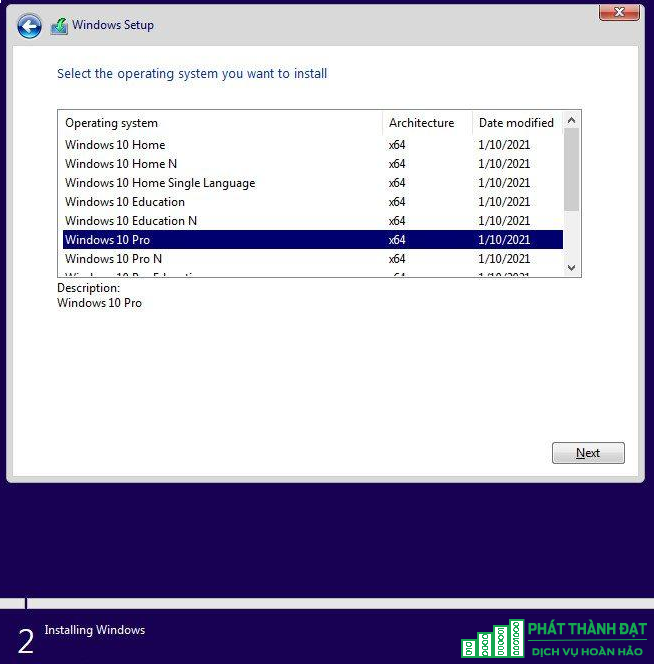
	<li>Bước 4: &nbsp;sử dụng usb để cài win 10 như bình thường, thay vì tự động nhận bản win 10 home, thì bây giờ máy sẽ hiển thị danh sách các bản win 10 cho bạn lựa chọn</li>
</ul>

<div class="image-center"><img alt="a3" height="668" src="https://phatthanhdat.com/uploads/news/2024_08/a3.png" width="654" /></div>
&nbsp;

<h3>2.1.2.&nbsp;<strong>Thêm file PID vào bộ cài của Win 10</strong></h3>

<ul>
	<li>Bước 1: mở ứng dụng “<strong>Notepad</strong>” lên rồi dán đoạn code sau vào rồi lưu với tên PID.txt</li>
</ul>

<p><strong>&nbsp;&#91;PID&#93;</strong></p>

<p><strong>&nbsp; &nbsp; &nbsp; &nbsp; &nbsp; &nbsp; Value=VK7JG-NPHTM-C97JM-9MPGT-3V66T</strong></p>

<ul>
	<li>Bước 2: copy file PID.txt vào thư mục Sources trong usb boot</li>
	<li>Bước 3: sử dụng usb để cài win 10 như bình thường</li>
</ul>

<p><strong>Lưu ý:</strong>&nbsp;Trong dòng lệnh trên có đoạn “<strong>VK7JG-NPHTM-C97JM-9MPGT-3V66T</strong>”, đây là product key của bản Pro. Nếu bạn muốn cài bản nào thì dán key của bản đó vô.</p>

<p><strong>Một số product key để nạp SKU:</strong></p>

<table>
	<tbody>
		<tr>
			<td><strong>Phiên bản</strong></td>
			<td><strong>Product key</strong></td>
		</tr>
		<tr>
			<td>Professional</td>
			<td>VK7JG-NPHTM-C97JM-9MPGT-3V66T</td>
		</tr>
		<tr>
			<td>ProfessionalN</td>
			<td>2B87N-8KFHP-DKV6R-Y2C8J-PKCKT</td>
		</tr>
		<tr>
			<td>Education</td>
			<td>YNMGQ-8RYV3-4PGQ3-C8XTP-7CFBY</td>
		</tr>
		<tr>
			<td>EducationN</td>
			<td>84NGF-MHBT6-FXBX8-QWJK7-DRR8H</td>
		</tr>
		<tr>
			<td>ProfessionalEducation</td>
			<td>8PTT6-RNW4C-6V7J2-C2D3X-MHBPB</td>
		</tr>
		<tr>
			<td>ProfessionaleducationN</td>
			<td>GJTYN-HDMQY-FRR76-HVGC7-QPF8P</td>
		</tr>
		<tr>
			<td>ProfessionalworkstationN</td>
			<td>WYPNQ-8C467-V2W6J-TX4WX-WT2RQ</td>
		</tr>
		<tr>
			<td>Professionalworkstation</td>
			<td>DXG7C-N36C4-C4HTG-X4T3X-2YV77</td>
		</tr>
		<tr>
			<td>Enterprise</td>
			<td>XGVPP-NMH47-7TTHJ-W3FW7-8HV2C</td>
		</tr>
		<tr>
			<td>EnterpriseN</td>
			<td>WGGHN-J84D6-QYCPR-T7PJ7-X766F</td>
		</tr>
		<tr>
			<td>Enterprises</td>
			<td>NK96Y-D9CD8-W44CQ-R8YTK-DYJWX</td>
		</tr>
		<tr>
			<td>Enterprises LTSC</td>
			<td>43TBQ-NH92J-XKTM7-KT3KK-P39PB</td>
		</tr>
	</tbody>
</table>

<h2>2.2. Máy có sẵn win</h2>

<ul>
	<li>Đối với những máy có sẵn Win, bạn chỉ cần nạp sku chứ không cần cài lại bản win mới</li>
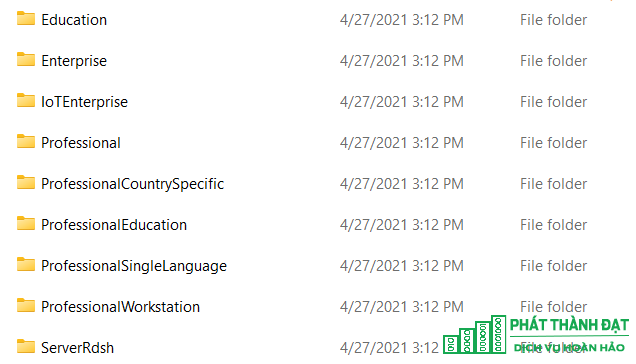
	<li>Bước 1: tới thư mục skus với đường dẫn C:\Windows\System32\spp\tokens\skus, bạn sẽ thấy chỉ có sẵn Folder của bản home thôi. Do đó, cần phải nạp thêm các skus của các bản win khác thì mới chuyển qua bản win mong muốn được.</li>
	<li>Bước 2: Để có skus, các bạn tải sku&nbsp;<a href="https://drive.google.com/file/d/1N6ysSjoqHn8lA3UcXopTqqwPJmroNJyU/view?usp=share_link" rel="noopener" target="_blank">tại đây</a></li>
	<li>Bước 3: giải nén file vừa tải về và dán các thư mục sku vào cửa sổ sku vừa mở phía trên</li>
</ul>

<div class="image-center"><img alt="a2" height="364" src="https://phatthanhdat.com/uploads/news/2024_08/a2.png" width="636" /></div>

<ul>
	<li>Bước 4: mở cmd bằng quyền admin và dùng lệnh cmd để nạp skus cho máy</li>
</ul>

<p>Lệnh nạp sku:</p>

<p><em>cscript.exe %windir%\system32\slmgr.vbs /rilc</em></p>

<p><em>&nbsp; &nbsp; &nbsp; &nbsp; &nbsp; cscript.exe %windir%\system32\slmgr.vbs /upk &gt;nul 2&gt;&amp;1</em></p>

<p><em>&nbsp; &nbsp; &nbsp; &nbsp; &nbsp; cscript.exe %windir%\system32\slmgr.vbs /upk &gt;nul 2&gt;&amp;1</em></p>

<p><em>&nbsp; &nbsp; &nbsp; &nbsp; &nbsp; cscript.exe %windir%\system32\slmgr.vbs /cpky &gt;nul 2&gt;&amp;1</em></p>

<p><em>&nbsp; &nbsp; &nbsp; &nbsp; &nbsp; cscript.exe %windir%\system32\slmgr.vbs /ipk VK7JG-NPHTM-C97JM-9MPGT-3V66T</em></p>

<p><em>&nbsp; &nbsp; &nbsp; &nbsp; &nbsp; sc config LicenseManager start= auto &amp; net start LicenseManager</em></p>

<p><em>&nbsp; &nbsp; &nbsp; &nbsp; &nbsp; sc config wuauserv start= auto &amp; net start wuauserv</em></p>

<p><em>&nbsp; &nbsp; &nbsp; &nbsp; &nbsp; clipup -v -o -altto c:\</em></p>

<p><em>&nbsp; &nbsp; &nbsp; &nbsp; &nbsp; echo</em></p>

<p><em>&nbsp; &nbsp; &nbsp; &nbsp; &nbsp; exit</em></p>

<p><em>&nbsp; &nbsp; &nbsp; &nbsp; &nbsp; exit</em></p>

<ul>
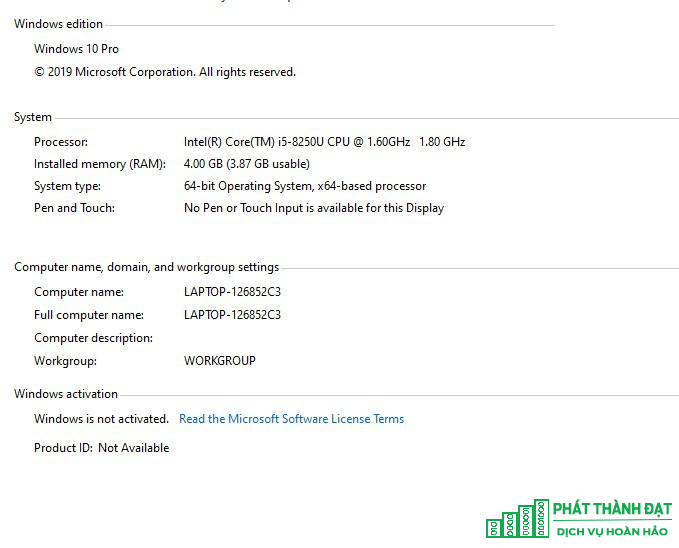
	<li>Dán xong máy sẽ tự chạy, bạn đợi 1 tí là máy sẽ tự nâng cấp lên Win 10 Pro, và đây là thành quả</li>
</ul>

<div class="image-center"><img alt="a4" height="548" src="https://phatthanhdat.com/uploads/news/2024_08/a4.png" width="679" /></div>

<p><strong>Cám ơn bạn đã đọc bài viết !</strong><br />
&nbsp;</p>

<ul>
	<li><b>Xem thêm</b><em>&nbsp;</em>&nbsp;

	<h4>1.&nbsp;<a data-content="Một trong những ưu điểm của NAS Synology được người dùng cực kỳ ưa thích chính là khả năng bảo mật dữ liệu. Với khả năng này, trong doanh nghiệp dễ..." data-img="/assets/news/2024_07/phat-thanh-dat-nas-1.png" data-original-title="" data-placement="bottom" data-rel="tooltip" href="https://phatthanhdat.com/quan-tri-mang/huong-dan-tao-thu-muc-va-phan-quyen-truy-cap-nas-synology-187.html" title="">Hướng dẫn tạo thư mục và phân quyền truy cập NAS Synology</a><br />
	2&nbsp;<a data-content="Ngày 5/10/2021 vừa qua, Microsoft đã chính thức công bố bản thương mại của Microsoft Office LTSC 2021. Office LTSC 2021 là viết tắt của Long Term..." data-img="/assets/news/2024_07/phat-thanh-dat-office-2021-1.png" data-original-title="" data-placement="bottom" data-rel="tooltip" href="https://phatthanhdat.com/quan-tri-mang/nhung-dieu-can-biet-va-huong-dan-cai-dat-office-ltsc-2021-standard-186.html" title="">Những điều cần biết và hướng dẫn cài đặt Office LTSC 2021 Standard</a>&nbsp;<br />
	3.&nbsp;<a data-content="&#039;Bước 1 – Chuẩn bị 1 USB có sẵn hệ điều hành Windows Server 2019

Boot hệ điều hành Windows Server vào USB

Bước 2 – Khởi động...&#039;" data-img="/assets/news/2024_07/phat-thanh-datreset-mat-khau-windows-server-1.png" data-original-title="" data-placement="bottom" data-rel="tooltip" href="https://phatthanhdat.com/quan-tri-mang/huong-dan-reset-password-windows-server-185.html" title="">Hướng dẫn RESET PASSWORD Windows Server</a><br />
	4&nbsp;<a data-content="Giả sử chúng ta có 1 server chạy ảo hóa Esxi, vì lý do nào đó chúng ta quên mất pass root. Hôm nay thegioifirewall sẽ giúp các bạn cách khắc phục sự..." data-img="/assets/news/2024_07/phat-thanh-dat-phan-mem-rufus.png" data-original-title="" data-placement="bottom" data-rel="tooltip" href="https://phatthanhdat.com/quan-tri-mang/huong-dan-reset-password-root-tren-wmware-esxi-184.html" title="">Hướng dẫn reset password root trên wmware esxi</a><br />
	5&nbsp;<a data-content="&#039;Fix lỗi&amp;nbsp;Vào mạng chậm khi kết nối VPN

1.&amp;nbsp;Mở ra&amp;nbsp;Control Panel.

2. Bấm vào&amp;nbsp;Network and Internet.

3. Bấm vào&amp;nbsp;Network...&#039;" data-img="/assets/news/2024_03/net1.jpg" data-original-title="" data-placement="bottom" data-rel="tooltip" href="https://phatthanhdat.com/quan-tri-mang/fix-loi-vao-mang-cham-khi-ket-noi-vpn-174.html" title="">Fix lỗi&nbsp;Vào mạng chậm khi kết nối VPN</a></h4>
	</li>
</ul>
		</div>
				<div id="author">
						<p>
				<strong>Tác giả:</strong>
				<a href="https://phatthanhdat.com/index.php/author/luuhongphuc/">luuhongphuc</a>
			</p>
		</div>
	</div>
	<div id="footer" class="clearfix">
		<div id="url">
			<strong>URL của bản tin này: </strong><a href="https://phatthanhdat.com/index.php/savefile/quan-tri-mang/cach-cai-win-10-pro-len-may-tich-hop-san-win-10-home-sl-ban-quyen-188.html" title="Cách cài Win 10 Pro lên máy tích hợp sẵn Win 10 Home SL bản quyền">https://phatthanhdat.com/index.php/savefile/quan-tri-mang/cach-cai-win-10-pro-len-may-tich-hop-san-win-10-home-sl-ban-quyen-188.html</a>

		</div>
		<div class="clear"></div>
		<div class="copyright">
			&copy; Phát Thành Đạt - Dịch vụ sửa chữa máy tính hóc môn
		</div>
		<div id="contact">
			<a href="mailto:info@phatthanhdat.com">info@phatthanhdat.com</a>
		</div>
	</div>
</div>
        <div id="timeoutsess" class="chromeframe">
            Bạn đã không sử dụng Site, <a onclick="timeoutsesscancel();" href="https://phatthanhdat.com/#">Bấm vào đây để duy trì trạng thái đăng nhập</a>. Thời gian chờ: <span id="secField"> 60 </span> giây
        </div>
        <div id="openidResult" class="nv-alert" style="display:none"></div>
        <div id="openidBt" data-result="" data-redirect=""></div>
<script src="https://phatthanhdat.com/assets/js/jquery/jquery.min.js"></script>
<script>var nv_base_siteurl="/",nv_lang_data="vi",nv_lang_interface="vi",nv_name_variable="nv",nv_fc_variable="op",nv_lang_variable="language",nv_module_name="news",nv_func_name="savefile",nv_is_user=0, nv_my_ofs=-4,nv_my_abbr="EDT",nv_cookie_prefix="nv4",nv_check_pass_mstime=1738000,nv_area_admin=0,nv_safemode=0,theme_responsive=0,nv_recaptcha_ver=2,nv_recaptcha_sitekey="",nv_recaptcha_type="image",XSSsanitize=1;</script>
<script src="https://phatthanhdat.com/assets/js/language/vi.js"></script>
<script src="https://phatthanhdat.com/assets/js/DOMPurify/purify3.js"></script>
<script src="https://phatthanhdat.com/assets/js/global.js"></script>
<script src="https://phatthanhdat.com/assets/js/site.js"></script>
<script src="https://phatthanhdat.com/themes/default/js/news.js"></script>
<script src="https://phatthanhdat.com/themes/default/js/main.js"></script>
<script src="https://phatthanhdat.com/themes/default/js/custom.js"></script>
<script type="application/ld+json">
        {
            "@context": "https://schema.org",
            "@type": "Organization",
            "url": "https://phatthanhdat.com",
            "logo": "https://phatthanhdat.com/uploads/about/logonho.png"
        }
        </script>
<script async custom-element="amp-ad" src="https://cdn.ampproject.org/v0/amp-ad-0.1.js"></script>
<script>
     (adsbygoogle = window.adsbygoogle || []).push({});
</script>
<script>(function(w,d,s,l,i){w[l]=w[l]||[];w[l].push({'gtm.start':
new Date().getTime(),event:'gtm.js'});var f=d.getElementsByTagName(s)[0],
j=d.createElement(s),dl=l!='dataLayer'?'&l='+l:'';j.async=true;j.src=
'https://www.googletagmanager.com/gtm.js?id='+i+dl;f.parentNode.insertBefore(j,f);
})(window,document,'script','dataLayer','GTM-KRZZ2CK');</script>
<script>
!function(f,b,e,v,n,t,s)
{if(f.fbq)return;n=f.fbq=function(){n.callMethod?
n.callMethod.apply(n,arguments):n.queue.push(arguments)};
if(!f._fbq)f._fbq=n;n.push=n;n.loaded=!0;n.version='2.0';
n.queue=[];t=b.createElement(e);t.async=!0;
t.src=v;s=b.getElementsByTagName(e)[0];
s.parentNode.insertBefore(t,s)}(window, document,'script',
'https://connect.facebook.net/en_US/fbevents.js');
fbq('init', '219812430112623');
fbq('track', 'PageView');
</script>
<script async src="https://pagead2.googlesyndication.com/pagead/js/adsbygoogle.js?client=ca-pub-3722185033130810" crossorigin="anonymous"></script>
<script>
      var chatbox = document.getElementById('fb-customer-chat');
      chatbox.setAttribute("page_id", "244380242794992");
      chatbox.setAttribute("attribution", "biz_inbox");

      window.fbAsyncInit = function() {
        FB.init({
          xfbml            : true,
          version          : 'v11.0'
        });
      };

      (function(d, s, id) {
        var js, fjs = d.getElementsByTagName(s)[0];
        if (d.getElementById(id)) return;
        js = d.createElement(s); js.id = id;
        js.src = 'https://connect.facebook.net/vi_VN/sdk/xfbml.customerchat.js';
        fjs.parentNode.insertBefore(js, fjs);
      }(document, 'script', 'facebook-jssdk'));
    </script>
<script src="https://sp.zalo.me/plugins/sdk.js"></script>
<script>
     (adsbygoogle = window.adsbygoogle || []).push({});
</script>
<script src="https://phatthanhdat.com/themes/default/js/bootstrap.min.js"></script>
</body>
</html>