<!DOCTYPE html>
    <html lang="vi" xmlns="http://www.w3.org/1999/xhtml" prefix="og: http://ogp.me/ns#">
    <head>
<title>Phát Thành Đạt HOW TO CONFIG PFSENSE HIGH AVAILABILITY STEP BY STEP</title>
<meta name="description" content="HOW TO CONFIG PFSENSE HIGH AVAILABILITY STEP BY STEP - Savefile - Tin Tức -...">
<meta name="author" content="Phát Thành Đạt - Dịch vụ sửa chữa máy tính hóc môn">
<meta name="copyright" content="Phát Thành Đạt - Dịch vụ sửa chữa máy tính hóc môn [info@phatthanhdat.com]">
<meta name="generator" content="NukeViet v4.5">
<meta name="facebook-domain-verification" content="nv4brgbtr5jrhsej2o63m6qx7nz5ek">
<meta http-equiv="Content-Type" content="text/html; charset=utf-8">
<meta property="og:title" content="HOW TO CONFIG PFSENSE HIGH AVAILABILITY STEP BY STEP">
<meta property="og:type" content="website">
<meta property="og:description" content="Savefile - Tin Tức - https&#x3A;&#x002F;&#x002F;phatthanhdat.com&#x002F;index.php&#x002F;savefile&#x002F;quan-tri-mang&#x002F;how-to-config-pfsense-high-availability-step-by-step-53.html">
<meta property="og:site_name" content="Phát Thành Đạt - Dịch vụ sửa chữa máy tính hóc môn">
<meta property="og:url" content="https://phatthanhdat.com/index.php/savefile/quan-tri-mang/how-to-config-pfsense-high-availability-step-by-step-53.html">
<link rel="shortcut icon" href="https://phatthanhdat.com/uploads/about/logonho.png">
<link rel="canonical" href="https://phatthanhdat.com/index.php/savefile/quan-tri-mang/how-to-config-pfsense-high-availability-step-by-step-53.html">
<link rel="alternate" href="https://phatthanhdat.com/index.php/rss/" title="Tin Tức" type="application/rss+xml">
<link rel="alternate" href="https://phatthanhdat.com/index.php/rss/quan-tri-mang/" title="Tin Tức - Quản Trị Mạng" type="application/rss+xml">
<link rel="alternate" href="https://phatthanhdat.com/index.php/rss/windows-server/" title="Tin Tức - Windows Server" type="application/rss+xml">
<link rel="alternate" href="https://phatthanhdat.com/index.php/rss/active-windows/" title="Tin Tức - Active Windows" type="application/rss+xml">
<link rel="alternate" href="https://phatthanhdat.com/index.php/rss/mang-may-tinh/" title="Tin Tức - Mạng Máy Tính" type="application/rss+xml">
<link rel="alternate" href="https://phatthanhdat.com/index.php/rss/quan-tri-mail-server/" title="Tin Tức - Quản Trị Mail Server" type="application/rss+xml">
<link rel="alternate" href="https://phatthanhdat.com/index.php/rss/y-nghia-cuoc-song/" title="Tin Tức - Ý nghĩa cuộc sống" type="application/rss+xml">
<link rel="alternate" href="https://phatthanhdat.com/index.php/rss/tien-ich/" title="Tin Tức - Tiện Ích" type="application/rss+xml">
<link rel="alternate" href="https://phatthanhdat.com/index.php/rss/facebook-add/" title="Tin Tức - Facebook Add" type="application/rss+xml">
<link rel="alternate" href="https://phatthanhdat.com/index.php/rss/nong-tren-mang/" title="Tin Tức - Nóng Trên Mạng" type="application/rss+xml">
<link rel="alternate" href="https://phatthanhdat.com/index.php/rss/covid-19/" title="Tin Tức - Covid 19" type="application/rss+xml">
<link rel="alternate" href="https://phatthanhdat.com/index.php/rss/hoc-duong/" title="Tin Tức - Học Đường" type="application/rss+xml">
<link rel="alternate" href="https://phatthanhdat.com/index.php/rss/tin-tuc-thi-truong/" title="Tin Tức - Tin Tức Thị Trường" type="application/rss+xml">
<link rel="alternate" href="https://phatthanhdat.com/index.php/rss/code-hay/" title="Tin Tức - Code hay" type="application/rss+xml">
<link rel="alternate" href="https://phatthanhdat.com/index.php/rss/kho-hang/" title="Tin Tức - Kho Hàng" type="application/rss+xml">
<link rel="alternate" href="https://phatthanhdat.com/index.php/rss/ai-tri-tue-nhan-tao/" title="Tin Tức - AI Trí Tuệ Nhân Tạo" type="application/rss+xml">
<link rel="alternate" href="https://phatthanhdat.com/index.php/rss/do-hoa/" title="Tin Tức - Đồ Hoạ" type="application/rss+xml">
<link rel="stylesheet" href="https://phatthanhdat.com/assets/css/font-awesome.min.css">
<link rel="stylesheet" href="https://phatthanhdat.com/themes/default/css/bootstrap.non-responsive.css">
<link rel="stylesheet" href="https://phatthanhdat.com/themes/default/css/style.css">
<link rel="stylesheet" href="https://phatthanhdat.com/themes/default/css/style.non-responsive.css">
<link rel="StyleSheet" href="https://phatthanhdat.com/themes/default/css/news.css">
<link rel="stylesheet" href="https://phatthanhdat.com/themes/default/css/custom.css">
<style type="text/css">
	body{background: #fff;}
</style>
<!-- Google Tag Manager -->
<!-- End Google Tag Manager -->

<!-- Facebook Pixel Code -->
<noscript><img height="1" width="1" style="display:none"
src="https://www.facebook.com/tr?id=219812430112623&ev=PageView&noscript=1"
/></noscript>
<!-- End Facebook Pixel Code -->
<!-- Messenger Plugin chat Code -->
    <div id="fb-root"></div>

    <!-- Your Plugin chat code -->
    <div id="fb-customer-chat" class="fb-customerchat">
    </div>
<script>(function(i,s,o,g,r,a,m){i['GoogleAnalyticsObject']=r;i[r]=i[r]||function(){
(i[r].q=i[r].q||[]).push(arguments)},i[r].l=1*new Date();a=s.createElement(o),
m=s.getElementsByTagName(o)[0];a.async=1;a.src=g;m.parentNode.insertBefore(a,m)
})(window,document,'script','https://www.google-analytics.com/analytics.js','ga');
ga('create', 'UA-133543348-1', '.phatthanhdat.com');
ga('send', 'pageview');
</script>
</head>
    <body>
<div class="zalo-chat-widget" data-oaid="1354977264109400055" data-welcome-message="R&#7845;t vui khi &#273;&#432;&#7907;c h&#7895; tr&#7907; b&#7841;n!" data-autopopup="0" data-width="" data-height=""></div>
<amp-ad width="100vw" height="320"
     type="adsense"
     data-ad-client="ca-pub-3722185033130810"
     data-ad-slot="5396409404"
     data-auto-format="rspv"
     data-full-width="">
  <div overflow=""></div>
</amp-ad>
<!-- Google Tag Manager (noscript) -->
<noscript><iframe src="https://www.googletagmanager.com/ns.html?id=GTM-KRZZ2CK"
height="0" width="0" style="display:none;visibility:hidden"></iframe></noscript>
<!-- End Google Tag Manager (noscript) -->
<div class="gcse-searchbox-only"></div>
<div id="print">
	<div id="hd_print">
		<h2 class="pull-left">Phát Thành Đạt - Dịch vụ sửa chữa máy tính hóc môn</h2>
		<p class="pull-right"><a title="Phát Thành Đạt - Dịch vụ sửa chữa máy tính hóc môn" href="https://phatthanhdat.com/">https://phatthanhdat.com</a></p>
	</div>
	<div class="clear"></div>
	<hr />
	<div id="content">
		<h1>HOW TO CONFIG PFSENSE HIGH AVAILABILITY STEP BY STEP</h1>
		<ul class="list-inline">
			<li>Chủ nhật - 30/05/2021 01:45</li>
			<li class="hidden-print txtrequired"><em class="fa fa-print">&nbsp;</em><a title="In ra" href="javascript:;" onclick="window.print()">In ra</a></li>
			<li class="hidden-print txtrequired"><em class="fa fa-power-off">&nbsp;</em><a title="Đóng cửa sổ này" href="javascript:;" onclick="window.close()">Đóng cửa sổ này</a></li>
		</ul>
		<div class="clear"></div>
		<div id="hometext">
			<p>CONFIG PFSENSE HIGH AVAIABLE</p>

<p>&nbsp;</p>

<p>1./ Giới thiệu​​&nbsp;</p>

<p>Trong bài Lab này tôi sẽ​​&nbsp;hướng dẫn cấu hình Firewall Pfsense chạy High Availability để​​&nbsp;dự​​&nbsp;phòng nếu 1 server Master bị​​&nbsp;down thì server Slave sẽ​​&nbsp;ngay lập​​&nbsp;tức lên thay thế. (downtime 1 gói tin khi ping liên tục.)</p>
		</div>
		<div id="bodytext" class="clearfix">
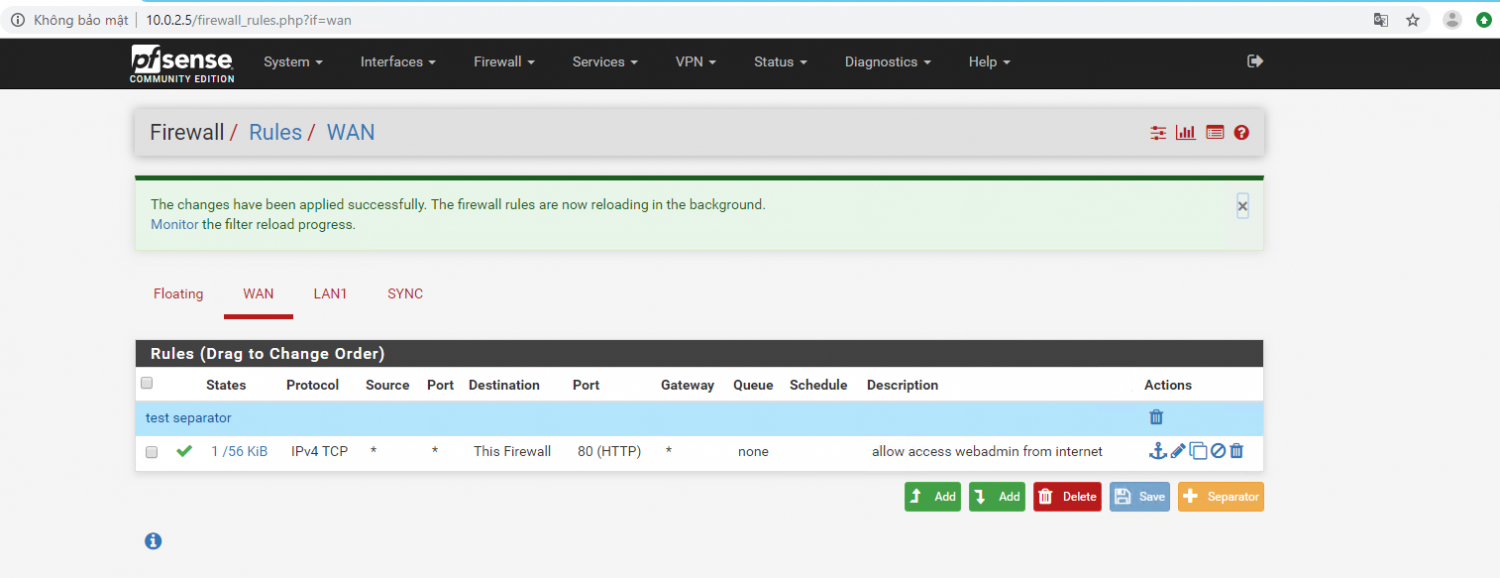
			<p>Sau khi add thêm card LAN, mặc định card WAN sẽ​​&nbsp;bị​​&nbsp;khoá truy cập, chỉ​​&nbsp;có thể​​&nbsp;truy cập qua port LAN của pfsense (vậy mà không cảnh báo)</p>

<p>#<a href="https://docs.netgate.com/pfsense/en/latest/book/highavailability/example-redundant-configuration.html" target="_top" title="">https://docs.netgate.com/pfsense/en/latest/book/highavailability/example-redundant-configuration.html</a></p>

<p>Muốn truy cập qua WAN vào webadmin thì có thể​​&nbsp;tạo rule như ảnh​​&nbsp;dưới.</p>

<p>&nbsp;</p>

<p><img alt="" height="583" src="https://phatthanhdat.com/uploads/news/2021_05/image-20210530124624-1.png" width="1514" /></p>

<p>&nbsp;</p>

<p>Hiện tại chưa có phần giao diện check status​​&nbsp;ACTIVE - STANDBY​​&nbsp;đã thành công =&gt; pfsense hơi tù. Do đó có thể​​&nbsp;test bằng cách tạo 1 rule trên master sau đó chuyển sang slave xem rule nếu sync sang rồi thì không có lỗi.</p>

<p>&nbsp;</p>

<p>Cấu hình CARP​​&nbsp;(Common Address Redundancy Protocol)</p>

<p>Link tham khảo về giao thức CARP</p>

<p>#<a href="https://en.wikipedia.org/wiki/Common_Address_Redundancy_Protocol" target="_top" title="">https://en.wikipedia.org/wiki/Common_Address_Redundancy_Protocol</a></p>

<p>&nbsp;</p>

<p>The&nbsp;Common Address Redundancy Protocol&nbsp;or&nbsp;CARP&nbsp;is a computer&nbsp;<a href="https://en.wikipedia.org/wiki/Networking_protocol" target="_top" title="Networking protocol">networking protocol</a>&nbsp;which allows multiple&nbsp;<a href="https://en.wikipedia.org/wiki/Host_(network)" target="_top" title="Host (network)">hosts</a>&nbsp;on the same&nbsp;<a href="https://en.wikipedia.org/wiki/Local_area_network" target="_top" title="Local area network">local area network</a>&nbsp;to share a set of&nbsp;<a href="https://en.wikipedia.org/wiki/IP_addresses" target="_top" title="IP addresses">IP addresses</a>. Its primary purpose is to provide&nbsp;<a href="https://en.wikipedia.org/wiki/Failover" target="_top" title="Failover">failover</a>&nbsp;redundancy,​​&nbsp;especially when used with&nbsp;<a href="https://en.wikipedia.org/wiki/Firewall_(computing)" target="_top" title="Firewall (computing)">firewalls</a>&nbsp;and&nbsp;<a href="https://en.wikipedia.org/wiki/Router_(computing)" target="_top" title="Router (computing)">routers</a>. In some configurations,​​&nbsp;CARP can also provide&nbsp;<a href="https://en.wikipedia.org/wiki/Load_balancing_(computing)" target="_top" title="Load balancing (computing)">load balancing</a>&nbsp;functionality. CARP provides functionality similar to&nbsp;<a href="https://en.wikipedia.org/wiki/VRRP" target="_top" title="VRRP">VRRP</a>&nbsp;and to&nbsp;<a href="https://en.wikipedia.org/wiki/Cisco_Systems" target="_top" title="Cisco Systems">Cisco Systems</a>&#039;&nbsp;<a href="https://en.wikipedia.org/wiki/HSRP" target="_top" title="HSRP">HSRP</a>. It is implemented in several&nbsp;<a href="https://en.wikipedia.org/wiki/BSD" target="_top" title="BSD">BSD</a>-based&nbsp;<a href="https://en.wikipedia.org/wiki/Operating_system" target="_top" title="Operating system">operating systems</a>&nbsp;and has been&nbsp;<a href="https://en.wikipedia.org/wiki/Porting" target="_top" title="Porting">ported</a>&nbsp;to&nbsp;<a href="https://en.wikipedia.org/wiki/Linux" target="_top" title="Linux">Linux</a>(ucarp).<a href="https://en.wikipedia.org/wiki/Common_Address_Redundancy_Protocol#cite_note-ucarp_manpage-1" target="_top" title="">&#91;1&#93;</a></p>

<p>&nbsp;</p>

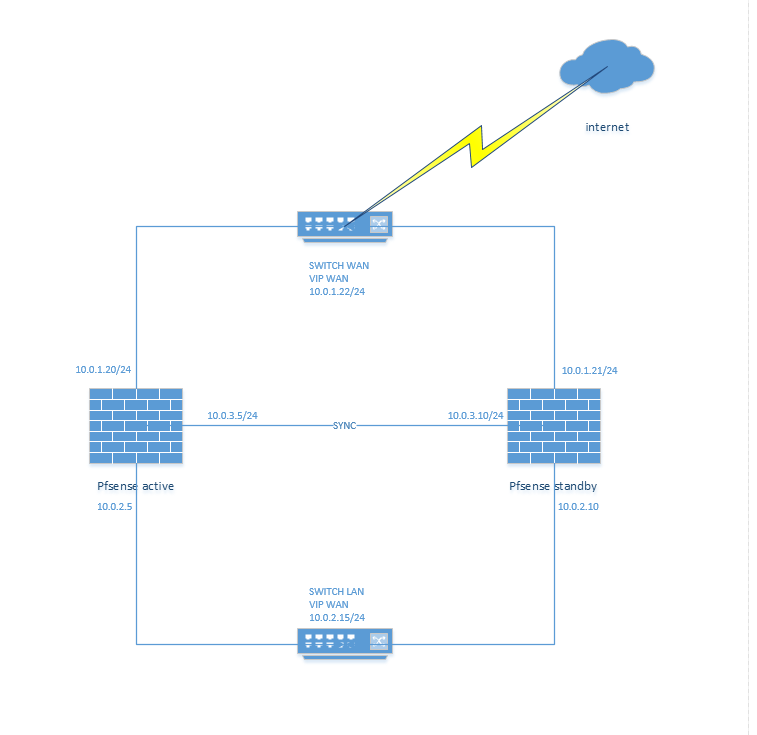
<p>2./​​&nbsp;Mô hình</p>

<p><img alt="" height="735" src="https://phatthanhdat.com/uploads/news/2021_05/image-20210530124624-2.png" width="757" /></p>

<p>&nbsp;</p>

<p>3./ cài đặt</p>

<h2>Setup Sync Interface</h2>

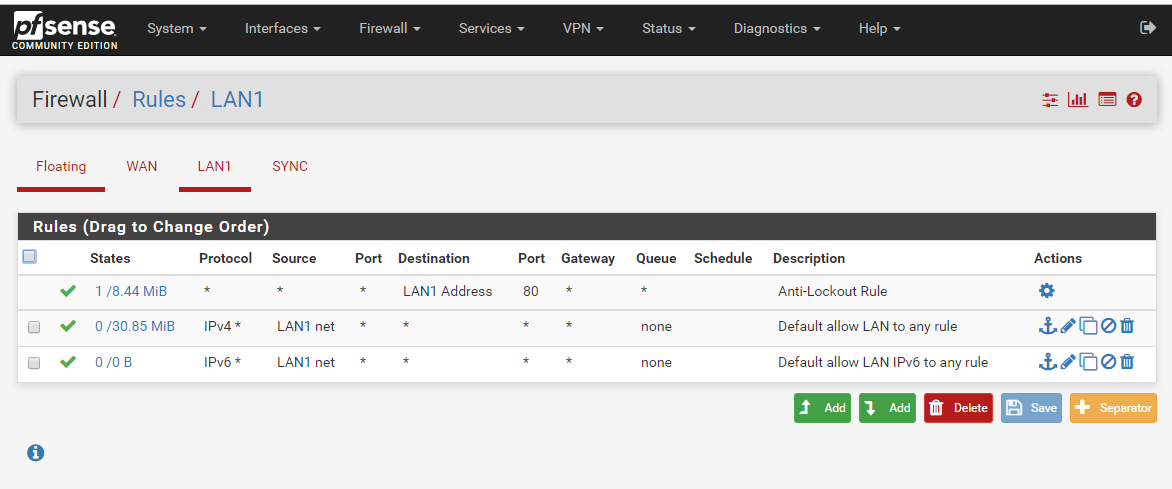
<p>Cài đặt trên cả​​&nbsp;FIREWALL​​&nbsp;Active và Standby</p>

<p>Tạo sample rule allow port 443 và​​&nbsp;port 80 trên cả​​&nbsp;2​​&nbsp;FIREWALL​​&nbsp;Active và standby.</p>

<p>&nbsp;</p>

<p><img alt="" height="489" src="https://phatthanhdat.com/uploads/news/2021_05/image-20210530124624-3.png" width="1172" /></p>

<p>Hoặc Tạo rule rất chặt thì như sau:</p>

<p></p>

<p>&nbsp;</p>

<h2>Configure pfsync</h2>

<p>Cấu hình trên cả​​&nbsp;2​​&nbsp;FIREWALL​​&nbsp;A – S</p>

<p>State synchronization using pfsync must be configured on both the primary and secondary nodes to function.</p>

<p>First on the primary node and then on the secondary, perform the following:</p>

<ul>
	<li>
	<p>Navigate to&nbsp;System &gt; High Avail Sync</p>
	</li>
	<li>
	<p>Check&nbsp;Synchronize States</p>
	</li>
	<li>
	<p>Set&nbsp;Synchronize Interface&nbsp;to&nbsp;SYNC</p>
	</li>
	<li>
	<p>Set&nbsp;pfsync Synchronize Peer IP&nbsp;to the other node. Set this to&nbsp;172.16.1.3&nbsp;when configuring the primary node, or&nbsp;172.16.1.2&nbsp;when configuring the secondary node</p>
	</li>
	<li>
	<p>Click&nbsp;Save</p>
	</li>
</ul>

<p>&nbsp;</p>

<p></p>

<p>&nbsp;</p>

<p>&nbsp;</p>

<h2>Configure Configuration Synchronization (XML-RPC)</h2>

<p>Lưu ý: chỉ​​&nbsp;cấu hình trên​​&nbsp;FIREWALL​​&nbsp;Active</p>

<p>Password của user admin​​&nbsp;FIREWALL​​&nbsp;Standby</p>

<p></p>

<p>Sau khi cấu hình xong interface SYNC, test tạo rule trên​​&nbsp;FIREWALL​​&nbsp;active​​&nbsp;nếu đồng bộ​​&nbsp;được sang​​&nbsp;FIREWALL​​&nbsp;standby thì đã xong.</p>

<p>&nbsp;</p>

<h3>Configuring the CARP Virtual IPs</h3>

<p></p>

<p>Chỉnh trọng số​​&nbsp;skew để​​&nbsp;lựa chọn server Firewall nào là master, lưu ý trọng số​​&nbsp;bằng 0 luôn luôn là master, càng thấp càng ưu tiên làm master</p>

<p></p>

<p>&nbsp;</p>

<p>&nbsp;</p>

<h3>Configure Outbound NAT for CARP</h3>

<p>Ví dụ: Cấu hình cho 1 IP hoặc cả​​&nbsp;dải IP Local được truy cập internet</p>

<p>&nbsp;</p>

<p></p>

<p>Ví dụ​​&nbsp;NAT 1-1</p>

<p>Allow 1-1 IP 10.0.2.100 trong LAN ra ngoài internet thông qua 1 vitural IP 10.0.1.23</p>

<p></p>

<p>Vitural IP cần được tạo trước khi NAT 11</p>

<p></p>

<p>Sau khi NAT 1-1 xong, để​​&nbsp;remote và ping được cần tạo 2 rules sau</p>

<p></p>

<p>Rule mở​​&nbsp;remote 3389 thì apply rất nhanh, nhưng rule allow ping thì khá lâu khi muốn deny ping, chỉ​​&nbsp;mở​​&nbsp;ping thì rất nhanh.</p>

<p>Tạo rule allow từ​​&nbsp;outsite truy cập ping và remote vào inside</p>

<p></p>

<p>RULE LAN</p>

<p></p>

<p>RULE SYNC</p>

<p>&nbsp;</p>

<p>4./​​&nbsp;Lưu ý:</p>

<ul>
	<li>
	<p>Update​​&nbsp;timezone chuẩn GMT+7 trong system /general setup</p>
	</li>
	<li>
	<p>Đã test high Avaiblity xong chỉ​​&nbsp;rớt 1-2 gói tin (version mới nhất pfsense 2.4.4-p3)</p>
	</li>
	<li>
	<p>Để​​&nbsp;tạo rule apply cho tất cả​​&nbsp;interface sử​​&nbsp;dụng Floating trong Firewall/Rule/Floating</p>
	</li>
	<li>
	<p>Disable update trên pfsense (có thể​​&nbsp;gây reboot​​&nbsp;FIREWALL​​&nbsp;rất nguy hiểm)</p>
	</li>
</ul>

<p>&nbsp;</p>

<p>chúc các bạn thành công, nếu gặp vấn đề gì trong cấu hình hãy comment ở bên dưới.</p>
		</div>
	</div>
	<div id="footer" class="clearfix">
		<div id="url">
			<strong>URL của bản tin này: </strong><a href="https://phatthanhdat.com/index.php/savefile/quan-tri-mang/how-to-config-pfsense-high-availability-step-by-step-53.html" title="HOW TO CONFIG PFSENSE HIGH AVAILABILITY STEP BY STEP">https://phatthanhdat.com/index.php/savefile/quan-tri-mang/how-to-config-pfsense-high-availability-step-by-step-53.html</a>

		</div>
		<div class="clear"></div>
		<div class="copyright">
			&copy; Phát Thành Đạt - Dịch vụ sửa chữa máy tính hóc môn
		</div>
		<div id="contact">
			<a href="mailto:info@phatthanhdat.com">info@phatthanhdat.com</a>
		</div>
	</div>
</div>
        <div id="timeoutsess" class="chromeframe">
            Bạn đã không sử dụng Site, <a onclick="timeoutsesscancel();" href="https://phatthanhdat.com/#">Bấm vào đây để duy trì trạng thái đăng nhập</a>. Thời gian chờ: <span id="secField"> 60 </span> giây
        </div>
        <div id="openidResult" class="nv-alert" style="display:none"></div>
        <div id="openidBt" data-result="" data-redirect=""></div>
<script src="https://phatthanhdat.com/assets/js/jquery/jquery.min.js"></script>
<script>var nv_base_siteurl="/",nv_lang_data="vi",nv_lang_interface="vi",nv_name_variable="nv",nv_fc_variable="op",nv_lang_variable="language",nv_module_name="news",nv_func_name="savefile",nv_is_user=0, nv_my_ofs=-4,nv_my_abbr="EDT",nv_cookie_prefix="nv4",nv_check_pass_mstime=1738000,nv_area_admin=0,nv_safemode=0,theme_responsive=0,nv_recaptcha_ver=2,nv_recaptcha_sitekey="",nv_recaptcha_type="image",XSSsanitize=1;</script>
<script src="https://phatthanhdat.com/assets/js/language/vi.js"></script>
<script src="https://phatthanhdat.com/assets/js/DOMPurify/purify3.js"></script>
<script src="https://phatthanhdat.com/assets/js/global.js"></script>
<script src="https://phatthanhdat.com/assets/js/site.js"></script>
<script src="https://phatthanhdat.com/themes/default/js/news.js"></script>
<script src="https://phatthanhdat.com/themes/default/js/main.js"></script>
<script src="https://phatthanhdat.com/themes/default/js/custom.js"></script>
<script type="application/ld+json">
        {
            "@context": "https://schema.org",
            "@type": "Organization",
            "url": "https://phatthanhdat.com",
            "logo": "https://phatthanhdat.com/uploads/about/logonho.png"
        }
        </script>
<script async custom-element="amp-ad" src="https://cdn.ampproject.org/v0/amp-ad-0.1.js"></script>
<script>
     (adsbygoogle = window.adsbygoogle || []).push({});
</script>
<script>(function(w,d,s,l,i){w[l]=w[l]||[];w[l].push({'gtm.start':
new Date().getTime(),event:'gtm.js'});var f=d.getElementsByTagName(s)[0],
j=d.createElement(s),dl=l!='dataLayer'?'&l='+l:'';j.async=true;j.src=
'https://www.googletagmanager.com/gtm.js?id='+i+dl;f.parentNode.insertBefore(j,f);
})(window,document,'script','dataLayer','GTM-KRZZ2CK');</script>
<script>
!function(f,b,e,v,n,t,s)
{if(f.fbq)return;n=f.fbq=function(){n.callMethod?
n.callMethod.apply(n,arguments):n.queue.push(arguments)};
if(!f._fbq)f._fbq=n;n.push=n;n.loaded=!0;n.version='2.0';
n.queue=[];t=b.createElement(e);t.async=!0;
t.src=v;s=b.getElementsByTagName(e)[0];
s.parentNode.insertBefore(t,s)}(window, document,'script',
'https://connect.facebook.net/en_US/fbevents.js');
fbq('init', '219812430112623');
fbq('track', 'PageView');
</script>
<script async src="https://pagead2.googlesyndication.com/pagead/js/adsbygoogle.js?client=ca-pub-3722185033130810" crossorigin="anonymous"></script>
<script>
      var chatbox = document.getElementById('fb-customer-chat');
      chatbox.setAttribute("page_id", "244380242794992");
      chatbox.setAttribute("attribution", "biz_inbox");

      window.fbAsyncInit = function() {
        FB.init({
          xfbml            : true,
          version          : 'v11.0'
        });
      };

      (function(d, s, id) {
        var js, fjs = d.getElementsByTagName(s)[0];
        if (d.getElementById(id)) return;
        js = d.createElement(s); js.id = id;
        js.src = 'https://connect.facebook.net/vi_VN/sdk/xfbml.customerchat.js';
        fjs.parentNode.insertBefore(js, fjs);
      }(document, 'script', 'facebook-jssdk'));
    </script>
<script src="https://sp.zalo.me/plugins/sdk.js"></script>
<script>
     (adsbygoogle = window.adsbygoogle || []).push({});
</script>
<script src="https://phatthanhdat.com/themes/default/js/bootstrap.min.js"></script>
</body>
</html>