<!DOCTYPE html>
    <html lang="vi" xmlns="http://www.w3.org/1999/xhtml" prefix="og: http://ogp.me/ns#">
    <head>
<title>Phát Thành Đạt Windows 11 24h2</title>
<meta name="description" content="Windows 11 24h2 - Savefile - Tin Tức - https&#x3A;&#x002F;&#x002F;phatthanhdat.com&#x002F;index.php&#x002F;savefile&#x002F;quan-tri-mang&#x002F;windows-11-24h2-196.html">
<meta name="author" content="Phát Thành Đạt - Dịch vụ sửa chữa máy tính hóc môn">
<meta name="copyright" content="Phát Thành Đạt - Dịch vụ sửa chữa máy tính hóc môn [info@phatthanhdat.com]">
<meta name="generator" content="NukeViet v4.5">
<meta name="facebook-domain-verification" content="nv4brgbtr5jrhsej2o63m6qx7nz5ek">
<meta http-equiv="Content-Type" content="text/html; charset=utf-8">
<meta property="og:title" content="Windows 11 24h2">
<meta property="og:type" content="website">
<meta property="og:description" content="Savefile - Tin Tức - https&#x3A;&#x002F;&#x002F;phatthanhdat.com&#x002F;index.php&#x002F;savefile&#x002F;quan-tri-mang&#x002F;windows-11-24h2-196.html">
<meta property="og:site_name" content="Phát Thành Đạt - Dịch vụ sửa chữa máy tính hóc môn">
<meta property="og:url" content="https://phatthanhdat.com/index.php/savefile/quan-tri-mang/windows-11-24h2-196.html">
<link rel="shortcut icon" href="https://phatthanhdat.com/uploads/about/logonho.png">
<link rel="canonical" href="https://phatthanhdat.com/index.php/savefile/quan-tri-mang/windows-11-24h2-196.html">
<link rel="alternate" href="https://phatthanhdat.com/index.php/rss/" title="Tin Tức" type="application/rss+xml">
<link rel="alternate" href="https://phatthanhdat.com/index.php/rss/quan-tri-mang/" title="Tin Tức - Quản Trị Mạng" type="application/rss+xml">
<link rel="alternate" href="https://phatthanhdat.com/index.php/rss/windows-server/" title="Tin Tức - Windows Server" type="application/rss+xml">
<link rel="alternate" href="https://phatthanhdat.com/index.php/rss/active-windows/" title="Tin Tức - Active Windows" type="application/rss+xml">
<link rel="alternate" href="https://phatthanhdat.com/index.php/rss/mang-may-tinh/" title="Tin Tức - Mạng Máy Tính" type="application/rss+xml">
<link rel="alternate" href="https://phatthanhdat.com/index.php/rss/quan-tri-mail-server/" title="Tin Tức - Quản Trị Mail Server" type="application/rss+xml">
<link rel="alternate" href="https://phatthanhdat.com/index.php/rss/y-nghia-cuoc-song/" title="Tin Tức - Ý nghĩa cuộc sống" type="application/rss+xml">
<link rel="alternate" href="https://phatthanhdat.com/index.php/rss/tien-ich/" title="Tin Tức - Tiện Ích" type="application/rss+xml">
<link rel="alternate" href="https://phatthanhdat.com/index.php/rss/facebook-add/" title="Tin Tức - Facebook Add" type="application/rss+xml">
<link rel="alternate" href="https://phatthanhdat.com/index.php/rss/nong-tren-mang/" title="Tin Tức - Nóng Trên Mạng" type="application/rss+xml">
<link rel="alternate" href="https://phatthanhdat.com/index.php/rss/covid-19/" title="Tin Tức - Covid 19" type="application/rss+xml">
<link rel="alternate" href="https://phatthanhdat.com/index.php/rss/hoc-duong/" title="Tin Tức - Học Đường" type="application/rss+xml">
<link rel="alternate" href="https://phatthanhdat.com/index.php/rss/tin-tuc-thi-truong/" title="Tin Tức - Tin Tức Thị Trường" type="application/rss+xml">
<link rel="alternate" href="https://phatthanhdat.com/index.php/rss/code-hay/" title="Tin Tức - Code hay" type="application/rss+xml">
<link rel="alternate" href="https://phatthanhdat.com/index.php/rss/kho-hang/" title="Tin Tức - Kho Hàng" type="application/rss+xml">
<link rel="alternate" href="https://phatthanhdat.com/index.php/rss/ai-tri-tue-nhan-tao/" title="Tin Tức - AI Trí Tuệ Nhân Tạo" type="application/rss+xml">
<link rel="alternate" href="https://phatthanhdat.com/index.php/rss/do-hoa/" title="Tin Tức - Đồ Hoạ" type="application/rss+xml">
<link rel="stylesheet" href="https://phatthanhdat.com/assets/css/font-awesome.min.css">
<link rel="stylesheet" href="https://phatthanhdat.com/themes/default/css/bootstrap.non-responsive.css">
<link rel="stylesheet" href="https://phatthanhdat.com/themes/default/css/style.css">
<link rel="stylesheet" href="https://phatthanhdat.com/themes/default/css/style.non-responsive.css">
<link rel="StyleSheet" href="https://phatthanhdat.com/themes/default/css/news.css">
<link rel="stylesheet" href="https://phatthanhdat.com/themes/default/css/custom.css">
<style type="text/css">
	body{background: #fff;}
</style>
<!-- Google Tag Manager -->
<!-- End Google Tag Manager -->

<!-- Facebook Pixel Code -->
<noscript><img height="1" width="1" style="display:none"
src="https://www.facebook.com/tr?id=219812430112623&ev=PageView&noscript=1"
/></noscript>
<!-- End Facebook Pixel Code -->
<!-- Messenger Plugin chat Code -->
    <div id="fb-root"></div>

    <!-- Your Plugin chat code -->
    <div id="fb-customer-chat" class="fb-customerchat">
    </div>
<script>(function(i,s,o,g,r,a,m){i['GoogleAnalyticsObject']=r;i[r]=i[r]||function(){
(i[r].q=i[r].q||[]).push(arguments)},i[r].l=1*new Date();a=s.createElement(o),
m=s.getElementsByTagName(o)[0];a.async=1;a.src=g;m.parentNode.insertBefore(a,m)
})(window,document,'script','https://www.google-analytics.com/analytics.js','ga');
ga('create', 'UA-133543348-1', '.phatthanhdat.com');
ga('send', 'pageview');
</script>
</head>
    <body>
<div class="zalo-chat-widget" data-oaid="1354977264109400055" data-welcome-message="R&#7845;t vui khi &#273;&#432;&#7907;c h&#7895; tr&#7907; b&#7841;n!" data-autopopup="0" data-width="" data-height=""></div>
<amp-ad width="100vw" height="320"
     type="adsense"
     data-ad-client="ca-pub-3722185033130810"
     data-ad-slot="5396409404"
     data-auto-format="rspv"
     data-full-width="">
  <div overflow=""></div>
</amp-ad>
<!-- Google Tag Manager (noscript) -->
<noscript><iframe src="https://www.googletagmanager.com/ns.html?id=GTM-KRZZ2CK"
height="0" width="0" style="display:none;visibility:hidden"></iframe></noscript>
<!-- End Google Tag Manager (noscript) -->
<div class="gcse-searchbox-only"></div>
<div id="print">
	<div id="hd_print">
		<h2 class="pull-left">Phát Thành Đạt - Dịch vụ sửa chữa máy tính hóc môn</h2>
		<p class="pull-right"><a title="Phát Thành Đạt - Dịch vụ sửa chữa máy tính hóc môn" href="https://phatthanhdat.com/">https://phatthanhdat.com</a></p>
	</div>
	<div class="clear"></div>
	<hr />
	<div id="content">
		<h1>Windows 11 24h2</h1>
		<ul class="list-inline">
			<li>Thứ năm - 01/05/2025 05:19</li>
			<li class="hidden-print txtrequired"><em class="fa fa-print">&nbsp;</em><a title="In ra" href="javascript:;" onclick="window.print()">In ra</a></li>
			<li class="hidden-print txtrequired"><em class="fa fa-power-off">&nbsp;</em><a title="Đóng cửa sổ này" href="javascript:;" onclick="window.close()">Đóng cửa sổ này</a></li>
		</ul>
		<div class="clear"></div>
		<div id="hometext">
			Tải bộ windows 11 phiên bản 2024 hoàn toàn mới<br />
&nbsp;
		</div>
		<div id="bodytext" class="clearfix">
			<ul>
	<li dir="ltr" style="text-align: justify;">Windows 11 Pro</li>
	<li dir="ltr" style="text-align: justify;">Windows 11 Pro N</li>
	<li dir="ltr" style="text-align: justify;">Windows 11 Pro for Workstations</li>
	<li dir="ltr" style="text-align: justify;">Windows 11 Pro N for Workstations</li>
	<li dir="ltr" style="text-align: justify;">Windows 11 Pro Education</li>
	<li dir="ltr" style="text-align: justify;">Windows 11 Pro Education N</li>
	<li dir="ltr" style="text-align: justify;">Windows 11 Education</li>
	<li dir="ltr" style="text-align: justify;">Windows 11 Education N</li>
	<li dir="ltr" style="text-align: justify;">Windows 11 Enterprise</li>
	<li dir="ltr" style="text-align: justify;">Windows 11 Enterprise N</li>
</ul>

<p style="text-align: justify;">&nbsp;</p>

<ul>
	<li dir="ltr" style="text-align: justify;">Windows 11 Home N</li>
	<li dir="ltr" style="text-align: justify;">Windows 11 Home</li>
	<li dir="ltr" style="text-align: justify;">Windows 11 Pro</li>
	<li dir="ltr" style="text-align: justify;">Windows 11 Pro N</li>
	<li dir="ltr" style="text-align: justify;">Windows 11 Pro for Workstations</li>
	<li dir="ltr" style="text-align: justify;">Windows 11 Pro N for Workstations</li>
	<li dir="ltr" style="text-align: justify;">Windows 11 Pro Education</li>
	<li dir="ltr" style="text-align: justify;">Windows 11 Pro Education N</li>
	<li dir="ltr" style="text-align: justify;">Windows 11 Education</li>
	<li dir="ltr" style="text-align: justify;">Windows 11 Education N</li>
</ul>

<div style="text-align: justify;">
<p dir="ltr"><strong>Windows 11 (business editions), version 24H2 (x64)</strong></p>

<p dir="ltr"><strong>Link:</strong>&nbsp;<a href="https://fdn.digiboy.ir/dlir-s3/en-us_windows_11_business_editions_version_24h2_x64_dvd_59a1851e.iso">en-us_windows_11_business_editions_version_24h2_x64_dvd_59a1851e.iso</a></p>

<p dir="ltr"><strong>File Size:</strong>&nbsp;5.32 GB</p>

<p dir="ltr"><strong>MD5:</strong>&nbsp;0e403b3a8f9d9a72754ef857a585ccdf<br />
<strong>SHA1:</strong>&nbsp;e5c20c4d57b56f0525b9e03895472d40b2f53a5d</p>

<p dir="ltr"><strong>SHA256:</strong>&nbsp;d0dca325314322518ae967d58c3061bcae57ee9743a8a1cf374aad8637e5e8ac</p>

<p dir="ltr"><strong>Build Number:</strong>&nbsp;26100.1742</p>

<p dir="ltr">♦♦♦♦♦</p>

<p dir="ltr"><strong>Windows 11 (business editions), version 24H2 (arm64)</strong></p>

<p dir="ltr"><strong>Link:</strong>&nbsp;<a href="https://fdn.digiboy.ir/dlir-s3/en-us_windows_11_business_editions_version_24h2_arm64_dvd_ad92e9d8.iso">en-us_windows_11_business_editions_version_24h2_arm64_dvd_ad92e9d8.iso</a></p>

<p dir="ltr"><strong>File Size:</strong>&nbsp;5.01 GB</p>

<p dir="ltr"><strong>MD5:</strong>&nbsp;ac69e5dabf09e12c06e69e619fa0890f<br />
<strong>SHA1:</strong>&nbsp;ffd076799c0ac657e80bfa128f0072acdd8a5d59</p>

<p dir="ltr"><strong>SHA256:</strong>&nbsp;15ff94a99e89846c54316275f60ea697c9517e5dea7b3a963157a4c632524f72</p>

<p dir="ltr"><strong>Build Number:</strong>&nbsp;26100.1742</p>

<p dir="ltr">♦♦♦♦♦</p>

<p dir="ltr"><strong>Windows 11 (consumer editions), version 24H2 (x64)</strong></p>

<p dir="ltr"><strong>Link:</strong>&nbsp;<a href="https://fdn.digiboy.ir/dlir-s3/en-us_windows_11_consumer_editions_version_24h2_x64_dvd_1d5fcad3.iso">en-us_windows_11_consumer_editions_version_24h2_x64_dvd_1d5fcad3.iso</a></p>

<p dir="ltr"><strong>File Size:</strong>&nbsp;5.41 GB</p>

<p dir="ltr"><strong>MD5:</strong>&nbsp;bb2acb101d4a360c71530e4be00ec43c<br />
<strong>SHA1:</strong>&nbsp;a81079ba4b9a9ce29a7a2a20cd34266ac21becce</p>

<p dir="ltr"><strong>SHA256:</strong>&nbsp;b56b911bf18a2ceaeb3904d87e7c770bdf92d3099599d61ac2497b91bf190b11</p>

<p dir="ltr"><strong>Build Number:</strong>&nbsp;26100.1742</p>

<p dir="ltr">♦♦♦♦♦</p>

<p dir="ltr"><strong>Windows 11 (consumer editions), version 24H2 (arm64)</strong></p>

<p dir="ltr"><strong>Link:</strong>&nbsp;<a href="https://fdn.digiboy.ir/dlir-s3/en-us_windows_11_consumer_editions_version_24h2_arm64_dvd_4cc70bf6.iso">en-us_windows_11_consumer_editions_version_24h2_arm64_dvd_4cc70bf6.iso</a></p>

<p dir="ltr"><strong>File Size:</strong>&nbsp;5.08 GB</p>

<p dir="ltr"><strong>MD5:</strong>&nbsp;ed2812d5f59b63ea7d0b463b1bfe664d<br />
<strong>SHA1:</strong>&nbsp;2b37786dbbee00d3a8f9587bfa94b6c70f59cfea</p>

<p dir="ltr"><strong>SHA256:</strong>&nbsp;57d1dfb2c6690a99fe99226540333c6c97d3fd2b557a50dfe3d68c3f675ef2b0</p>

<p dir="ltr"><strong>Build Number:</strong>&nbsp;26100.1742</p>

<p dir="ltr">♦♦♦♦♦</p>

<p dir="ltr"><strong>Windows 11 IoT Enterprise, version 24H2 (x64)</strong></p>

<p dir="ltr"><strong>Link:</strong>&nbsp;<a href="https://fdn.digiboy.ir/dlir-s3/en-us_windows_11_iot_enterprise_version_24h2_x64_dvd_3a99b72b.iso">en-us_windows_11_iot_enterprise_version_24h2_x64_dvd_3a99b72b.iso</a></p>

<p dir="ltr"><strong>File Size:</strong>&nbsp;5.08 GB</p>

<p dir="ltr"><strong>MD5:</strong>&nbsp;6437def7cdf34af346bfffa1e6634b91<br />
<strong>SHA1:</strong>&nbsp;7eac64ac85e6492611e6a1e3fb09b70685c6469b</p>

<p dir="ltr"><strong>SHA256:</strong>&nbsp;eceb8dc167077e07f9a9bd04e472ea542944974b81b2ebc25477772a71bdbb69</p>

<p dir="ltr"><strong>Build Number:</strong>&nbsp;26100.1742</p>

<p dir="ltr">♦♦♦♦♦</p>

<p dir="ltr"><strong>Windows 11 IoT Enterprise, version 24H2 (arm64)</strong></p>

<p dir="ltr"><strong>Link:</strong>&nbsp;<a href="https://fdn.digiboy.ir/dlir-s3/en-us_windows_11_iot_enterprise_version_24h2_arm64_dvd_e9155a10.iso">en-us_windows_11_iot_enterprise_version_24h2_arm64_dvd_e9155a10.iso</a></p>

<p dir="ltr"><strong>File Size:</strong>&nbsp;5.04 GB</p>

<p dir="ltr"><strong>MD5:</strong>&nbsp;c50dae1eec6b82e8ee1907448a739619<br />
<strong>SHA1:</strong>&nbsp;7fed7812095d3dea00e2c35614eecacfc21eb912</p>

<p dir="ltr"><strong>SHA256:</strong>&nbsp;a931b791cadd12e0d38aac2d765d389a06bcba3154a4164afeacc839a3bdbc0d</p>

<p dir="ltr"><strong>Build Number:</strong>&nbsp;26100.1742</p>
</div>

<div style="background: rgb(238, 238, 238); border: 1px solid rgb(204, 204, 204); padding: 5px 10px; text-align: justify;">Đối với&nbsp;bản cập nhật Windows 11 năm 2024&nbsp;, còn được gọi là phiên bản 24H2 (tức là 2024, nửa sau), Microsoft đã xây dựng lại phần lớn mã hạt nhân cơ bản để có hiệu suất và bảo mật tốt hơn. Thay vì các tính năng mới thú vị, chúng ta thấy một số tinh chỉnh hữu ích về giao diện, như khả năng cuộn bảng Quick Actions để có thêm nhiều cài đặt và Copilot được thiết kế lại không còn nằm ở bên phải màn hình của bạn nữa. Nó cũng bổ sung các bản cập nhật cho File Explorer và cải thiện các tính năng Phone Link.<br />
Nhưng những thay đổi lớn nhất đến từ&nbsp;PC Copilot+&nbsp;, hiện có thể chạy trên CPU Qualcomm Snapdragon có thời lượng pin dài hoặc CPU từ Intel và AMD. Các thiết bị được trang bị&nbsp;<a href="https://www.pcmag.com/news/the-meteor-lake-npu-meet-intels-dedicated-silicon-for-local-ai-processing" style="border:0px solid rgb(247, 247, 247); box-sizing:border-box; scrollbar-color:auto; scrollbar-width:auto; --transition-duration:250ms; --tw-border-spacing-x:0; --tw-border-spacing-y:0; --tw-translate-x:0; --tw-translate-y:0; --tw-rotate:0; --tw-skew-x:0; --tw-skew-y:0; --tw-scale-x:1; --tw-scale-y:1; --tw-pan-x: ; --tw-pan-y: ; --tw-pinch-zoom: ; --tw-scroll-snap-strictness:proximity; --tw-gradient-from-position: ; --tw-gradient-via-position: ; --tw-gradient-to-position: ; --tw-ordinal: ; --tw-slashed-zero: ; --tw-numeric-figure: ; --tw-numeric-spacing: ; --tw-numeric-fraction: ; --tw-ring-inset: ; --tw-ring-offset-width:0px; --tw-ring-offset-color:rgb(255, 255, 255); --tw-ring-color:rgba(59,130,246,.5); --tw-ring-offset-shadow:0 0 #0000; --tw-ring-shadow:0 0 #0000; --tw-shadow:0 0 #0000; --tw-shadow-colored:0 0 #0000; --tw-blur: ; --tw-brightness: ; --tw-contrast: ; --tw-grayscale: ; --tw-hue-rotate: ; --tw-invert: ; --tw-saturate: ; --tw-sepia: ; --tw-drop-shadow: ; --tw-backdrop-blur: ; --tw-backdrop-brightness: ; --tw-backdrop-contrast: ; --tw-backdrop-grayscale: ; --tw-backdrop-hue-rotate: ; --tw-backdrop-invert: ; --tw-backdrop-opacity: ; --tw-backdrop-saturate: ; --tw-backdrop-sepia: ; color:inherit; text-decoration:underline; padding-bottom:0.1rem; font-family:roboto-flex, Helvetica, sans-serif; font-size:18px; font-style:normal; font-variant-ligatures:normal; font-weight:400; text-align:start; white-space:normal" target="_self">NPU</a>&nbsp;này có các tính năng mới hỗ trợ AI như Click to Do, Super Resolution trong ứng dụng Photos, tìm kiếm ngôn ngữ tự nhiên trong các thành phần của hệ điều hành và tính năng Erase and Fill trong ứng dụng Paint.<br />
Phiên bản Windows mới nhất không phải là bản cập nhật cuối cùng. Microsoft bổ sung các tính năng mới trong cái mà họ gọi là &quot;&nbsp;sự đổi mới liên tục&nbsp;&quot;. Nói cách khác, ngoài bản cập nhật lớn hàng năm, bạn sẽ nhận được các tính năng và thay đổi mới trong suốt cả năm

<h2 id="cau-hinh-yeu-cau-de-download-windows-11-iso"><strong>Cấu hình yêu cầu để download Windows 11 ISO&nbsp;</strong></h2>

<p>Trước khi tiến hành download Windows 11 ISO, bạn cần kiểm tra cấu hình máy tính để đảm bảo nó đáp ứng đủ các yêu cầu của Microsoft đối với Windows 11. Đây là một bước quan trọng để tránh gặp phải sự cố trong quá trình cài đặt. Sau đây là một số yêu cầu về cấu hình mà bạn cần nắm:</p>

<ul>
	<li><strong>CPU:&nbsp;</strong>Bộ vi xử lý có ít nhất 2 lõi, tốc độ tối thiểu 1GHz.</li>
	<li><strong>RAM:&nbsp;</strong>Yêu cầu tối thiểu 4GB hoặc nhiều hơn.</li>
	<li><strong>Màn hình:</strong>&nbsp;Màn hình có kích thước tối thiểu 9 inch, độ phân giải 720p hoặc cao hơn.</li>
	<li><strong>Dung lượng ổ cứng:&nbsp;</strong>Dung lượng trống tối thiểu 64GB.</li>
	<li><strong>TPM (Trusted Platform Module):</strong>&nbsp;Máy tính của bạn cần phải có chip bảo mật TPM 2.0, nhằm tăng cường bảo mật.</li>
	<li><strong>Card đồ họa:&nbsp;</strong>Hỗ trợ DirectX 12 và có driver WDDM 2.0 trở lên.</li>
	<li><strong>Firmware hệ thống:&nbsp;</strong>Hỗ trợ UEFI và tính năng Secure Boot.</li>
</ul>

<h2 id="tai-sao-nen-download-windows-11-iso-tu-microsoft"><strong>Tại sao nên download Windows 11 ISO từ Microsoft?</strong></h2>

<p>Việc download Windows 11 ISO từ trang chính thức của Microsoft mang lại nhiều lợi ích vượt trội, giúp bạn tránh được các rủi ro liên quan đến bảo mật và hiệu năng. Dưới đây là những lý do quan trọng bạn nên download Windows 11 ISO từ nguồn chính thống:</p>

<ul>
	<li><strong>An toàn tuyệt đối:&nbsp;</strong>Khi tải từ Microsoft, bạn có thể yên tâm rằng file ISO đã được kiểm tra và không chứa mã độc hay phần mềm độc hại, điều mà các trang web tải không chính thức có thể không đảm bảo.</li>
	<li><strong>Bản cập nhật mới nhất:&nbsp;</strong>Tải từ Microsoft đảm bảo rằng bạn sẽ nhận được phiên bản Windows 11 mới nhất, với đầy đủ các tính năng mới và bản vá bảo mật quan trọng.</li>
	<li><strong>Hỗ trợ kỹ thuật:&nbsp;</strong>Nếu tải từ Microsoft, bạn sẽ được hỗ trợ trực tiếp từ nhà phát triển trong trường hợp gặp lỗi hoặc sự cố trong quá trình cài đặt và sử dụng.</li>
	<li><strong>Tránh nguy cơ phần mềm không rõ nguồn gốc:</strong>&nbsp;Sử dụng phiên bản Windows từ các nguồn không chính thức có thể dẫn đến những hậu quả không mong muốn như mất dữ liệu, nhiễm virus hoặc sự cố khi cài đặt.</li>
</ul>

<figure>
<div class="image-center"><img alt="Tại sao nên download Windows 11 ISO từ Microsoft?" height="338" src="https://cdn-media.sforum.vn/storage/app/media/nhuy/Nhu-Y/download-windows-11-iso-4.jpg" title="Tại sao nên download Windows 11 ISO từ Microsoft?" width="600" /></div>

<figcaption>Tại sao nên download Windows 11 ISO từ Microsoft?</figcaption>
</figure>

<h2 id="huong-dan-chi-tiet-cach-download-windows-11-iso-tu-microsoft"><strong>Hướng dẫn chi tiết cách download Windows 11 ISO từ Microsoft</strong></h2>

<p>Nếu bạn đang tìm cách tải Windows 11 ISO chính thức và an toàn, việc thực hiện qua trang web Microsoft là lựa chọn tốt nhất. Dưới đây là các bước chi tiết download Windows 11 ISO mà bạn có thể thực hiện:</p>

<h3 id="buoc-1-truy-cap-trang-tai-chinh-thuc-cua-microsoft"><strong>Bước 1: Truy cập trang tải chính thức của Microsoft</strong></h3>

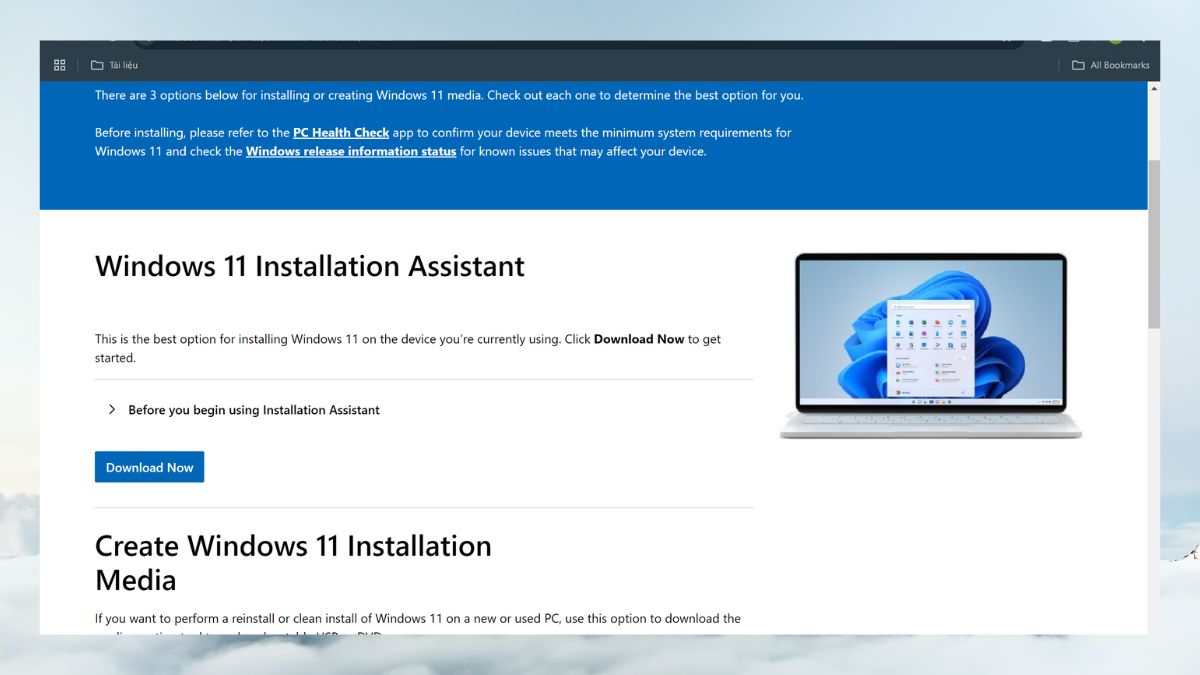
<p>Để bắt đầu quá trình download Windows 11 ISO, bạn cần truy cập&nbsp;<strong>website chính thức của Microsoft</strong>&nbsp;qua đường link sau:&nbsp;<strong><a href="https://www.microsoft.com/en-us/software-download/Windows11" rel="nofollow">https://www.microsoft.com/en-us/software-download/Windows11</a>.</strong>&nbsp; Việc truy cập đúng trang web giúp bạn tránh khỏi các file độc hại từ nguồn không rõ ràng và đảm bảo quá trình tải file an toàn, chính xác.</p>

<figure>
<div class="image-center"><img alt="Truy cập trang tải chính thức của Microsoft" height="338" src="https://cdn-media.sforum.vn/storage/app/media/nhuy/Nhu-Y/download-windows-11-iso-5.jpg" title="Truy cập trang tải chính thức của Microsoft" width="600" /></div>

<figcaption>Truy cập trang tải chính thức của Microsoft</figcaption>
</figure>

<h3 id="buoc-2-chon-phien-ban-windows-11-iso"><strong>Bước 2: Chọn phiên bản Windows 11 ISO</strong></h3>

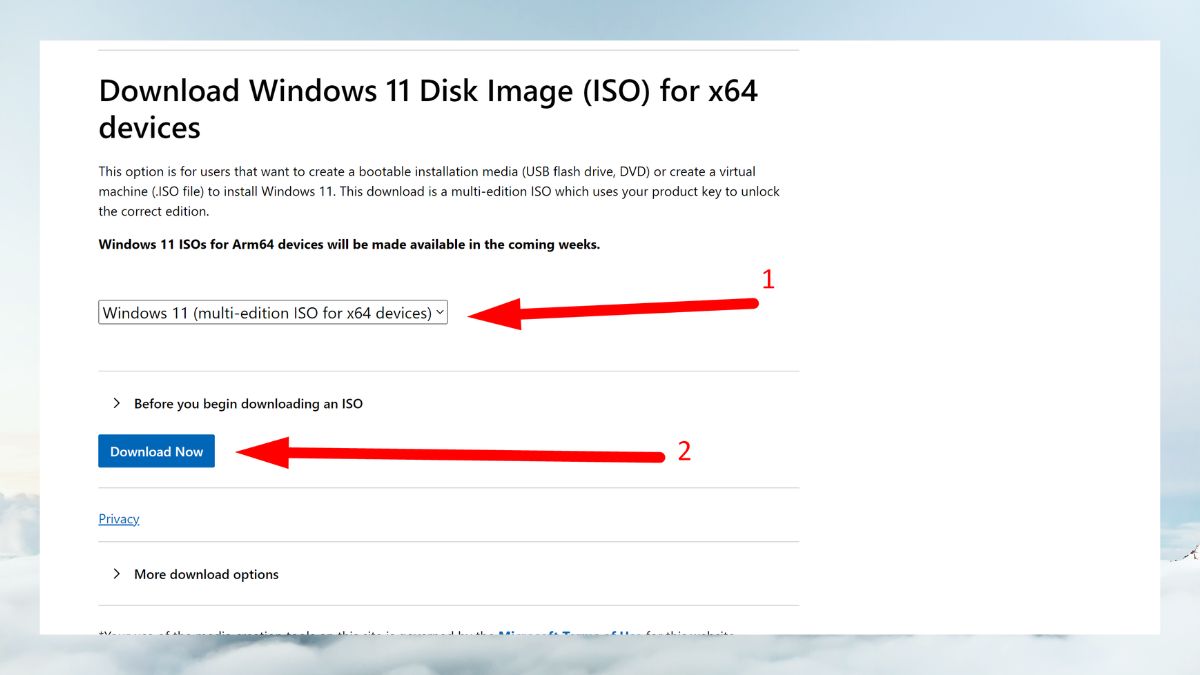
<p>Sau khi vào trang tải, bạn&nbsp;<strong>kéo xuống mục Download Windows 11 Disk Image (ISO)&nbsp;</strong>&gt;&nbsp; Lúc này, bạn sẽ thấy hộp chọn<strong>&nbsp;Select Download</strong>, ấn vào đây và&nbsp;<strong>chọn phiên bản&nbsp;</strong><strong>Windows 11 multi-edition ISO for x64 devices (64-bit)</strong>.&nbsp;Sau khi chọn xong,&nbsp;<strong>nhấp vào nút Download Now</strong>&nbsp;để tiếp tục.</p>

<figure>
<div class="image-center"><img alt="Chọn phiên bản Windows 11 ISO" height="338" src="https://cdn-media.sforum.vn/storage/app/media/nhuy/Nhu-Y/download-windows-11-iso-7.jpg" title="Chọn phiên bản Windows 11 ISO" width="600" /></div>

<figcaption>Chọn phiên bản Windows 11 ISO</figcaption>
</figure>

<h3 id="buoc-3-lua-chon-ngon-ngu-cho-he-dieu-hanh"><strong>Bước 3: Lựa chọn ngôn ngữ cho hệ điều hành</strong></h3>

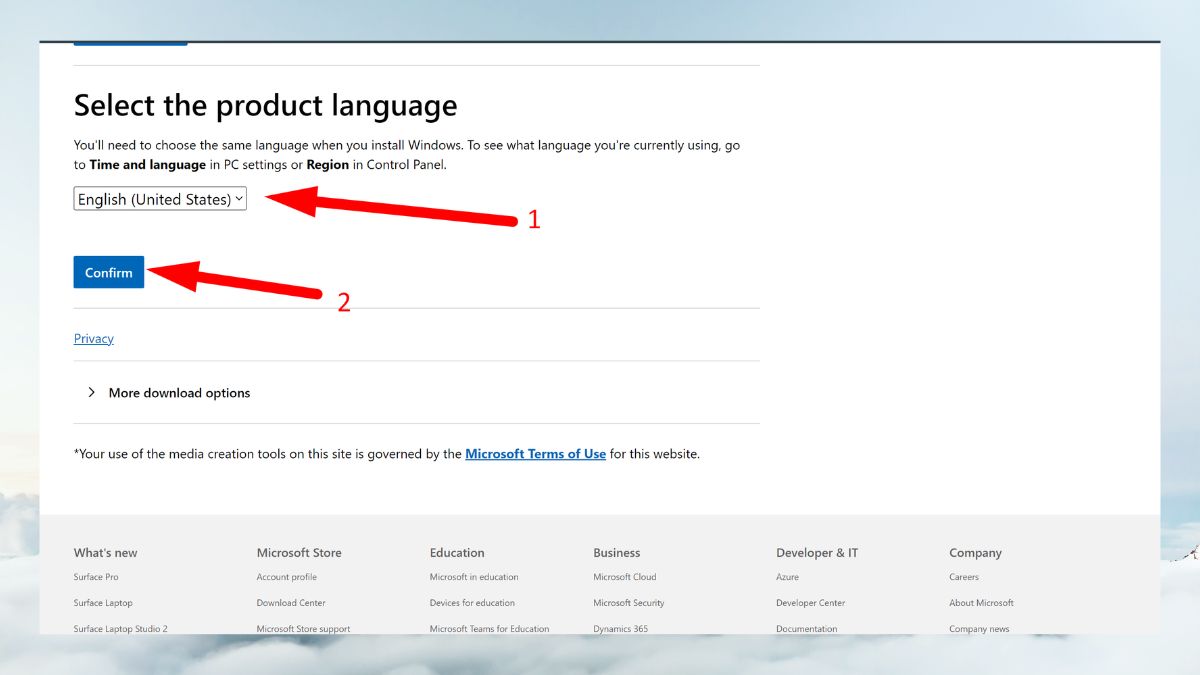
<p>Khi bạn đã chọn phiên bản Windows 11 ISO,&nbsp;<strong>Microsoft sẽ yêu cầu bạn lựa chọn ngôn ngữ</strong>&nbsp;cài đặt cho hệ điều hành. Đây là bước quan trọng vì ngôn ngữ này sẽ là ngôn ngữ mặc định trong quá trình sử dụng sau này. Chọn ngôn ngữ mà bạn muốn, trong bài hướng dẫn này mình&nbsp;<strong>chọn ngôn ngữ English&nbsp;</strong>và sau đó&nbsp;<strong>nhấn Confirm để xác nhận</strong>.</p>

<figure>
<div class="image-center"><img alt="Lựa chọn ngôn ngữ cho hệ điều hành" height="338" src="https://cdn-media.sforum.vn/storage/app/media/nhuy/Nhu-Y/download-windows-11-iso-8.jpg" title="Lựa chọn ngôn ngữ cho hệ điều hành" width="600" /></div>

<figcaption>Lựa chọn ngôn ngữ cho hệ điều hành</figcaption>
</figure>

<h3 id="buoc-4-tai-file-iso-ve-may-tinh"><strong>Bước 4: Tải file ISO về máy tính</strong></h3>

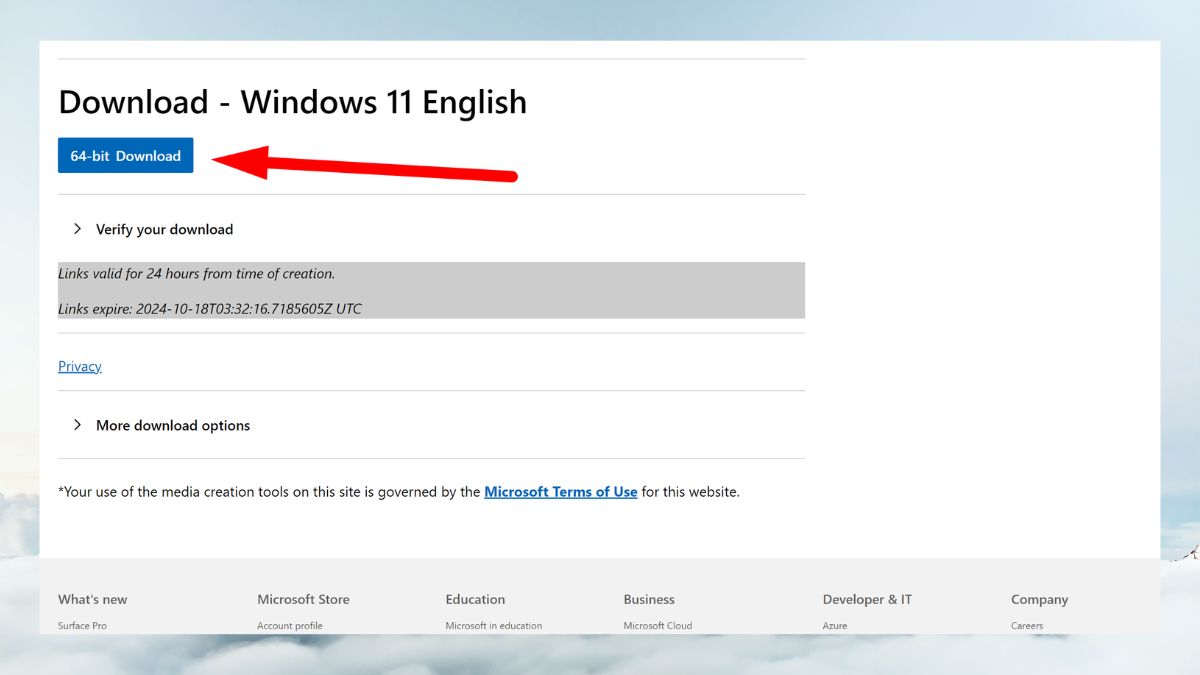
<p>Sau khi chọn ngôn ngữ, bạn sẽ thấy link tải hiện ra&nbsp;<strong>64-bit Download</strong>,&nbsp;<strong>ấn vào link này để bắt đầu tải file ISO</strong>&nbsp;về máy tính.</p>

<p><strong>Lưu ý:&nbsp;</strong>File ISO của Windows 11 có dung lượng lớn,&nbsp;<strong>dao động từ 5-6GB</strong>&nbsp;nên bạn cần phải đảm bảo rằng&nbsp;<strong>máy tính của bạn có đủ dung lượng trống để lưu file</strong>&nbsp;và&nbsp;<strong>kết nối internet của bạn ổn định&nbsp;</strong>để&nbsp;tránh sự cố gián đoạn.</p>

<figure>
<div class="image-center"><img alt="Tải file ISO về máy tính" height="338" src="https://cdn-media.sforum.vn/storage/app/media/nhuy/Nhu-Y/download-windows-11-iso-10.jpg" title="Tải file ISO về máy tính" width="600" /></div>

<figcaption>Tải file ISO về máy tính</figcaption>
</figure>

<h3 id="buoc-5-luu-file-iso"><strong>Bước 5: Lưu file ISO&nbsp;</strong></h3>

<p>Khi quá trình tải hoàn tất,&nbsp;<strong>bạn cần lưu file ISO vào nơi dễ tìm trên máy tính</strong>, nên&nbsp;<strong>lưu file vào một ổ đĩa có dung lượng lớn&nbsp;</strong>và&nbsp;<strong>không gian trống đủ để cài đặt hệ điều hành</strong>.</p>

<figure>
<div class="image-center"><img alt="Lưu file ISO" height="338" src="https://cdn-media.sforum.vn/storage/app/media/nhuy/Nhu-Y/download-windows-11-iso-10(1).jpg" title="Lưu file ISO" width="601" /></div>

<figcaption>Lưu file ISO</figcaption>
</figure>

<p>Việc download Windows 11 ISO từ Microsoft và cài đặt Windows 11 là một quá trình không quá phức tạp nhưng bạn cần kiểm tra cấu hình cũng như các bước thực hiện. Windows 11 không chỉ mang đến giao diện mới mẻ, mà còn tối ưu hiệu suất làm việc, bảo mật tốt hơn và tích hợp nhiều tính năng hữu ích.&nbsp;</p>
</div>
		</div>
				<div id="author">
						<p>
				<strong>Tác giả:</strong>
				<a href="https://phatthanhdat.com/index.php/author/luuhongphuc/">luuhongphuc</a>
			</p>
		</div>
	</div>
	<div id="footer" class="clearfix">
		<div id="url">
			<strong>URL của bản tin này: </strong><a href="https://phatthanhdat.com/index.php/savefile/quan-tri-mang/windows-11-24h2-196.html" title="Windows 11 24h2">https://phatthanhdat.com/index.php/savefile/quan-tri-mang/windows-11-24h2-196.html</a>

		</div>
		<div class="clear"></div>
		<div class="copyright">
			&copy; Phát Thành Đạt - Dịch vụ sửa chữa máy tính hóc môn
		</div>
		<div id="contact">
			<a href="mailto:info@phatthanhdat.com">info@phatthanhdat.com</a>
		</div>
	</div>
</div>
        <div id="timeoutsess" class="chromeframe">
            Bạn đã không sử dụng Site, <a onclick="timeoutsesscancel();" href="https://phatthanhdat.com/#">Bấm vào đây để duy trì trạng thái đăng nhập</a>. Thời gian chờ: <span id="secField"> 60 </span> giây
        </div>
        <div id="openidResult" class="nv-alert" style="display:none"></div>
        <div id="openidBt" data-result="" data-redirect=""></div>
<script src="https://phatthanhdat.com/assets/js/jquery/jquery.min.js"></script>
<script>var nv_base_siteurl="/",nv_lang_data="vi",nv_lang_interface="vi",nv_name_variable="nv",nv_fc_variable="op",nv_lang_variable="language",nv_module_name="news",nv_func_name="savefile",nv_is_user=0, nv_my_ofs=-4,nv_my_abbr="EDT",nv_cookie_prefix="nv4",nv_check_pass_mstime=1738000,nv_area_admin=0,nv_safemode=0,theme_responsive=0,nv_recaptcha_ver=2,nv_recaptcha_sitekey="",nv_recaptcha_type="image",XSSsanitize=1;</script>
<script src="https://phatthanhdat.com/assets/js/language/vi.js"></script>
<script src="https://phatthanhdat.com/assets/js/DOMPurify/purify3.js"></script>
<script src="https://phatthanhdat.com/assets/js/global.js"></script>
<script src="https://phatthanhdat.com/assets/js/site.js"></script>
<script src="https://phatthanhdat.com/themes/default/js/news.js"></script>
<script src="https://phatthanhdat.com/themes/default/js/main.js"></script>
<script src="https://phatthanhdat.com/themes/default/js/custom.js"></script>
<script type="application/ld+json">
        {
            "@context": "https://schema.org",
            "@type": "Organization",
            "url": "https://phatthanhdat.com",
            "logo": "https://phatthanhdat.com/uploads/about/logonho.png"
        }
        </script>
<script async custom-element="amp-ad" src="https://cdn.ampproject.org/v0/amp-ad-0.1.js"></script>
<script>
     (adsbygoogle = window.adsbygoogle || []).push({});
</script>
<script>(function(w,d,s,l,i){w[l]=w[l]||[];w[l].push({'gtm.start':
new Date().getTime(),event:'gtm.js'});var f=d.getElementsByTagName(s)[0],
j=d.createElement(s),dl=l!='dataLayer'?'&l='+l:'';j.async=true;j.src=
'https://www.googletagmanager.com/gtm.js?id='+i+dl;f.parentNode.insertBefore(j,f);
})(window,document,'script','dataLayer','GTM-KRZZ2CK');</script>
<script>
!function(f,b,e,v,n,t,s)
{if(f.fbq)return;n=f.fbq=function(){n.callMethod?
n.callMethod.apply(n,arguments):n.queue.push(arguments)};
if(!f._fbq)f._fbq=n;n.push=n;n.loaded=!0;n.version='2.0';
n.queue=[];t=b.createElement(e);t.async=!0;
t.src=v;s=b.getElementsByTagName(e)[0];
s.parentNode.insertBefore(t,s)}(window, document,'script',
'https://connect.facebook.net/en_US/fbevents.js');
fbq('init', '219812430112623');
fbq('track', 'PageView');
</script>
<script async src="https://pagead2.googlesyndication.com/pagead/js/adsbygoogle.js?client=ca-pub-3722185033130810" crossorigin="anonymous"></script>
<script>
      var chatbox = document.getElementById('fb-customer-chat');
      chatbox.setAttribute("page_id", "244380242794992");
      chatbox.setAttribute("attribution", "biz_inbox");

      window.fbAsyncInit = function() {
        FB.init({
          xfbml            : true,
          version          : 'v11.0'
        });
      };

      (function(d, s, id) {
        var js, fjs = d.getElementsByTagName(s)[0];
        if (d.getElementById(id)) return;
        js = d.createElement(s); js.id = id;
        js.src = 'https://connect.facebook.net/vi_VN/sdk/xfbml.customerchat.js';
        fjs.parentNode.insertBefore(js, fjs);
      }(document, 'script', 'facebook-jssdk'));
    </script>
<script src="https://sp.zalo.me/plugins/sdk.js"></script>
<script>
     (adsbygoogle = window.adsbygoogle || []).push({});
</script>
<script src="https://phatthanhdat.com/themes/default/js/bootstrap.min.js"></script>
</body>
</html>