<!DOCTYPE html>
    <html lang="vi" xmlns="http://www.w3.org/1999/xhtml" prefix="og: http://ogp.me/ns#">
    <head>
<title>Phát Thành Đạt Hướng dẫn cài đặt Windows Server 2019</title>
<meta name="description" content="Hướng dẫn cài đặt Windows Server 2019 - Savefile - Tin Tức - https&#x3A;&#x002F;&#x002F;phatthanhdat.com&#x002F;index.php&#x002F;savefile&#x002F;quan-tri-mang&#x002F;windows-server-2019-69.html">
<meta name="author" content="Phát Thành Đạt - Dịch vụ sửa chữa máy tính hóc môn">
<meta name="copyright" content="Phát Thành Đạt - Dịch vụ sửa chữa máy tính hóc môn [info@phatthanhdat.com]">
<meta name="generator" content="NukeViet v4.5">
<meta name="facebook-domain-verification" content="nv4brgbtr5jrhsej2o63m6qx7nz5ek">
<meta http-equiv="Content-Type" content="text/html; charset=utf-8">
<meta property="og:title" content="Hướng dẫn cài đặt Windows Server 2019">
<meta property="og:type" content="website">
<meta property="og:description" content="Savefile - Tin Tức - https&#x3A;&#x002F;&#x002F;phatthanhdat.com&#x002F;index.php&#x002F;savefile&#x002F;quan-tri-mang&#x002F;windows-server-2019-69.html">
<meta property="og:site_name" content="Phát Thành Đạt - Dịch vụ sửa chữa máy tính hóc môn">
<meta property="og:url" content="https://phatthanhdat.com/index.php/savefile/quan-tri-mang/windows-server-2019-69.html">
<link rel="shortcut icon" href="https://phatthanhdat.com/uploads/about/logonho.png">
<link rel="canonical" href="https://phatthanhdat.com/index.php/savefile/quan-tri-mang/windows-server-2019-69.html">
<link rel="alternate" href="https://phatthanhdat.com/index.php/rss/" title="Tin Tức" type="application/rss+xml">
<link rel="alternate" href="https://phatthanhdat.com/index.php/rss/quan-tri-mang/" title="Tin Tức - Quản Trị Mạng" type="application/rss+xml">
<link rel="alternate" href="https://phatthanhdat.com/index.php/rss/windows-server/" title="Tin Tức - Windows Server" type="application/rss+xml">
<link rel="alternate" href="https://phatthanhdat.com/index.php/rss/active-windows/" title="Tin Tức - Active Windows" type="application/rss+xml">
<link rel="alternate" href="https://phatthanhdat.com/index.php/rss/mang-may-tinh/" title="Tin Tức - Mạng Máy Tính" type="application/rss+xml">
<link rel="alternate" href="https://phatthanhdat.com/index.php/rss/quan-tri-mail-server/" title="Tin Tức - Quản Trị Mail Server" type="application/rss+xml">
<link rel="alternate" href="https://phatthanhdat.com/index.php/rss/y-nghia-cuoc-song/" title="Tin Tức - Ý nghĩa cuộc sống" type="application/rss+xml">
<link rel="alternate" href="https://phatthanhdat.com/index.php/rss/tien-ich/" title="Tin Tức - Tiện Ích" type="application/rss+xml">
<link rel="alternate" href="https://phatthanhdat.com/index.php/rss/facebook-add/" title="Tin Tức - Facebook Add" type="application/rss+xml">
<link rel="alternate" href="https://phatthanhdat.com/index.php/rss/nong-tren-mang/" title="Tin Tức - Nóng Trên Mạng" type="application/rss+xml">
<link rel="alternate" href="https://phatthanhdat.com/index.php/rss/covid-19/" title="Tin Tức - Covid 19" type="application/rss+xml">
<link rel="alternate" href="https://phatthanhdat.com/index.php/rss/hoc-duong/" title="Tin Tức - Học Đường" type="application/rss+xml">
<link rel="alternate" href="https://phatthanhdat.com/index.php/rss/tin-tuc-thi-truong/" title="Tin Tức - Tin Tức Thị Trường" type="application/rss+xml">
<link rel="alternate" href="https://phatthanhdat.com/index.php/rss/code-hay/" title="Tin Tức - Code hay" type="application/rss+xml">
<link rel="alternate" href="https://phatthanhdat.com/index.php/rss/kho-hang/" title="Tin Tức - Kho Hàng" type="application/rss+xml">
<link rel="alternate" href="https://phatthanhdat.com/index.php/rss/ai-tri-tue-nhan-tao/" title="Tin Tức - AI Trí Tuệ Nhân Tạo" type="application/rss+xml">
<link rel="alternate" href="https://phatthanhdat.com/index.php/rss/do-hoa/" title="Tin Tức - Đồ Hoạ" type="application/rss+xml">
<link rel="stylesheet" href="https://phatthanhdat.com/assets/css/font-awesome.min.css">
<link rel="stylesheet" href="https://phatthanhdat.com/themes/default/css/bootstrap.non-responsive.css">
<link rel="stylesheet" href="https://phatthanhdat.com/themes/default/css/style.css">
<link rel="stylesheet" href="https://phatthanhdat.com/themes/default/css/style.non-responsive.css">
<link rel="StyleSheet" href="https://phatthanhdat.com/themes/default/css/news.css">
<link rel="stylesheet" href="https://phatthanhdat.com/themes/default/css/custom.css">
<style type="text/css">
	body{background: #fff;}
</style>
<!-- Google Tag Manager -->
<!-- End Google Tag Manager -->

<!-- Facebook Pixel Code -->
<noscript><img height="1" width="1" style="display:none"
src="https://www.facebook.com/tr?id=219812430112623&ev=PageView&noscript=1"
/></noscript>
<!-- End Facebook Pixel Code -->
<!-- Messenger Plugin chat Code -->
    <div id="fb-root"></div>

    <!-- Your Plugin chat code -->
    <div id="fb-customer-chat" class="fb-customerchat">
    </div>
<script>(function(i,s,o,g,r,a,m){i['GoogleAnalyticsObject']=r;i[r]=i[r]||function(){
(i[r].q=i[r].q||[]).push(arguments)},i[r].l=1*new Date();a=s.createElement(o),
m=s.getElementsByTagName(o)[0];a.async=1;a.src=g;m.parentNode.insertBefore(a,m)
})(window,document,'script','https://www.google-analytics.com/analytics.js','ga');
ga('create', 'UA-133543348-1', '.phatthanhdat.com');
ga('send', 'pageview');
</script>
</head>
    <body>
<div class="zalo-chat-widget" data-oaid="1354977264109400055" data-welcome-message="R&#7845;t vui khi &#273;&#432;&#7907;c h&#7895; tr&#7907; b&#7841;n!" data-autopopup="0" data-width="" data-height=""></div>
<amp-ad width="100vw" height="320"
     type="adsense"
     data-ad-client="ca-pub-3722185033130810"
     data-ad-slot="5396409404"
     data-auto-format="rspv"
     data-full-width="">
  <div overflow=""></div>
</amp-ad>
<!-- Google Tag Manager (noscript) -->
<noscript><iframe src="https://www.googletagmanager.com/ns.html?id=GTM-KRZZ2CK"
height="0" width="0" style="display:none;visibility:hidden"></iframe></noscript>
<!-- End Google Tag Manager (noscript) -->
<div class="gcse-searchbox-only"></div>
<div id="print">
	<div id="hd_print">
		<h2 class="pull-left">Phát Thành Đạt - Dịch vụ sửa chữa máy tính hóc môn</h2>
		<p class="pull-right"><a title="Phát Thành Đạt - Dịch vụ sửa chữa máy tính hóc môn" href="https://phatthanhdat.com/">https://phatthanhdat.com</a></p>
	</div>
	<div class="clear"></div>
	<hr />
	<div id="content">
		<h1>Hướng dẫn cài đặt Windows Server 2019</h1>
		<ul class="list-inline">
			<li>Thứ tư - 04/08/2021 20:32</li>
			<li class="hidden-print txtrequired"><em class="fa fa-print">&nbsp;</em><a title="In ra" href="javascript:;" onclick="window.print()">In ra</a></li>
			<li class="hidden-print txtrequired"><em class="fa fa-power-off">&nbsp;</em><a title="Đóng cửa sổ này" href="javascript:;" onclick="window.close()">Đóng cửa sổ này</a></li>
		</ul>
		<div class="clear"></div>
		<div id="hometext">
			<div style="text-align: justify;"><a href="https://phatthanhdat.com/quan-tri-mang/windows-server-2019-69.html">Hướng dẫn cài đặt Windows Server 2019</a> hiện tại là phiên bản mới nhất của hệ điều hành máy chủ do Microsoft phát hành. Phát hành từ tháng 10 năm 2018, <a href="https://phatthanhdat.com/quan-tri-mang/windows-server-2019-69.html">Windows Server 2019</a> được Microsoft xây dựng trên nền tảng mạnh mẽ của phiên bản trước – Windows Server 2016</div>
		</div>
		<div id="bodytext" class="clearfix">
			<div style="text-align: justify;">
<h1><a href="https://phatthanhdat.com/quan-tri-mang/windows-server-2019-69.html"><span style="font-size:24px;"><span style="font-family:Times New Roman,Times,serif;">Windows Server 2019</span></span></a>&nbsp;-&nbsp;Hướng dẫn cài đặt Windows Server 2019</h1>

<p><span style="font-size:14px;"><span style="font-family:Times New Roman,Times,serif;">Server 2019 là hệ điều hành kết nối môi trường tại chỗ với Azure, bổ sung thêm các lớp bảo mật đồng thời giúp người dùng hiện đại hóa những ứng dụng và cơ sở hạ tầng của mình.</span></span></p>

<h2><a href="https://www.microsoft.com/en-us/evalcenter/evaluate-windows-server-2019"><span style="font-size:14px;"><span style="font-family:Times New Roman,Times,serif;">Tải và cài đặt Windows Server 2019</span></span></a></h2>

<div><a href="https://phatthanhdat.com/active-windows/active-license-windows-server-2019-moi-phien-ban-khong-su-dung-file-crack-khong-virus-thanh-cong-100-25.html">Tải bản Active Windows Server 2019</a></div>

<h3><a href="https://www.microsoft.com/en-us/evalcenter/evaluate-windows-server-2019"><span style="font-size:14px;"><span style="font-family:Times New Roman,Times,serif;">Tải Windows Server 2019</span></span></a></h3>

<div><a href="https://phatthanhdat.com/active-windows/active-license-windows-server-2019-moi-phien-ban-khong-su-dung-file-crack-khong-virus-thanh-cong-100-25.html">Crack Windows Server 2019</a></div>

<p><span style="font-size:14px;"><span style="font-family:Times New Roman,Times,serif;">Hãy tham khảo mô tả về Windows Server 2019 trên trang của Microsoft tại:</span></span></p>

<pre id="pre0">
<code>https://www.microsoft.com/en-us/windows-server</code></pre>

<p><span style="font-size:14px;"><span style="font-family:Times New Roman,Times,serif;">Để sử dụng Windows Server 2019, hãy mua nó. Tuy nhiên, bạn có thể thử sử dụng phiên bản Evaluation của Windows Server 2019 trong 180 ngày. Bạn có thể tải xuống file ISO của phiên bản Evaluation từ trang web sau khi đăng ký&nbsp;<a href="https://www.microsoft.com/en-us/evalcenter/evaluate-windows-server-2019" rel="nofollow noopener" target="_blank" title="Tải Windows Server 2019 (bản dùng thử)">tại đây</a>.</span></span></p>

<h3><a href="https://phatthanhdat.com/quan-tri-mang/windows-server-2019-69.html"><span style="font-size:14px;"><span style="font-family:Times New Roman,Times,serif;">Cài đặt Windows Server 2019</span></span></a></h3>

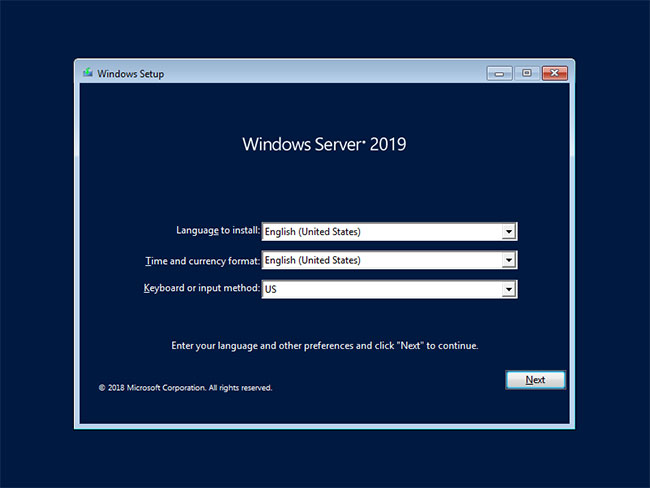
<p><span style="font-size:14px;"><span style="font-family:Times New Roman,Times,serif;"><strong>B1:</strong>&nbsp;Cắm phương tiện cài đặt Windows Server 2019 vào và khởi động máy tính. Sau đó, màn hình sau sẽ được hiển thị. Tiếp tục nhấp vào nút&nbsp;<strong>Next</strong>.</span></span></p>

<figure>
<div>
<div style="text-align:center"><img alt="Nhấp vào nút Next" data-i="0" data-src="https://st.quantrimang.com/photos/image/2021/03/19/windows-server-2019-1.jpg" data-was-processed="true" height="638" src="https://st.quantrimang.com/photos/image/2021/03/19/windows-server-2019-1.jpg" width="850" /></div>
</div>
</figure>
</div>

<figcaption>
<div style="text-align: justify;"><span style="font-size:14px;"><span style="font-family:Times New Roman,Times,serif;">Nhấp vào nút Next</span></span></div>
</figcaption>

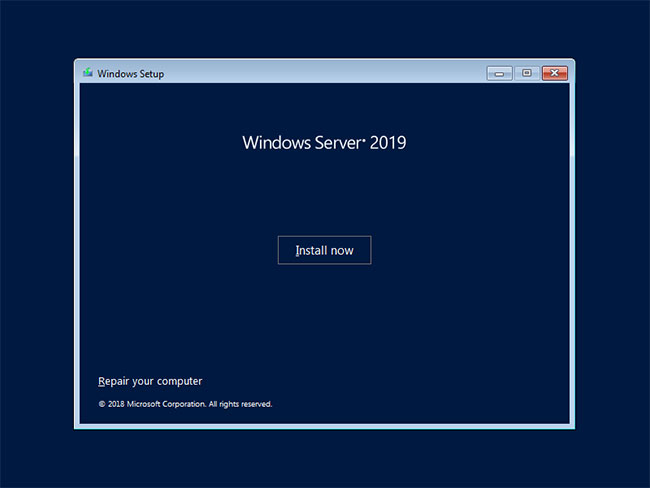
<p style="text-align: justify;"><span style="font-size:14px;"><span style="font-family:Times New Roman,Times,serif;"><strong>B2:</strong>&nbsp;Nhấp vào&nbsp;<strong>Install Now</strong>&nbsp;để bắt đầu cài đặt.</span></span></p>

<figure>
<div>
<div style="text-align:center"><img alt="Nhấp vào Install Now" data-i="1" data-src="https://st.quantrimang.com/photos/image/2021/03/19/windows-server-2019-2.jpg" data-was-processed="true" height="638" src="https://st.quantrimang.com/photos/image/2021/03/19/windows-server-2019-2.jpg" width="850" /></div>
</div>

<figcaption>
<div style="text-align: justify;"><span style="font-size:14px;"><span style="font-family:Times New Roman,Times,serif;">Nhấp vào Install Now</span></span></div>
</figcaption>
</figure>

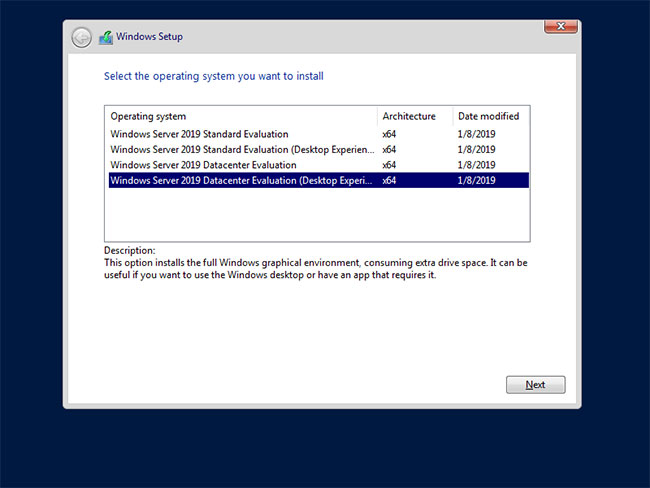
<p style="text-align: justify;"><span style="font-size:14px;"><span style="font-family:Times New Roman,Times,serif;"><strong>B3:</strong>&nbsp;Chọn phiên bản Windows Server bạn muốn cài đặt.<br />
Trong ví dụ này, bài viết đã chọn phiên bản&nbsp;<strong>Datacenter with Graphical ***</strong>.</span></span></p>

<figure>
<div style="text-align: justify;"><span style="font-size:14px;"><span style="font-family:Times New Roman,Times,serif;"><img alt="Chọn phiên bản Windows Server bạn muốn cài đặt" data-i="2" data-src="https://st.quantrimang.com/photos/image/2021/03/19/windows-server-2019-3.jpg" data-was-processed="true" height="638" src="https://st.quantrimang.com/photos/image/2021/03/19/windows-server-2019-3.jpg" width="850" /></span></span></div>

<figcaption>
<div style="text-align: justify;"><span style="font-size:14px;"><span style="font-family:Times New Roman,Times,serif;">Chọn phiên bản Windows Server bạn muốn cài đặt</span></span></div>
</figcaption>
</figure>

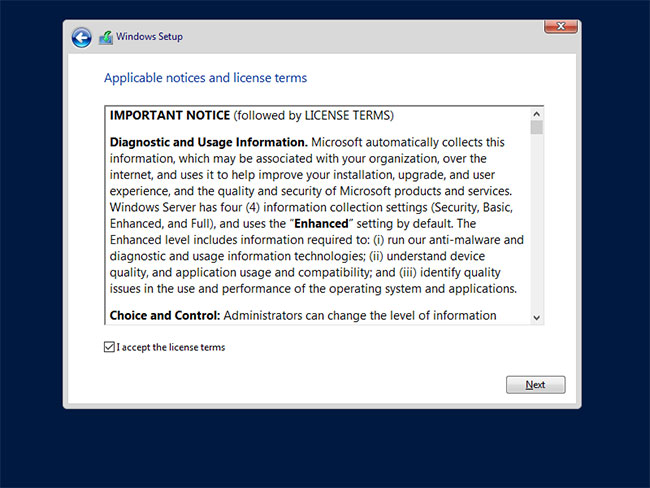
<p style="text-align: justify;"><span style="font-size:14px;"><span style="font-family:Times New Roman,Times,serif;"><strong>B4:</strong>&nbsp;Đọc kỹ phần điều khoản cấp phép và chọn hộp<strong>&nbsp;I acceppt ***</strong>&nbsp;để tiếp tục.</span></span></p>

<figure>
<div style="text-align: justify;"><span style="font-size:14px;"><span style="font-family:Times New Roman,Times,serif;"><img alt="Đọc kỹ phần điều khoản cấp phép" data-i="3" data-src="https://st.quantrimang.com/photos/image/2021/03/19/windows-server-2019-4.jpg" data-was-processed="true" height="638" src="https://st.quantrimang.com/photos/image/2021/03/19/windows-server-2019-4.jpg" width="850" /></span></span></div>

<figcaption>
<div style="text-align: justify;"><span style="font-size:14px;"><span style="font-family:Times New Roman,Times,serif;">Đọc kỹ phần điều khoản cấp phép</span></span></div>
</figcaption>
</figure>

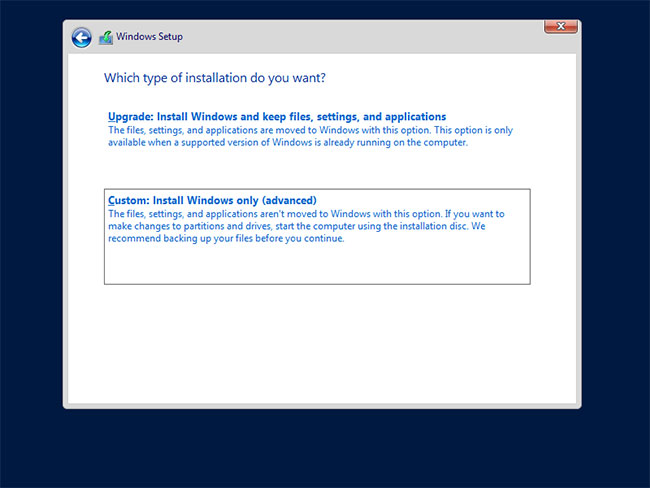
<p style="text-align: justify;"><span style="font-size:14px;"><span style="font-family:Times New Roman,Times,serif;"><strong>B5:</strong>&nbsp;Để cài đặt mới Windows Server, chọn&nbsp;<strong>Custom: Install Windows only</strong>.</span></span></p>

<figure>
<div style="text-align: justify;"><span style="font-size:14px;"><span style="font-family:Times New Roman,Times,serif;"><img alt="Chọn Custom: Install Windows only" data-i="4" data-src="https://st.quantrimang.com/photos/image/2021/03/19/windows-server-2019-5.jpg" data-was-processed="true" height="638" src="https://st.quantrimang.com/photos/image/2021/03/19/windows-server-2019-5.jpg" width="850" /></span></span></div>

<figcaption>
<div style="text-align: justify;"><span style="font-size:14px;"><span style="font-family:Times New Roman,Times,serif;">Chọn Custom: Install Windows only</span></span></div>
</figcaption>
</figure>

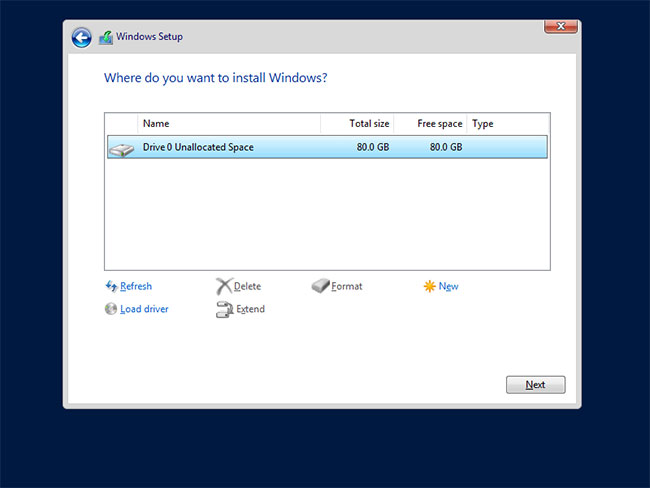
<p style="text-align: justify;"><span style="font-size:14px;"><span style="font-family:Times New Roman,Times,serif;"><strong>B6:</strong>&nbsp;Chọn phân vùng để cài đặt Windows Server.</span></span></p>

<figure>
<div style="text-align: justify;"><span style="font-size:14px;"><span style="font-family:Times New Roman,Times,serif;"><img alt="Chọn phân vùng để cài đặt Windows Server" data-i="5" data-src="https://st.quantrimang.com/photos/image/2021/03/19/windows-server-2019-6.jpg" data-was-processed="true" height="638" src="https://st.quantrimang.com/photos/image/2021/03/19/windows-server-2019-6.jpg" width="850" /></span></span></div>

<figcaption>
<div style="text-align: justify;"><span style="font-size:14px;"><span style="font-family:Times New Roman,Times,serif;">Chọn phân vùng để cài đặt Windows Server</span></span></div>
</figcaption>
</figure>

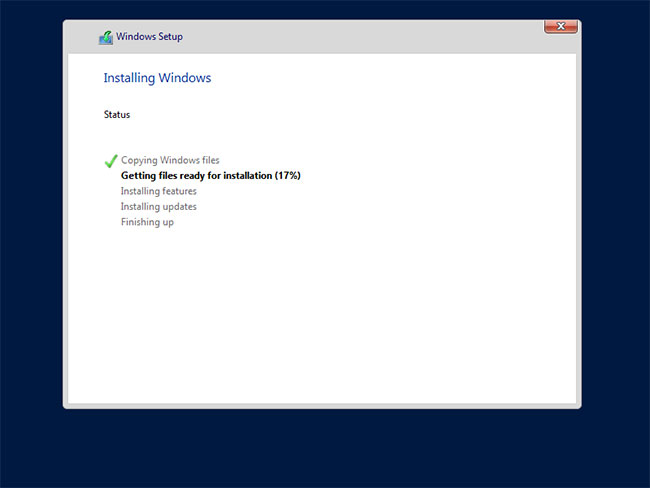
<p style="text-align: justify;"><span style="font-size:14px;"><span style="font-family:Times New Roman,Times,serif;"><strong>B7:</strong>&nbsp;Quá trình cài đặt Windows Server bắt đầu. Trong khi cài đặt, máy tính sẽ tự động khởi động lại.</span></span></p>

<figure>
<div style="text-align: justify;"><span style="font-size:14px;"><span style="font-family:Times New Roman,Times,serif;"><img alt="Quá trình cài đặt Windows Server bắt đầu" data-i="6" data-src="https://st.quantrimang.com/photos/image/2021/03/19/windows-server-2019-7.jpg" data-was-processed="true" height="638" src="https://st.quantrimang.com/photos/image/2021/03/19/windows-server-2019-7.jpg" width="850" /></span></span></div>

<figcaption>
<div style="text-align: justify;"><span style="font-size:14px;"><span style="font-family:Times New Roman,Times,serif;">Quá trình cài đặt Windows Server bắt đầu</span></span></div>
</figcaption>
</figure>

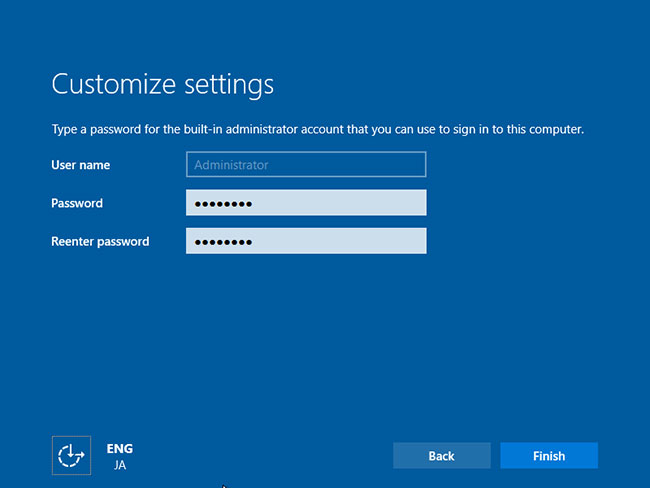
<p style="text-align: justify;"><span style="font-size:14px;"><span style="font-family:Times New Roman,Times,serif;"><strong>B8:</strong>&nbsp;Sau khi&nbsp;<a href="https://quantrimang.com/6-cach-khoi-dong-lai-windows-that-pro-116819" title="6 cách khởi động lại máy tính Windows từ đơn giản đến &#039;Pro&#039;">khởi động lại máy tính</a>, màn hình sau sẽ hiển thị, sau đó đặt mật khẩu admin.</span></span></p>

<figure>
<div style="text-align: justify;"><span style="font-size:14px;"><span style="font-family:Times New Roman,Times,serif;"><img alt="Đặt mật khẩu admin" data-i="7" data-src="https://st.quantrimang.com/photos/image/2021/03/19/windows-server-2019-8.jpg" data-was-processed="true" height="638" src="https://st.quantrimang.com/photos/image/2021/03/19/windows-server-2019-8.jpg" width="850" /></span></span></div>

<figcaption>
<div style="text-align: justify;"><span style="font-size:14px;"><span style="font-family:Times New Roman,Times,serif;">Đặt mật khẩu admin</span></span></div>
</figcaption>
</figure>

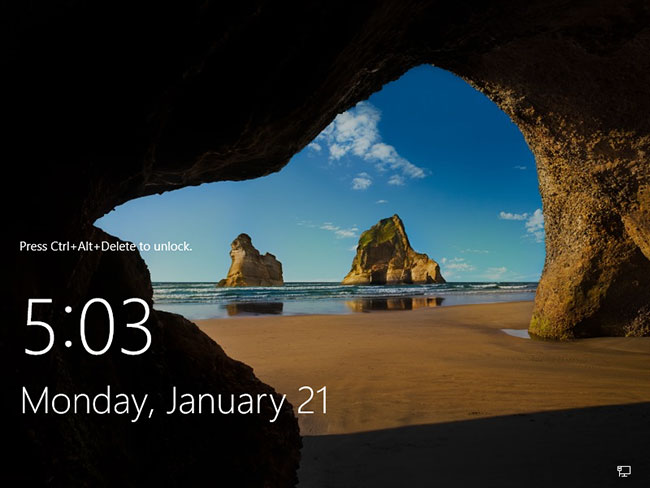
<p style="text-align: justify;"><span style="font-size:14px;"><span style="font-family:Times New Roman,Times,serif;"><strong>B9:</strong>&nbsp;Nhấn phím&nbsp;<strong>Ctrl + Alt + Del</strong>&nbsp;để đăng nhập.</span></span></p>

<figure>
<div style="text-align: justify;"><span style="font-size:14px;"><span style="font-family:Times New Roman,Times,serif;"><img alt="Nhấn phím Ctrl + Alt + Del để đăng nhập" data-i="8" data-src="https://st.quantrimang.com/photos/image/2021/03/19/windows-server-2019-9.jpg" data-was-processed="true" height="638" src="https://st.quantrimang.com/photos/image/2021/03/19/windows-server-2019-9.jpg" width="850" /></span></span></div>

<figcaption>
<div style="text-align: justify;"><span style="font-size:14px;"><span style="font-family:Times New Roman,Times,serif;">Nhấn phím Ctrl + Alt + Del để đăng nhập</span></span></div>
</figcaption>
</figure>

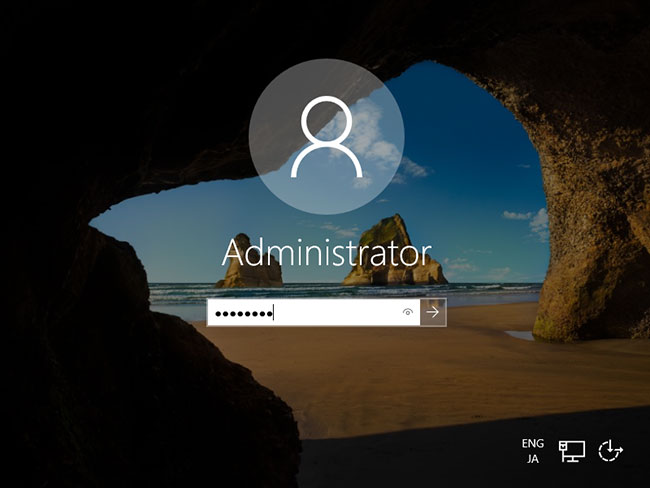
<p style="text-align: justify;"><span style="font-size:14px;"><span style="font-family:Times New Roman,Times,serif;"><strong>B10:</strong>&nbsp;Nhập mật khẩu admin mà bạn đã đặt trong bước 8 để đăng nhập.</span></span></p>

<figure>
<div style="text-align: justify;"><span style="font-size:14px;"><span style="font-family:Times New Roman,Times,serif;"><img alt="Nhập mật khẩu admin" data-i="9" data-src="https://st.quantrimang.com/photos/image/2021/03/19/windows-server-2019-10.jpg" data-was-processed="true" height="638" src="https://st.quantrimang.com/photos/image/2021/03/19/windows-server-2019-10.jpg" width="850" /></span></span></div>

<figcaption>
<div style="text-align: justify;"><span style="font-size:14px;"><span style="font-family:Times New Roman,Times,serif;">Nhập mật khẩu admin</span></span></div>
</figcaption>
</figure>

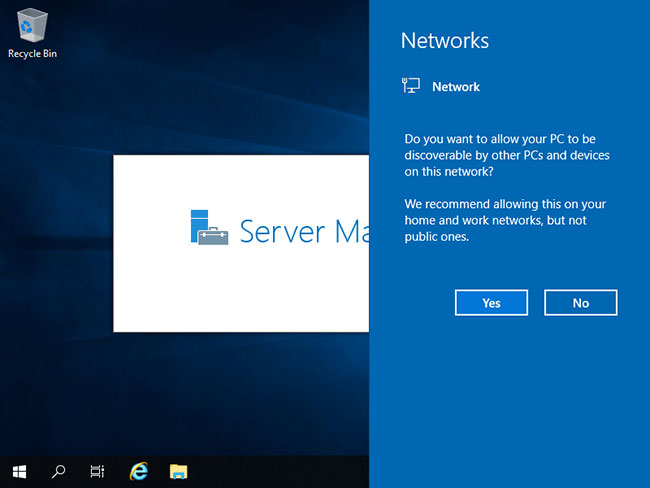
<p style="text-align: justify;"><span style="font-size:14px;"><span style="font-family:Times New Roman,Times,serif;"><strong>B11:</strong>&nbsp;Chỉ cần đăng nhập vào Windows Server. Đối với quá trình đăng nhập lần đầu, xác nhận cài đặt&nbsp;<strong>Networks</strong>&nbsp;được hiển thị như sau. Chọn&nbsp;<strong>Yes</strong>&nbsp;hoặc&nbsp;<strong>No.</strong></span></span></p>

<figure>
<div style="text-align: justify;"><span style="font-size:14px;"><span style="font-family:Times New Roman,Times,serif;"><img alt="Chọn Yes hoặc No để xác nhận cài đặt mạng" data-i="10" data-src="https://st.quantrimang.com/photos/image/2021/03/19/windows-server-2019-11.jpg" data-was-processed="true" height="638" src="https://st.quantrimang.com/photos/image/2021/03/19/windows-server-2019-11.jpg" width="850" /></span></span></div>

<figcaption>
<div style="text-align: justify;"><span style="font-size:14px;"><span style="font-family:Times New Roman,Times,serif;">Chọn Yes hoặc No để xác nhận cài đặt mạng</span></span></div>
</figcaption>
</figure>

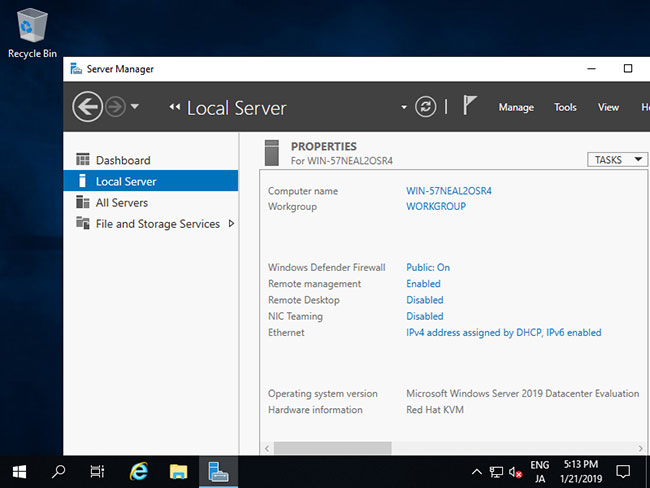
<p style="text-align: justify;"><span style="font-size:14px;"><span style="font-family:Times New Roman,Times,serif;"><strong>B12:</strong>&nbsp;Đây là desktop trên Windows Server 2019. Quá trình cài đặt Windows Server đã hoàn tất.</span></span></p>

<figure>
<div>
<div style="text-align:center"><img alt="Quá trình cài đặt Windows Server đã hoàn tất" data-i="11" data-src="https://st.quantrimang.com/photos/image/2021/03/19/windows-server-2019-12.jpg" data-was-processed="true" height="638" src="https://st.quantrimang.com/photos/image/2021/03/19/windows-server-2019-12.jpg" width="850" /></div>
</div>

<figcaption>
<div style="text-align: justify;"><span style="font-size:14px;"><span style="font-family:Times New Roman,Times,serif;">Quá trình cài đặt Windows Server đã hoàn tất</span></span></div>
</figcaption>
</figure>

<h2 style="text-align: justify;"><span style="font-size:14px;"><span style="font-family:Times New Roman,Times,serif;">Những tính năng chính của Windows Server 2019</span></span></h2>

<p style="text-align: justify;"><span style="font-size:14px;"><span style="font-family:Times New Roman,Times,serif;">Windows Server 2019 bổ sung thêm các tính năng cho siêu hội tụ, quản lý, bảo mật, container và nhiều tính năng khác. Bởi vì Microsoft đã chuyển sang nâng cấp dần dần Windows Server, nên nhiều tính năng có sẵn trong Windows Server 2019 đã được sử dụng trong các mạng doanh nghiệp và đây là 6 tính năng tốt nhất của nó.</span></span></p>

<h3 style="text-align: justify;"><span style="font-size:14px;"><span style="font-family:Times New Roman,Times,serif;">Hạ tầng siêu hội tụ cấp doanh nghiệp (HCI)</span></span></h3>

<p style="text-align: justify;"><span style="font-size:14px;"><span style="font-family:Times New Roman,Times,serif;">Với việc phát hành Windows Server 2019, Microsoft tung ra ba năm cập nhật cho nền tảng hạ tầng siêu hội tụ (Hyperconverged infrastructure - HCI) của nó. Đó là bởi vì lịch nâng cấp dần dần mà Microsoft hiện sử dụng là bản phát hành Semi-Annual Channel, nâng cấp gia tăng cho đến khi chúng khả dụng. Sau đó, vài năm một lần, nó tạo ra bản phát hành chính gọi là Long-Term Servicing Channel (LTSC), gồm các bản nâng cấp từ các bản phát hành Semi-Annual Channel trước đó.</span></span></p>

<div style="text-align:center"><img alt="Windows Server 2019" data-i="12" data-src="https://st.quantrimang.com/photos/image/2018/06/22/tinh-nang-windows-server-2019-640.jpg" data-was-processed="true" height="445" src="https://st.quantrimang.com/photos/image/2018/06/22/tinh-nang-windows-server-2019-640.jpg" width="850" /></div>

<p style="text-align: justify;"><span style="font-size:14px;"><span style="font-family:Times New Roman,Times,serif;">Phiên bản LTSC Windows Server 2019 sẽ ra mắt vào mùa thu này và hiện đã có cho các thành viên của chương trình Insider của Microsoft. Mặc dù các thành phần cơ bản của HCI (tính toán, lưu trữ và kết nối mạng) đã được cải thiện trong bản phát hành Semi-Annual Channel cho các tổ chức xây dựng trung tâm dữ liệu và nền tảng được điều khiển bằng phần mềm quy mô cao, Windows Server 2019 vẫn là phiên bản quan trọng cho trung tâm dữ liệu được điều khiển bằng phần mềm.</span></span></p>

<p style="text-align: justify;"><span style="font-size:14px;"><span style="font-family:Times New Roman,Times,serif;">Với bản phát hành mới nhất, hạ tầng siêu hội tụ được cung cấp trên một tập hợp các thành phần đi kèm với giấy phép máy chủ. Nó là xương sống của các máy chủ chạy HyperV, cho phép tăng hoặc giảm khả năng thực hiện khối công việc mà không có thời gian chết.</span></span></p>

<h3 style="text-align: justify;"><span style="font-size:14px;"><span style="font-family:Times New Roman,Times,serif;">Giao diện đồ họa người dùng (GUI) cho Windows Server 2019</span></span></h3>

<p style="text-align: justify;"><span style="font-size:14px;"><span style="font-family:Times New Roman,Times,serif;">Một điều bất ngờ đối với nhiều doanh nghiệp bắt đầu triển khai phiên bản Semi-Annual Channel của Windows Server 2016 là thiếu GUI. Bản phát hành Semi-Annual Channel chỉ hỗ trợ cấu hình GUI-less của ServerCore (và Nano). Với bản phát hành LTSC của Windows Server 2019, các chuyên gia công nghệ thông tin một lần nữa sẽ có giao diện đồ họa của Windows Server ngoài các bản phát hành GUI-less của Nano và ServerCore.</span></span></p>

<h3 style="text-align: justify;"><span style="font-size:14px;"><span style="font-family:Times New Roman,Times,serif;">Công cụ quản lý máy chủ Project Honolulu</span></span></h3>

<p style="text-align: justify;"><span style="font-size:14px;"><span style="font-family:Times New Roman,Times,serif;">Với việc phát hành Windows Server 2019, Microsoft sẽ chính thức phát hành công cụ quản lý máy chủ Project Honolulu của họ. Project Honolulu là một giao diện điều khiển trung tâm cho phép các chuyên gia CNTT dễ dàng quản lý các máy chủ Windows 2019, 2016 và&nbsp;<a href="https://quantrimang.com/windows-server2012" title="Windows server 2012">2012R2</a>&nbsp;có giao diện và không có giao diện trong môi trường của họ.</span></span></p>

<p style="text-align: justify;"><span style="font-size:14px;"><span style="font-family:Times New Roman,Times,serif;">Những người dùng đầu tiên đã tìm thấy ở công cụ quản lý này sự đơn giản mà nó mang đến bằng cách đưa ra các nhiệm vụ phổ biến như giám sát hiệu suất (PerfMon), cấu hình máy chủ, các nhiệm vụ cài đặt và quản lý Windows Services chạy trên hệ thống máy chủ. Điều này giúp các quản trị viên dễ dàng quản lý các máy chủ.</span></span></p>

<h3 style="text-align: justify;"><span style="font-size:14px;"><span style="font-family:Times New Roman,Times,serif;">Cải tiến về bảo mật</span></span></h3>

<p style="text-align: justify;"><span style="font-size:14px;"><span style="font-family:Times New Roman,Times,serif;">Microsoft đã tiếp tục đưa ra các chức năng bảo mật tích hợp, giúp các tổ chức giải quyết mô hình quản lý bảo mật của họ. Windows Server 2019 bao gồm Windows Defender Advanced Threat Protection (ATP) đánh giá các vectơ chung cho các vi phạm an ninh, tự động chặn và cảnh báo về các cuộc tấn công nguy hiểm tiềm tàng. Người dùng Windows 10 đã nhận được nhiều tính năng của Windows Defender ATP trong vài tháng qua. Windows Defender ATP trên Windows Server 2019 cho phép họ tận dụng lợi thế của lưu trữ dữ liệu, truyền tải mạng và các thành phần bảo mật toàn vẹn để ngăn chặn sự xâm nhập trên hệ thống Windows Server 2019.</span></span></p>

<h3 style="text-align: justify;"><span style="font-size:14px;"><span style="font-family:Times New Roman,Times,serif;">Container nhỏ nhưng hiệu quả hơn</span></span></h3>

<p style="text-align: justify;"><span style="font-size:14px;"><span style="font-family:Times New Roman,Times,serif;">Các tổ chức đang nhanh chóng tìm cách giảm thiểu chi phí của các hoạt động CNTT và loại bỏ nhiều máy chủ cồng kềnh hơn với các container mỏng và hiệu quả hơn. Windows Insiders đã được hưởng lợi từ việc sử dụng container này bằng cách đạt được mật độ tính toán cao hơn để cải thiện hoạt động ứng dụng tổng thể mà không mất thêm chi phí trong các hệ thống máy chủ phần cứng hoặc mở rộng dung lượng phần cứng.</span></span></p>

<p style="text-align: justify;"><span style="font-size:14px;"><span style="font-family:Times New Roman,Times,serif;">Windows Server 2019 có hình ảnh ServerCore nhỏ hơn, gọn hơn, giúp cắt giảm chi phí máy ảo lên 50-80%. Khi một tổ chức có thể nhận được cùng một (hoặc nhiều) chức năng trong một hình ảnh nhỏ hơn đáng kể, tổ chức đó có thể giảm chi phí và nâng cao hiệu quả trong đầu tư CNTT.</span></span></p>

<h3 style="text-align: justify;"><span style="font-size:14px;"><span style="font-family:Times New Roman,Times,serif;">Windows Subsystem trên Linux</span></span></h3>

<p style="text-align: justify;"><span style="font-size:14px;"><span style="font-family:Times New Roman,Times,serif;">Một thập kỷ trước, người ta hiếm khi nói Microsoft và Linux có cùng các dịch vụ nền tảng, nhưng điều này đã thay đổi. Windows Server 2016 đã mở ra một cơ hội cho các instance Linux, hỗ trợ nó như&nbsp;<a href="https://quantrimang.com/tim-hieu-ve-may-ao-88905" title="Tìm hiểu về máy ảo">máy ảo</a>&nbsp;và bản phát hành mới của Windows Server 2019 tạo ra sự tiến bộ lớn bằng cách bao gồm một hệ thống con hoàn toàn tối ưu hóa hoạt động của hệ thống Linux trên Windows Server.</span></span></p>

<p style="text-align: justify;"><span style="font-size:14px;"><span style="font-family:Times New Roman,Times,serif;">Hệ thống con của Windows dành cho Linux mở rộng hoạt động máy ảo cơ bản của các hệ thống Linux trên Windows Server và cung cấp lớp tích hợp sâu hơn cho mạng, lưu trữ hệ thống tập tin gốc và các điều khiển bảo mật. Nó có thể kích hoạt các instance ảo được Linux mã hóa. Đó chính xác là cách Microsoft cung cấp các máy ảo Shielded cho Windows trong Windows Server 2016, nhưng bây giờ là các máy ảo Shielded cho Linux trên Windows Server 2019.</span></span></p>

<p style="text-align: justify;"><span style="font-size:14px;"><span style="font-family:Times New Roman,Times,serif;">Các doanh nghiệp đã tìm thấy việc tối ưu hóa container cùng với khả năng hỗ trợ Linux trên máy chủ Windows Server có thể giảm chi phí bằng cách loại bỏ hai hoặc ba nền tảng hạ tầng và thay vào đó chạy chúng trên Windows Server 2019.</span></span></p>

<p style="text-align: justify;"><span style="font-size:14px;"><span style="font-family:Times New Roman,Times,serif;">Bởi vì hầu hết các “tính năng mới” trong Windows Server 2019 đã có trong bản cập nhật trong một vài năm qua, nên người dùng không còn xa lạ gì với nó nữa. Tuy nhiên, điều này cũng có nghĩa là những tính năng trong Windows Server 2019 là một phần của bản phát hành Semi-Annual Channel của Windows Server 2016 đã được thử nghiệm, kiểm tra, cập nhật và chứng minh, do đó khi chuyển sang Windows Server 2019, các tổ chức không phải đợi 6 đến 12 tháng để nhận các gói dịch vụ sửa lỗi.</span></span></p>

<p style="text-align: justify;"><span style="font-size:14px;"><span style="font-family:Times New Roman,Times,serif;">Đây là một thay đổi đáng kể giúp các tổ chức tiếp nhận Windows Server 2019 sớm hơn tổ chức đã áp dụng nền tảng phát hành chính trước đây và những cải tiến đáng kể cho các trung tâm dữ liệu doanh nghiệp khi nhận được lợi ích từ Windows Server 2019, giúp trung tâm dữ liệu được bảo mật, ổn định và tối ưu hóa hơn trong một trường có nhịp độ nhanh như hiện nay.</span></span></p>

<div style="text-align: justify;"><br />
<span style="font-size:14px;"><span style="font-family:Times New Roman,Times,serif;">Chức năng của phiên bản 2019 mang đến những cơ hội mới khi nói đến môi trường đám mây lai, lưu trữ, bảo mật và quản trị. Windows Server 2019 có ba phiên bản: Essentials, Standard và Datacenter. Như tên của chúng ngụ ý, chúng được thiết kế cho các tổ chức có quy mô khác nhau và với các yêu cầu ảo hóa và trung tâm dữ liệu khác nhau. Windows Server 2019 Essentials hoàn toàn phù hợp với nhu cầu của một cơ sở hạ tầng nhỏ, trong khi phiên bản Datacenter cung cấp phạm vi chức năng rộng nhất trong số tất cả các hệ điều hành máy chủ khác của Microsoft.</span></span></div>

<p style="text-align: justify;"><span style="font-size:14px;"><span style="font-family:Times New Roman,Times,serif;">Việc có dữ liệu và ứng dụng của bạn được backup có thể giúp bạn đảm bảo tính liên tục trong kinh doanh và đạt được RPO và RTO thấp nhất có thể.&nbsp;NAKIVO Backup &amp; Replication&nbsp;cho phép bạn bảo vệ một cách đáng tin cậy các máy Windows Server của&nbsp;mình.&nbsp;Dùng thử miễn phí phần mềm&nbsp;để kiểm tra khả năng đảm bảo dữ liệu Windows Server của bạn an toàn và có thể phục&nbsp;hồi được.</span></span></p>

<h2 style="text-align: justify;"><span style="font-size:14px;"><span style="font-family:Times New Roman,Times,serif;">Windows Server 2019 Essentials: Các tính năng chính</span></span></h2>

<p style="text-align: justify;"><span style="font-size:14px;"><span style="font-family:Times New Roman,Times,serif;">Phiên bản này được thiết kế cho các công ty nhỏ với tối đa 25 người dùng và 50 thiết bị. Điều đáng chú ý là Microsoft khuyến khích người dùng của mình bước ra khỏi Windows Server Essentials bà chuyển sang Microsoft 365, đây là giải pháp mới nhất của công ty dành cho khách hàng doanh nghiệp nhỏ.&nbsp;Theo tài liệu của họ, Microsoft Office 365 cung cấp chức năng mới để lưu trữ, chia sẻ, bảo vệ, v.v… Tuy nhiên, Windows Server Essentials có đủ các tính năng để đáp ứng nhu cầu của một cơ sở hạ tầng&nbsp;nhỏ.</span></span></p>

<p style="text-align: justify;"><span style="font-size:14px;"><span style="font-family:Times New Roman,Times,serif;">Giống như phiên bản trước, Windows Server 2016 Essentials, phiên bản 2019 cho phép tích hợp với các dịch vụ Azure Site Recovery. Tính năng này nhằm giúp bạn duy trì tính liên tục trong kinh doanh trong trường hợp có lỗi phần cứng hoặc lỗi khác, khi máy ảo (VM) hoặc máy chủ của nó bị hỏng. Chức năng này cho phép bạn sao chép máy ảo ở chế độ thời gian thực sang kho lưu trữ backup trong Azure. Nếu thảm họa xảy ra, bạn có thể chuyển sang bản sao và tiếp tục các hoạt động kinh doanh quan trọng của mình.</span></span></p>

<p style="text-align: justify;"><span style="font-size:14px;"><span style="font-family:Times New Roman,Times,serif;">Phiên bản Essentials 2019 cũng cho phép tích hợp với mạng Azure Virtual. Di chuyển tài nguyên của một doanh nghiệp lên đám mây có thể là một vấn đề phức tạp. Cách đúng đắn là cho phép đủ thời gian cho quá trình này và thực hiện từng bước một. Đến lượt Windows Server 2019 Essentials làm cho các tài nguyên và quy trình đang chạy trong Azure trông như thể chúng nằm trên mạng cục bộ của bạn. Điều này cho phép các công ty di chuyển liền mạch tài nguyên của họ&nbsp;lên đám mây.</span></span></p>

<p style="text-align: justify;"><span style="font-size:14px;"><span style="font-family:Times New Roman,Times,serif;">Một trong những điều làm nên sự khác biệt của Windows Server 2019 Essentials với phiên bản 2016 là chức năng&nbsp;Experience Role&nbsp;đã bị loại bỏ. Trong thực tế, điều này có nghĩa là tất cả các tác vụ liên quan đến quản lý và cấu hình phải được thực hiện thủ công. Ngoài ra, client backup và remote web acces&nbsp;không còn truy cập được.</span></span></p>

<p style="text-align: justify;"><span style="font-size:14px;"><span style="font-family:Times New Roman,Times,serif;"><a href="https://www.nakivo.com/blog/wp-content/uploads/2020/02/Windows-Server-2019-Essentials-Standard-Datacenter.jpg"><img alt="Windows Server 2019 Essentials, Standard, Datacenter" height="567" src="https://thegioimaychu.vn/blog/wp-content/uploads/2020/04/tgmc-blog-5ea00522dd33e.jpg" width="850" /></a></span></span></p>

<h2 style="text-align: justify;"><span style="font-size:14px;"><span style="font-family:Times New Roman,Times,serif;">Windows Server 2019 Standard có phải là lựa chọn vàng không?</span></span></h2>

<p style="text-align: justify;"><span style="font-size:14px;"><span style="font-family:Times New Roman,Times,serif;">Phiên bản Standard được thiết kế cho các môi trường ảo hóa vật lý hoặc tối thiển. Đối với số lượng người dùng tối đa, nó dựa trên CAL, hoặc yêu cầu giấy phép truy cập của khách hàng. Nói chung, phiên bản Standard cung cấp chức năng Windows Server cốt lõi (bao gồm nhưng không giới hạn ở chức năng của Windows Server Essentials 2019).</span></span></p>

<p style="text-align: justify;"><span style="font-size:14px;"><span style="font-family:Times New Roman,Times,serif;">Phiên bản Standard cho phép các hoạt động lai trong môi trường Azure. Bạn có thể kiểm kê và di chuyển dữ liệu, cũng như cài đặt bảo mật và các cấu hình khác, từ các hệ thống cũ sang Windows Server 2019 và / hoặc đám mây Azure. Chức năng của phiên bản Standard cho phép bạn tập trung chia sẻ tệp của công ty bằng cách đồng bộ hóa máy chủ file với Azure. Cùng với đó, tính linh hoạt và hiệu suất của máy chủ file cục bộ được giữ nguyên. Ngoài ra, các ứng dụng đang chạy trong mạng cục bộ của bạn có thể sử dụng nhiều cải tiến khác nhau trên đám mây, chẳng hạn như Trí tuệ nhân tạo hoặc Internet ò Things.</span></span></p>

<p style="text-align: justify;"><span style="font-size:14px;"><span style="font-family:Times New Roman,Times,serif;">Khi nói đến ảo hóa, Windows Server 2019 Standard bao gồm quyền sử dụng cho hai OSE (môi trường hệ điều hành) hoặc VM trên mỗi license, cộng với một máy chủ Hyper-V. Nếu bạn cần thêm VM trong cơ sở hạ tầng của mình, bạn phải mua license bổ sung. Để so sánh, số lượng VM được hỗ trợ trong Windows Server Datacenter&nbsp;là không giới hạn.</span></span></p>

<p style="text-align: justify;"><span style="font-size:14px;"><span style="font-family:Times New Roman,Times,serif;">Một đặc điểm đáng chú ý khác là phiên bản Standard chỉ hỗ trợ tối đa hai container Hyper-V. Số lượng Windows container mà phiên bản hỗ trợ là không giới hạn. Chỉ để tham khảo, các container và microservice có thể được sử dụng để giúp bạn tạo ra các ứng dụng native trên đám mây và hiện đại hóa các ứng dụng truyền thống. Cùng với đó, các container Linux và Windows có thể được chạy bên cạnh nhau.</span></span></p>

<p style="text-align: justify;"><span style="font-size:14px;"><span style="font-family:Times New Roman,Times,serif;">Một sự khác biệt khác liên quan đến các bản backup, đó là chức năng cho phép sao chép giữa các máy chủ cho mục đích khắc phục thảm họa. Không có giới hạn trong phiên bản Datacenter, trong khi volume có sẵn trong phiên bản Standard được giới hạn ở mức 2TB.</span></span></p>

<h2 style="text-align: justify;"><span style="font-size:14px;"><span style="font-family:Times New Roman,Times,serif;">Windows Server Datacenter là gì?</span></span></h2>

<p style="text-align: justify;"><span style="font-size:14px;"><span style="font-family:Times New Roman,Times,serif;">Phiên bản Datacenter phù hợp với nhu cầu của các trung tâm dữ liệu ảo hóa và môi trường đám mây. Nó cung cấp chức năng của Windows Server 2019 Standard và không có giới hạn. Bạn có thể tạo bất kỳ số lượng máy ảo nào, cộng với một máy chủ Hyper-V trên mỗi license. Như đã đề cập ở trên, phiên bản Datacenter hỗ trợ không giới hạn số lượng container Windows và Hyper-V. Cùng với đó, có một vài tính năng khác không có trong bất kỳ phiên bản Windows Server nào&nbsp;khác.</span></span></p>

<p style="text-align: justify;"><span style="font-size:14px;"><span style="font-family:Times New Roman,Times,serif;">Một trong những tính năng chỉ được cung cấp trong Windows Server Datacenter là bộ điều khiển mạng. Nó cho phép quản lý cơ sở hạ tầng tập trung và cung cấp cho bạn các công cụ để theo dõi, định cấu hình và khắc phục sự cố môi trường mạng ảo hóa của bạn một cách tự động. Bộ điều khiển mạng có thể được sử dụng để tự động hóa cấu hình mạng thay vì định cấu hình các thiết bị và dịch vụ mạng theo cách thủ công.</span></span></p>

<p style="text-align: justify;"><span style="font-size:14px;"><span style="font-family:Times New Roman,Times,serif;">Một tính năng khác chỉ có trong phiên bản Datacenter là Hỗ trợ Hyper-V của Host Guardian. Nó cho bạn biết nếu hoster hoặc doanh nghiệp biết về các máy chủ Hyper-V môi trường FC. Ngoài ra, dịch vụ này có thể giúp bạn quản lý các khóa được yêu cầu để khởi động máy ảo được bảo vệ. Chế độ offline của dịch vụ Host Guard cho phép các máy ảo được bảo vệ bật lên nếu dịch vụ không thể đạt được, mặc dù chỉ trong trường hợp cài đặt bảo mật của máy chủ Hyper-V của bạn&nbsp;không bị thay đổi.</span></span></p>

<p style="text-align: justify;"><span style="font-size:14px;"><span style="font-family:Times New Roman,Times,serif;">Điều đáng chú ý là phiên bản Datacenter cung cấp chức năng xây dựng&nbsp;cơ sở hạ tầng siêu hội tụ. Cho đến nay, nó được coi là một trong những giải pháp hiệu quả nhất và có thể mở rộng để tạo ra một trung tâm dữ liệu được xác định bằng phần mềm (software-defined data centet). Nói chung, chức năng của&nbsp;cơ sở hạ tầng siêu hội tụ&nbsp;cho phép bạn hợp nhất các tài nguyên điện toán, lưu trữ và kết nối mạng thành một cụm, đây là cách để cải thiện hiệu suất và tiết kiệm chi phí.</span></span></p>

<h2 style="text-align: justify;"><span style="font-size:14px;"><span style="font-family:Times New Roman,Times,serif;"><strong>Tóm tắt: Windows Server Standard vs Datacenter</strong></span></span></h2>

<p style="text-align: justify;"><span style="font-size:14px;"><span style="font-family:Times New Roman,Times,serif;">Tóm lại, sự khác biệt chính giữa phiên bản Essential và Standard nằm ở số lượng người dùng và thiết bị chúng hỗ trợ. Để biết tổng quan về sự khác biệt cơ bản giữa các phiên bản Standard và Datacenter, hãy xem bảng dưới&nbsp;đây:</span></span></p>

<table border="1">
	<tbody>
		<tr>
			<td style="text-align: justify;" width="195"><span style="font-size:14px;"><span style="font-family:Times New Roman,Times,serif;"><strong>Feature</strong></span></span></td>
			<td style="text-align: justify;" width="185"><span style="font-size:14px;"><span style="font-family:Times New Roman,Times,serif;"><strong>Standard edition</strong></span></span></td>
			<td style="text-align: justify;" width="186"><span style="font-size:14px;"><span style="font-family:Times New Roman,Times,serif;"><strong>Datacenter edition</strong></span></span></td>
		</tr>
		<tr>
			<td style="text-align: justify;" width="195"><span style="font-size:14px;"><span style="font-family:Times New Roman,Times,serif;">Basic functionality of Windows Server</span></span></td>
			<td style="text-align: justify;" width="185"><span style="font-size:14px;"><span style="font-family:Times New Roman,Times,serif;">Yes</span></span></td>
			<td style="text-align: justify;" width="186"><span style="font-size:14px;"><span style="font-family:Times New Roman,Times,serif;">Yes</span></span></td>
		</tr>
		<tr>
			<td style="text-align: justify;" width="195"><span style="font-size:14px;"><span style="font-family:Times New Roman,Times,serif;">Integration with Azure</span></span></td>
			<td style="text-align: justify;" width="185"><span style="font-size:14px;"><span style="font-family:Times New Roman,Times,serif;">Yes</span></span></td>
			<td style="text-align: justify;" width="186"><span style="font-size:14px;"><span style="font-family:Times New Roman,Times,serif;">Yes</span></span></td>
		</tr>
		<tr>
			<td style="text-align: justify;" width="195"><span style="font-size:14px;"><span style="font-family:Times New Roman,Times,serif;">Hyper-Converged Infrastructure</span></span></td>
			<td style="text-align: justify;" width="185"><span style="font-size:14px;"><span style="font-family:Times New Roman,Times,serif;">No</span></span></td>
			<td style="text-align: justify;" width="186"><span style="font-size:14px;"><span style="font-family:Times New Roman,Times,serif;">Yes</span></span></td>
		</tr>
		<tr>
			<td style="text-align: justify;" width="195"><span style="font-size:14px;"><span style="font-family:Times New Roman,Times,serif;">Hyper-V/OSEs (operating system environments) containers</span></span></td>
			<td style="text-align: justify;" width="185"><span style="font-size:14px;"><span style="font-family:Times New Roman,Times,serif;">2 per license</span></span></td>
			<td style="text-align: justify;" width="186"><span style="font-size:14px;"><span style="font-family:Times New Roman,Times,serif;">Unlimited</span></span></td>
		</tr>
		<tr>
			<td style="text-align: justify;" width="195"><span style="font-size:14px;"><span style="font-family:Times New Roman,Times,serif;">Windows Server containers</span></span></td>
			<td style="text-align: justify;" width="185"><span style="font-size:14px;"><span style="font-family:Times New Roman,Times,serif;">Unlimited</span></span></td>
			<td style="text-align: justify;" width="186"><span style="font-size:14px;"><span style="font-family:Times New Roman,Times,serif;">Unlimited</span></span></td>
		</tr>
		<tr>
			<td style="text-align: justify;" width="195"><span style="font-size:14px;"><span style="font-family:Times New Roman,Times,serif;">HGS (Host Guardian Service)</span></span></td>
			<td style="text-align: justify;" width="185"><span style="font-size:14px;"><span style="font-family:Times New Roman,Times,serif;">Yes</span></span></td>
			<td style="text-align: justify;" width="186"><span style="font-size:14px;"><span style="font-family:Times New Roman,Times,serif;">Yes</span></span></td>
		</tr>
		<tr>
			<td style="text-align: justify;" width="195"><span style="font-size:14px;"><span style="font-family:Times New Roman,Times,serif;">Host Guardian Hyper-V Support</span></span></td>
			<td style="text-align: justify;" width="185"><span style="font-size:14px;"><span style="font-family:Times New Roman,Times,serif;">No</span></span></td>
			<td style="text-align: justify;" width="186"><span style="font-size:14px;"><span style="font-family:Times New Roman,Times,serif;">Yes</span></span></td>
		</tr>
		<tr>
			<td style="text-align: justify;" width="195"><span style="font-size:14px;"><span style="font-family:Times New Roman,Times,serif;">Storage&nbsp;replica</span></span></td>
			<td style="text-align: justify;" width="185"><span style="font-size:14px;"><span style="font-family:Times New Roman,Times,serif;">Yes (up to 2 TB of volume)</span></span></td>
			<td style="text-align: justify;" width="186"><span style="font-size:14px;"><span style="font-family:Times New Roman,Times,serif;">Yes</span></span></td>
		</tr>
		<tr>
			<td style="text-align: justify;" width="195"><span style="font-size:14px;"><span style="font-family:Times New Roman,Times,serif;">Shielded virtual machines (VMs)</span></span></td>
			<td style="text-align: justify;" width="185"><span style="font-size:14px;"><span style="font-family:Times New Roman,Times,serif;">No</span></span></td>
			<td style="text-align: justify;" width="186"><span style="font-size:14px;"><span style="font-family:Times New Roman,Times,serif;">Yes</span></span></td>
		</tr>
		<tr>
			<td style="text-align: justify;" width="195"><span style="font-size:14px;"><span style="font-family:Times New Roman,Times,serif;">Software-defined networking/storage</span></span></td>
			<td style="text-align: justify;" width="185"><span style="font-size:14px;"><span style="font-family:Times New Roman,Times,serif;">No</span></span></td>
			<td style="text-align: justify;" width="186"><span style="font-size:14px;"><span style="font-family:Times New Roman,Times,serif;">Yes</span></span></td>
		</tr>
	</tbody>
</table>

<p style="text-align: justify;"><span style="font-size:14px;"><span style="font-family:Times New Roman,Times,serif;">Hiện tại, Windows Server Datacenter có thể được coi là phiên bản toàn diện nhất của toàn bộ hệ điều hành máy chủ Microsoft.So với phiên bản Tiêu chuẩn, nó cung cấp nhiều lựa chọn công cụ và tính năng nhất với số lượng giới hạn thấp nhất trên mỗi giấy phép.Tuy nhiên, việc chọn phiên bản Datacenter chỉ hợp lý nếu cơ sở hạ tầng của bạn đủ lớn để cho phép bạn sử dụng hết chức năng của phiên bản này.Xét cho cùng, giá của nó cao hơn đáng kể so với giá của Windows Server Standard.</span></span></p>

<h2 style="text-align: justify;"><span style="font-size:14px;"><span style="font-family:Times New Roman,Times,serif;"><strong>Backup Windows Server với NAKIVO Backup &amp; Replication</strong></span></span></h2>

<p style="text-align: justify;"><span style="font-size:14px;"><span style="font-family:Times New Roman,Times,serif;">Một trong những tính năng mới nhất của&nbsp;NAKIVO Backup &amp; Replication&nbsp;là cho phép bạn&nbsp;backup liền mạch cho&nbsp;Windows Server. Dưới đây là bảng tóm tắt các chức năng của giải pháp:</span></span></p>

<ul>
	<li style="text-align: justify;"><span style="font-size:14px;"><span style="font-family:Times New Roman,Times,serif;"><strong>Application-aware mode</strong>: Backup dữ liệu của các ứng dụng và cơ sở dữ liệu, chẳng hạn như MS Exchange, MS SQL, Active Directory, v.v…, ở trạng thái nhất quán trong giao dịch.</span></span></li>
	<li style="text-align: justify;"><span style="font-size:14px;"><span style="font-family:Times New Roman,Times,serif;"><strong>Data&nbsp;deduplication &amp; compression</strong>: Giảm kích thước của các bản backup của bạn bằng cách loại trừ các khối dữ liệu trùng lặp và sau đó nén các khối dữ liệu duy nhất.Sự kết hợp của các tính năng này cung cấp cho bạn một cách để giảm yêu cầu không gian lưu trữ lên đến 30 lần.</span></span></li>
	<li style="text-align: justify;"><span style="font-size:14px;"><span style="font-family:Times New Roman,Times,serif;"><strong>Physical to Virtual</strong>: Chuyển đổi các máy vật lý chạy Windows Server sang Hyper-V hoặc cả máy ảo VMware. Điều này cho phép bạn di chuyển khối lượng công việc vật lý của mình sang môi trường ảo và cung cấp cách khôi phục dữ liệu từ máy chủ Windows Server của bạn nếu cái sau không khả dụng.</span></span></li>
	<li style="text-align: justify;"><span style="font-size:14px;"><span style="font-family:Times New Roman,Times,serif;"><strong>Backup Copy</strong>: Lưu giữ một&nbsp;bản sao bổ sung&nbsp;các bản backup của bạn&nbsp;trên đám mây hoặc tại một địa điểm từ xa. Nếu bản backup chính của bạn vô tình bị xóa, bị mất hoặc bị hỏng, bản backup có thể là phương tiện duy nhất để khôi phục dữ liệu của bạn.</span></span></li>
	<li style="text-align: justify;"><span style="font-size:14px;"><span style="font-family:Times New Roman,Times,serif;"><strong>Instant Recovery</strong>: Khôi phục lại các tệp, thư mục hoặc đối tượng ứng dụng riêng lẻ (MS Exchange, SQL và Active Directory) mà không cần khôi phục toàn bộ máy chủ Windows Server.</span></span></li>
</ul>

<p style="text-align: justify;"><span style="font-size:14px;"><span style="font-family:Times New Roman,Times,serif;">Chức năng của NAKIVO Backup &amp; Replication cho phép bạn nâng cao hiệu suất của các bản backup Windows Server trong khi giảm mức tiêu thụ tài nguyên mạng. Để tiếp tục cải thiện hiệu quả của việc quản lý backup, bạn có thể thiết lập lịch trình cho các công việc backup. Với phần mềm của NAKIVO, bạn có thể yên tâm rằng dữ liệu và ứng dụng của bạn được bảo vệ một cách tin cậy và có thể được truy cập ngay cả trong trường hợp xảy ra thảm họa.</span></span></p>

<h1>SỬA CHỮA MÁY TÍNH TẠI NHÀ Ở&nbsp;HÓC MÔN</h1>
SỬA CHỮA MÁY TÍNH TẠI NHÀ Ở HỒ CHÍ MINH

<p>Với dịch vụ sửa máy tính tại nhà ở Hóc Môn và dịch vụ sửa máy tính tại nhà ở TP.HCM, Công ty Phát Thành Đạt&nbsp;sẽ luôn đem lại sự hài lòng nhất tới cho bạn, dịch vụ sửa chữa máy tính tại nhà luôn đồng hành cùng bạn từ (8h tới 17h trong ngày). Bảo trì định kỳ mỗi tháng (vệ sinh máy tính, update virus, tối ưu hệ thống...). Liên hệ Hotline 0908.554.558 - Info@phatthanhdat.com</p>

<p>Chúc bạn thực hiện thành công!</p>
		</div>
	</div>
	<div id="footer" class="clearfix">
		<div id="url">
			<strong>URL của bản tin này: </strong><a href="https://phatthanhdat.com/index.php/savefile/quan-tri-mang/windows-server-2019-69.html" title="Hướng dẫn cài đặt Windows Server 2019">https://phatthanhdat.com/index.php/savefile/quan-tri-mang/windows-server-2019-69.html</a>

		</div>
		<div class="clear"></div>
		<div class="copyright">
			&copy; Phát Thành Đạt - Dịch vụ sửa chữa máy tính hóc môn
		</div>
		<div id="contact">
			<a href="mailto:info@phatthanhdat.com">info@phatthanhdat.com</a>
		</div>
	</div>
</div>
        <div id="timeoutsess" class="chromeframe">
            Bạn đã không sử dụng Site, <a onclick="timeoutsesscancel();" href="https://phatthanhdat.com/#">Bấm vào đây để duy trì trạng thái đăng nhập</a>. Thời gian chờ: <span id="secField"> 60 </span> giây
        </div>
        <div id="openidResult" class="nv-alert" style="display:none"></div>
        <div id="openidBt" data-result="" data-redirect=""></div>
<script src="https://phatthanhdat.com/assets/js/jquery/jquery.min.js"></script>
<script>var nv_base_siteurl="/",nv_lang_data="vi",nv_lang_interface="vi",nv_name_variable="nv",nv_fc_variable="op",nv_lang_variable="language",nv_module_name="news",nv_func_name="savefile",nv_is_user=0, nv_my_ofs=-4,nv_my_abbr="EDT",nv_cookie_prefix="nv4",nv_check_pass_mstime=1738000,nv_area_admin=0,nv_safemode=0,theme_responsive=0,nv_recaptcha_ver=2,nv_recaptcha_sitekey="",nv_recaptcha_type="image",XSSsanitize=1;</script>
<script src="https://phatthanhdat.com/assets/js/language/vi.js"></script>
<script src="https://phatthanhdat.com/assets/js/DOMPurify/purify3.js"></script>
<script src="https://phatthanhdat.com/assets/js/global.js"></script>
<script src="https://phatthanhdat.com/assets/js/site.js"></script>
<script src="https://phatthanhdat.com/themes/default/js/news.js"></script>
<script src="https://phatthanhdat.com/themes/default/js/main.js"></script>
<script src="https://phatthanhdat.com/themes/default/js/custom.js"></script>
<script type="application/ld+json">
        {
            "@context": "https://schema.org",
            "@type": "Organization",
            "url": "https://phatthanhdat.com",
            "logo": "https://phatthanhdat.com/uploads/about/logonho.png"
        }
        </script>
<script async custom-element="amp-ad" src="https://cdn.ampproject.org/v0/amp-ad-0.1.js"></script>
<script>
     (adsbygoogle = window.adsbygoogle || []).push({});
</script>
<script>(function(w,d,s,l,i){w[l]=w[l]||[];w[l].push({'gtm.start':
new Date().getTime(),event:'gtm.js'});var f=d.getElementsByTagName(s)[0],
j=d.createElement(s),dl=l!='dataLayer'?'&l='+l:'';j.async=true;j.src=
'https://www.googletagmanager.com/gtm.js?id='+i+dl;f.parentNode.insertBefore(j,f);
})(window,document,'script','dataLayer','GTM-KRZZ2CK');</script>
<script>
!function(f,b,e,v,n,t,s)
{if(f.fbq)return;n=f.fbq=function(){n.callMethod?
n.callMethod.apply(n,arguments):n.queue.push(arguments)};
if(!f._fbq)f._fbq=n;n.push=n;n.loaded=!0;n.version='2.0';
n.queue=[];t=b.createElement(e);t.async=!0;
t.src=v;s=b.getElementsByTagName(e)[0];
s.parentNode.insertBefore(t,s)}(window, document,'script',
'https://connect.facebook.net/en_US/fbevents.js');
fbq('init', '219812430112623');
fbq('track', 'PageView');
</script>
<script async src="https://pagead2.googlesyndication.com/pagead/js/adsbygoogle.js?client=ca-pub-3722185033130810" crossorigin="anonymous"></script>
<script>
      var chatbox = document.getElementById('fb-customer-chat');
      chatbox.setAttribute("page_id", "244380242794992");
      chatbox.setAttribute("attribution", "biz_inbox");

      window.fbAsyncInit = function() {
        FB.init({
          xfbml            : true,
          version          : 'v11.0'
        });
      };

      (function(d, s, id) {
        var js, fjs = d.getElementsByTagName(s)[0];
        if (d.getElementById(id)) return;
        js = d.createElement(s); js.id = id;
        js.src = 'https://connect.facebook.net/vi_VN/sdk/xfbml.customerchat.js';
        fjs.parentNode.insertBefore(js, fjs);
      }(document, 'script', 'facebook-jssdk'));
    </script>
<script src="https://sp.zalo.me/plugins/sdk.js"></script>
<script>
     (adsbygoogle = window.adsbygoogle || []).push({});
</script>
<script src="https://phatthanhdat.com/themes/default/js/bootstrap.min.js"></script>
</body>
</html>