<!DOCTYPE html>
    <html lang="vi" xmlns="http://www.w3.org/1999/xhtml" prefix="og: http://ogp.me/ns#">
    <head>
<title>Phát Thành Đạt Download Adobe Media Encoder CC 2020 không cần crack + Link Google Drive + Hướng Dẫn Cài Đặt Chi Tiết</title>
<meta name="description" content="Download Adobe Media Encoder CC 2020 không cần crack + Link Google Drive + Hướng Dẫn Cài Đặt Chi Tiết - Savefile - Tin Tức -...">
<meta name="author" content="Phát Thành Đạt - Dịch vụ sửa chữa máy tính hóc môn">
<meta name="copyright" content="Phát Thành Đạt - Dịch vụ sửa chữa máy tính hóc môn [info@phatthanhdat.com]">
<meta name="generator" content="NukeViet v4.5">
<meta name="viewport" content="width=device-width, initial-scale=1">
<meta name="facebook-domain-verification" content="nv4brgbtr5jrhsej2o63m6qx7nz5ek">
<meta http-equiv="Content-Type" content="text/html; charset=utf-8">
<meta property="og:title" content="Download Adobe Media Encoder CC 2020 không cần crack + Link Google Drive + Hướng Dẫn Cài Đặt Chi Tiết">
<meta property="og:type" content="website">
<meta property="og:description" content="Savefile - Tin Tức -...">
<meta property="og:site_name" content="Phát Thành Đạt - Dịch vụ sửa chữa máy tính hóc môn">
<meta property="og:url" content="https://phatthanhdat.com/index.php/savefile/tien-ich/download-adobe-media-encoder-cc-2020-khong-can-crack-link-google-drive-huong-dan-cai-dat-chi-tiet-67.html">
<link rel="shortcut icon" href="https://phatthanhdat.com/uploads/about/logonho.png">
<link rel="canonical" href="https://phatthanhdat.com/index.php/savefile/tien-ich/download-adobe-media-encoder-cc-2020-khong-can-crack-link-google-drive-huong-dan-cai-dat-chi-tiet-67.html">
<link rel="alternate" href="https://phatthanhdat.com/index.php/rss/" title="Tin Tức" type="application/rss+xml">
<link rel="alternate" href="https://phatthanhdat.com/index.php/rss/quan-tri-mang/" title="Tin Tức - Quản Trị Mạng" type="application/rss+xml">
<link rel="alternate" href="https://phatthanhdat.com/index.php/rss/windows-server/" title="Tin Tức - Windows Server" type="application/rss+xml">
<link rel="alternate" href="https://phatthanhdat.com/index.php/rss/active-windows/" title="Tin Tức - Active Windows" type="application/rss+xml">
<link rel="alternate" href="https://phatthanhdat.com/index.php/rss/mang-may-tinh/" title="Tin Tức - Mạng Máy Tính" type="application/rss+xml">
<link rel="alternate" href="https://phatthanhdat.com/index.php/rss/quan-tri-mail-server/" title="Tin Tức - Quản Trị Mail Server" type="application/rss+xml">
<link rel="alternate" href="https://phatthanhdat.com/index.php/rss/y-nghia-cuoc-song/" title="Tin Tức - Ý nghĩa cuộc sống" type="application/rss+xml">
<link rel="alternate" href="https://phatthanhdat.com/index.php/rss/tien-ich/" title="Tin Tức - Tiện Ích" type="application/rss+xml">
<link rel="alternate" href="https://phatthanhdat.com/index.php/rss/facebook-add/" title="Tin Tức - Facebook Add" type="application/rss+xml">
<link rel="alternate" href="https://phatthanhdat.com/index.php/rss/nong-tren-mang/" title="Tin Tức - Nóng Trên Mạng" type="application/rss+xml">
<link rel="alternate" href="https://phatthanhdat.com/index.php/rss/covid-19/" title="Tin Tức - Covid 19" type="application/rss+xml">
<link rel="alternate" href="https://phatthanhdat.com/index.php/rss/hoc-duong/" title="Tin Tức - Học Đường" type="application/rss+xml">
<link rel="alternate" href="https://phatthanhdat.com/index.php/rss/tin-tuc-thi-truong/" title="Tin Tức - Tin Tức Thị Trường" type="application/rss+xml">
<link rel="alternate" href="https://phatthanhdat.com/index.php/rss/code-hay/" title="Tin Tức - Code hay" type="application/rss+xml">
<link rel="alternate" href="https://phatthanhdat.com/index.php/rss/kho-hang/" title="Tin Tức - Kho Hàng" type="application/rss+xml">
<link rel="alternate" href="https://phatthanhdat.com/index.php/rss/ai-tri-tue-nhan-tao/" title="Tin Tức - AI Trí Tuệ Nhân Tạo" type="application/rss+xml">
<link rel="alternate" href="https://phatthanhdat.com/index.php/rss/do-hoa/" title="Tin Tức - Đồ Hoạ" type="application/rss+xml">
<link rel="stylesheet" href="https://phatthanhdat.com/assets/css/font-awesome.min.css">
<link rel="stylesheet" href="https://phatthanhdat.com/themes/default/css/bootstrap.min.css">
<link rel="stylesheet" href="https://phatthanhdat.com/themes/default/css/style.css">
<link rel="stylesheet" href="https://phatthanhdat.com/themes/default/css/style.responsive.css">
<link rel="StyleSheet" href="https://phatthanhdat.com/themes/default/css/news.css">
<link rel="stylesheet" href="https://phatthanhdat.com/themes/default/css/custom.css">
<style type="text/css">
	body{background: #fff;}
</style>
<!-- Google Tag Manager -->
<!-- End Google Tag Manager -->

<!-- Facebook Pixel Code -->
<noscript><img height="1" width="1" style="display:none"
src="https://www.facebook.com/tr?id=219812430112623&ev=PageView&noscript=1"
/></noscript>
<!-- End Facebook Pixel Code -->
<!-- Messenger Plugin chat Code -->
    <div id="fb-root"></div>

    <!-- Your Plugin chat code -->
    <div id="fb-customer-chat" class="fb-customerchat">
    </div>
<script>(function(i,s,o,g,r,a,m){i['GoogleAnalyticsObject']=r;i[r]=i[r]||function(){
(i[r].q=i[r].q||[]).push(arguments)},i[r].l=1*new Date();a=s.createElement(o),
m=s.getElementsByTagName(o)[0];a.async=1;a.src=g;m.parentNode.insertBefore(a,m)
})(window,document,'script','https://www.google-analytics.com/analytics.js','ga');
ga('create', 'UA-133543348-1', '.phatthanhdat.com');
ga('send', 'pageview');
</script>
</head>
    <body>
<div class="zalo-chat-widget" data-oaid="1354977264109400055" data-welcome-message="R&#7845;t vui khi &#273;&#432;&#7907;c h&#7895; tr&#7907; b&#7841;n!" data-autopopup="0" data-width="" data-height=""></div>
<amp-ad width="100vw" height="320"
     type="adsense"
     data-ad-client="ca-pub-3722185033130810"
     data-ad-slot="5396409404"
     data-auto-format="rspv"
     data-full-width="">
  <div overflow=""></div>
</amp-ad>
<!-- Google Tag Manager (noscript) -->
<noscript><iframe src="https://www.googletagmanager.com/ns.html?id=GTM-KRZZ2CK"
height="0" width="0" style="display:none;visibility:hidden"></iframe></noscript>
<!-- End Google Tag Manager (noscript) -->
<div class="gcse-searchbox-only"></div>
<div id="print">
	<div id="hd_print">
		<h2 class="pull-left">Phát Thành Đạt - Dịch vụ sửa chữa máy tính hóc môn</h2>
		<p class="pull-right"><a title="Phát Thành Đạt - Dịch vụ sửa chữa máy tính hóc môn" href="https://phatthanhdat.com/">https://phatthanhdat.com</a></p>
	</div>
	<div class="clear"></div>
	<hr />
	<div id="content">
		<h1>Download Adobe Media Encoder CC 2020 không cần crack + Link Google Drive + Hướng Dẫn Cài Đặt Chi Tiết</h1>
		<ul class="list-inline">
			<li>Thứ tư - 04/08/2021 10:30</li>
			<li class="hidden-print txtrequired"><em class="fa fa-print">&nbsp;</em><a title="In ra" href="javascript:;" onclick="window.print()">In ra</a></li>
			<li class="hidden-print txtrequired"><em class="fa fa-power-off">&nbsp;</em><a title="Đóng cửa sổ này" href="javascript:;" onclick="window.close()">Đóng cửa sổ này</a></li>
		</ul>
		<div class="clear"></div>
		<div id="hometext">
			<div style="text-align: justify;">Adobe Media Encoder CC 2020 là một phần mềm đồ họa được dùng để xử lý video cũng như chỉnh sửa video. Và đặc biệt là khả năng chuyển đổi định dạng video và render video được tạo ra từ các phần mềm After Effect hay Adobe Premiere của hãng phát triển nổi tiếng Adobe. Các phần mềm chỉnh sửa video này có sự đồng bộ với nhau nên việc sử dụng của người dùng cũng trở nên đơn giản và tối ưu công việc hơn.</div>
		</div>
				<div class="imghome">
			<img alt="Download Adobe Media Encoder CC 2020 không cần crack + Link Google Drive + Hướng Dẫn Cài Đặt Chi Tiết" src="https://phatthanhdat.com/uploads/news/2021_08/63786353.png" width="460" class="img-thumbnail" />
						<p>
				<em>Download Adobe Media Encoder CC 2020 không cần crack + Link Google Drive + Hướng Dẫn Cài Đặt Chi Tiết</em>
			</p>
		</div>
		<div class="clear"></div>
		<div id="bodytext" class="clearfix">
			<p style="text-align: justify;">&nbsp;</p>

<div style="text-align:center"><img alt="Download Adobe Media Encoder CC 2020 không cần crack + Link Google Drive + Hướng Dẫn Cài Đặt Chi Tiết" height="567" src="https://phatthanhdat.com/uploads/news/2021_08/63786353.png" width="850" /></div>

<p style="text-align: justify;"><br />
<a href="https://drive.google.com/file/d/1Oz9OQ4ySqGsaTVEtxr1MiLBJ-k33KsB1/view" target="_blank">Tải về</a><br />
Với việc sử dụng Adobe Media Encoder CC 2019&nbsp;&nbsp;người dùng cũng cảm thấy thoải mái, dễ sử dụng hơn. Do giao diện của phần mềm trông rất đơn giản, thân thiện với người dùng nhưng vẫn giữ được tính chất chuyên nghiệp của một phần mềm đồ họa hiện đại.</p>

<p style="text-align: justify;"><strong>Một số phần mềm khác có thể bạn muốn tham khảo:</strong></p>

<h3 style="text-align: justify;"><em><strong>Tính năng mới có trong Adobe Media Encoder CC 2020:</strong></em></h3>

<ul>
	<li style="text-align: justify;">Tối ưu, cải thiện giao diện người dùng giúp làm việc nhanh hơn</li>
	<li style="text-align: justify;">Thay thế khung tự động cho các lỗi giải mã bằng sử dụng bản sao</li>
	<li style="text-align: justify;">Hỗ trợ xuất 8K H.264 và xuất định dạng XAVC QFHD</li>
	<li style="text-align: justify;">Cải thiện hiệu suất giải mã cảnh quay H.264 và HEVC</li>
	<li style="text-align: justify;">Hỗ trợ xuất HDR trong HEVC (H.265) và xuất cho Panasonic AVC</li>
	<li style="text-align: justify;">Tùy chọn duy trì phát lại trong Premiere Pro trong khi hiển thị</li>
	<li style="text-align: justify;">Nhập tệp hình ảnh động với khung hình Delta</li>
	<li style="text-align: justify;">Nhập khẩu cảnh quay Canon XF-HEVC, Sony Venice V4</li>
	<li style="text-align: justify;">Lựa chọn danh sách phát khi xuất bản lên YouTube</li>
	<li style="text-align: justify;">Thông báo cho các mục bị thiếu trong hàng đợi trước khi mã hóa</li>
	<li style="text-align: justify;">Sắp xếp hợp lý độ sâu bit và kênh alpha (chỉ dành cho QuickTime)</li>
	<li style="text-align: justify;">Hỗ trợ nhập cảnh quay ProRes HDR, bao gồm màu Rec2020 và PQ/HLG</li>
	<li style="text-align: justify;">Nhập tệp HEIF được ghi trên thiết bị iOS trên macOS và Windows</li>
	<li style="text-align: justify;">Hỗ trợ định dạng máy ảnh Sony Venice, ARRI Alexa LF</li>
	<li style="text-align: justify;">Thêm tiêu đề tùy chỉnh khi xuất bản lên YouTube, Facebook</li>
	<li style="text-align: justify;">Nhập tệp tin AVI Motion JPEG trên MacOS</li>
	<li style="text-align: justify;">Giải mã nhanh hơn cho Canon Cinema RAW Light (Windows)</li>
	<li style="text-align: justify;">Mã hóa HEVC được tăng tốc phần cứng trên Windows 10</li>
</ul>

<h2 style="text-align: justify;"><strong>Adobe Media Encoder CC 2020</strong>&nbsp;Y<strong>êu Cầu Hệ Thống Như Thế Nào?</strong></h2>

<ul>
	<li style="text-align: justify;">Hệ điều hành:&nbsp;Microsoft Windows 10 –&nbsp;<strong><em>64 Bit</em></strong></li>
	<li style="text-align: justify;">Bộ vi sử lý:&nbsp;Core2 Duo hoặc AMD Phenom II</li>
	<li style="text-align: justify;">RAM:&nbsp;8 GB (Khuyến nghị 16 GB)</li>
	<li style="text-align: justify;">Độ phân giải:&nbsp;1280 x 800 hoặc cao hơn</li>
	<li style="text-align: justify;">Tùy chọn:&nbsp;Thẻ GPU được Adobe chứng nhận cho trình kết xuất 3D theo dõi tia được tăng tốc GPU</li>
	<li style="text-align: justify;">Hệ thống hỗ trợ:&nbsp;OpenGL 2.0</li>
	<li style="text-align: justify;">Dung lượng ổ cứng:&nbsp;4 GB để cài đặt</li>
</ul>

<h2 style="text-align: justify;"><strong>Hướng Dẫn Cài Đặt&nbsp;Adobe Media Encoder CC 2020&nbsp;Chi Tiết</strong></h2>

<p style="text-align: justify;"><em><strong>Lưu ý:</strong>&nbsp;Đây là bản Repack (đã crack sẵn)&nbsp;nên bạn chỉ việc cài đặt là được, sẽ tự động kích hoạt bản quyền. Trong quá trình cài đặt bạn không cần phải ngắt internet hay tắt phần mềm diệt virus như trước nữa mà chỉ việc tải về và cài đặt bình thường thôi.&nbsp;</em></p>

<ul>
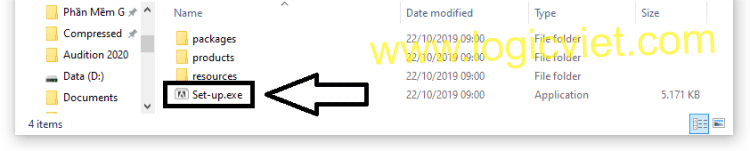
	<li style="text-align: justify;"><strong>Bước 1:</strong>&nbsp;Chạy&nbsp;<strong>Set-up.exe</strong>&nbsp;như hình dưới nhé</li>
</ul>

<p style="text-align: justify;"><img alt="" height="91" src="https://logicviet.com/laravel-filemanager/photos/1/Media%20Encoder/me20-1.png" width="452" /></p>

<ul>
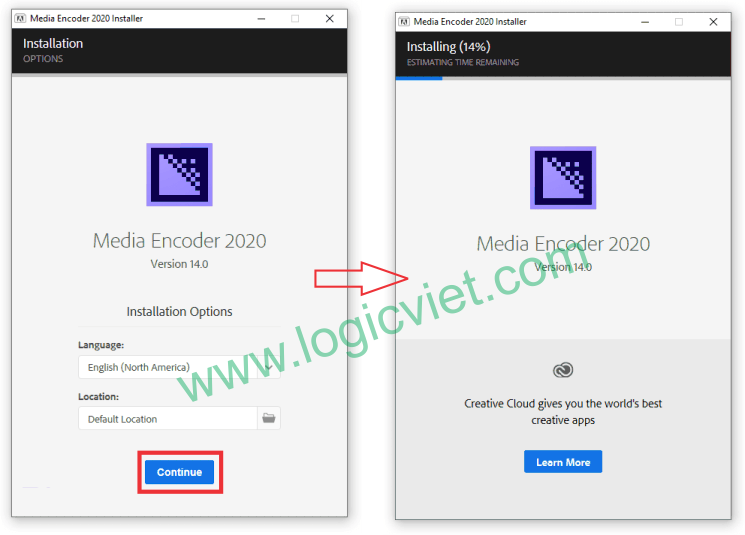
	<li style="text-align: justify;"><strong>Bước 2</strong>: Chọn&nbsp;<strong>Continue</strong>&nbsp;như hình dưới. Bạn chờ đợi vài phút để phần mềm cài đặt</li>
</ul>

<p style="text-align: justify;"><img alt="" height="399" src="https://logicviet.com/laravel-filemanager/photos/1/Media%20Encoder/me20-2.png" width="555" /></p>

<p style="text-align: justify;">&nbsp;</p>

<ul>
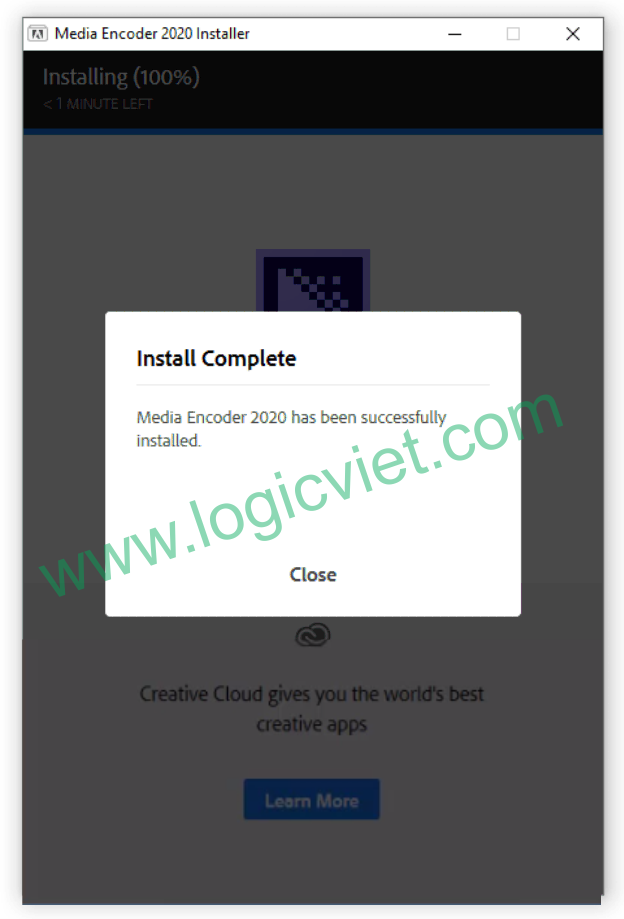
	<li style="text-align: justify;">Hiện thông báo như hình dưới là thành công rồi nhé. Chọn&nbsp;<strong>Close</strong></li>
</ul>

<p style="text-align: justify;"><img alt="" height="772" src="https://logicviet.com/laravel-filemanager/photos/1/Media%20Encoder/me20-3.png" width="524" /></p>

<p style="text-align: justify;">Vậy là việc cài đặt phần mềm thành công rồi đó, bạn có thể mở nó lên và dùng xem sao nhé.</p>

<p style="text-align: justify;"><strong>Chúc các bạn cài đặt thành công!</strong></p>

<p style="text-align: justify;"><strong>Link&nbsp;Download Adobe Media Encoder CC 2020</strong></p>

<p style="text-align: justify;"><a href="https://drive.google.com/file/d/1Oz9OQ4ySqGsaTVEtxr1MiLBJ-k33KsB1/view" target="_blank">Tải về</a><br />
&nbsp;</p>

<h1 style="text-align: justify;">SỬA CHỮA MÁY TÍNH TẠI NHÀ Ở&nbsp;HÓC MÔN</h1>

<div style="text-align: justify;">SỬA CHỮA MÁY TÍNH TẠI NHÀ Ở HỒ CHÍ MINH</div>

<p style="text-align: justify;">Với dịch vụ sửa máy tính tại nhà ở Hóc Môn và dịch vụ sửa máy tính tại nhà ở TP.HCM, Công ty Phát Thành Đạt&nbsp;sẽ luôn đem lại sự hài lòng nhất tới cho bạn, dịch vụ sửa chữa máy tính tại nhà luôn đồng hành cùng bạn từ (8h tới 17h trong ngày). Bảo trì định kỳ mỗi tháng (vệ sinh máy tính, update virus, tối ưu hệ thống...). Liên hệ Hotline 0908.554.558 - Info@phatthanhdat.com</p>

<p style="text-align: justify;">Chúc bạn thực hiện thành công!</p>

<p style="text-align: justify;">&nbsp;</p>
		</div>
	</div>
	<div id="footer" class="clearfix">
		<div id="url">
			<strong>URL của bản tin này: </strong><a href="https://phatthanhdat.com/index.php/savefile/tien-ich/download-adobe-media-encoder-cc-2020-khong-can-crack-link-google-drive-huong-dan-cai-dat-chi-tiet-67.html" title="Download Adobe Media Encoder CC 2020 không cần crack + Link Google Drive + Hướng Dẫn Cài Đặt Chi Tiết">https://phatthanhdat.com/index.php/savefile/tien-ich/download-adobe-media-encoder-cc-2020-khong-can-crack-link-google-drive-huong-dan-cai-dat-chi-tiet-67.html</a>

		</div>
		<div class="clear"></div>
		<div class="copyright">
			&copy; Phát Thành Đạt - Dịch vụ sửa chữa máy tính hóc môn
		</div>
		<div id="contact">
			<a href="mailto:info@phatthanhdat.com">info@phatthanhdat.com</a>
		</div>
	</div>
</div>
        <div id="timeoutsess" class="chromeframe">
            Bạn đã không sử dụng Site, <a onclick="timeoutsesscancel();" href="https://phatthanhdat.com/#">Bấm vào đây để duy trì trạng thái đăng nhập</a>. Thời gian chờ: <span id="secField"> 60 </span> giây
        </div>
        <div id="openidResult" class="nv-alert" style="display:none"></div>
        <div id="openidBt" data-result="" data-redirect=""></div>
<div id="run_cronjobs" style="visibility:hidden;display:none;"><img alt="cron" src="/index.php?second=cronjobs&amp;p=h85HZX3C" width="1" height="1" /></div>
<script src="https://phatthanhdat.com/assets/js/jquery/jquery.min.js"></script>
<script>var nv_base_siteurl="/",nv_lang_data="vi",nv_lang_interface="vi",nv_name_variable="nv",nv_fc_variable="op",nv_lang_variable="language",nv_module_name="news",nv_func_name="savefile",nv_is_user=0, nv_my_ofs=-4,nv_my_abbr="EDT",nv_cookie_prefix="nv4",nv_check_pass_mstime=1738000,nv_area_admin=0,nv_safemode=0,theme_responsive=1,nv_recaptcha_ver=2,nv_recaptcha_sitekey="",nv_recaptcha_type="image",XSSsanitize=1;</script>
<script src="https://phatthanhdat.com/assets/js/language/vi.js"></script>
<script src="https://phatthanhdat.com/assets/js/DOMPurify/purify3.js"></script>
<script src="https://phatthanhdat.com/assets/js/global.js"></script>
<script src="https://phatthanhdat.com/assets/js/site.js"></script>
<script src="https://phatthanhdat.com/themes/default/js/news.js"></script>
<script src="https://phatthanhdat.com/themes/default/js/main.js"></script>
<script src="https://phatthanhdat.com/themes/default/js/custom.js"></script>
<script type="application/ld+json">
        {
            "@context": "https://schema.org",
            "@type": "Organization",
            "url": "https://phatthanhdat.com",
            "logo": "https://phatthanhdat.com/uploads/about/logonho.png"
        }
        </script>
<script async custom-element="amp-ad" src="https://cdn.ampproject.org/v0/amp-ad-0.1.js"></script>
<script>
     (adsbygoogle = window.adsbygoogle || []).push({});
</script>
<script>(function(w,d,s,l,i){w[l]=w[l]||[];w[l].push({'gtm.start':
new Date().getTime(),event:'gtm.js'});var f=d.getElementsByTagName(s)[0],
j=d.createElement(s),dl=l!='dataLayer'?'&l='+l:'';j.async=true;j.src=
'https://www.googletagmanager.com/gtm.js?id='+i+dl;f.parentNode.insertBefore(j,f);
})(window,document,'script','dataLayer','GTM-KRZZ2CK');</script>
<script>
!function(f,b,e,v,n,t,s)
{if(f.fbq)return;n=f.fbq=function(){n.callMethod?
n.callMethod.apply(n,arguments):n.queue.push(arguments)};
if(!f._fbq)f._fbq=n;n.push=n;n.loaded=!0;n.version='2.0';
n.queue=[];t=b.createElement(e);t.async=!0;
t.src=v;s=b.getElementsByTagName(e)[0];
s.parentNode.insertBefore(t,s)}(window, document,'script',
'https://connect.facebook.net/en_US/fbevents.js');
fbq('init', '219812430112623');
fbq('track', 'PageView');
</script>
<script async src="https://pagead2.googlesyndication.com/pagead/js/adsbygoogle.js?client=ca-pub-3722185033130810" crossorigin="anonymous"></script>
<script>
      var chatbox = document.getElementById('fb-customer-chat');
      chatbox.setAttribute("page_id", "244380242794992");
      chatbox.setAttribute("attribution", "biz_inbox");

      window.fbAsyncInit = function() {
        FB.init({
          xfbml            : true,
          version          : 'v11.0'
        });
      };

      (function(d, s, id) {
        var js, fjs = d.getElementsByTagName(s)[0];
        if (d.getElementById(id)) return;
        js = d.createElement(s); js.id = id;
        js.src = 'https://connect.facebook.net/vi_VN/sdk/xfbml.customerchat.js';
        fjs.parentNode.insertBefore(js, fjs);
      }(document, 'script', 'facebook-jssdk'));
    </script>
<script src="https://sp.zalo.me/plugins/sdk.js"></script>
<script>
     (adsbygoogle = window.adsbygoogle || []).push({});
</script>
<script src="https://phatthanhdat.com/themes/default/js/bootstrap.min.js"></script>
</body>
</html>