<!DOCTYPE html>
    <html lang="vi" xmlns="http://www.w3.org/1999/xhtml" prefix="og: http://ogp.me/ns#">
    <head>
<title>Phát Thành Đạt Download Adobe Premiere Pro 2020 Repack không cần Crack + Link Google Drive + Hướng Dẫn Cài Đặt Chi Tiết</title>
<meta name="description" content="Download Adobe Premiere Pro 2020 Repack không cần Crack + Link Google Drive + Hướng Dẫn Cài Đặt Chi Tiết - Savefile - Tin Tức -...">
<meta name="author" content="Phát Thành Đạt - Dịch vụ sửa chữa máy tính hóc môn">
<meta name="copyright" content="Phát Thành Đạt - Dịch vụ sửa chữa máy tính hóc môn [info@phatthanhdat.com]">
<meta name="generator" content="NukeViet v4.5">
<meta name="facebook-domain-verification" content="nv4brgbtr5jrhsej2o63m6qx7nz5ek">
<meta http-equiv="Content-Type" content="text/html; charset=utf-8">
<meta property="og:title" content="Download Adobe Premiere Pro 2020 Repack không cần Crack + Link Google Drive + Hướng Dẫn Cài Đặt Chi Tiết">
<meta property="og:type" content="website">
<meta property="og:description" content="Savefile - Tin Tức -...">
<meta property="og:site_name" content="Phát Thành Đạt - Dịch vụ sửa chữa máy tính hóc môn">
<meta property="og:url" content="https://phatthanhdat.com/index.php/savefile/tien-ich/download-adobe-premiere-pro-2020-repack-khong-can-crack-link-google-drive-huong-dan-cai-dat-chi-tiet-64.html">
<link rel="shortcut icon" href="https://phatthanhdat.com/uploads/about/logonho.png">
<link rel="canonical" href="https://phatthanhdat.com/index.php/savefile/tien-ich/download-adobe-premiere-pro-2020-repack-khong-can-crack-link-google-drive-huong-dan-cai-dat-chi-tiet-64.html">
<link rel="alternate" href="https://phatthanhdat.com/index.php/rss/" title="Tin Tức" type="application/rss+xml">
<link rel="alternate" href="https://phatthanhdat.com/index.php/rss/quan-tri-mang/" title="Tin Tức - Quản Trị Mạng" type="application/rss+xml">
<link rel="alternate" href="https://phatthanhdat.com/index.php/rss/windows-server/" title="Tin Tức - Windows Server" type="application/rss+xml">
<link rel="alternate" href="https://phatthanhdat.com/index.php/rss/active-windows/" title="Tin Tức - Active Windows" type="application/rss+xml">
<link rel="alternate" href="https://phatthanhdat.com/index.php/rss/mang-may-tinh/" title="Tin Tức - Mạng Máy Tính" type="application/rss+xml">
<link rel="alternate" href="https://phatthanhdat.com/index.php/rss/quan-tri-mail-server/" title="Tin Tức - Quản Trị Mail Server" type="application/rss+xml">
<link rel="alternate" href="https://phatthanhdat.com/index.php/rss/y-nghia-cuoc-song/" title="Tin Tức - Ý nghĩa cuộc sống" type="application/rss+xml">
<link rel="alternate" href="https://phatthanhdat.com/index.php/rss/tien-ich/" title="Tin Tức - Tiện Ích" type="application/rss+xml">
<link rel="alternate" href="https://phatthanhdat.com/index.php/rss/facebook-add/" title="Tin Tức - Facebook Add" type="application/rss+xml">
<link rel="alternate" href="https://phatthanhdat.com/index.php/rss/nong-tren-mang/" title="Tin Tức - Nóng Trên Mạng" type="application/rss+xml">
<link rel="alternate" href="https://phatthanhdat.com/index.php/rss/covid-19/" title="Tin Tức - Covid 19" type="application/rss+xml">
<link rel="alternate" href="https://phatthanhdat.com/index.php/rss/hoc-duong/" title="Tin Tức - Học Đường" type="application/rss+xml">
<link rel="alternate" href="https://phatthanhdat.com/index.php/rss/tin-tuc-thi-truong/" title="Tin Tức - Tin Tức Thị Trường" type="application/rss+xml">
<link rel="alternate" href="https://phatthanhdat.com/index.php/rss/code-hay/" title="Tin Tức - Code hay" type="application/rss+xml">
<link rel="alternate" href="https://phatthanhdat.com/index.php/rss/kho-hang/" title="Tin Tức - Kho Hàng" type="application/rss+xml">
<link rel="alternate" href="https://phatthanhdat.com/index.php/rss/ai-tri-tue-nhan-tao/" title="Tin Tức - AI Trí Tuệ Nhân Tạo" type="application/rss+xml">
<link rel="alternate" href="https://phatthanhdat.com/index.php/rss/do-hoa/" title="Tin Tức - Đồ Hoạ" type="application/rss+xml">
<link rel="stylesheet" href="https://phatthanhdat.com/assets/css/font-awesome.min.css">
<link rel="stylesheet" href="https://phatthanhdat.com/themes/default/css/bootstrap.non-responsive.css">
<link rel="stylesheet" href="https://phatthanhdat.com/themes/default/css/style.css">
<link rel="stylesheet" href="https://phatthanhdat.com/themes/default/css/style.non-responsive.css">
<link rel="StyleSheet" href="https://phatthanhdat.com/themes/default/css/news.css">
<link rel="stylesheet" href="https://phatthanhdat.com/themes/default/css/custom.css">
<style type="text/css">
	body{background: #fff;}
</style>
<!-- Google Tag Manager -->
<!-- End Google Tag Manager -->

<!-- Facebook Pixel Code -->
<noscript><img height="1" width="1" style="display:none"
src="https://www.facebook.com/tr?id=219812430112623&ev=PageView&noscript=1"
/></noscript>
<!-- End Facebook Pixel Code -->
<!-- Messenger Plugin chat Code -->
    <div id="fb-root"></div>

    <!-- Your Plugin chat code -->
    <div id="fb-customer-chat" class="fb-customerchat">
    </div>
<script>(function(i,s,o,g,r,a,m){i['GoogleAnalyticsObject']=r;i[r]=i[r]||function(){
(i[r].q=i[r].q||[]).push(arguments)},i[r].l=1*new Date();a=s.createElement(o),
m=s.getElementsByTagName(o)[0];a.async=1;a.src=g;m.parentNode.insertBefore(a,m)
})(window,document,'script','https://www.google-analytics.com/analytics.js','ga');
ga('create', 'UA-133543348-1', '.phatthanhdat.com');
ga('send', 'pageview');
</script>
</head>
    <body>
<div class="zalo-chat-widget" data-oaid="1354977264109400055" data-welcome-message="R&#7845;t vui khi &#273;&#432;&#7907;c h&#7895; tr&#7907; b&#7841;n!" data-autopopup="0" data-width="" data-height=""></div>
<amp-ad width="100vw" height="320"
     type="adsense"
     data-ad-client="ca-pub-3722185033130810"
     data-ad-slot="5396409404"
     data-auto-format="rspv"
     data-full-width="">
  <div overflow=""></div>
</amp-ad>
<!-- Google Tag Manager (noscript) -->
<noscript><iframe src="https://www.googletagmanager.com/ns.html?id=GTM-KRZZ2CK"
height="0" width="0" style="display:none;visibility:hidden"></iframe></noscript>
<!-- End Google Tag Manager (noscript) -->
<div class="gcse-searchbox-only"></div>
<div id="print">
	<div id="hd_print">
		<h2 class="pull-left">Phát Thành Đạt - Dịch vụ sửa chữa máy tính hóc môn</h2>
		<p class="pull-right"><a title="Phát Thành Đạt - Dịch vụ sửa chữa máy tính hóc môn" href="https://phatthanhdat.com/">https://phatthanhdat.com</a></p>
	</div>
	<div class="clear"></div>
	<hr />
	<div id="content">
		<h1>Download Adobe Premiere Pro 2020 Repack không cần Crack + Link Google Drive + Hướng Dẫn Cài Đặt Chi Tiết</h1>
		<ul class="list-inline">
			<li>Thứ tư - 04/08/2021 10:17</li>
			<li class="hidden-print txtrequired"><em class="fa fa-print">&nbsp;</em><a title="In ra" href="javascript:;" onclick="window.print()">In ra</a></li>
			<li class="hidden-print txtrequired"><em class="fa fa-power-off">&nbsp;</em><a title="Đóng cửa sổ này" href="javascript:;" onclick="window.close()">Đóng cửa sổ này</a></li>
		</ul>
		<div class="clear"></div>
		<div id="hometext">
			<h2><strong>Các Tính Năng Mới Có Trong Adobe Premiere Pro 2020</strong></h2>

<p>Qua một thời gian tham khảo trên internet và những dòng chia sẻ của các bạn đã dùng thử trên các group Design, mình xin tóm tắt một số tính năng chính trong bản Premiere Pro mới nhất hiện nay. Các bạn có thể đọc qua tham khảo để có quyết định update lên phiên bản này không nhé.</p>
		</div>
				<div class="imghome">
			<img alt="Download Adobe Premiere Pro 2020 Repack không cần Crack + Link Google Drive + Hướng Dẫn Cài Đặt Chi Tiết" src="https://logicviet.com/laravel-filemanager/photos/1/pr20-0.png" width="460" class="img-thumbnail" />
						<p>
				<em>Download Adobe Premiere Pro 2020 Repack không cần Crack + Link Google Drive + Hướng Dẫn Cài Đặt Chi Tiết</em>
			</p>
		</div>
		<div class="clear"></div>
		<div id="bodytext" class="clearfix">
			<h2 style="text-align: justify;"><strong>Các Tính Năng Mới Có Trong Adobe Premiere Pro 2020</strong></h2>

<div style="text-align: justify;"><a href="https://drive.google.com/file/d/15A_xeLWvC7xZ5Nekd-mTAz4RMiQQ52GW/view">Tải về</a></div>

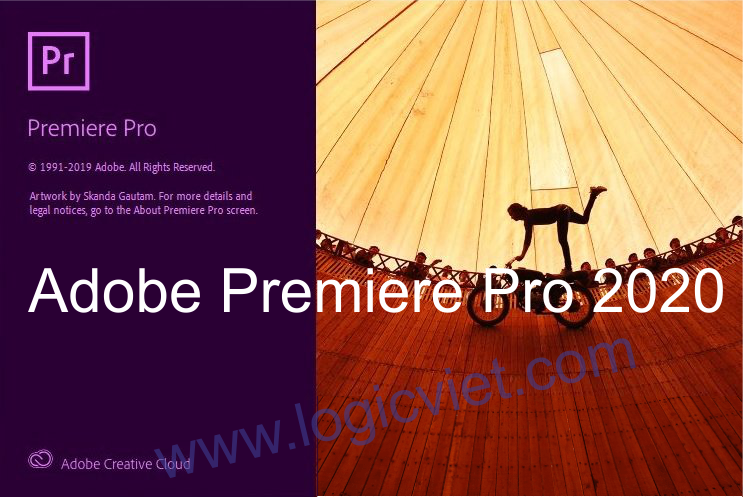
<p style="text-align: justify;">Qua một thời gian tham khảo trên internet và những dòng chia sẻ của các bạn đã dùng thử trên các group Design, mình xin tóm tắt một số tính năng chính trong bản Premiere Pro mới nhất hiện nay. Các bạn có thể đọc qua tham khảo để có quyết định update lên phiên bản này không nhé.</p>

<div style="text-align:center"><img alt="" height="569" src="https://logicviet.com/laravel-filemanager/photos/1/pr20-0.png" width="850" /></div>

<p style="text-align: justify;">&nbsp;</p>

<ul>
	<li style="text-align: justify;">Bố trí văn bản, đồ họa và video clip với độ chính xác cao.</li>
	<li style="text-align: justify;">Sử dụng chế độ xem Freeform mới trong bảng Project.</li>
	<li style="text-align: justify;">Tự động định dạng lại video và tối ưu hóa cảnh quay.</li>
	<li style="text-align: justify;">Tính năng tinh chỉnh giúp giữ nội dung quan trọng trong khung hình.</li>
	<li style="text-align: justify;">Tự động điều chỉnh âm lượng nền xung quanh hộp thoại.</li>
	<li style="text-align: justify;">Tăng tốc độ phân loại màu và nhận diện khuôn mặt nhanh hơn.</li>
	<li style="text-align: justify;">Phát lại HEVC trên Windows mượt mà hơn với giải mã phần cứng 10bit.</li>
	<li style="text-align: justify;">Thay thế các khung sự cố bằng một bản sao của khung liền kề.</li>
	<li style="text-align: justify;">Tùy chọn xuất mới cho phụ đề cung cấp cho bạn nhiều điều khiển hơn.</li>
	<li style="text-align: justify;">Hỗ trợ phím tắt thông minh hơn cho bàn phím không sử dụng tiếng Anh.</li>
	<li style="text-align: justify;">Hỗ trợ định dạng mới với tệp Sony Venice V3 gốc để hỗ trợ máy ảnh.</li>
	<li style="text-align: justify;">Tùy chọn tỷ lệ hình ảnh thông minh và lựa chọn chính xác hơn</li>
	<li style="text-align: justify;">Công cụ xác định các vấn đề có tương thích hệ thống hay không</li>
	<li style="text-align: justify;">Bảng điều khiển Essential Graphics có một số cải tiến</li>
	<li style="text-align: justify;">Một menu View chuyên dụng mới trong Premiere hợp nhất các lệnh</li>
	<li style="text-align: justify;">Sao chép và dán hiệu ứng âm thanh trong một bản nhạc dễ dàng</li>
</ul>

<p style="text-align: justify;"><strong>Yêu Cầu Về Hệ Thống:</strong></p>

<ul>
	<li style="text-align: justify;">Bộ xử lý: Intel® 7<sup>th</sup>Gen or newer CPU – or AMD equivalent</li>
	<li style="text-align: justify;">RAM: 16 GB RAM cho video HD, Full HD (khuyên dùng 32 GB).</li>
	<li style="text-align: justify;">Hệ điều hành: Microsoft Windows 10 (64-bit) phiên bản 1703 trở lên (bắt buộc)</li>
	<li style="text-align: justify;">GPU:&nbsp; VRAM 4 GB</li>
	<li style="text-align: justify;">Dung lượng ổ cứng: khuyến nghị sử dụng ổ đĩa SSD để cài đặt ứng dụng và cache – bổ sung thêm high-speed drive(s) for media</li>
	<li style="text-align: justify;">Độ phân giải màn hình: Độ phân giải màn hình 1920 x 1080 trở lên</li>
</ul>

<div style="text-align: justify;">&nbsp;</div>

<h2 style="text-align: justify;"><strong>Hướng Dẫn Cài Đặt Adobe Premiere Pro 2020</strong></h2>

<p style="text-align: justify;">Premiere Pro 2020 Repack, đây là phiên bản đã được chỉnh sửa lại. Các bạn&nbsp;<strong>chỉ cần tải, làm theo các bước hướng dẫn của mình ở phần dưới mà không cần phải tìm cách để&nbsp;crack&nbsp;</strong>nữa nhé. Hơn nữa bản này dùng rất ổn định, không gặp các lỗi oái oăm như các bản&nbsp;crack&nbsp;khác.</p>

<ul>
	<li style="text-align: justify;"><strong>Bước 1</strong>: Đối với việc cài đặt&nbsp;<strong>Premiere Pro 2020</strong>&nbsp;thì không có gì khó khăn cả, bạn hãy tải về&nbsp;và giải nén file ra nhé. Sau khi quá trình giải nén thành công, bạn hãy&nbsp;<strong>tắt mạng internet</strong>&nbsp;trên máy tính của bạn để bắt đầu các bước cài đặt.</li>
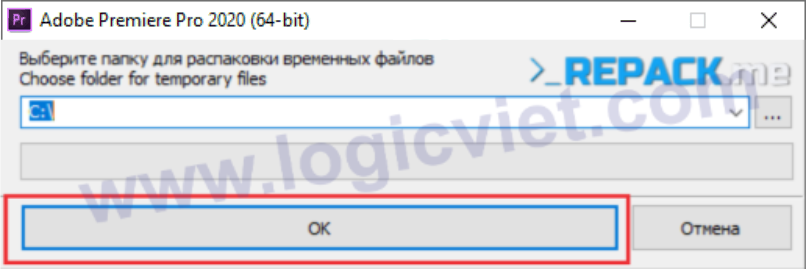
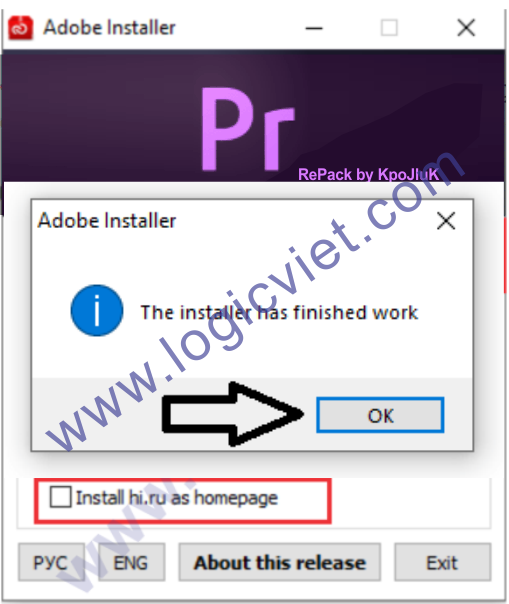
	<li style="text-align: justify;">Chạy chương trình<strong>&nbsp;Adobe.Premiere.Pro.2020.v14.0.exe</strong>&nbsp;lên nhé. Sau khoảng 1 vài giây, một hộp thoại hiện lên như hình dưới, bạn hãy click vào&nbsp;<strong>OK</strong>&nbsp;nhé.</li>
</ul>

<div style="text-align:center"><img alt="" height="284" src="https://logicviet.com/laravel-filemanager/photos/1/pr20-1.png" width="850" /></div>

<ul>
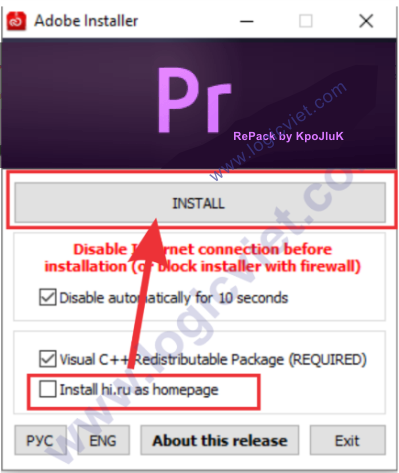
	<li style="text-align: justify;"><strong>Bước 2</strong>: Trong bước tiếp theo, các bạn cần chú ý bỏ dấu tích ô&nbsp;<strong>Install hi.ru as homepage</strong>&nbsp;như hình dưới. Nếu trên máy của bạn đã từng cài Visual C++ redistributable trên máy rồi thì có thể bỏ qua dấu tích ở giữa luôn nhé. Sau đó, click vào Install để bắt đầu việc cài đặt.</li>
</ul>

<div style="text-align:center"><img alt="" height="1008" src="https://logicviet.com/laravel-filemanager/photos/1/pr20-2.png" width="850" /></div>

<ul>
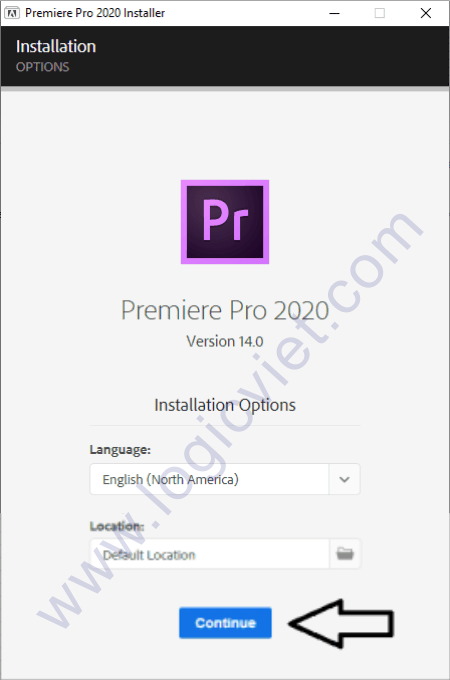
	<li style="text-align: justify;"><strong>Bước 3:</strong>&nbsp;Kết thúc quá trình cài Visual C++ redistributable, phần mềm sẽ chuyển sang giao diện cài đặt mặc định của Premiere. Hãy click vào&nbsp;<strong>Continue</strong>&nbsp;để chuyển sang bước tiếp theo nhé.</li>
</ul>

<div style="text-align:center"><img alt="" height="1284" src="https://logicviet.com/laravel-filemanager/photos/1/pr20-4.png" width="850" /></div>

<ul>
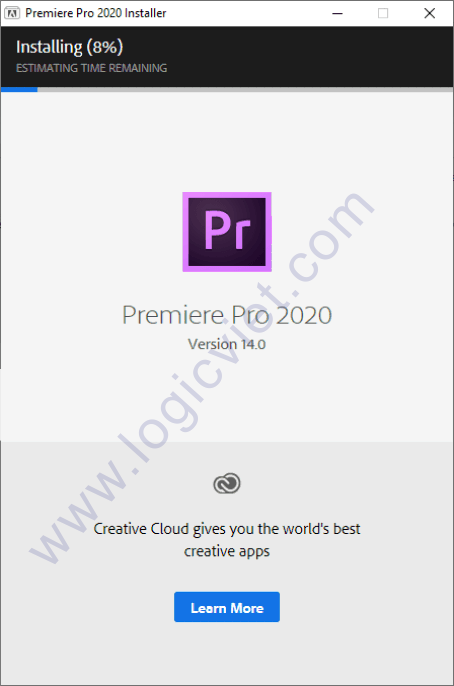
	<li style="text-align: justify;"><strong>Bước 4</strong>: Tại bước này, tiến trình cài đặt sẽ được chạy tự động</li>
</ul>

<div style="text-align:center"><img alt="" height="1284" src="https://logicviet.com/laravel-filemanager/photos/1/pr20-5.png" width="850" /></div>

<ul>
	<li style="text-align: justify;"><strong>Bước 5</strong>: Thông báo quá trình cài đặt đã hoàn thành xong, bạn hãy click vào hình&nbsp;<strong>OK</strong>&nbsp;hoặc dấu&nbsp;<strong>X</strong>. Vậy là đã hoàn thành xong việc cài đặt nhé.</li>
</ul>

<div style="text-align:center"><img alt="" height="1009" src="https://logicviet.com/laravel-filemanager/photos/1/pr20-6.png" width="850" /></div>

<ul>
	<li style="text-align: justify;">Bạn có thể mở phần mềm Adobe Premiere Pro 2020 lên và dùng thử xem nhé. Nếu bạn gặp lỗi trong quá trình cài đặt, hãy copy lại dòng thông báo ấy và để lại comment dưới bài viết này nhé.</li>
</ul>

<p style="text-align: justify;"><strong>Chúc các bạn cài đặt thành công!<br />
<a href="https://drive.google.com/file/d/15A_xeLWvC7xZ5Nekd-mTAz4RMiQQ52GW/view">Tải về&nbsp;</a></strong><br />
&nbsp;</p>

<h1>SỬA CHỮA MÁY TÍNH TẠI NHÀ Ở&nbsp;HÓC MÔN</h1>
SỬA CHỮA MÁY TÍNH TẠI NHÀ Ở HỒ CHÍ MINH

<p>Với dịch vụ sửa máy tính tại nhà ở Hóc Môn và dịch vụ sửa máy tính tại nhà ở TP.HCM, Công ty Phát Thành Đạt&nbsp;sẽ luôn đem lại sự hài lòng nhất tới cho bạn, dịch vụ sửa chữa máy tính tại nhà luôn đồng hành cùng bạn từ (8h tới 17h trong ngày). Bảo trì định kỳ mỗi tháng (vệ sinh máy tính, update virus, tối ưu hệ thống...). Liên hệ Hotline 0908.554.558 - Info@phatthanhdat.com</p>

<p>Chúc bạn thực hiện thành công!</p>

<p style="text-align: justify;">&nbsp;</p>
		</div>
	</div>
	<div id="footer" class="clearfix">
		<div id="url">
			<strong>URL của bản tin này: </strong><a href="https://phatthanhdat.com/index.php/savefile/tien-ich/download-adobe-premiere-pro-2020-repack-khong-can-crack-link-google-drive-huong-dan-cai-dat-chi-tiet-64.html" title="Download Adobe Premiere Pro 2020 Repack không cần Crack + Link Google Drive + Hướng Dẫn Cài Đặt Chi Tiết">https://phatthanhdat.com/index.php/savefile/tien-ich/download-adobe-premiere-pro-2020-repack-khong-can-crack-link-google-drive-huong-dan-cai-dat-chi-tiet-64.html</a>

		</div>
		<div class="clear"></div>
		<div class="copyright">
			&copy; Phát Thành Đạt - Dịch vụ sửa chữa máy tính hóc môn
		</div>
		<div id="contact">
			<a href="mailto:info@phatthanhdat.com">info@phatthanhdat.com</a>
		</div>
	</div>
</div>
        <div id="timeoutsess" class="chromeframe">
            Bạn đã không sử dụng Site, <a onclick="timeoutsesscancel();" href="https://phatthanhdat.com/#">Bấm vào đây để duy trì trạng thái đăng nhập</a>. Thời gian chờ: <span id="secField"> 60 </span> giây
        </div>
        <div id="openidResult" class="nv-alert" style="display:none"></div>
        <div id="openidBt" data-result="" data-redirect=""></div>
<div id="run_cronjobs" style="visibility:hidden;display:none;"><img alt="cron" src="/index.php?second=cronjobs&amp;p=g54Wxip6" width="1" height="1" /></div>
<script src="https://phatthanhdat.com/assets/js/jquery/jquery.min.js"></script>
<script>var nv_base_siteurl="/",nv_lang_data="vi",nv_lang_interface="vi",nv_name_variable="nv",nv_fc_variable="op",nv_lang_variable="language",nv_module_name="news",nv_func_name="savefile",nv_is_user=0, nv_my_ofs=-4,nv_my_abbr="EDT",nv_cookie_prefix="nv4",nv_check_pass_mstime=1738000,nv_area_admin=0,nv_safemode=0,theme_responsive=0,nv_recaptcha_ver=2,nv_recaptcha_sitekey="",nv_recaptcha_type="image",XSSsanitize=1;</script>
<script src="https://phatthanhdat.com/assets/js/language/vi.js"></script>
<script src="https://phatthanhdat.com/assets/js/DOMPurify/purify3.js"></script>
<script src="https://phatthanhdat.com/assets/js/global.js"></script>
<script src="https://phatthanhdat.com/assets/js/site.js"></script>
<script src="https://phatthanhdat.com/themes/default/js/news.js"></script>
<script src="https://phatthanhdat.com/themes/default/js/main.js"></script>
<script src="https://phatthanhdat.com/themes/default/js/custom.js"></script>
<script type="application/ld+json">
        {
            "@context": "https://schema.org",
            "@type": "Organization",
            "url": "https://phatthanhdat.com",
            "logo": "https://phatthanhdat.com/uploads/about/logonho.png"
        }
        </script>
<script async custom-element="amp-ad" src="https://cdn.ampproject.org/v0/amp-ad-0.1.js"></script>
<script>
     (adsbygoogle = window.adsbygoogle || []).push({});
</script>
<script>(function(w,d,s,l,i){w[l]=w[l]||[];w[l].push({'gtm.start':
new Date().getTime(),event:'gtm.js'});var f=d.getElementsByTagName(s)[0],
j=d.createElement(s),dl=l!='dataLayer'?'&l='+l:'';j.async=true;j.src=
'https://www.googletagmanager.com/gtm.js?id='+i+dl;f.parentNode.insertBefore(j,f);
})(window,document,'script','dataLayer','GTM-KRZZ2CK');</script>
<script>
!function(f,b,e,v,n,t,s)
{if(f.fbq)return;n=f.fbq=function(){n.callMethod?
n.callMethod.apply(n,arguments):n.queue.push(arguments)};
if(!f._fbq)f._fbq=n;n.push=n;n.loaded=!0;n.version='2.0';
n.queue=[];t=b.createElement(e);t.async=!0;
t.src=v;s=b.getElementsByTagName(e)[0];
s.parentNode.insertBefore(t,s)}(window, document,'script',
'https://connect.facebook.net/en_US/fbevents.js');
fbq('init', '219812430112623');
fbq('track', 'PageView');
</script>
<script async src="https://pagead2.googlesyndication.com/pagead/js/adsbygoogle.js?client=ca-pub-3722185033130810" crossorigin="anonymous"></script>
<script>
      var chatbox = document.getElementById('fb-customer-chat');
      chatbox.setAttribute("page_id", "244380242794992");
      chatbox.setAttribute("attribution", "biz_inbox");

      window.fbAsyncInit = function() {
        FB.init({
          xfbml            : true,
          version          : 'v11.0'
        });
      };

      (function(d, s, id) {
        var js, fjs = d.getElementsByTagName(s)[0];
        if (d.getElementById(id)) return;
        js = d.createElement(s); js.id = id;
        js.src = 'https://connect.facebook.net/vi_VN/sdk/xfbml.customerchat.js';
        fjs.parentNode.insertBefore(js, fjs);
      }(document, 'script', 'facebook-jssdk'));
    </script>
<script src="https://sp.zalo.me/plugins/sdk.js"></script>
<script>
     (adsbygoogle = window.adsbygoogle || []).push({});
</script>
<script src="https://phatthanhdat.com/themes/default/js/bootstrap.min.js"></script>
</body>
</html>