<!DOCTYPE html>
    <html lang="vi" xmlns="http://www.w3.org/1999/xhtml" prefix="og: http://ogp.me/ns#">
    <head>
<title>Phát Thành Đạt Download Optitex 21 Full Crack – Google Drive + Hướng dẫn cài đặt 2023</title>
<meta name="description" content="Download Optitex 21 Full Crack – Google Drive + Hướng dẫn cài đặt 2023 - Savefile - Tin Tức -...">
<meta name="author" content="Phát Thành Đạt - Dịch vụ sửa chữa máy tính hóc môn">
<meta name="copyright" content="Phát Thành Đạt - Dịch vụ sửa chữa máy tính hóc môn [info@phatthanhdat.com]">
<meta name="generator" content="NukeViet v4.5">
<meta name="facebook-domain-verification" content="nv4brgbtr5jrhsej2o63m6qx7nz5ek">
<meta http-equiv="Content-Type" content="text/html; charset=utf-8">
<meta property="og:title" content="Download Optitex 21 Full Crack – Google Drive + Hướng dẫn cài đặt 2023">
<meta property="og:type" content="website">
<meta property="og:description" content="Savefile - Tin Tức - https&#x3A;&#x002F;&#x002F;phatthanhdat.com&#x002F;index.php&#x002F;savefile&#x002F;tien-ich&#x002F;download-optitex-21-full-crack-google-drive-huong-dan-cai-dat-2023-167.html">
<meta property="og:site_name" content="Phát Thành Đạt - Dịch vụ sửa chữa máy tính hóc môn">
<meta property="og:url" content="https://phatthanhdat.com/index.php/savefile/tien-ich/download-optitex-21-full-crack-google-drive-huong-dan-cai-dat-2023-167.html">
<link rel="shortcut icon" href="https://phatthanhdat.com/uploads/about/logonho.png">
<link rel="canonical" href="https://phatthanhdat.com/index.php/savefile/tien-ich/download-optitex-21-full-crack-google-drive-huong-dan-cai-dat-2023-167.html">
<link rel="alternate" href="https://phatthanhdat.com/index.php/rss/" title="Tin Tức" type="application/rss+xml">
<link rel="alternate" href="https://phatthanhdat.com/index.php/rss/quan-tri-mang/" title="Tin Tức - Quản Trị Mạng" type="application/rss+xml">
<link rel="alternate" href="https://phatthanhdat.com/index.php/rss/windows-server/" title="Tin Tức - Windows Server" type="application/rss+xml">
<link rel="alternate" href="https://phatthanhdat.com/index.php/rss/active-windows/" title="Tin Tức - Active Windows" type="application/rss+xml">
<link rel="alternate" href="https://phatthanhdat.com/index.php/rss/mang-may-tinh/" title="Tin Tức - Mạng Máy Tính" type="application/rss+xml">
<link rel="alternate" href="https://phatthanhdat.com/index.php/rss/quan-tri-mail-server/" title="Tin Tức - Quản Trị Mail Server" type="application/rss+xml">
<link rel="alternate" href="https://phatthanhdat.com/index.php/rss/y-nghia-cuoc-song/" title="Tin Tức - Ý nghĩa cuộc sống" type="application/rss+xml">
<link rel="alternate" href="https://phatthanhdat.com/index.php/rss/tien-ich/" title="Tin Tức - Tiện Ích" type="application/rss+xml">
<link rel="alternate" href="https://phatthanhdat.com/index.php/rss/facebook-add/" title="Tin Tức - Facebook Add" type="application/rss+xml">
<link rel="alternate" href="https://phatthanhdat.com/index.php/rss/nong-tren-mang/" title="Tin Tức - Nóng Trên Mạng" type="application/rss+xml">
<link rel="alternate" href="https://phatthanhdat.com/index.php/rss/covid-19/" title="Tin Tức - Covid 19" type="application/rss+xml">
<link rel="alternate" href="https://phatthanhdat.com/index.php/rss/hoc-duong/" title="Tin Tức - Học Đường" type="application/rss+xml">
<link rel="alternate" href="https://phatthanhdat.com/index.php/rss/tin-tuc-thi-truong/" title="Tin Tức - Tin Tức Thị Trường" type="application/rss+xml">
<link rel="alternate" href="https://phatthanhdat.com/index.php/rss/code-hay/" title="Tin Tức - Code hay" type="application/rss+xml">
<link rel="alternate" href="https://phatthanhdat.com/index.php/rss/kho-hang/" title="Tin Tức - Kho Hàng" type="application/rss+xml">
<link rel="alternate" href="https://phatthanhdat.com/index.php/rss/ai-tri-tue-nhan-tao/" title="Tin Tức - AI Trí Tuệ Nhân Tạo" type="application/rss+xml">
<link rel="alternate" href="https://phatthanhdat.com/index.php/rss/do-hoa/" title="Tin Tức - Đồ Hoạ" type="application/rss+xml">
<link rel="stylesheet" href="https://phatthanhdat.com/assets/css/font-awesome.min.css">
<link rel="stylesheet" href="https://phatthanhdat.com/themes/default/css/bootstrap.non-responsive.css">
<link rel="stylesheet" href="https://phatthanhdat.com/themes/default/css/style.css">
<link rel="stylesheet" href="https://phatthanhdat.com/themes/default/css/style.non-responsive.css">
<link rel="StyleSheet" href="https://phatthanhdat.com/themes/default/css/news.css">
<link rel="stylesheet" href="https://phatthanhdat.com/themes/default/css/custom.css">
<style type="text/css">
	body{background: #fff;}
</style>
<!-- Google Tag Manager -->
<!-- End Google Tag Manager -->

<!-- Facebook Pixel Code -->
<noscript><img height="1" width="1" style="display:none"
src="https://www.facebook.com/tr?id=219812430112623&ev=PageView&noscript=1"
/></noscript>
<!-- End Facebook Pixel Code -->
<!-- Messenger Plugin chat Code -->
    <div id="fb-root"></div>

    <!-- Your Plugin chat code -->
    <div id="fb-customer-chat" class="fb-customerchat">
    </div>
<script>(function(i,s,o,g,r,a,m){i['GoogleAnalyticsObject']=r;i[r]=i[r]||function(){
(i[r].q=i[r].q||[]).push(arguments)},i[r].l=1*new Date();a=s.createElement(o),
m=s.getElementsByTagName(o)[0];a.async=1;a.src=g;m.parentNode.insertBefore(a,m)
})(window,document,'script','https://www.google-analytics.com/analytics.js','ga');
ga('create', 'UA-133543348-1', '.phatthanhdat.com');
ga('send', 'pageview');
</script>
</head>
    <body>
<div class="zalo-chat-widget" data-oaid="1354977264109400055" data-welcome-message="R&#7845;t vui khi &#273;&#432;&#7907;c h&#7895; tr&#7907; b&#7841;n!" data-autopopup="0" data-width="" data-height=""></div>
<amp-ad width="100vw" height="320"
     type="adsense"
     data-ad-client="ca-pub-3722185033130810"
     data-ad-slot="5396409404"
     data-auto-format="rspv"
     data-full-width="">
  <div overflow=""></div>
</amp-ad>
<!-- Google Tag Manager (noscript) -->
<noscript><iframe src="https://www.googletagmanager.com/ns.html?id=GTM-KRZZ2CK"
height="0" width="0" style="display:none;visibility:hidden"></iframe></noscript>
<!-- End Google Tag Manager (noscript) -->
<div class="gcse-searchbox-only"></div>
<div id="print">
	<div id="hd_print">
		<h2 class="pull-left">Phát Thành Đạt - Dịch vụ sửa chữa máy tính hóc môn</h2>
		<p class="pull-right"><a title="Phát Thành Đạt - Dịch vụ sửa chữa máy tính hóc môn" href="https://phatthanhdat.com/">https://phatthanhdat.com</a></p>
	</div>
	<div class="clear"></div>
	<hr />
	<div id="content">
		<h1>Download Optitex 21 Full Crack – Google Drive + Hướng dẫn cài đặt 2023</h1>
		<ul class="list-inline">
			<li>Thứ hai - 09/10/2023 10:09</li>
			<li class="hidden-print txtrequired"><em class="fa fa-print">&nbsp;</em><a title="In ra" href="javascript:;" onclick="window.print()">In ra</a></li>
			<li class="hidden-print txtrequired"><em class="fa fa-power-off">&nbsp;</em><a title="Đóng cửa sổ này" href="javascript:;" onclick="window.close()">Đóng cửa sổ này</a></li>
		</ul>
		<div class="clear"></div>
		<div id="hometext">
			<h1>Download Optitex 21 Full Crack – Google Drive + Hướng dẫn cài đặt 2023 ✅</h1>
Optitex là một phần mềm kỹ thuật được sử dụng nhiều trong ngày công nghiệp may mặc và thiết kế thời trang. Nếu bạn đang quan tâm và muốn sử dụng phần mềm này thì đừng bỏ quan bài viết dưới đây. <b>Phát Thành Đạt</b>&nbsp;sẽ cung cấp link tải và hướng dẫn cài đặt&nbsp;<strong>Optitex 21</strong>&nbsp;chi tiết nhất.<br />
&nbsp;
		</div>
		<div id="bodytext" class="clearfix">
			<h2 id="ftoc-heading-1"><strong>Giới thiệu tổng quan về phần mềm Optitex 21</strong></h2>

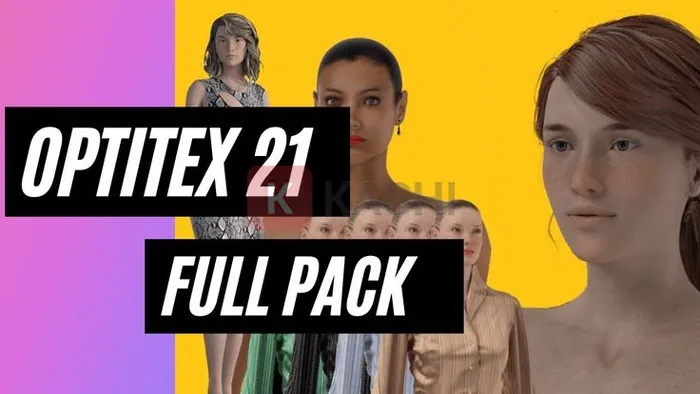
<p><strong>Optitex 21</strong>&nbsp;là phần mềm chuyên dụng trong lĩnh vực thời trang cho các dịch vụ CAD / CAM hai chiều và ba chiều. Phần mềm cho phép cả công nghệ phảng lẫn 3 chiều, giúp người dùng có thể tạo ra những sản phẩm quần áo tuyệt đẹp.</p>

<figure aria-describedby="caption-attachment-13330" id="attachment_13330"><img alt="Phần mềm Optitex 21" data-lazy-sizes="(max-width: 700px) 100vw, 700px" data-lazy-src="https://kashi.com.vn/wp-content/uploads/2022/08/Optitex-21_26.webp" data-lazy-srcset="https://kashi.com.vn/wp-content/uploads/2022/08/Optitex-21_26.webp 700w,https://kashi.com.vn/wp-content/uploads/2022/08/Optitex-21_26-696x392.webp 696w" data-ll-status="loaded" decoding="async" fetchpriority="high" height="394" sizes="(max-width: 700px) 100vw, 700px" src="https://kashi.com.vn/wp-content/uploads/2022/08/Optitex-21_26.webp" srcset="https://kashi.com.vn/wp-content/uploads/2022/08/Optitex-21_26.webp 700w,https://kashi.com.vn/wp-content/uploads/2022/08/Optitex-21_26-696x392.webp 696w" width="700" />
<figcaption id="caption-attachment-13330">Phần mềm Optitex 21</figcaption>
</figure>

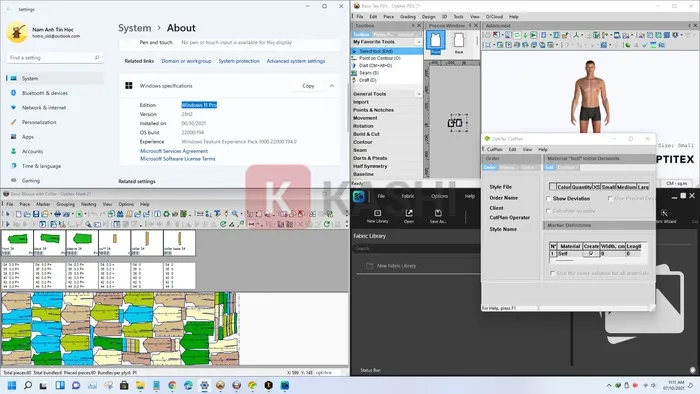
<p>Phần mềm Optitex 21 giúp người dùng có thể nhìn thấy trước được mô hình sản phẩm, ước tính lượng nguyên liệu cần sử dụng, từ đó tiết kiệm được tối đa tài nguyên và tránh gây lãng phí trong quá trình sản xuất.</p>

<p>Bên cạnh đó, phần mềm Optitex 21 có tính năng vượt trội giúp đẩy nhanh quá trình ra rập, nhảy size được tin dùng tại rất nhiều các doanh nghiệp, hãng thời trang lớn.</p>

<figure aria-describedby="caption-attachment-13331" id="attachment_13331"><img alt="Giao diện phần mềm Optitex 21" data-lazy-sizes="(max-width: 700px) 100vw, 700px" data-lazy-src="https://kashi.com.vn/wp-content/uploads/2022/08/Optitex-21_25.webp" data-lazy-srcset="https://kashi.com.vn/wp-content/uploads/2022/08/Optitex-21_25.webp 700w,https://kashi.com.vn/wp-content/uploads/2022/08/Optitex-21_25-696x392.webp 696w" data-ll-status="loaded" decoding="async" height="394" sizes="(max-width: 700px) 100vw, 700px" src="https://kashi.com.vn/wp-content/uploads/2022/08/Optitex-21_25.webp" srcset="https://kashi.com.vn/wp-content/uploads/2022/08/Optitex-21_25.webp 700w,https://kashi.com.vn/wp-content/uploads/2022/08/Optitex-21_25-696x392.webp 696w" width="700" />
<figcaption id="caption-attachment-13331">Giao diện phần mềm Optitex 21</figcaption>
</figure>

<h2 id="ftoc-heading-2"><strong>Những tính năng nổi trội của phần mềm Optitex 21</strong></h2>

<p>Phần mềm Optitex 21 được người dùng đánh giá cao bởi những tính năng nổi bật sau đây:</p>

<h3 id="ftoc-heading-3"><strong>1. Minh họa thời trang 3D</strong></h3>

<p>Phần mềm Optitex 21 cho phép nhà thiết kế có thể xác thực thời gian thực và tùy chỉnh sản phẩm trên không gian 3D. Người dùng có thể dễ dàng hình dung các sản phẩm của mình trong không gian 3 chiều với tỉ lệ chính xác nhất, các họa tiết và hoa văn in trên quần áo mà không cần chờ mẫu in.</p>

<h3 id="ftoc-heading-4"><strong>2. Xem lại sản phẩm thiết kế</strong></h3>

<p>Phần mềm hỗ trợ xem lại các mẫu thiết kế ảo, từ đó giúp tiết kiệm thời gian làm việc hơn rất nhiều mà mang đến hiệu quả cao. Với kết xuất chất lượng cao, phong cách của bạn sẽ được làm rõ qua những mẫu ảo chân thực, chính xác.</p>

<p>Bên cạnh đó, bạn còn có thể dễ dàng chia sẻ sản phẩm của mình với hội nhóm hay nhà cung ứng.</p>

<h3 id="ftoc-heading-5"><strong>3. Thiết kế mẫu 2D/3D</strong></h3>

<p>Optitex 21 cung cấp giải pháp độc đáo kết hợp với thiết kế 2D mạnh mẽ cùng với sự chân thực, trực quan của thiết kế 3D ở trong một nền tảng duy nhất, do đó có thể đáp ứng tốt được nhu cầu của ngành công nghiệp dệt may và kỹ thuật.</p>

<h3 id="ftoc-heading-6"><strong>4. Tính năng Maker</strong></h3>

<p>Tính năng Maker sẽ giúp tối ưu hóa giác sơ đồ, từ đó tiết kiệm được thời gian và nguyên liệu bằng việc tối ưu hóa sử dụng vải thông qua lồng tự động hoặc đặt các bán thành phẩm trên bảng giác sơ đồ.</p>

<p>Với Marker, bạn sẽ tận dụng tối đa vải của mình bằng cách sắp xếp các mảnh trên bàn cắt bằng các tiêu chí khác nhau.</p>

<p>Ngoài ra, phần mềm Optitex 21 còn có rất nhiều những tính năng hữu ích khác mà bạn có thể trải nghiệm trực tiếp trong quá trình sử dụng nhé.</p>

<h2 id="ftoc-heading-7"><strong>Yêu cầu cấu hình cài đặt phần mềm Optitex 21</strong></h2>

<p>Để có thể cài đặt phần mềm Optitex 21 về máy thành công và hoạt động mượt mà thì yêu cầu cấu hình thiết bị của bạn phải đáp ứng được:</p>

<ul>
	<li><strong>Hệ điều hành</strong>: Windows 7/8/10/11 với phiên bản 64bit.</li>
	<li><strong>RAM</strong>: 4GB trở lên.</li>
	<li>VGA từ GTX660 (Fermi) hoặc Quadro 2000.</li>
</ul>

<h2 id="ftoc-heading-8"><strong>Link download phần mềm Optitex 21 Full Crack – cập nhật mới nhất 10/2023</strong></h2>

<p>Để tải phần mềm Optitex 21 về máy, bạn hãy click chuột vào đường link mình cung cấp dưới đây.<br />
<span style="color:rgb(192, 57, 43);"><span style="font-size:36px;"><strong>MẬT KHẨU GIẢI NÉN:&nbsp;1800969661</strong></span></span></p>

<p><strong>Link tải qua Google Drive:</strong></p>

<p><a data-wpel-link="external" href="https://drive.google.com/drive/folders/10bp1lB0Pa2opeGuv5wD3CZ1X_zzi5bsT?usp=sharing" rel="noopener nofollow noreferrer" target="_blank"><img alt="" data-lazy-src="https://kashi.com.vn/wp-content/uploads/2022/07/GG-300x77-1-4.webp" data-ll-status="loaded" decoding="async" height="77" src="https://kashi.com.vn/wp-content/uploads/2022/07/GG-300x77-1-4.webp" width="300" /></a></p>

<p><strong>Dự phòng:</strong></p>

<ul>
	<li>https://drive.google.com/drive/folders/1HdD9W-Uo8nJVbfR25qnjvJIKHXKgxHzU?usp=sharing</li>
</ul>

<p><strong>Link tải qua Fshare:</strong></p>

<p><a data-wpel-link="external" href="https://www.fshare.vn/file/4HQ2Q8QNTUIP" rel="noopener nofollow noreferrer" target="_blank"><img alt="" data-lazy-src="https://kashi.com.vn/wp-content/uploads/2022/07/fshare-300x77-1-4.webp" data-ll-status="loaded" decoding="async" height="77" src="https://kashi.com.vn/wp-content/uploads/2022/07/fshare-300x77-1-4.webp" width="300" /></a></p>

<p><strong>*Note:</strong>&nbsp;Trước khi giải nén bạn nên tắt windows defender,&nbsp;Windows Security&nbsp;trong hệ điều hành Windows và các phần mềm diệt virus đi nhé.</p>

<h2 id="ftoc-heading-9"><strong>Hướng dẫn cài đặt phần mềm Optitex 21 chi tiết</strong></h2>

<p>Sau khi tải phần mềm Optitex 21 về máy xong, bạn tiến hành cài đặt nhanh chóng theo các bước sau đây:</p>

<h4 id="ftoc-heading-10"><strong>Bước 1:</strong></h4>

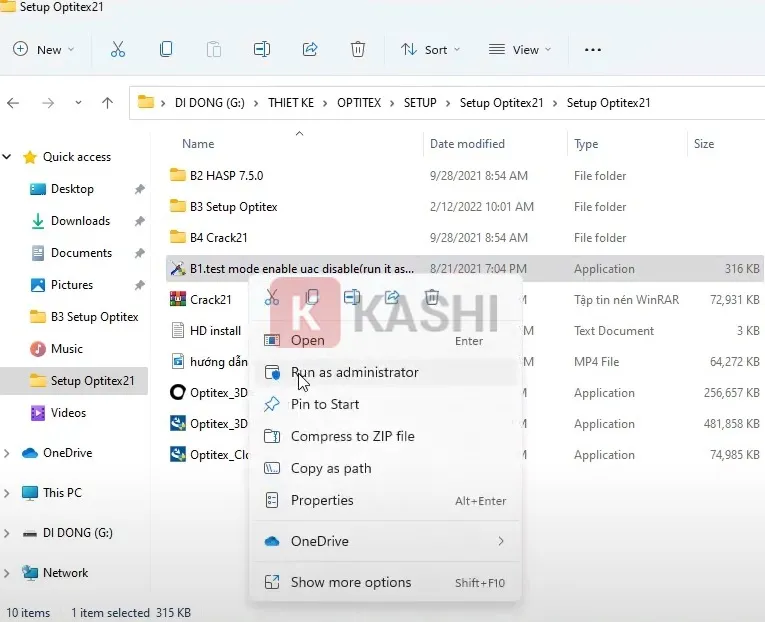
<p>Bạn bật chế độ Test Mode bằng cách nhấn chuột phải vào file và chọn “<strong>Run as administrator</strong>” =&gt;&nbsp;<strong>Enter</strong>&nbsp;=&gt;&nbsp;<strong>Enter</strong>.</p>

<figure aria-describedby="caption-attachment-13306" id="attachment_13306"><img alt="Bật chế độ Test Mode" data-lazy-sizes="(max-width: 765px) 100vw, 765px" data-lazy-src="https://kashi.com.vn/wp-content/uploads/2022/08/Optitex-21_24.webp" data-lazy-srcset="https://kashi.com.vn/wp-content/uploads/2022/08/Optitex-21_24.webp 765w,https://kashi.com.vn/wp-content/uploads/2022/08/Optitex-21_24-696x566.webp 696w,https://kashi.com.vn/wp-content/uploads/2022/08/Optitex-21_24-517x420.webp 517w" data-ll-status="loaded" decoding="async" height="622" sizes="(max-width: 765px) 100vw, 765px" src="https://kashi.com.vn/wp-content/uploads/2022/08/Optitex-21_24.webp" srcset="https://kashi.com.vn/wp-content/uploads/2022/08/Optitex-21_24.webp 765w,https://kashi.com.vn/wp-content/uploads/2022/08/Optitex-21_24-696x566.webp 696w,https://kashi.com.vn/wp-content/uploads/2022/08/Optitex-21_24-517x420.webp 517w" width="765" />
<figcaption id="caption-attachment-13306">Bật chế độ Test Mode</figcaption>
</figure>

<h4 id="ftoc-heading-11"><strong>Bước 2:</strong></h4>

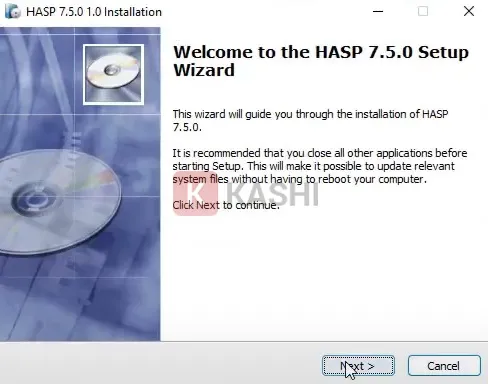
<p>Bạn thực hiện reset lại máy, sau đó bạn kích đúp chuột vào file “<strong>HASP 7.5.0</strong>” và nhấn “<strong>Next</strong>“.</p>

<figure aria-describedby="caption-attachment-13307" id="attachment_13307"><img alt="Nhấn &#039;Next&#039;" data-lazy-src="https://kashi.com.vn/wp-content/uploads/2022/08/Optitex-21_23.webp" data-ll-status="loaded" decoding="async" height="384" src="https://kashi.com.vn/wp-content/uploads/2022/08/Optitex-21_23.webp" width="488" />
<figcaption id="caption-attachment-13307">Nhấn “Next”</figcaption>
</figure>

<h4 id="ftoc-heading-12"><strong>Bước 3:</strong></h4>

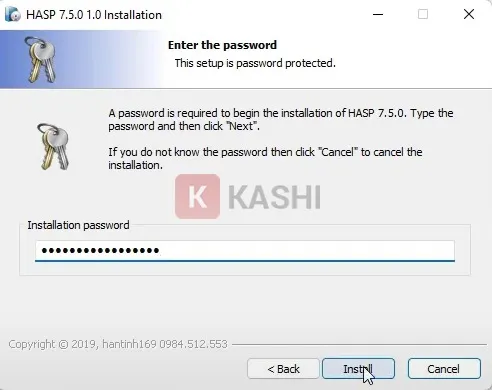
<p>Bạn nhập Pass vào và nhấn “<strong>Install</strong>“.</p>

<figure aria-describedby="caption-attachment-13308" id="attachment_13308"><img alt="Nhấn &#039;Install&#039;." data-lazy-src="https://kashi.com.vn/wp-content/uploads/2022/08/Optitex-21_22.webp" data-ll-status="loaded" decoding="async" height="390" src="https://kashi.com.vn/wp-content/uploads/2022/08/Optitex-21_22.webp" width="492" />
<figcaption id="caption-attachment-13308">Nhấn “Install”.</figcaption>
</figure>

<h4 id="ftoc-heading-13"><strong>Bước 4:</strong></h4>

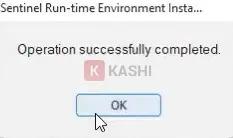
<p>Bạn chờ trong ít phút rồi nhấn “<strong>Ok</strong>“.</p>

<figure aria-describedby="caption-attachment-13309" id="attachment_13309"><img alt="Nhấn &#039;Ok&#039;" data-lazy-src="https://kashi.com.vn/wp-content/uploads/2022/08/Optitex-21_21.webp" data-ll-status="loaded" decoding="async" height="138" src="https://kashi.com.vn/wp-content/uploads/2022/08/Optitex-21_21.webp" width="233" />
<figcaption id="caption-attachment-13309">Nhấn “Ok”</figcaption>
</figure>

<h4 id="ftoc-heading-14"><strong>Bước 5:</strong></h4>

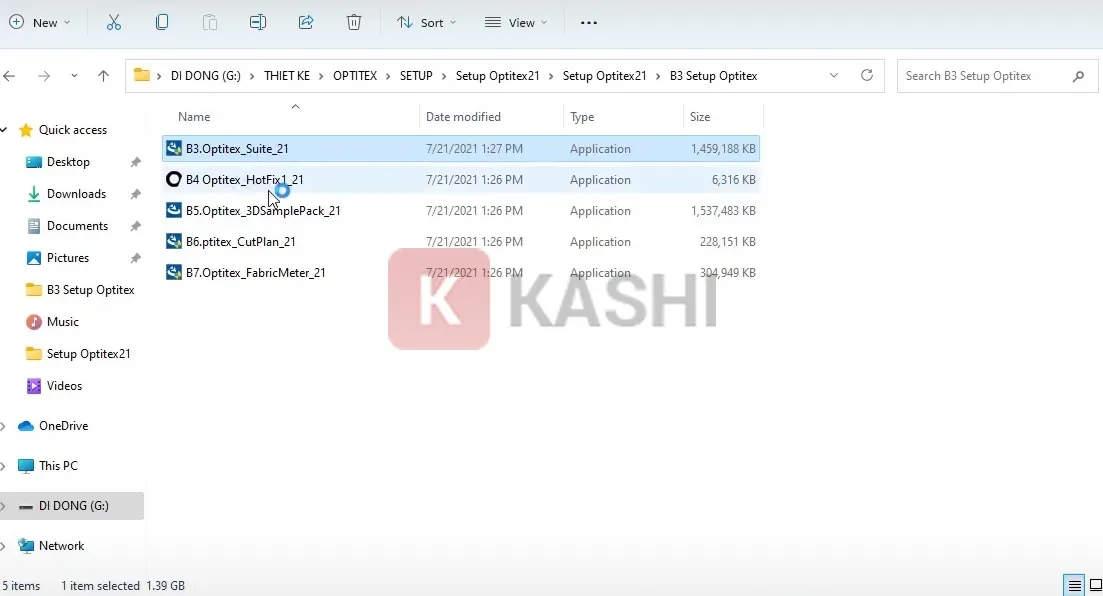
<p>Bạn thực hiện cài đặt lần lượt các file theo từng bước như hình bên dưới.</p>

<figure aria-describedby="caption-attachment-13310" id="attachment_13310"><img alt="Cài đặt lần lượt các file" data-lazy-sizes="(max-width: 1103px) 100vw, 1103px" data-lazy-src="https://kashi.com.vn/wp-content/uploads/2022/08/Optitex-21_20.webp" data-lazy-srcset="https://kashi.com.vn/wp-content/uploads/2022/08/Optitex-21_20.webp 1103w,https://kashi.com.vn/wp-content/uploads/2022/08/Optitex-21_20-768x415.webp 768w,https://kashi.com.vn/wp-content/uploads/2022/08/Optitex-21_20-696x376.webp 696w,https://kashi.com.vn/wp-content/uploads/2022/08/Optitex-21_20-1068x577.webp 1068w,https://kashi.com.vn/wp-content/uploads/2022/08/Optitex-21_20-777x420.webp 777w" data-ll-status="loaded" decoding="async" height="596" sizes="(max-width: 1103px) 100vw, 1103px" src="https://kashi.com.vn/wp-content/uploads/2022/08/Optitex-21_20.webp" srcset="https://kashi.com.vn/wp-content/uploads/2022/08/Optitex-21_20.webp 1103w,https://kashi.com.vn/wp-content/uploads/2022/08/Optitex-21_20-768x415.webp 768w,https://kashi.com.vn/wp-content/uploads/2022/08/Optitex-21_20-696x376.webp 696w,https://kashi.com.vn/wp-content/uploads/2022/08/Optitex-21_20-1068x577.webp 1068w,https://kashi.com.vn/wp-content/uploads/2022/08/Optitex-21_20-777x420.webp 777w" width="1103" />
<figcaption id="caption-attachment-13310">Cài đặt lần lượt các file</figcaption>
</figure>

<ul>
	<li>Đầu tiên bạn thực hiện cài đặt file “<strong>Optitex_Suite_21</strong>” bằng cách kích đúp chuột vào.</li>
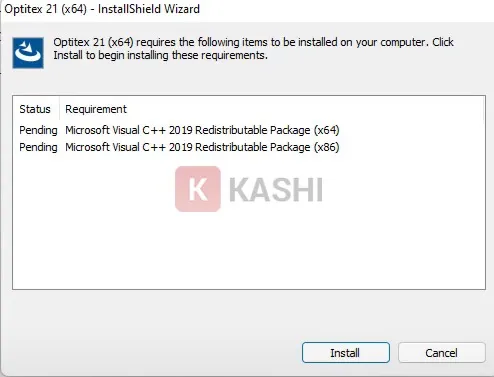
	<li>Nhấn “<strong>Install</strong>“.</li>
</ul>

<figure aria-describedby="caption-attachment-13311" id="attachment_13311"><img alt="Nhấn &#039;Install&#039;." data-lazy-sizes="(max-width: 494px) 100vw, 494px" data-lazy-src="https://kashi.com.vn/wp-content/uploads/2022/08/Optitex-21_19.webp" data-lazy-srcset="https://kashi.com.vn/wp-content/uploads/2022/08/Optitex-21_19.webp 494w,https://kashi.com.vn/wp-content/uploads/2022/08/Optitex-21_19-80x60.webp 80w" data-ll-status="loaded" decoding="async" height="377" sizes="(max-width: 494px) 100vw, 494px" src="https://kashi.com.vn/wp-content/uploads/2022/08/Optitex-21_19.webp" srcset="https://kashi.com.vn/wp-content/uploads/2022/08/Optitex-21_19.webp 494w,https://kashi.com.vn/wp-content/uploads/2022/08/Optitex-21_19-80x60.webp 80w" width="494" />
<figcaption id="caption-attachment-13311">Nhấn “Install”.</figcaption>
</figure>

<ul>
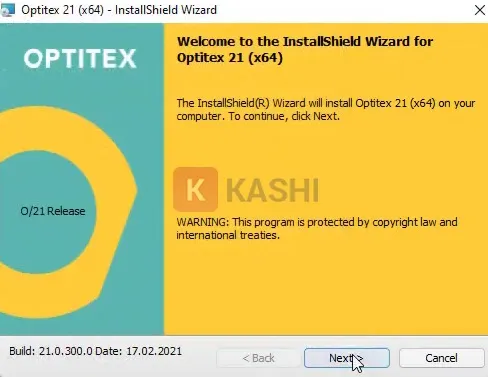
	<li>Nhấn “<strong>Next</strong>“.</li>
</ul>

<figure aria-describedby="caption-attachment-13312" id="attachment_13312"><img alt="Nhấn &#039;Next&#039;." data-lazy-src="https://kashi.com.vn/wp-content/uploads/2022/08/Optitex-21_18.webp" data-ll-status="loaded" decoding="async" height="377" src="https://kashi.com.vn/wp-content/uploads/2022/08/Optitex-21_18.webp" width="488" />
<figcaption id="caption-attachment-13312">Nhấn “Next”.</figcaption>
</figure>

<ul>
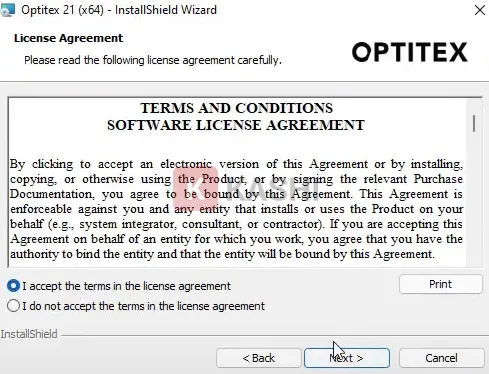
	<li>Tick vào “<strong>I accept…</strong>” để đồng ý điều khoản rồi nhấn “<strong>Next</strong>“.</li>
</ul>

<figure aria-describedby="caption-attachment-13313" id="attachment_13313"><img alt="Đồng ý điều khoản rồi nhấn &#039;Next&#039;." data-lazy-sizes="(max-width: 489px) 100vw, 489px" data-lazy-src="https://kashi.com.vn/wp-content/uploads/2022/08/Optitex-21_17.webp" data-lazy-srcset="https://kashi.com.vn/wp-content/uploads/2022/08/Optitex-21_17.webp 489w,https://kashi.com.vn/wp-content/uploads/2022/08/Optitex-21_17-80x60.webp 80w" data-ll-status="loaded" decoding="async" height="374" sizes="(max-width: 489px) 100vw, 489px" src="https://kashi.com.vn/wp-content/uploads/2022/08/Optitex-21_17.webp" srcset="https://kashi.com.vn/wp-content/uploads/2022/08/Optitex-21_17.webp 489w,https://kashi.com.vn/wp-content/uploads/2022/08/Optitex-21_17-80x60.webp 80w" width="489" />
<figcaption id="caption-attachment-13313">Đồng ý điều khoản rồi nhấn “Next”.</figcaption>
</figure>

<ul>
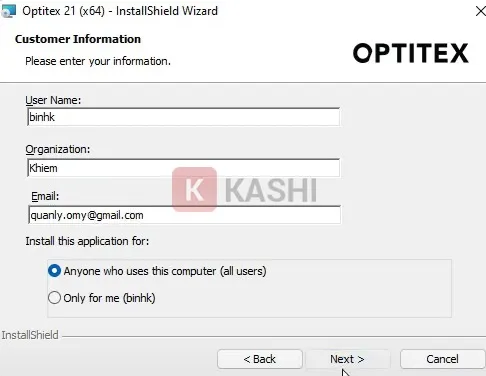
	<li>Nhập tên người dùng rồi nhấn “<strong>Next</strong>“.</li>
</ul>

<figure aria-describedby="caption-attachment-13314" id="attachment_13314"><img alt="Nhập tên người dùng" data-lazy-src="https://kashi.com.vn/wp-content/uploads/2022/08/Optitex-21_16.webp" data-ll-status="loaded" decoding="async" height="376" src="https://kashi.com.vn/wp-content/uploads/2022/08/Optitex-21_16.webp" width="486" />
<figcaption id="caption-attachment-13314">Nhập tên người dùng</figcaption>
</figure>

<ul>
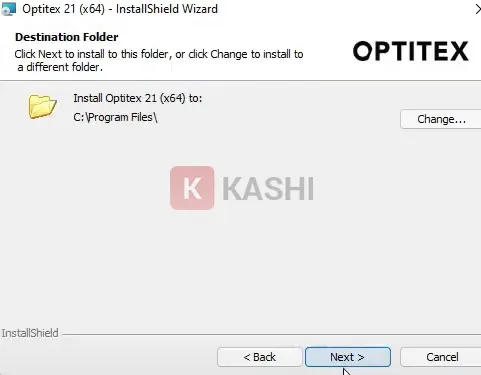
	<li>Để cài đặt mặc định vào ổ C và nhấn “<strong>Next</strong>“.</li>
</ul>

<figure aria-describedby="caption-attachment-13315" id="attachment_13315"><img alt="Nhấn &#039;Next&#039;" data-lazy-src="https://kashi.com.vn/wp-content/uploads/2022/08/Optitex-21_15.webp" data-ll-status="loaded" decoding="async" height="375" src="https://kashi.com.vn/wp-content/uploads/2022/08/Optitex-21_15.webp" width="481" />
<figcaption id="caption-attachment-13315">Nhấn “Next”</figcaption>
</figure>

<ul>
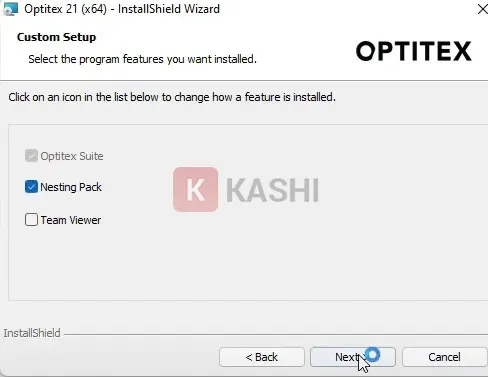
	<li>Tick vào “<strong>Nesting Pack</strong>” và bỏ chọn ô bên dưới đi rồi nhấn “<strong>Next</strong>“.</li>
</ul>

<figure aria-describedby="caption-attachment-13316" id="attachment_13316"><img alt="Tick vào &#039;Nesting Pack&#039;" data-lazy-src="https://kashi.com.vn/wp-content/uploads/2022/08/Optitex-21_14.webp" data-ll-status="loaded" decoding="async" height="377" src="https://kashi.com.vn/wp-content/uploads/2022/08/Optitex-21_14.webp" width="488" />
<figcaption id="caption-attachment-13316">Tick vào “Nesting Pack”</figcaption>
</figure>

<ul>
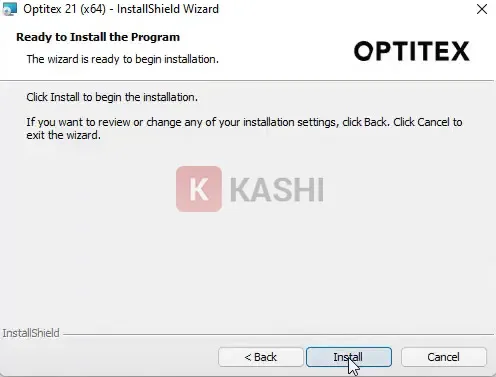
	<li>Nhấn “<strong>Next</strong>” lần nữa rồi chọn “<strong>Install</strong>“.</li>
</ul>

<figure aria-describedby="caption-attachment-13317" id="attachment_13317"><img alt="Chọn &#039;Install&#039;." data-lazy-sizes="(max-width: 496px) 100vw, 496px" data-lazy-src="https://kashi.com.vn/wp-content/uploads/2022/08/Optitex-21_13.webp" data-lazy-srcset="https://kashi.com.vn/wp-content/uploads/2022/08/Optitex-21_13.webp 496w,https://kashi.com.vn/wp-content/uploads/2022/08/Optitex-21_13-80x60.webp 80w" data-ll-status="loaded" decoding="async" height="377" sizes="(max-width: 496px) 100vw, 496px" src="https://kashi.com.vn/wp-content/uploads/2022/08/Optitex-21_13.webp" srcset="https://kashi.com.vn/wp-content/uploads/2022/08/Optitex-21_13.webp 496w,https://kashi.com.vn/wp-content/uploads/2022/08/Optitex-21_13-80x60.webp 80w" width="496" />
<figcaption id="caption-attachment-13317">Chọn “Install”.</figcaption>
</figure>

<ul>
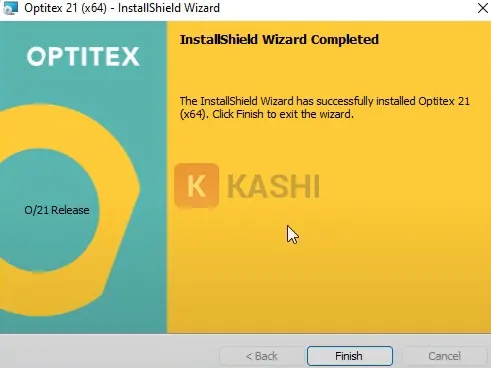
	<li>Nhấn “<strong>Finish</strong>” để hoàn tất cài đặt.</li>
</ul>

<figure aria-describedby="caption-attachment-13318" id="attachment_13318"><img alt="Nhấn &#039;Finish&#039;" data-lazy-sizes="(max-width: 491px) 100vw, 491px" data-lazy-src="https://kashi.com.vn/wp-content/uploads/2022/08/Optitex-21_12.webp" data-lazy-srcset="https://kashi.com.vn/wp-content/uploads/2022/08/Optitex-21_12.webp 491w,https://kashi.com.vn/wp-content/uploads/2022/08/Optitex-21_12-80x60.webp 80w,https://kashi.com.vn/wp-content/uploads/2022/08/Optitex-21_12-265x198.webp 265w" data-ll-status="loaded" decoding="async" height="368" sizes="(max-width: 491px) 100vw, 491px" src="https://kashi.com.vn/wp-content/uploads/2022/08/Optitex-21_12.webp" srcset="https://kashi.com.vn/wp-content/uploads/2022/08/Optitex-21_12.webp 491w,https://kashi.com.vn/wp-content/uploads/2022/08/Optitex-21_12-80x60.webp 80w,https://kashi.com.vn/wp-content/uploads/2022/08/Optitex-21_12-265x198.webp 265w" width="491" />
<figcaption id="caption-attachment-13318">Nhấn “Finish”</figcaption>
</figure>

<h4 id="ftoc-heading-15"><strong>Bước 6:</strong></h4>

<p>Bạn thực hiện cài đặt tương tự với các file còn lại là hoàn tất nhé.</p>

<h2 id="ftoc-heading-16"><strong>Hướng dẫn crack phần mềm Optitex 21</strong></h2>

<p>Để sử dụng phần mềm Optitex 21 vĩnh viễn với đầy đủ các tính năng thì bạn cần tiếp tục crack theo các bước sau đây:</p>

<h4 id="ftoc-heading-17"><strong>Bước 1:</strong></h4>

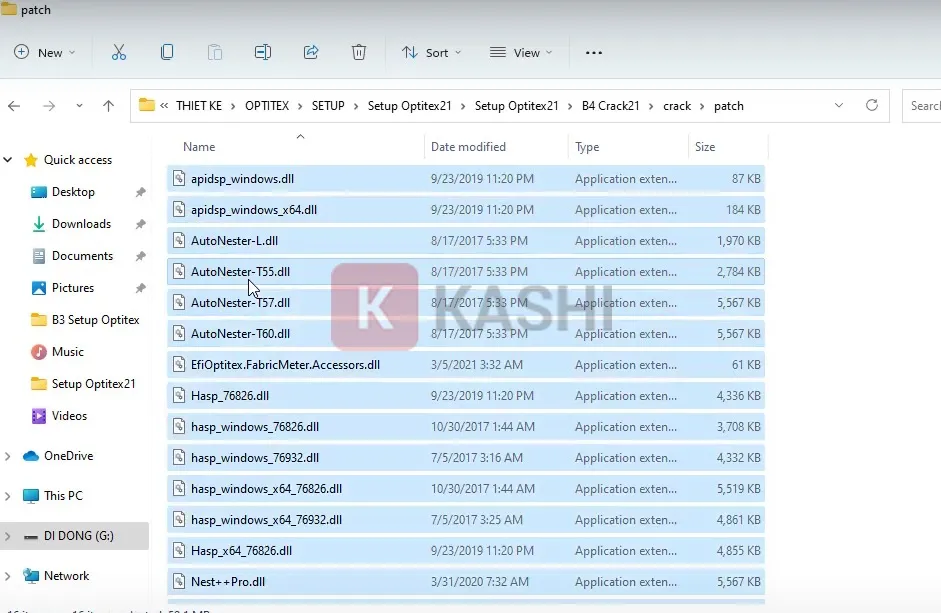
<p>Bạn truy cập vào thư mục crack, chọn file “<strong>Patch</strong>” và copy tất cả các thư mục trong đó.</p>

<figure aria-describedby="caption-attachment-13319" id="attachment_13319"><img alt="Copy tất cả các file" data-lazy-sizes="(max-width: 941px) 100vw, 941px" data-lazy-src="https://kashi.com.vn/wp-content/uploads/2022/08/Optitex-21_11.webp" data-lazy-srcset="https://kashi.com.vn/wp-content/uploads/2022/08/Optitex-21_11.webp 941w,https://kashi.com.vn/wp-content/uploads/2022/08/Optitex-21_11-768x500.webp 768w,https://kashi.com.vn/wp-content/uploads/2022/08/Optitex-21_11-696x453.webp 696w,https://kashi.com.vn/wp-content/uploads/2022/08/Optitex-21_11-645x420.webp 645w" data-ll-status="loaded" decoding="async" height="613" sizes="(max-width: 941px) 100vw, 941px" src="https://kashi.com.vn/wp-content/uploads/2022/08/Optitex-21_11.webp" srcset="https://kashi.com.vn/wp-content/uploads/2022/08/Optitex-21_11.webp 941w,https://kashi.com.vn/wp-content/uploads/2022/08/Optitex-21_11-768x500.webp 768w,https://kashi.com.vn/wp-content/uploads/2022/08/Optitex-21_11-696x453.webp 696w,https://kashi.com.vn/wp-content/uploads/2022/08/Optitex-21_11-645x420.webp 645w" width="941" />
<figcaption id="caption-attachment-13319">Copy tất cả các file</figcaption>
</figure>

<h4 id="ftoc-heading-18"><strong>Bước 2:</strong></h4>

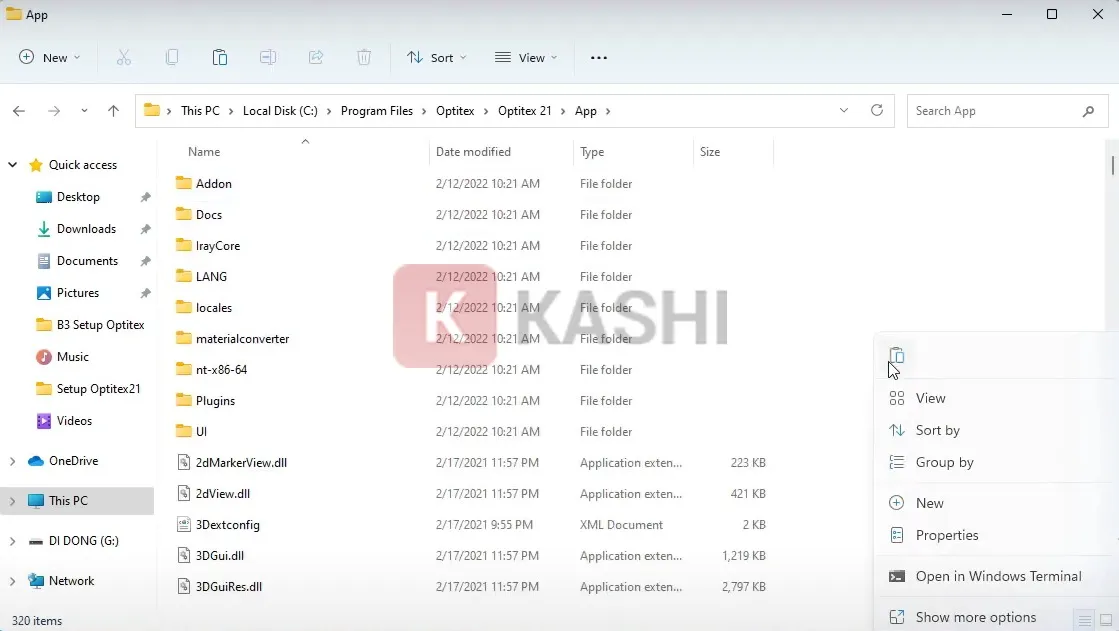
<p>Bạn dán vào đường dẫn:<strong>&nbsp;C:Program filesOpitexOpitex 21App</strong>.</p>

<figure aria-describedby="caption-attachment-13320" id="attachment_13320"><img alt="Dán file" data-lazy-sizes="(max-width: 1119px) 100vw, 1119px" data-lazy-src="https://kashi.com.vn/wp-content/uploads/2022/08/Optitex-21_10.webp" data-lazy-srcset="https://kashi.com.vn/wp-content/uploads/2022/08/Optitex-21_10.webp 1119w,https://kashi.com.vn/wp-content/uploads/2022/08/Optitex-21_10-768x433.webp 768w,https://kashi.com.vn/wp-content/uploads/2022/08/Optitex-21_10-696x392.webp 696w,https://kashi.com.vn/wp-content/uploads/2022/08/Optitex-21_10-1068x602.webp 1068w,https://kashi.com.vn/wp-content/uploads/2022/08/Optitex-21_10-745x420.webp 745w" data-ll-status="loaded" decoding="async" height="631" sizes="(max-width: 1119px) 100vw, 1119px" src="https://kashi.com.vn/wp-content/uploads/2022/08/Optitex-21_10.webp" srcset="https://kashi.com.vn/wp-content/uploads/2022/08/Optitex-21_10.webp 1119w,https://kashi.com.vn/wp-content/uploads/2022/08/Optitex-21_10-768x433.webp 768w,https://kashi.com.vn/wp-content/uploads/2022/08/Optitex-21_10-696x392.webp 696w,https://kashi.com.vn/wp-content/uploads/2022/08/Optitex-21_10-1068x602.webp 1068w,https://kashi.com.vn/wp-content/uploads/2022/08/Optitex-21_10-745x420.webp 745w" width="1119" />
<figcaption id="caption-attachment-13320">Dán file</figcaption>
</figure>

<h4 id="ftoc-heading-19"><strong>Bước 3:</strong></h4>

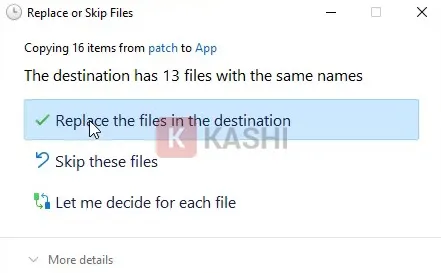
<p>Bạn nhấn vào “<strong>Replace the file in the destination</strong>” để xác nhận thay thế file.</p>

<figure aria-describedby="caption-attachment-13321" id="attachment_13321"><img alt="Nhấn &#039;Replace the file in the destination&#039;" data-lazy-sizes="(max-width: 441px) 100vw, 441px" data-lazy-src="https://kashi.com.vn/wp-content/uploads/2022/08/Optitex-21_9.webp" data-lazy-srcset="https://kashi.com.vn/wp-content/uploads/2022/08/Optitex-21_9.webp 441w,https://kashi.com.vn/wp-content/uploads/2022/08/Optitex-21_9-356x220.webp 356w" data-ll-status="loaded" decoding="async" height="273" sizes="(max-width: 441px) 100vw, 441px" src="https://kashi.com.vn/wp-content/uploads/2022/08/Optitex-21_9.webp" srcset="https://kashi.com.vn/wp-content/uploads/2022/08/Optitex-21_9.webp 441w,https://kashi.com.vn/wp-content/uploads/2022/08/Optitex-21_9-356x220.webp 356w" width="441" />
<figcaption id="caption-attachment-13321">Nhấn “Replace the file in the destination”</figcaption>
</figure>

<h4 id="ftoc-heading-20"><strong>Bước 4:</strong></h4>

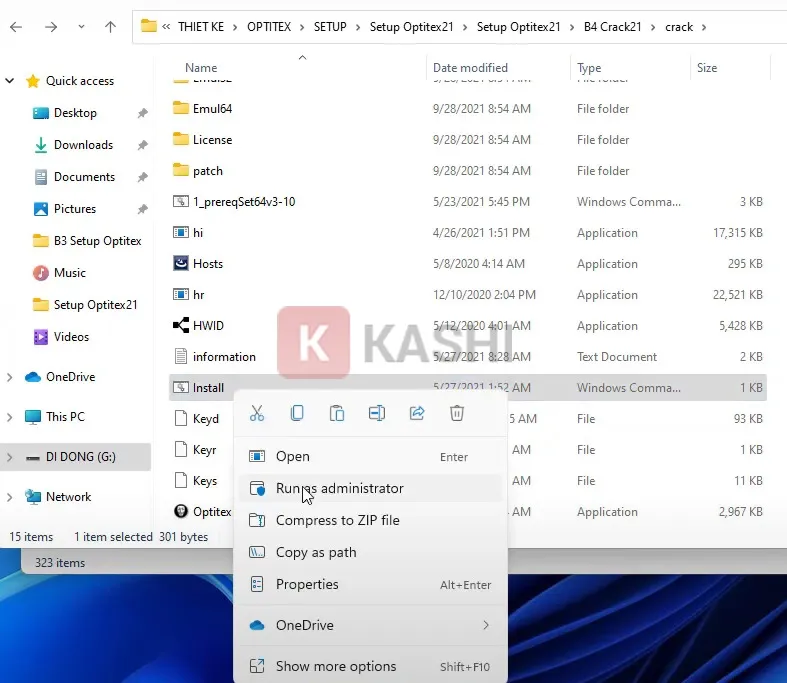
<p>Bạn quay lại thư mục crack, nhấn chuột phải vào “<strong>Install</strong>” và chọn “<strong>Run as administrator</strong>“.</p>

<figure aria-describedby="caption-attachment-13322" id="attachment_13322"><img alt="Chạy &#039;Install&#039; với quyền admin" data-lazy-sizes="(max-width: 787px) 100vw, 787px" data-lazy-src="https://kashi.com.vn/wp-content/uploads/2022/08/Optitex-21_8.webp" data-lazy-srcset="https://kashi.com.vn/wp-content/uploads/2022/08/Optitex-21_8.webp 787w,https://kashi.com.vn/wp-content/uploads/2022/08/Optitex-21_8-768x667.webp 768w,https://kashi.com.vn/wp-content/uploads/2022/08/Optitex-21_8-534x462.webp 534w,https://kashi.com.vn/wp-content/uploads/2022/08/Optitex-21_8-696x604.webp 696w,https://kashi.com.vn/wp-content/uploads/2022/08/Optitex-21_8-484x420.webp 484w" data-ll-status="loaded" decoding="async" height="683" sizes="(max-width: 787px) 100vw, 787px" src="https://kashi.com.vn/wp-content/uploads/2022/08/Optitex-21_8.webp" srcset="https://kashi.com.vn/wp-content/uploads/2022/08/Optitex-21_8.webp 787w,https://kashi.com.vn/wp-content/uploads/2022/08/Optitex-21_8-768x667.webp 768w,https://kashi.com.vn/wp-content/uploads/2022/08/Optitex-21_8-534x462.webp 534w,https://kashi.com.vn/wp-content/uploads/2022/08/Optitex-21_8-696x604.webp 696w,https://kashi.com.vn/wp-content/uploads/2022/08/Optitex-21_8-484x420.webp 484w" width="787" />
<figcaption id="caption-attachment-13322">Chạy “Install” với quyền admin</figcaption>
</figure>

<h4 id="ftoc-heading-21"><strong>Bước 5:</strong></h4>

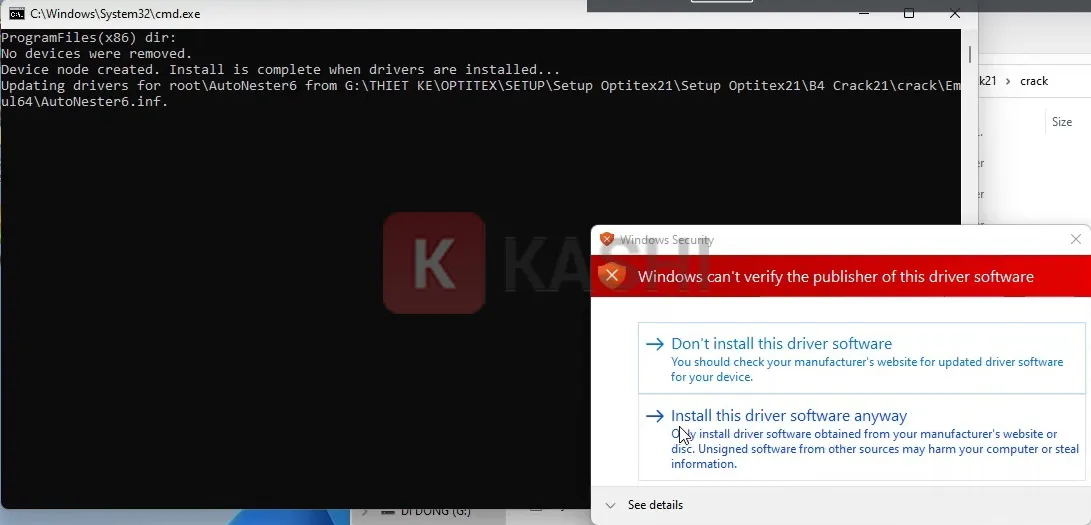
<p>Bạn chờ trong ít phút, khi xuất hiện thông báo như hình bên dưới thì chọn “<strong>Install this driver software any way</strong>” 2 lần.</p>

<figure aria-describedby="caption-attachment-13323" id="attachment_13323"><img alt="Nhấn &#039;Install this driver software any way&#039;" data-lazy-sizes="(max-width: 1091px) 100vw, 1091px" data-lazy-src="https://kashi.com.vn/wp-content/uploads/2022/08/Optitex-21_7.webp" data-lazy-srcset="https://kashi.com.vn/wp-content/uploads/2022/08/Optitex-21_7.webp 1091w,https://kashi.com.vn/wp-content/uploads/2022/08/Optitex-21_7-768x370.webp 768w,https://kashi.com.vn/wp-content/uploads/2022/08/Optitex-21_7-696x335.webp 696w,https://kashi.com.vn/wp-content/uploads/2022/08/Optitex-21_7-1068x514.webp 1068w,https://kashi.com.vn/wp-content/uploads/2022/08/Optitex-21_7-873x420.webp 873w" data-ll-status="loaded" decoding="async" height="525" sizes="(max-width: 1091px) 100vw, 1091px" src="https://kashi.com.vn/wp-content/uploads/2022/08/Optitex-21_7.webp" srcset="https://kashi.com.vn/wp-content/uploads/2022/08/Optitex-21_7.webp 1091w,https://kashi.com.vn/wp-content/uploads/2022/08/Optitex-21_7-768x370.webp 768w,https://kashi.com.vn/wp-content/uploads/2022/08/Optitex-21_7-696x335.webp 696w,https://kashi.com.vn/wp-content/uploads/2022/08/Optitex-21_7-1068x514.webp 1068w,https://kashi.com.vn/wp-content/uploads/2022/08/Optitex-21_7-873x420.webp 873w" width="1091" />
<figcaption id="caption-attachment-13323">Nhấn “Install this driver software any way”</figcaption>
</figure>

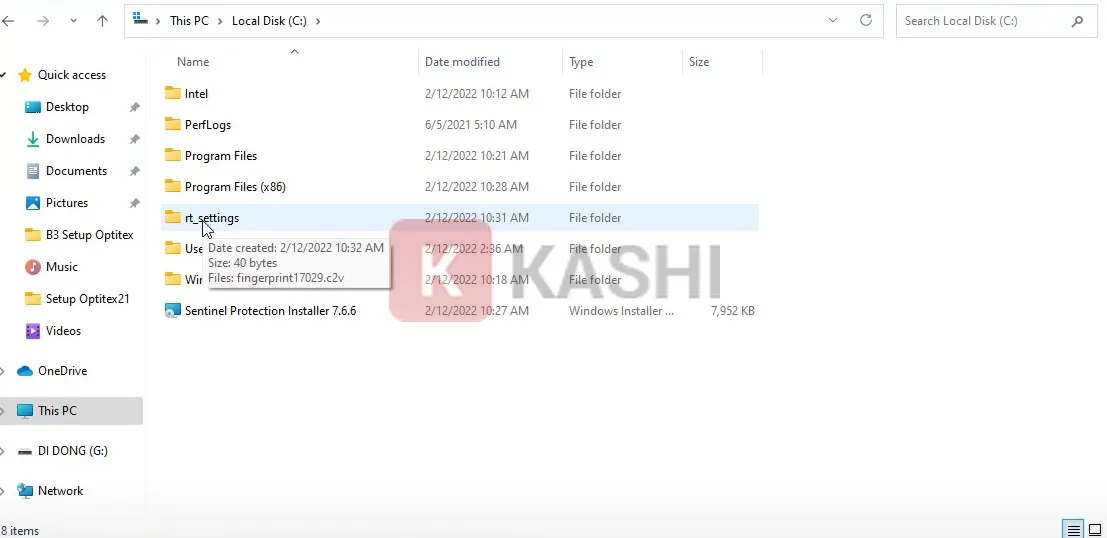
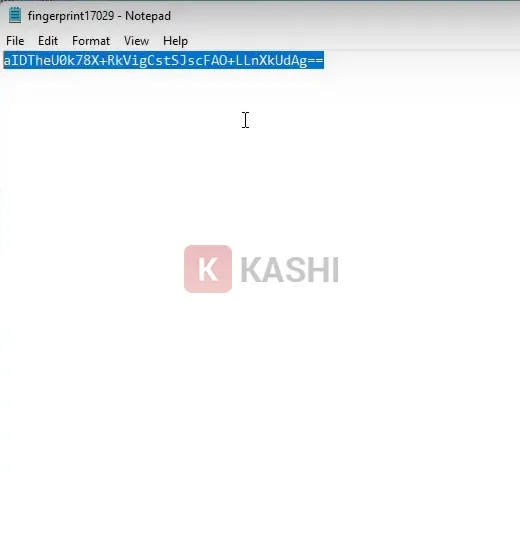
<h4 id="ftoc-heading-22"><strong>Bước 6:</strong></h4>

<p>Bạn truy cập vào thư mục “<strong>rt-settigs</strong>“, sau đó mở file với Notepad và copy dòng code.</p>

<figure aria-describedby="caption-attachment-13324" id="attachment_13324"><img alt="Mở &#039;rt-settigs&#039;" data-lazy-sizes="(max-width: 1107px) 100vw, 1107px" data-lazy-src="https://kashi.com.vn/wp-content/uploads/2022/08/Optitex-21_6.webp" data-lazy-srcset="https://kashi.com.vn/wp-content/uploads/2022/08/Optitex-21_6.webp 1107w,https://kashi.com.vn/wp-content/uploads/2022/08/Optitex-21_6-768x373.webp 768w,https://kashi.com.vn/wp-content/uploads/2022/08/Optitex-21_6-696x338.webp 696w,https://kashi.com.vn/wp-content/uploads/2022/08/Optitex-21_6-1068x519.webp 1068w,https://kashi.com.vn/wp-content/uploads/2022/08/Optitex-21_6-864x420.webp 864w" data-ll-status="loaded" decoding="async" height="538" sizes="(max-width: 1107px) 100vw, 1107px" src="https://kashi.com.vn/wp-content/uploads/2022/08/Optitex-21_6.webp" srcset="https://kashi.com.vn/wp-content/uploads/2022/08/Optitex-21_6.webp 1107w,https://kashi.com.vn/wp-content/uploads/2022/08/Optitex-21_6-768x373.webp 768w,https://kashi.com.vn/wp-content/uploads/2022/08/Optitex-21_6-696x338.webp 696w,https://kashi.com.vn/wp-content/uploads/2022/08/Optitex-21_6-1068x519.webp 1068w,https://kashi.com.vn/wp-content/uploads/2022/08/Optitex-21_6-864x420.webp 864w" width="1107" />
<figcaption id="caption-attachment-13324">Mở “rt-settigs”</figcaption>
</figure>

<figure aria-describedby="caption-attachment-13325" id="attachment_13325"><img alt="Copy code" data-lazy-sizes="(max-width: 520px) 100vw, 520px" data-lazy-src="https://kashi.com.vn/wp-content/uploads/2022/08/Optitex-21_5.webp" data-lazy-srcset="https://kashi.com.vn/wp-content/uploads/2022/08/Optitex-21_5.webp 520w,https://kashi.com.vn/wp-content/uploads/2022/08/Optitex-21_5-407x420.webp 407w" data-ll-status="loaded" decoding="async" height="536" sizes="(max-width: 520px) 100vw, 520px" src="https://kashi.com.vn/wp-content/uploads/2022/08/Optitex-21_5.webp" srcset="https://kashi.com.vn/wp-content/uploads/2022/08/Optitex-21_5.webp 520w,https://kashi.com.vn/wp-content/uploads/2022/08/Optitex-21_5-407x420.webp 407w" width="520" />
<figcaption id="caption-attachment-13325">Copy code</figcaption>
</figure>

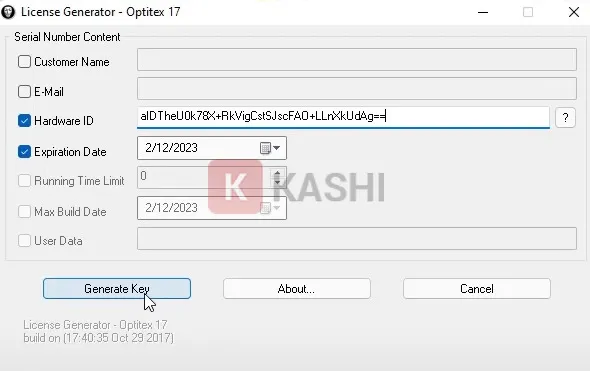
<h4 id="ftoc-heading-23"><strong>Bước 7:</strong></h4>

<p>Bạn mở file “<strong>OpitexKG</strong>” lên, bỏ dấu tick 2 ô đầu, dán dòng code vừa copy vào dòng thứ 3 và nhấn “<strong>Generate Key</strong>“.</p>

<figure aria-describedby="caption-attachment-13326" id="attachment_13326"><img alt="Nhấn &#039;Generate Key&#039;." data-lazy-src="https://kashi.com.vn/wp-content/uploads/2022/08/Optitex-21_4.webp" data-ll-status="loaded" decoding="async" height="371" src="https://kashi.com.vn/wp-content/uploads/2022/08/Optitex-21_4.webp" width="590" />
<figcaption id="caption-attachment-13326">Nhấn “Generate Key”.</figcaption>
</figure>

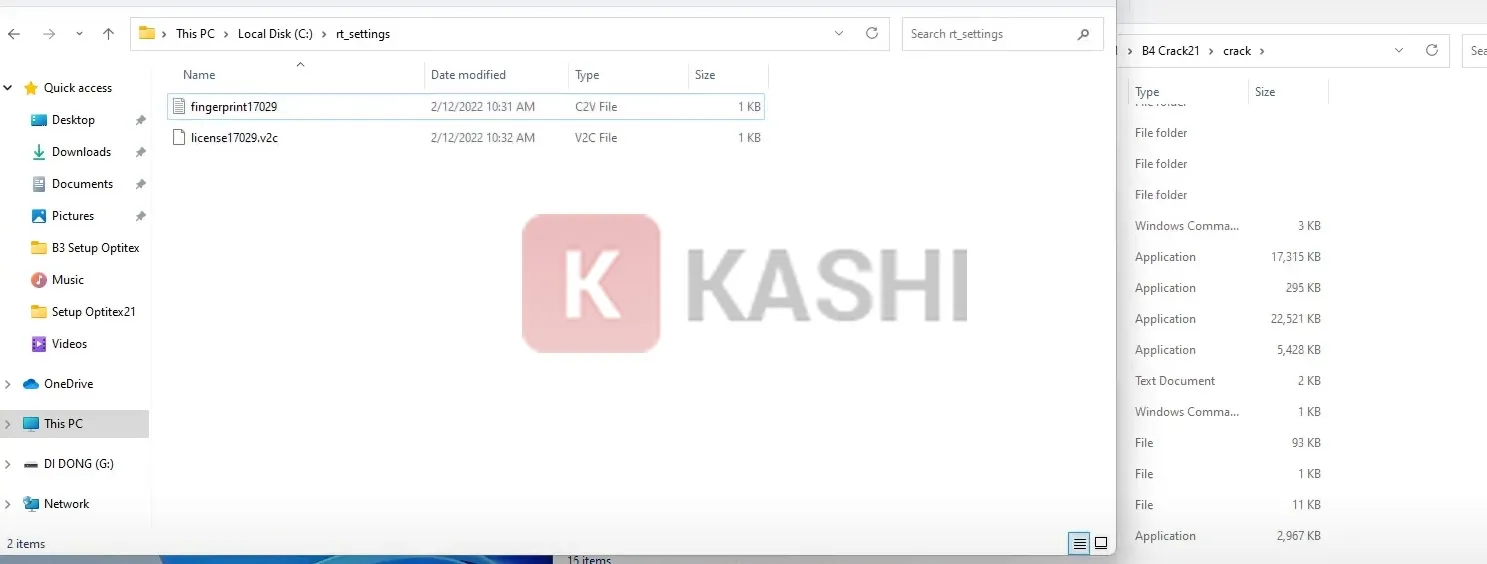
<h4 id="ftoc-heading-24"><strong>Bước 8:</strong></h4>

<p>Lúc này nó sẽ sinh ra một file ở ngay cạnh “<strong>OpitexKG</strong>“, bạn nhấn “<strong>Ctrl + X</strong>” file đó và paste nó vào trong thư mục “<strong>rt-settigs</strong>“.</p>

<figure aria-describedby="caption-attachment-13327" id="attachment_13327"><img alt="Paste file" data-lazy-sizes="(max-width: 1487px) 100vw, 1487px" data-lazy-src="https://kashi.com.vn/wp-content/uploads/2022/08/Optitex-21_3.webp" data-lazy-srcset="https://kashi.com.vn/wp-content/uploads/2022/08/Optitex-21_3.webp 1487w,https://kashi.com.vn/wp-content/uploads/2022/08/Optitex-21_3-768x291.webp 768w,https://kashi.com.vn/wp-content/uploads/2022/08/Optitex-21_3-696x264.webp 696w,https://kashi.com.vn/wp-content/uploads/2022/08/Optitex-21_3-1068x405.webp 1068w,https://kashi.com.vn/wp-content/uploads/2022/08/Optitex-21_3-1107x420.webp 1107w" data-ll-status="loaded" decoding="async" height="564" sizes="(max-width: 1487px) 100vw, 1487px" src="https://kashi.com.vn/wp-content/uploads/2022/08/Optitex-21_3.webp" srcset="https://kashi.com.vn/wp-content/uploads/2022/08/Optitex-21_3.webp 1487w,https://kashi.com.vn/wp-content/uploads/2022/08/Optitex-21_3-768x291.webp 768w,https://kashi.com.vn/wp-content/uploads/2022/08/Optitex-21_3-696x264.webp 696w,https://kashi.com.vn/wp-content/uploads/2022/08/Optitex-21_3-1068x405.webp 1068w,https://kashi.com.vn/wp-content/uploads/2022/08/Optitex-21_3-1107x420.webp 1107w" width="1487" />
<figcaption id="caption-attachment-13327">Paste file</figcaption>
</figure>

<h4 id="ftoc-heading-25"><strong>Bước 9:</strong></h4>

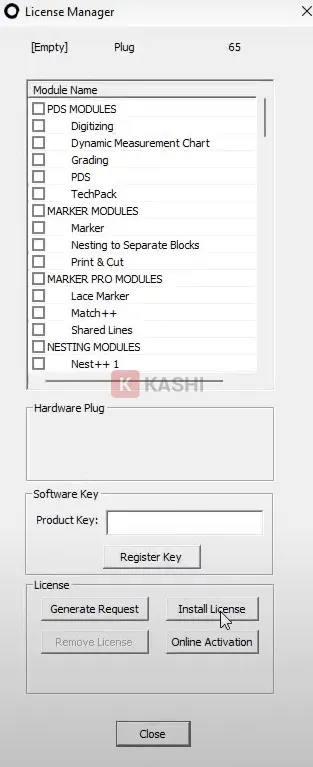
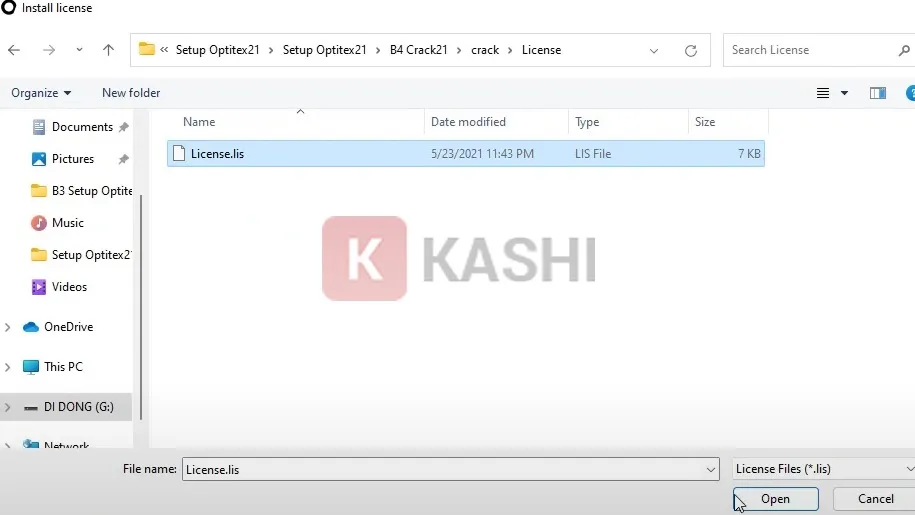
<p>Bạn khởi động lại phần mềm Optitex và nhấn vào “<strong>Install License</strong>“. Sau đó, bạn chọn vào “<strong>License.Lix</strong>” trong thư mục crack.</p>

<figure aria-describedby="caption-attachment-13328" id="attachment_13328"><img alt="Nhấn vào &#039;Install License&#039;" data-lazy-sizes="(max-width: 313px) 100vw, 313px" data-lazy-src="https://kashi.com.vn/wp-content/uploads/2022/08/Optitex-21_2.webp" data-lazy-srcset="https://kashi.com.vn/wp-content/uploads/2022/08/Optitex-21_2.webp 313w,https://kashi.com.vn/wp-content/uploads/2022/08/Optitex-21_2-171x420.webp 171w" data-ll-status="loaded" decoding="async" height="767" sizes="(max-width: 313px) 100vw, 313px" src="https://kashi.com.vn/wp-content/uploads/2022/08/Optitex-21_2.webp" srcset="https://kashi.com.vn/wp-content/uploads/2022/08/Optitex-21_2.webp 313w,https://kashi.com.vn/wp-content/uploads/2022/08/Optitex-21_2-171x420.webp 171w" width="313" />
<figcaption id="caption-attachment-13328">Nhấn vào “Install License”</figcaption>
</figure>

<figure aria-describedby="caption-attachment-13329" id="attachment_13329"><img alt="Chọn vào &#039;License.Lix&#039;" data-lazy-sizes="(max-width: 915px) 100vw, 915px" data-lazy-src="https://kashi.com.vn/wp-content/uploads/2022/08/Optitex-21.webp" data-lazy-srcset="https://kashi.com.vn/wp-content/uploads/2022/08/Optitex-21.webp 915w,https://kashi.com.vn/wp-content/uploads/2022/08/Optitex-21-768x432.webp 768w,https://kashi.com.vn/wp-content/uploads/2022/08/Optitex-21-696x392.webp 696w,https://kashi.com.vn/wp-content/uploads/2022/08/Optitex-21-746x420.webp 746w" data-ll-status="loaded" decoding="async" height="515" sizes="(max-width: 915px) 100vw, 915px" src="https://kashi.com.vn/wp-content/uploads/2022/08/Optitex-21.webp" srcset="https://kashi.com.vn/wp-content/uploads/2022/08/Optitex-21.webp 915w,https://kashi.com.vn/wp-content/uploads/2022/08/Optitex-21-768x432.webp 768w,https://kashi.com.vn/wp-content/uploads/2022/08/Optitex-21-696x392.webp 696w,https://kashi.com.vn/wp-content/uploads/2022/08/Optitex-21-746x420.webp 746w" width="915" />
<figcaption id="caption-attachment-13329">Chọn vào “License.Lix”</figcaption>
</figure>

<p>Như vậy là bạn đã hoàn thành rồi. Giờ đây, bạn có thể mở phần mềm Optitex 21 lên vfa sử dụng bình thường nhé.</p>

<p><strong>Kết luận:</strong></p>

<p>Trên đây là bài viết hướng dẫn cách tải, cài đặt và kích hoạt cho phần mềm Optitex 21. Mong rằng những thông tin này hữu ích với bạn.</p>

<p>Chúc các bạn thành công!<br />
Xem thêm<br />
1.&nbsp;<a href="https://phatthanhdat.com/active-windows/active-license-moi-phien-ban-windows-server-2012-khong-su-dung-file-crack-khong-virus-27.html" title="Active license mọi phiên bản Windows server 2012 không sử dụng file crack – không virus">Active license mọi phiên bản Windows server 2012 không sử dụng file crack – không virus</a><br />
2.&nbsp;<a href="https://phatthanhdat.com/active-windows/active-license-windows-server-2016-moi-phien-ban-khong-su-dung-file-crack-khong-virus-active-100-thanh-cong-26.html" title="Active license Windows server 2016 mọi phiên bản không sử dụng file crack – không virus – active 100% thành công">Active license Windows server 2016 mọi phiên bản không sử dụng file crack – không virus</a><br />
3.&nbsp;<a href="https://phatthanhdat.com/active-windows/rat-nhieu-nguoi-dang-mong-doi-window-11-ra-mat-chinh-thuc-58.html" title="Rất nhiều người đang mong đợi Window 11 ra mắt chính thức">Rất nhiều người đang mong đợi Window 11 ra mắt chính thức</a><br />
4.&nbsp;<a href="https://phatthanhdat.com/quan-tri-mang/windows-server-2019-69.html">Hướng dẫn cài đặt Windows Server 2019</a><br />
5.&nbsp;<a href="https://phatthanhdat.com/quan-tri-mang/office-2021-full-crack-5-cach-active-chuan-thanh-cong-1000-140.html">Office 2021 Full Crack, 5 cách active chuẩn thành công 1000%</a></p>
		</div>
				<div id="author">
						<p>
				<strong>Tác giả:</strong>
				<a href="https://phatthanhdat.com/index.php/author/luuhongphuc/">luuhongphuc</a>
			</p>
		</div>
	</div>
	<div id="footer" class="clearfix">
		<div id="url">
			<strong>URL của bản tin này: </strong><a href="https://phatthanhdat.com/index.php/savefile/tien-ich/download-optitex-21-full-crack-google-drive-huong-dan-cai-dat-2023-167.html" title="Download Optitex 21 Full Crack – Google Drive + Hướng dẫn cài đặt 2023">https://phatthanhdat.com/index.php/savefile/tien-ich/download-optitex-21-full-crack-google-drive-huong-dan-cai-dat-2023-167.html</a>

		</div>
		<div class="clear"></div>
		<div class="copyright">
			&copy; Phát Thành Đạt - Dịch vụ sửa chữa máy tính hóc môn
		</div>
		<div id="contact">
			<a href="mailto:info@phatthanhdat.com">info@phatthanhdat.com</a>
		</div>
	</div>
</div>
        <div id="timeoutsess" class="chromeframe">
            Bạn đã không sử dụng Site, <a onclick="timeoutsesscancel();" href="https://phatthanhdat.com/#">Bấm vào đây để duy trì trạng thái đăng nhập</a>. Thời gian chờ: <span id="secField"> 60 </span> giây
        </div>
        <div id="openidResult" class="nv-alert" style="display:none"></div>
        <div id="openidBt" data-result="" data-redirect=""></div>
<script src="https://phatthanhdat.com/assets/js/jquery/jquery.min.js"></script>
<script>var nv_base_siteurl="/",nv_lang_data="vi",nv_lang_interface="vi",nv_name_variable="nv",nv_fc_variable="op",nv_lang_variable="language",nv_module_name="news",nv_func_name="savefile",nv_is_user=0, nv_my_ofs=-4,nv_my_abbr="EDT",nv_cookie_prefix="nv4",nv_check_pass_mstime=1738000,nv_area_admin=0,nv_safemode=0,theme_responsive=0,nv_recaptcha_ver=2,nv_recaptcha_sitekey="",nv_recaptcha_type="image",XSSsanitize=1;</script>
<script src="https://phatthanhdat.com/assets/js/language/vi.js"></script>
<script src="https://phatthanhdat.com/assets/js/DOMPurify/purify3.js"></script>
<script src="https://phatthanhdat.com/assets/js/global.js"></script>
<script src="https://phatthanhdat.com/assets/js/site.js"></script>
<script src="https://phatthanhdat.com/themes/default/js/news.js"></script>
<script src="https://phatthanhdat.com/themes/default/js/main.js"></script>
<script src="https://phatthanhdat.com/themes/default/js/custom.js"></script>
<script type="application/ld+json">
        {
            "@context": "https://schema.org",
            "@type": "Organization",
            "url": "https://phatthanhdat.com",
            "logo": "https://phatthanhdat.com/uploads/about/logonho.png"
        }
        </script>
<script async custom-element="amp-ad" src="https://cdn.ampproject.org/v0/amp-ad-0.1.js"></script>
<script>
     (adsbygoogle = window.adsbygoogle || []).push({});
</script>
<script>(function(w,d,s,l,i){w[l]=w[l]||[];w[l].push({'gtm.start':
new Date().getTime(),event:'gtm.js'});var f=d.getElementsByTagName(s)[0],
j=d.createElement(s),dl=l!='dataLayer'?'&l='+l:'';j.async=true;j.src=
'https://www.googletagmanager.com/gtm.js?id='+i+dl;f.parentNode.insertBefore(j,f);
})(window,document,'script','dataLayer','GTM-KRZZ2CK');</script>
<script>
!function(f,b,e,v,n,t,s)
{if(f.fbq)return;n=f.fbq=function(){n.callMethod?
n.callMethod.apply(n,arguments):n.queue.push(arguments)};
if(!f._fbq)f._fbq=n;n.push=n;n.loaded=!0;n.version='2.0';
n.queue=[];t=b.createElement(e);t.async=!0;
t.src=v;s=b.getElementsByTagName(e)[0];
s.parentNode.insertBefore(t,s)}(window, document,'script',
'https://connect.facebook.net/en_US/fbevents.js');
fbq('init', '219812430112623');
fbq('track', 'PageView');
</script>
<script async src="https://pagead2.googlesyndication.com/pagead/js/adsbygoogle.js?client=ca-pub-3722185033130810" crossorigin="anonymous"></script>
<script>
      var chatbox = document.getElementById('fb-customer-chat');
      chatbox.setAttribute("page_id", "244380242794992");
      chatbox.setAttribute("attribution", "biz_inbox");

      window.fbAsyncInit = function() {
        FB.init({
          xfbml            : true,
          version          : 'v11.0'
        });
      };

      (function(d, s, id) {
        var js, fjs = d.getElementsByTagName(s)[0];
        if (d.getElementById(id)) return;
        js = d.createElement(s); js.id = id;
        js.src = 'https://connect.facebook.net/vi_VN/sdk/xfbml.customerchat.js';
        fjs.parentNode.insertBefore(js, fjs);
      }(document, 'script', 'facebook-jssdk'));
    </script>
<script src="https://sp.zalo.me/plugins/sdk.js"></script>
<script>
     (adsbygoogle = window.adsbygoogle || []).push({});
</script>
<script src="https://phatthanhdat.com/themes/default/js/bootstrap.min.js"></script>
</body>
</html>