<!DOCTYPE html>
    <html lang="vi" xmlns="http://www.w3.org/1999/xhtml" prefix="og: http://ogp.me/ns#">
    <head>
<title>Phát Thành Đạt Hướng dẫn tạo user VPN trên Draytek Vigor và kết nối từ Window Client đến Draytek Vigor</title>
<meta name="description" content="Hướng dẫn tạo user VPN trên Draytek Vigor và kết nối từ Window Client đến Draytek Vigor - Savefile - Tin Tức -...">
<meta name="author" content="Phát Thành Đạt - Dịch vụ sửa chữa máy tính hóc môn">
<meta name="copyright" content="Phát Thành Đạt - Dịch vụ sửa chữa máy tính hóc môn [info@phatthanhdat.com]">
<meta name="generator" content="NukeViet v4.5">
<meta name="facebook-domain-verification" content="nv4brgbtr5jrhsej2o63m6qx7nz5ek">
<meta http-equiv="Content-Type" content="text/html; charset=utf-8">
<meta property="og:title" content="Hướng dẫn tạo user VPN trên Draytek Vigor và kết nối từ Window Client đến Draytek Vigor">
<meta property="og:type" content="website">
<meta property="og:description" content="Savefile - Tin Tức - https&#x3A;&#x002F;&#x002F;phatthanhdat.com&#x002F;index.php&#x002F;savefile&#x002F;tien-ich&#x002F;huong-dan-tao-user-vpn-tren-draytek-vigor-va-ket-noi-tu-window-client-den-draytek-vigor-63.html">
<meta property="og:site_name" content="Phát Thành Đạt - Dịch vụ sửa chữa máy tính hóc môn">
<meta property="og:url" content="https://phatthanhdat.com/index.php/savefile/tien-ich/huong-dan-tao-user-vpn-tren-draytek-vigor-va-ket-noi-tu-window-client-den-draytek-vigor-63.html">
<link rel="shortcut icon" href="https://phatthanhdat.com/uploads/about/logonho.png">
<link rel="canonical" href="https://phatthanhdat.com/index.php/savefile/tien-ich/huong-dan-tao-user-vpn-tren-draytek-vigor-va-ket-noi-tu-window-client-den-draytek-vigor-63.html">
<link rel="alternate" href="https://phatthanhdat.com/index.php/rss/" title="Tin Tức" type="application/rss+xml">
<link rel="alternate" href="https://phatthanhdat.com/index.php/rss/quan-tri-mang/" title="Tin Tức - Quản Trị Mạng" type="application/rss+xml">
<link rel="alternate" href="https://phatthanhdat.com/index.php/rss/windows-server/" title="Tin Tức - Windows Server" type="application/rss+xml">
<link rel="alternate" href="https://phatthanhdat.com/index.php/rss/active-windows/" title="Tin Tức - Active Windows" type="application/rss+xml">
<link rel="alternate" href="https://phatthanhdat.com/index.php/rss/mang-may-tinh/" title="Tin Tức - Mạng Máy Tính" type="application/rss+xml">
<link rel="alternate" href="https://phatthanhdat.com/index.php/rss/quan-tri-mail-server/" title="Tin Tức - Quản Trị Mail Server" type="application/rss+xml">
<link rel="alternate" href="https://phatthanhdat.com/index.php/rss/y-nghia-cuoc-song/" title="Tin Tức - Ý nghĩa cuộc sống" type="application/rss+xml">
<link rel="alternate" href="https://phatthanhdat.com/index.php/rss/tien-ich/" title="Tin Tức - Tiện Ích" type="application/rss+xml">
<link rel="alternate" href="https://phatthanhdat.com/index.php/rss/facebook-add/" title="Tin Tức - Facebook Add" type="application/rss+xml">
<link rel="alternate" href="https://phatthanhdat.com/index.php/rss/nong-tren-mang/" title="Tin Tức - Nóng Trên Mạng" type="application/rss+xml">
<link rel="alternate" href="https://phatthanhdat.com/index.php/rss/covid-19/" title="Tin Tức - Covid 19" type="application/rss+xml">
<link rel="alternate" href="https://phatthanhdat.com/index.php/rss/hoc-duong/" title="Tin Tức - Học Đường" type="application/rss+xml">
<link rel="alternate" href="https://phatthanhdat.com/index.php/rss/tin-tuc-thi-truong/" title="Tin Tức - Tin Tức Thị Trường" type="application/rss+xml">
<link rel="alternate" href="https://phatthanhdat.com/index.php/rss/code-hay/" title="Tin Tức - Code hay" type="application/rss+xml">
<link rel="alternate" href="https://phatthanhdat.com/index.php/rss/kho-hang/" title="Tin Tức - Kho Hàng" type="application/rss+xml">
<link rel="alternate" href="https://phatthanhdat.com/index.php/rss/ai-tri-tue-nhan-tao/" title="Tin Tức - AI Trí Tuệ Nhân Tạo" type="application/rss+xml">
<link rel="alternate" href="https://phatthanhdat.com/index.php/rss/do-hoa/" title="Tin Tức - Đồ Hoạ" type="application/rss+xml">
<link rel="stylesheet" href="https://phatthanhdat.com/assets/css/font-awesome.min.css">
<link rel="stylesheet" href="https://phatthanhdat.com/themes/default/css/bootstrap.non-responsive.css">
<link rel="stylesheet" href="https://phatthanhdat.com/themes/default/css/style.css">
<link rel="stylesheet" href="https://phatthanhdat.com/themes/default/css/style.non-responsive.css">
<link rel="StyleSheet" href="https://phatthanhdat.com/themes/default/css/news.css">
<link rel="stylesheet" href="https://phatthanhdat.com/themes/default/css/custom.css">
<style type="text/css">
	body{background: #fff;}
</style>
<!-- Google Tag Manager -->
<!-- End Google Tag Manager -->

<!-- Facebook Pixel Code -->
<noscript><img height="1" width="1" style="display:none"
src="https://www.facebook.com/tr?id=219812430112623&ev=PageView&noscript=1"
/></noscript>
<!-- End Facebook Pixel Code -->
<!-- Messenger Plugin chat Code -->
    <div id="fb-root"></div>

    <!-- Your Plugin chat code -->
    <div id="fb-customer-chat" class="fb-customerchat">
    </div>
<script>(function(i,s,o,g,r,a,m){i['GoogleAnalyticsObject']=r;i[r]=i[r]||function(){
(i[r].q=i[r].q||[]).push(arguments)},i[r].l=1*new Date();a=s.createElement(o),
m=s.getElementsByTagName(o)[0];a.async=1;a.src=g;m.parentNode.insertBefore(a,m)
})(window,document,'script','https://www.google-analytics.com/analytics.js','ga');
ga('create', 'UA-133543348-1', '.phatthanhdat.com');
ga('send', 'pageview');
</script>
</head>
    <body>
<div class="zalo-chat-widget" data-oaid="1354977264109400055" data-welcome-message="R&#7845;t vui khi &#273;&#432;&#7907;c h&#7895; tr&#7907; b&#7841;n!" data-autopopup="0" data-width="" data-height=""></div>
<amp-ad width="100vw" height="320"
     type="adsense"
     data-ad-client="ca-pub-3722185033130810"
     data-ad-slot="5396409404"
     data-auto-format="rspv"
     data-full-width="">
  <div overflow=""></div>
</amp-ad>
<!-- Google Tag Manager (noscript) -->
<noscript><iframe src="https://www.googletagmanager.com/ns.html?id=GTM-KRZZ2CK"
height="0" width="0" style="display:none;visibility:hidden"></iframe></noscript>
<!-- End Google Tag Manager (noscript) -->
<div class="gcse-searchbox-only"></div>
<div id="print">
	<div id="hd_print">
		<h2 class="pull-left">Phát Thành Đạt - Dịch vụ sửa chữa máy tính hóc môn</h2>
		<p class="pull-right"><a title="Phát Thành Đạt - Dịch vụ sửa chữa máy tính hóc môn" href="https://phatthanhdat.com/">https://phatthanhdat.com</a></p>
	</div>
	<div class="clear"></div>
	<hr />
	<div id="content">
		<h1>Hướng dẫn tạo user VPN trên Draytek Vigor và kết nối từ Window Client đến Draytek Vigor</h1>
		<ul class="list-inline">
			<li>Thứ tư - 04/08/2021 10:10</li>
			<li class="hidden-print txtrequired"><em class="fa fa-print">&nbsp;</em><a title="In ra" href="javascript:;" onclick="window.print()">In ra</a></li>
			<li class="hidden-print txtrequired"><em class="fa fa-power-off">&nbsp;</em><a title="Đóng cửa sổ này" href="javascript:;" onclick="window.close()">Đóng cửa sổ này</a></li>
		</ul>
		<div class="clear"></div>
		<div id="hometext">
			<p style="text-align: justify;">Hướng dẫn​​&nbsp;tạo user​​&nbsp;VPN​​&nbsp;trên Draytek Vigor và kết nối​​&nbsp;từ​​&nbsp;Window​​&nbsp;Client​​&nbsp;đến Draytek Vigor. Windows 10 built-in VPN to Vigor3900​​&nbsp;–​​&nbsp;PPTP/ L2TP over IPsec. Đây là hướng dẫn cách tạo VPN được tạo từ Host to Lan&nbsp;PPTP/ L2TP over IPsec VPN từ&nbsp;PC tới&nbsp;Vigor3900. , on Vigor 3900 and on PC.</p>
		</div>
				<div class="imghome">
			<img alt="Hướng dẫn tạo user VPN trên Draytek Vigor và kết nối từ Window Client đến Draytek Vigor" src="https://phatthanhdat.com/uploads/news/2021_08/image-20210804211235-1.png" width="460" class="img-thumbnail" />
		</div>
		<div class="clear"></div>
		<div id="bodytext" class="clearfix">
			<p style="text-align: justify;">Tiến hành thực hiện tạo VPN cho Dreytek Vigor3900</p>

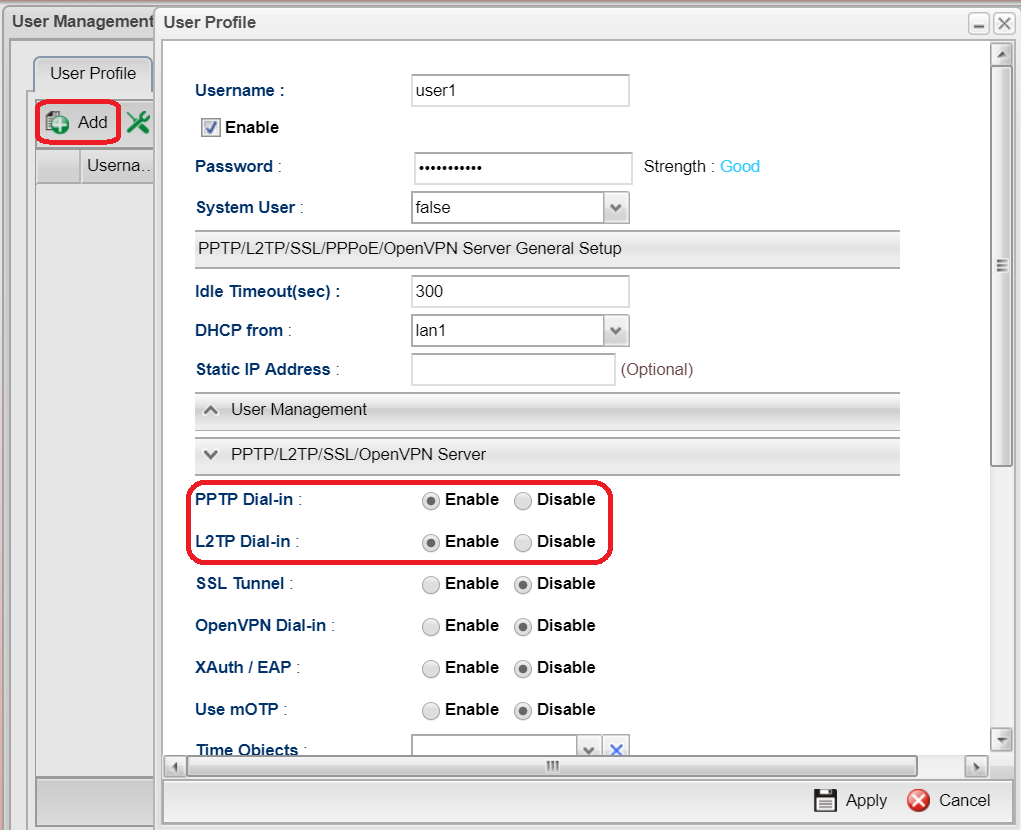
<p style="text-align: justify;">1. Navigate to&nbsp;User Management&nbsp;&gt;&gt;&nbsp;User Profile, click&nbsp;Add&nbsp;to add a new profile,</p>

<p style="text-align: justify;">2.&nbsp;Configure the following settings:</p>

<p style="text-align: justify;">Enable&nbsp;the profile.</p>

<p style="text-align: justify;">Type&nbsp;Username&nbsp;and&nbsp;Password.</p>

<p style="text-align: justify;">Enable&nbsp;PPTP&nbsp;and&nbsp;L2TP.</p>

<p style="text-align: justify;">Then click&nbsp;Apply&nbsp;to save the User profile.</p>

<p style="text-align: justify;">&nbsp;</p>

<div style="text-align:center"><img alt="" height="691" src="https://phatthanhdat.com/uploads/news/2021_08/image-20210804211235-1.png" width="850" /></div>

<p style="text-align: justify;"><a href="https://www.draytek.com/en/assets/files/faq/2018/G71206/user.PNG" target="_top" title="">　&nbsp;　</a></p>

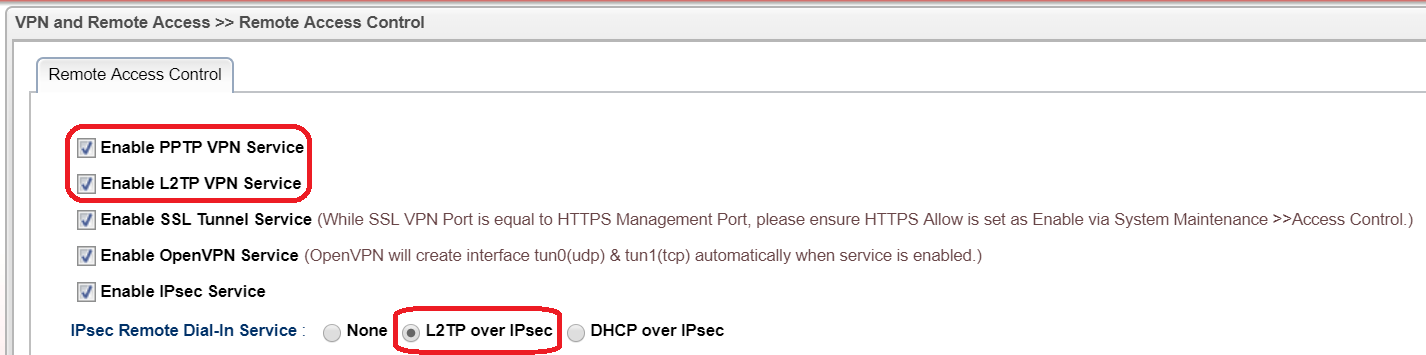
<p style="text-align: justify;">3. Go to&nbsp;VPN&gt;&gt;Remote Access Control&nbsp;and enable PPTP, L2TP and select L2TP over IPsec for IPsec Remote Dial-in Service</p>

<p style="text-align: justify;">&nbsp;</p>

<div style="text-align:center"><img alt="" height="212" src="https://phatthanhdat.com/uploads/news/2021_08/image-20210804211235-2.png" width="850" /></div>

<p style="text-align: justify;"><a href="https://www.draytek.com/en/assets/files/faq/2018/G71206/VPN%20general.PNG" target="_top" title="">　&nbsp;　</a></p>

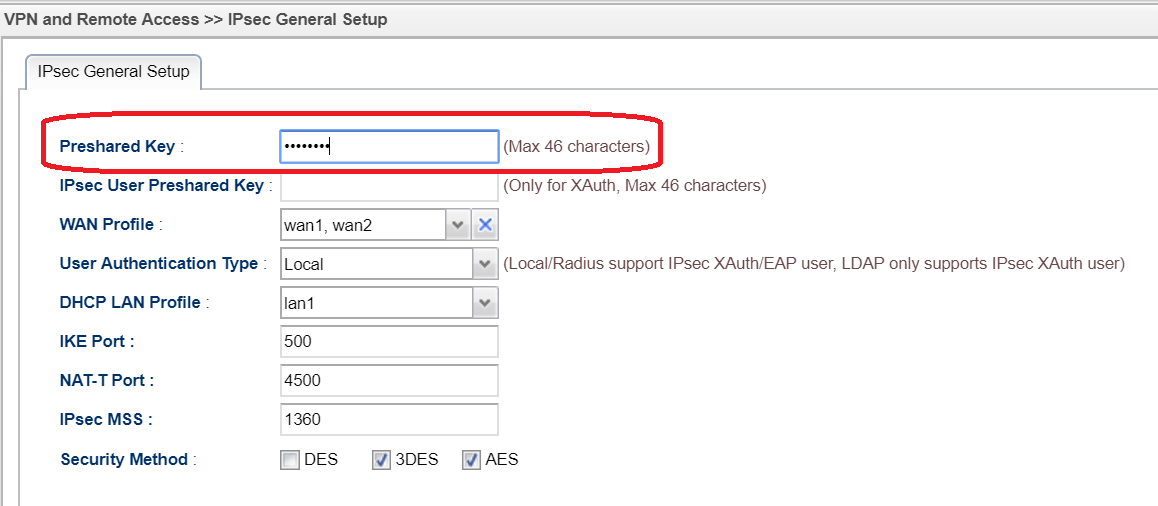
<p style="text-align: justify;">4.&nbsp;Go to&nbsp;VPN&gt;&gt;IPsec General Setup&nbsp;and enter Preshared Key for L2TP over IPsec</p>

<p style="text-align: justify;">&nbsp;</p>

<div style="text-align:center"><img alt="" height="506" src="https://phatthanhdat.com/uploads/news/2021_08/image-20210804211235-3.png" width="1158" /></div>

<p style="text-align: justify;"><a href="https://www.draytek.com/en/assets/files/faq/2018/G71206/ipsec.PNG" target="_top" title="">　&nbsp;　</a></p>

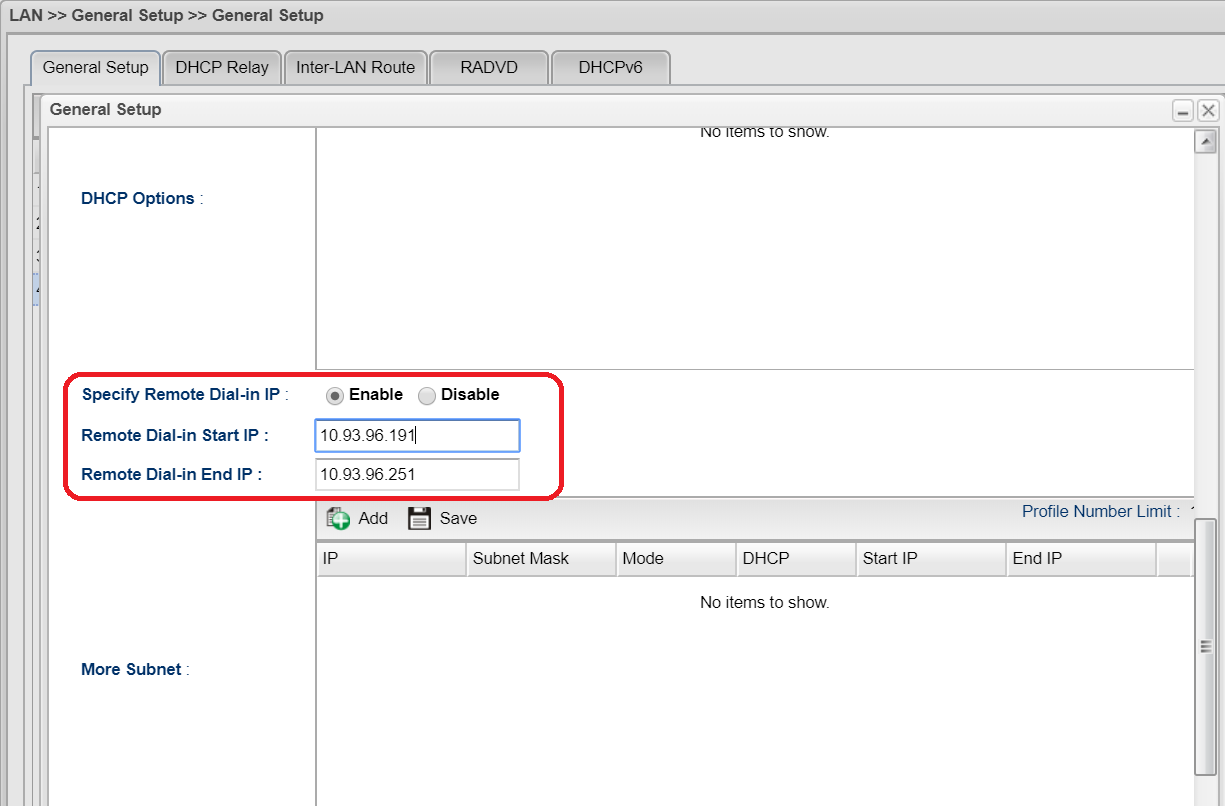
<p style="text-align: justify;">4.&nbsp;If&nbsp;the DHCP server on Vigor3900 is disabled, you must enable&nbsp;Specify Remote Dial In IP&nbsp;in the&nbsp;LAN&gt;&gt;&nbsp;General Setup&nbsp;&gt;&gt;&nbsp;DHCP&nbsp;Tab.</p>

<p style="text-align: justify;">&nbsp;</p>

<div style="text-align:center"><img alt="" height="559" src="https://phatthanhdat.com/uploads/news/2021_08/image-20210804211235-4.png" width="850" /></div>

<p style="text-align: justify;"><a href="https://www.draytek.com/en/assets/files/faq/2018/G71206/lan.PNG" target="_top" title="">　&nbsp;　</a></p>

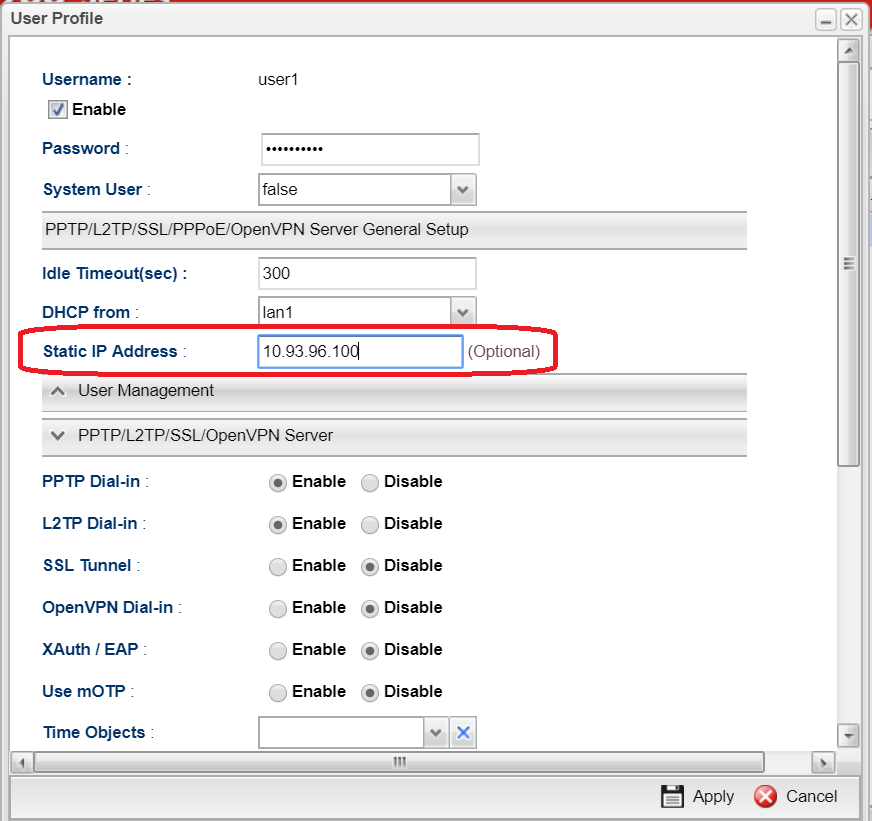
<p style="text-align: justify;">5. Or set&nbsp;Static IP Address&nbsp;in the User Profile.&nbsp;Otherwise, PPTP/ L2TP VPN cannot be created successfully.</p>

<p style="text-align: justify;">&nbsp;</p>

<div style="text-align:center"><img alt="" height="821" src="https://phatthanhdat.com/uploads/news/2021_08/image-20210804211235-5.png" width="872" /></div>

<p style="text-align: justify;"><a href="https://www.draytek.com/en/assets/files/faq/2018/G71206/static.PNG" target="_top" title="">　&nbsp;　</a></p>

<p style="text-align: justify;">Configuring Smart VPN Client for PPTP VPN</p>

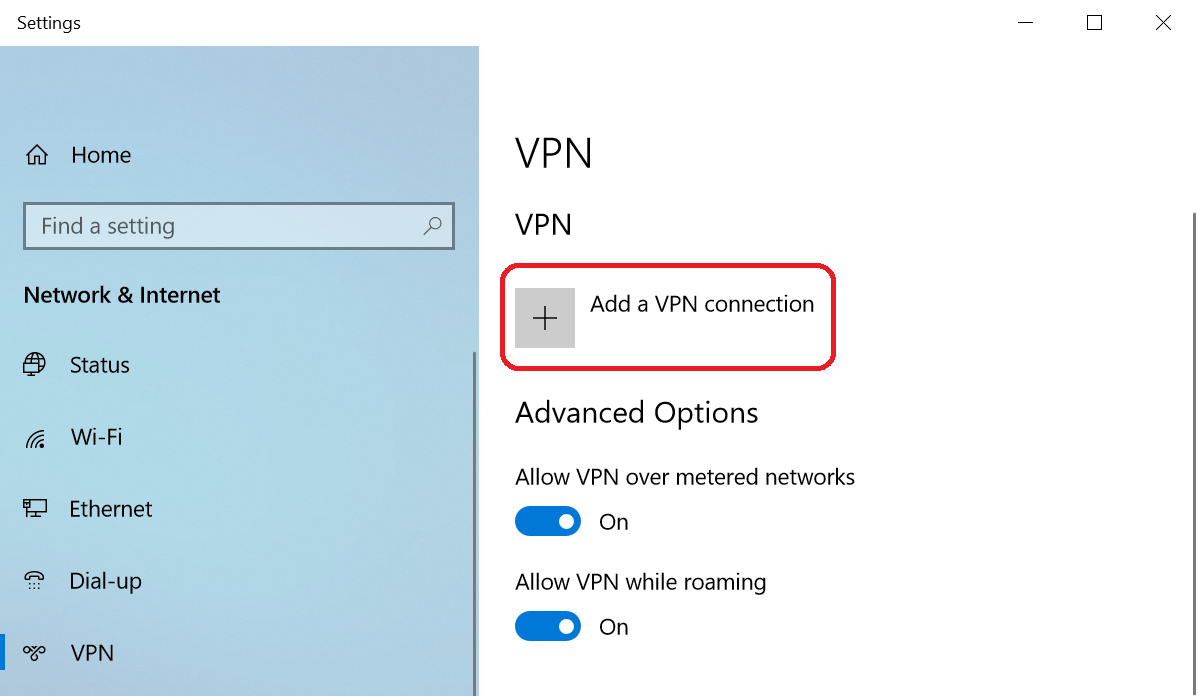
<p style="text-align: justify;">1.&nbsp;Go to&nbsp;Network &amp; Internet Setting&gt;&gt;VPN&nbsp;and Add a VPN connection</p>

<p style="text-align: justify;">&nbsp;</p>

<div style="text-align:center"><img alt="" height="494" src="https://phatthanhdat.com/uploads/news/2021_08/image-20210804211235-6.png" width="850" /></div>

<p style="text-align: justify;"><a href="https://www.draytek.com/en/assets/files/faq/2018/G71206/vpn.PNG" target="_top" title="">　&nbsp;　</a></p>

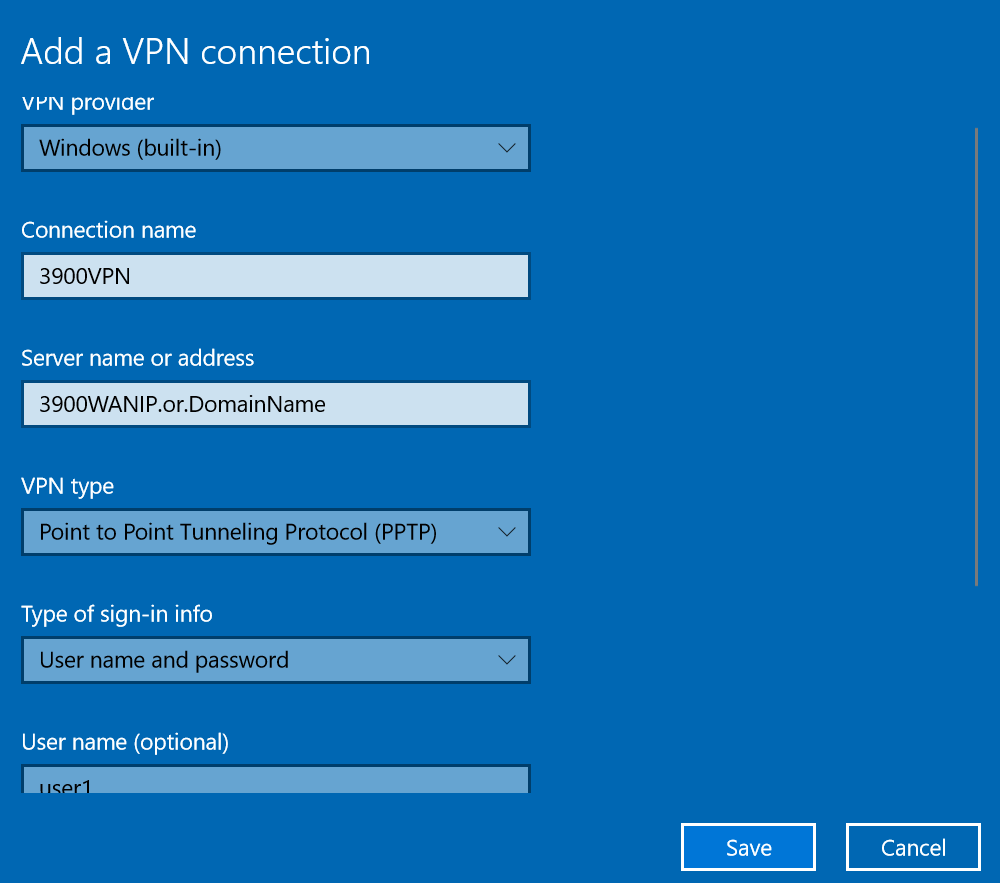
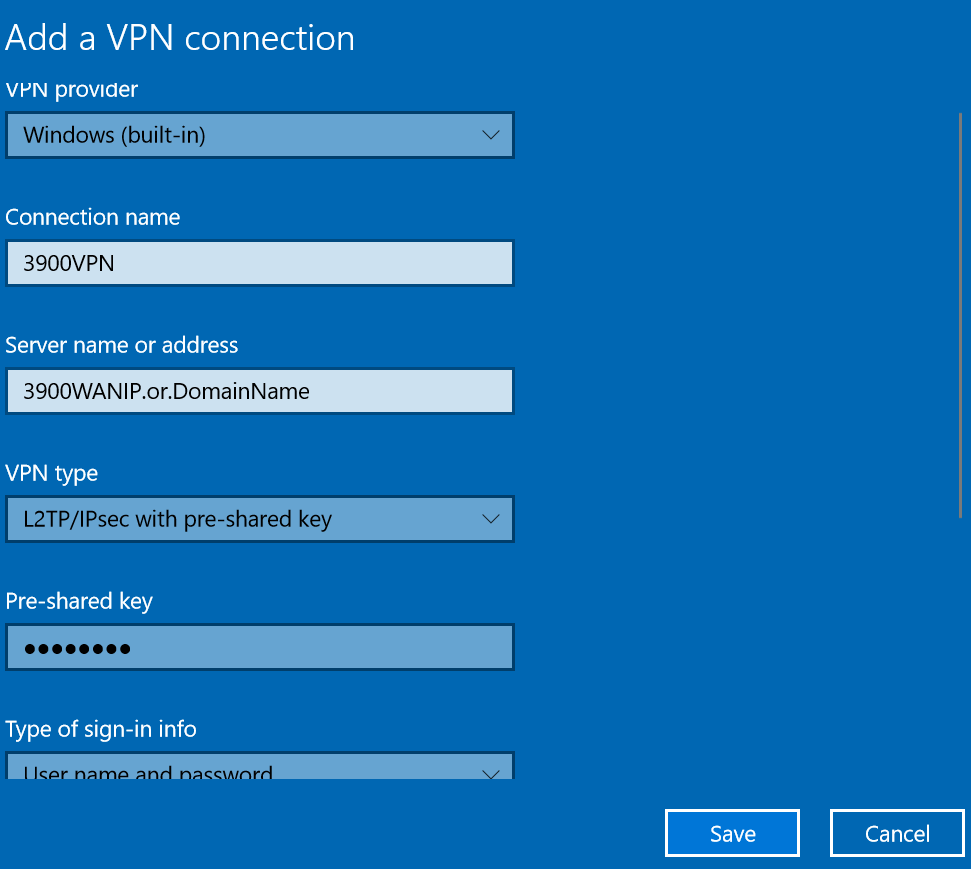
<p style="text-align: justify;">2. Enter WAN IP or domain name of Vigor3900</p>

<p style="text-align: justify;">3. Select PPTP/L2TP over IPsec as VPN type</p>

<p style="text-align: justify;">4. Enter Username, Password and Pre-shared key(for L2TP over IPsec) then save it</p>

<p style="text-align: justify;">&nbsp;</p>

<div style="text-align:center"><img alt="" height="751" src="https://phatthanhdat.com/uploads/news/2021_08/image-20210804211235-7.png" width="850" /></div>

<p style="text-align: justify;"><a href="https://www.draytek.com/en/assets/files/faq/2018/G71206/pptp.PNG" target="_top" title="">　&nbsp;　</a></p>

<div style="text-align:center"><img alt="" height="761" src="https://phatthanhdat.com/uploads/news/2021_08/image-20210804211235-8.png" width="850" /></div>

<p style="text-align: justify;"><a href="https://www.draytek.com/en/assets/files/faq/2018/G71206/l2tp.PNG" target="_top" title="">　&nbsp;　</a></p>

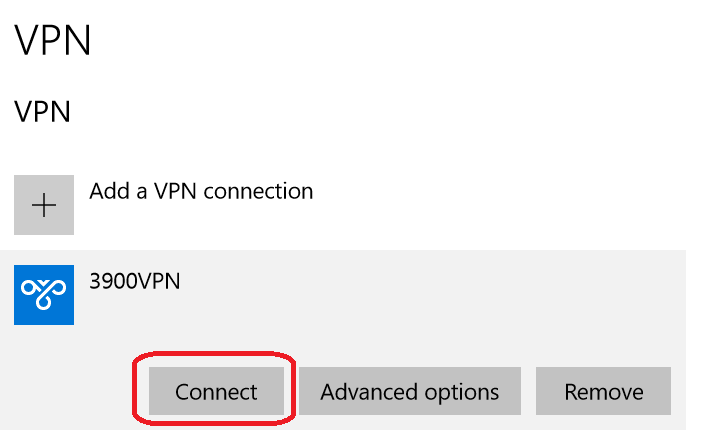
<p style="text-align: justify;">5.&nbsp;Click Connect to start VPN connection</p>

<p style="text-align: justify;">&nbsp;</p>

<div style="text-align:center"><img alt="" height="532" src="https://phatthanhdat.com/uploads/news/2021_08/image-20210804211235-9.png" width="850" /></div>

<p style="text-align: justify;"><a href="https://www.draytek.com/en/assets/files/faq/2018/G71206/connect.PNG" target="_top" title="">　&nbsp;　</a></p>

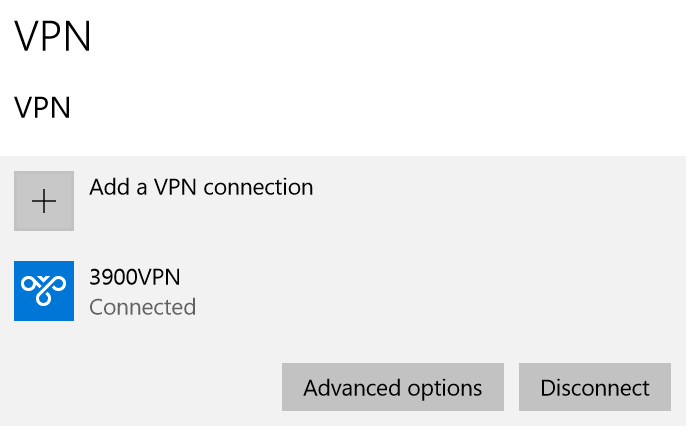
<p style="text-align: justify;">Then check the status after VPN is connected</p>

<div style="text-align:center"><img alt="" height="435" src="https://phatthanhdat.com/uploads/news/2021_08/image-20210804211235-10.png" width="698" /></div>

<p style="text-align: justify;">Như vậy là đã thành công, cảm ơn các bạn đã theo dõi<br />
&nbsp;</p>

<h1>SỬA CHỮA MÁY TÍNH TẠI NHÀ Ở&nbsp;HÓC MÔN</h1>
SỬA CHỮA MÁY TÍNH TẠI NHÀ Ở HỒ CHÍ MINH

<p>Với dịch vụ sửa máy tính tại nhà ở Hóc Môn và dịch vụ sửa máy tính tại nhà ở TP.HCM, Công ty Phát Thành Đạt&nbsp;sẽ luôn đem lại sự hài lòng nhất tới cho bạn, dịch vụ sửa chữa máy tính tại nhà luôn đồng hành cùng bạn từ (8h tới 17h trong ngày). Bảo trì định kỳ mỗi tháng (vệ sinh máy tính, update virus, tối ưu hệ thống...). Liên hệ Hotline 0908.554.558 - Info@phatthanhdat.com</p>

<p>Chúc bạn thực hiện thành công!</p>
		</div>
	</div>
	<div id="footer" class="clearfix">
		<div id="url">
			<strong>URL của bản tin này: </strong><a href="https://phatthanhdat.com/index.php/savefile/tien-ich/huong-dan-tao-user-vpn-tren-draytek-vigor-va-ket-noi-tu-window-client-den-draytek-vigor-63.html" title="Hướng dẫn tạo user VPN trên Draytek Vigor và kết nối từ Window Client đến Draytek Vigor">https://phatthanhdat.com/index.php/savefile/tien-ich/huong-dan-tao-user-vpn-tren-draytek-vigor-va-ket-noi-tu-window-client-den-draytek-vigor-63.html</a>

		</div>
		<div class="clear"></div>
		<div class="copyright">
			&copy; Phát Thành Đạt - Dịch vụ sửa chữa máy tính hóc môn
		</div>
		<div id="contact">
			<a href="mailto:info@phatthanhdat.com">info@phatthanhdat.com</a>
		</div>
	</div>
</div>
        <div id="timeoutsess" class="chromeframe">
            Bạn đã không sử dụng Site, <a onclick="timeoutsesscancel();" href="https://phatthanhdat.com/#">Bấm vào đây để duy trì trạng thái đăng nhập</a>. Thời gian chờ: <span id="secField"> 60 </span> giây
        </div>
        <div id="openidResult" class="nv-alert" style="display:none"></div>
        <div id="openidBt" data-result="" data-redirect=""></div>
<script src="https://phatthanhdat.com/assets/js/jquery/jquery.min.js"></script>
<script>var nv_base_siteurl="/",nv_lang_data="vi",nv_lang_interface="vi",nv_name_variable="nv",nv_fc_variable="op",nv_lang_variable="language",nv_module_name="news",nv_func_name="savefile",nv_is_user=0, nv_my_ofs=-4,nv_my_abbr="EDT",nv_cookie_prefix="nv4",nv_check_pass_mstime=1738000,nv_area_admin=0,nv_safemode=0,theme_responsive=0,nv_recaptcha_ver=2,nv_recaptcha_sitekey="",nv_recaptcha_type="image",XSSsanitize=1;</script>
<script src="https://phatthanhdat.com/assets/js/language/vi.js"></script>
<script src="https://phatthanhdat.com/assets/js/DOMPurify/purify3.js"></script>
<script src="https://phatthanhdat.com/assets/js/global.js"></script>
<script src="https://phatthanhdat.com/assets/js/site.js"></script>
<script src="https://phatthanhdat.com/themes/default/js/news.js"></script>
<script src="https://phatthanhdat.com/themes/default/js/main.js"></script>
<script src="https://phatthanhdat.com/themes/default/js/custom.js"></script>
<script type="application/ld+json">
        {
            "@context": "https://schema.org",
            "@type": "Organization",
            "url": "https://phatthanhdat.com",
            "logo": "https://phatthanhdat.com/uploads/about/logonho.png"
        }
        </script>
<script async custom-element="amp-ad" src="https://cdn.ampproject.org/v0/amp-ad-0.1.js"></script>
<script>
     (adsbygoogle = window.adsbygoogle || []).push({});
</script>
<script>(function(w,d,s,l,i){w[l]=w[l]||[];w[l].push({'gtm.start':
new Date().getTime(),event:'gtm.js'});var f=d.getElementsByTagName(s)[0],
j=d.createElement(s),dl=l!='dataLayer'?'&l='+l:'';j.async=true;j.src=
'https://www.googletagmanager.com/gtm.js?id='+i+dl;f.parentNode.insertBefore(j,f);
})(window,document,'script','dataLayer','GTM-KRZZ2CK');</script>
<script>
!function(f,b,e,v,n,t,s)
{if(f.fbq)return;n=f.fbq=function(){n.callMethod?
n.callMethod.apply(n,arguments):n.queue.push(arguments)};
if(!f._fbq)f._fbq=n;n.push=n;n.loaded=!0;n.version='2.0';
n.queue=[];t=b.createElement(e);t.async=!0;
t.src=v;s=b.getElementsByTagName(e)[0];
s.parentNode.insertBefore(t,s)}(window, document,'script',
'https://connect.facebook.net/en_US/fbevents.js');
fbq('init', '219812430112623');
fbq('track', 'PageView');
</script>
<script async src="https://pagead2.googlesyndication.com/pagead/js/adsbygoogle.js?client=ca-pub-3722185033130810" crossorigin="anonymous"></script>
<script>
      var chatbox = document.getElementById('fb-customer-chat');
      chatbox.setAttribute("page_id", "244380242794992");
      chatbox.setAttribute("attribution", "biz_inbox");

      window.fbAsyncInit = function() {
        FB.init({
          xfbml            : true,
          version          : 'v11.0'
        });
      };

      (function(d, s, id) {
        var js, fjs = d.getElementsByTagName(s)[0];
        if (d.getElementById(id)) return;
        js = d.createElement(s); js.id = id;
        js.src = 'https://connect.facebook.net/vi_VN/sdk/xfbml.customerchat.js';
        fjs.parentNode.insertBefore(js, fjs);
      }(document, 'script', 'facebook-jssdk'));
    </script>
<script src="https://sp.zalo.me/plugins/sdk.js"></script>
<script>
     (adsbygoogle = window.adsbygoogle || []).push({});
</script>
<script src="https://phatthanhdat.com/themes/default/js/bootstrap.min.js"></script>
</body>
</html>