<!DOCTYPE html>
    <html lang="vi" xmlns="http://www.w3.org/1999/xhtml" prefix="og: http://ogp.me/ns#">
    <head>
<title>Phát Thành Đạt Microsoft Office 2019</title>
<meta name="description" content="Microsoft Office 2019 - Savefile - Tin Tức - https&#x3A;&#x002F;&#x002F;phatthanhdat.com&#x002F;index.php&#x002F;savefile&#x002F;tien-ich&#x002F;microsoft-office-2019-60.html">
<meta name="author" content="Phát Thành Đạt - Dịch vụ sửa chữa máy tính hóc môn">
<meta name="copyright" content="Phát Thành Đạt - Dịch vụ sửa chữa máy tính hóc môn [info@phatthanhdat.com]">
<meta name="generator" content="NukeViet v4.5">
<meta name="facebook-domain-verification" content="nv4brgbtr5jrhsej2o63m6qx7nz5ek">
<meta http-equiv="Content-Type" content="text/html; charset=utf-8">
<meta property="og:title" content="Microsoft Office 2019">
<meta property="og:type" content="website">
<meta property="og:description" content="Savefile - Tin Tức - https&#x3A;&#x002F;&#x002F;phatthanhdat.com&#x002F;index.php&#x002F;savefile&#x002F;tien-ich&#x002F;microsoft-office-2019-60.html">
<meta property="og:site_name" content="Phát Thành Đạt - Dịch vụ sửa chữa máy tính hóc môn">
<meta property="og:url" content="https://phatthanhdat.com/index.php/savefile/tien-ich/microsoft-office-2019-60.html">
<link rel="shortcut icon" href="https://phatthanhdat.com/uploads/about/logonho.png">
<link rel="canonical" href="https://phatthanhdat.com/index.php/savefile/tien-ich/microsoft-office-2019-60.html">
<link rel="alternate" href="https://phatthanhdat.com/index.php/rss/" title="Tin Tức" type="application/rss+xml">
<link rel="alternate" href="https://phatthanhdat.com/index.php/rss/quan-tri-mang/" title="Tin Tức - Quản Trị Mạng" type="application/rss+xml">
<link rel="alternate" href="https://phatthanhdat.com/index.php/rss/windows-server/" title="Tin Tức - Windows Server" type="application/rss+xml">
<link rel="alternate" href="https://phatthanhdat.com/index.php/rss/active-windows/" title="Tin Tức - Active Windows" type="application/rss+xml">
<link rel="alternate" href="https://phatthanhdat.com/index.php/rss/mang-may-tinh/" title="Tin Tức - Mạng Máy Tính" type="application/rss+xml">
<link rel="alternate" href="https://phatthanhdat.com/index.php/rss/quan-tri-mail-server/" title="Tin Tức - Quản Trị Mail Server" type="application/rss+xml">
<link rel="alternate" href="https://phatthanhdat.com/index.php/rss/y-nghia-cuoc-song/" title="Tin Tức - Ý nghĩa cuộc sống" type="application/rss+xml">
<link rel="alternate" href="https://phatthanhdat.com/index.php/rss/tien-ich/" title="Tin Tức - Tiện Ích" type="application/rss+xml">
<link rel="alternate" href="https://phatthanhdat.com/index.php/rss/facebook-add/" title="Tin Tức - Facebook Add" type="application/rss+xml">
<link rel="alternate" href="https://phatthanhdat.com/index.php/rss/nong-tren-mang/" title="Tin Tức - Nóng Trên Mạng" type="application/rss+xml">
<link rel="alternate" href="https://phatthanhdat.com/index.php/rss/covid-19/" title="Tin Tức - Covid 19" type="application/rss+xml">
<link rel="alternate" href="https://phatthanhdat.com/index.php/rss/hoc-duong/" title="Tin Tức - Học Đường" type="application/rss+xml">
<link rel="alternate" href="https://phatthanhdat.com/index.php/rss/tin-tuc-thi-truong/" title="Tin Tức - Tin Tức Thị Trường" type="application/rss+xml">
<link rel="alternate" href="https://phatthanhdat.com/index.php/rss/code-hay/" title="Tin Tức - Code hay" type="application/rss+xml">
<link rel="alternate" href="https://phatthanhdat.com/index.php/rss/kho-hang/" title="Tin Tức - Kho Hàng" type="application/rss+xml">
<link rel="alternate" href="https://phatthanhdat.com/index.php/rss/ai-tri-tue-nhan-tao/" title="Tin Tức - AI Trí Tuệ Nhân Tạo" type="application/rss+xml">
<link rel="alternate" href="https://phatthanhdat.com/index.php/rss/do-hoa/" title="Tin Tức - Đồ Hoạ" type="application/rss+xml">
<link rel="stylesheet" href="https://phatthanhdat.com/assets/css/font-awesome.min.css">
<link rel="stylesheet" href="https://phatthanhdat.com/themes/default/css/bootstrap.non-responsive.css">
<link rel="stylesheet" href="https://phatthanhdat.com/themes/default/css/style.css">
<link rel="stylesheet" href="https://phatthanhdat.com/themes/default/css/style.non-responsive.css">
<link rel="StyleSheet" href="https://phatthanhdat.com/themes/default/css/news.css">
<link rel="stylesheet" href="https://phatthanhdat.com/themes/default/css/custom.css">
<style type="text/css">
	body{background: #fff;}
</style>
<!-- Google Tag Manager -->
<!-- End Google Tag Manager -->

<!-- Facebook Pixel Code -->
<noscript><img height="1" width="1" style="display:none"
src="https://www.facebook.com/tr?id=219812430112623&ev=PageView&noscript=1"
/></noscript>
<!-- End Facebook Pixel Code -->
<!-- Messenger Plugin chat Code -->
    <div id="fb-root"></div>

    <!-- Your Plugin chat code -->
    <div id="fb-customer-chat" class="fb-customerchat">
    </div>
<script>(function(i,s,o,g,r,a,m){i['GoogleAnalyticsObject']=r;i[r]=i[r]||function(){
(i[r].q=i[r].q||[]).push(arguments)},i[r].l=1*new Date();a=s.createElement(o),
m=s.getElementsByTagName(o)[0];a.async=1;a.src=g;m.parentNode.insertBefore(a,m)
})(window,document,'script','https://www.google-analytics.com/analytics.js','ga');
ga('create', 'UA-133543348-1', '.phatthanhdat.com');
ga('send', 'pageview');
</script>
</head>
    <body>
<div class="zalo-chat-widget" data-oaid="1354977264109400055" data-welcome-message="R&#7845;t vui khi &#273;&#432;&#7907;c h&#7895; tr&#7907; b&#7841;n!" data-autopopup="0" data-width="" data-height=""></div>
<amp-ad width="100vw" height="320"
     type="adsense"
     data-ad-client="ca-pub-3722185033130810"
     data-ad-slot="5396409404"
     data-auto-format="rspv"
     data-full-width="">
  <div overflow=""></div>
</amp-ad>
<!-- Google Tag Manager (noscript) -->
<noscript><iframe src="https://www.googletagmanager.com/ns.html?id=GTM-KRZZ2CK"
height="0" width="0" style="display:none;visibility:hidden"></iframe></noscript>
<!-- End Google Tag Manager (noscript) -->
<div class="gcse-searchbox-only"></div>
<div id="print">
	<div id="hd_print">
		<h2 class="pull-left">Phát Thành Đạt - Dịch vụ sửa chữa máy tính hóc môn</h2>
		<p class="pull-right"><a title="Phát Thành Đạt - Dịch vụ sửa chữa máy tính hóc môn" href="https://phatthanhdat.com/">https://phatthanhdat.com</a></p>
	</div>
	<div class="clear"></div>
	<hr />
	<div id="content">
		<h1>Microsoft Office 2019</h1>
		<ul class="list-inline">
			<li>Thứ tư - 04/08/2021 05:15</li>
			<li class="hidden-print txtrequired"><em class="fa fa-print">&nbsp;</em><a title="In ra" href="javascript:;" onclick="window.print()">In ra</a></li>
			<li class="hidden-print txtrequired"><em class="fa fa-power-off">&nbsp;</em><a title="Đóng cửa sổ này" href="javascript:;" onclick="window.close()">Đóng cửa sổ này</a></li>
		</ul>
		<div class="clear"></div>
		<div id="hometext">
			<strong>Microsoft Office 2019 Professional Plus</strong>&nbsp;là bộ phần mềm văn phòng mới nhất của Microsoft được phát hành vào 2018 cho cả Windows và Mac.&nbsp;<strong>Office 2019</strong>&nbsp;là phiên bản được nâng cấp từ Microsoft 2016 bao gồm:&nbsp;&nbsp;<em>Word, Excel, PowerPoint, Access, Outlook, Publisher, Skype bussiness, OneDrive Bussiness.</em>
		</div>
		<div id="bodytext" class="clearfix">
			<p><strong>Microsoft Office 2019 Professional Plus</strong>&nbsp;là bộ phần mềm văn phòng mới nhất của Microsoft được phát hành vào 2018 cho cả Windows và Mac.&nbsp;<strong>Office 2019</strong>&nbsp;là phiên bản được nâng cấp từ Microsoft 2016 bao gồm:&nbsp;&nbsp;<em>Word, Excel, PowerPoint, Access, Outlook, Publisher, Skype bussiness, OneDrive Bussiness.</em></p>

<p><strong>Ms Office 2019 chỉ cài được trên window 10</strong></p>

<p>Link download Ms&nbsp;<strong><a href="https://benthanhoto-my.sharepoint.com/:u:/g/personal/tmtuan_benthanhford_com_vn/ETDVjyusGYRJvc3i_NzaNekBIJPZnxR4ExpmCSMFKXU5fQ?e=NQtkT1" target="_blank" title="Office 2019">Office 2019</a></strong>&nbsp;<strong>trực tiếp từ Microsoft</strong></p>

<p><strong>&nbsp;1/ Hướng dẫn cài đặt</strong></p>

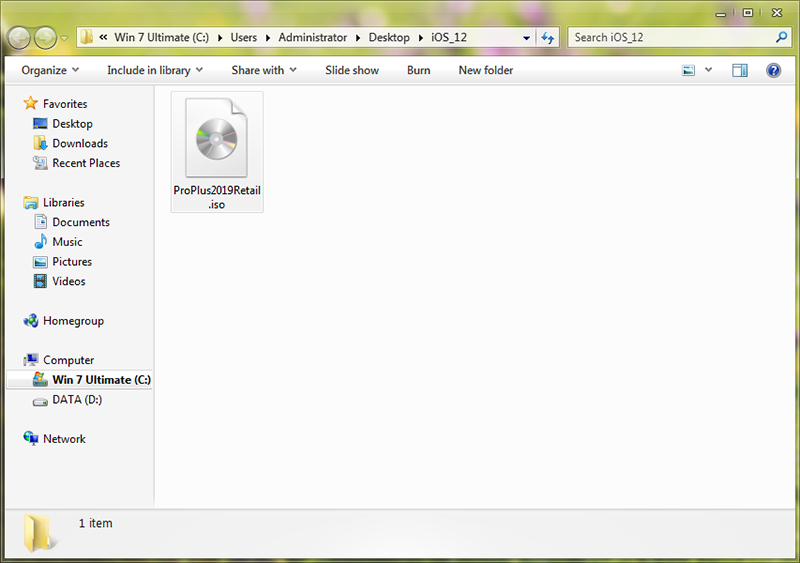
<p><strong>&nbsp;B1/</strong>&nbsp;Sau khi download về, file có&nbsp;tên&nbsp;<strong>&quot;ProPlus2019Retail.img&quot;</strong>. Các bạn&nbsp;bạn cần đổi tên sang&nbsp;<strong>&quot;ProPlus2019Retail.iso&quot;</strong>&nbsp;trước khi cài đặt</p>

<div class="image-center"><img alt="" height="423" src="https://tuanquynh.net/source/TinTuc/Ms_Office/Office_2019/thumuc.jpg?1585479468848" width="600" /></div>

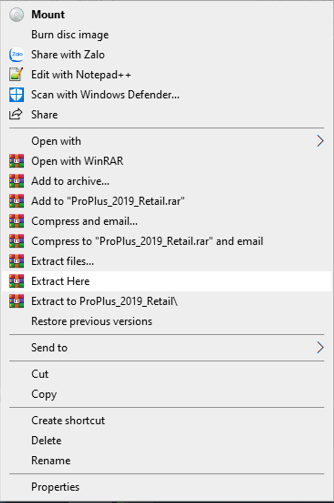
<p><strong>B2/ Xả nén file</strong>&nbsp;bằng cách&nbsp;<strong>click phải chuột</strong>&nbsp;vào file mới đổi tên chọn &gt;&nbsp;<strong>Extract here</strong></p>

<p>&nbsp;</p>

<div class="image-center"><img alt="" height="503" src="https://tuanquynh.net/source/TinTuc/Ms_Office/Office_2019/Extract.PNG?1585479845973" width="334" /></div>

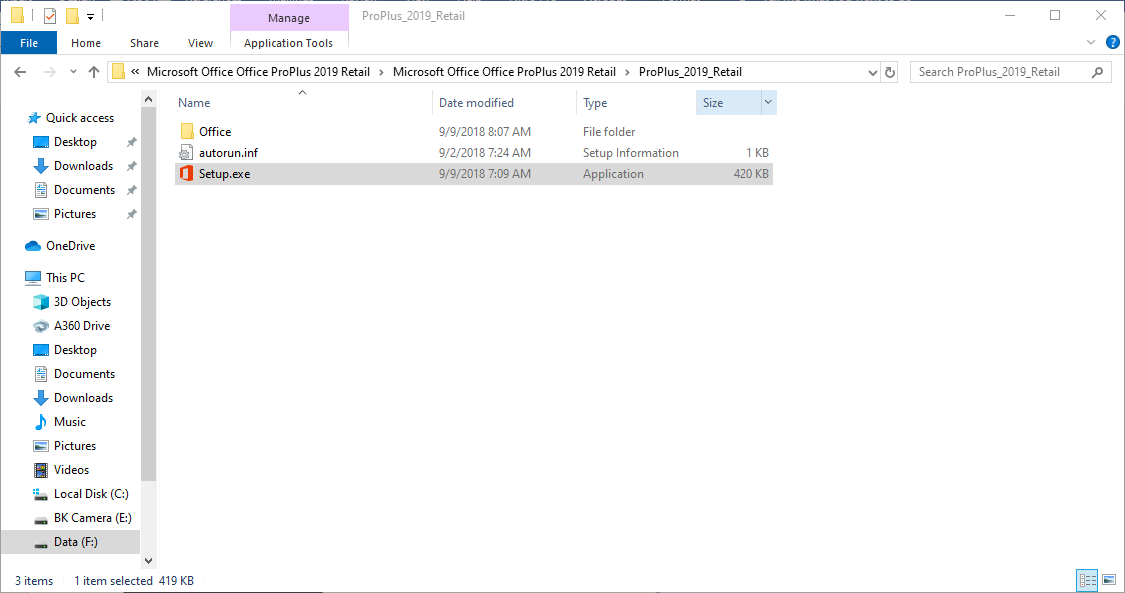
<p><strong>B3/</strong>&nbsp;Click vào file&nbsp;<strong>Setup.exe</strong>&nbsp;để cài đặt</p>

<p>&nbsp;</p>

<div class="image-center"><img alt="" height="421" src="https://tuanquynh.net/source/TinTuc/Ms_Office/Office_2019/caidat.PNG?1585479992060" width="800" /></div>

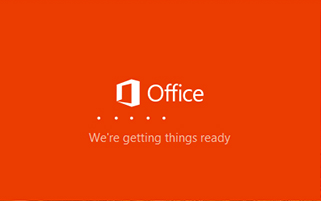
<p><strong>B4/&nbsp;</strong>Quá trình cài đặt sẽ diễn ra hoàn toàn tự động trong vài phút</p>

<div class="image-center"><img alt="" height="201" src="https://tuanquynh.net/source/TinTuc/Ms_Office/Office_2019/setupoffice.PNG?1585480261234" width="321" /></div>

<p><strong>B5/</strong>&nbsp;Hướng dẫn&nbsp;<strong>Crack</strong></p>

<p>Sau khi phần mền cài xong, các bạn vào đây xem hướng dẫn chi tiết crack nhé</p>

<p>Crack&nbsp;<strong>Office phiên bản 2016</strong>&nbsp;trở xuống,&nbsp;<strong>phiên bản 2019</strong>&nbsp;cũng dùng phần mền này nhưng thao tác thêm 1 bước.&nbsp;Hướng dẫn&nbsp;<strong>crack&nbsp;Office 2019</strong>&nbsp;cuối bài</p>

<p>Office và window là phần không thể thiếu, tuy nhiên không phải ai cũng có điều kiện để mua phần mền bản quyền. Hôm nay&nbsp; Phát Thành Đạt&nbsp;chia sẽ đến các bạn cách bẻ khóa Office với Window vĩnh viễn nhé (mọi phiên bản)</p>

<p><strong>Chú ý: kết nối internet để crack</strong></p>

<p>Đầu tiên các bạn download công cụ crack theo link bên dưới.&nbsp;<strong>Mật khẩu giải nén là</strong>: phatthanhdat</p>

<p><a href="https://benthanhoto-my.sharepoint.com/personal/tmtuan_benthanhford_com_vn/_layouts/15/onedrive.aspx?id=%2Fpersonal%2Ftmtuan%5Fbenthanhford%5Fcom%5Fvn%2FDocuments%2FPhan%20mem%2FCrack%20Office&amp;ga=1" target="_blank">Link tải bản crack</a></p>

<p>Sau khi download về các bạn giải nén rồi chạy file với quyền admin bằng cách:</p>

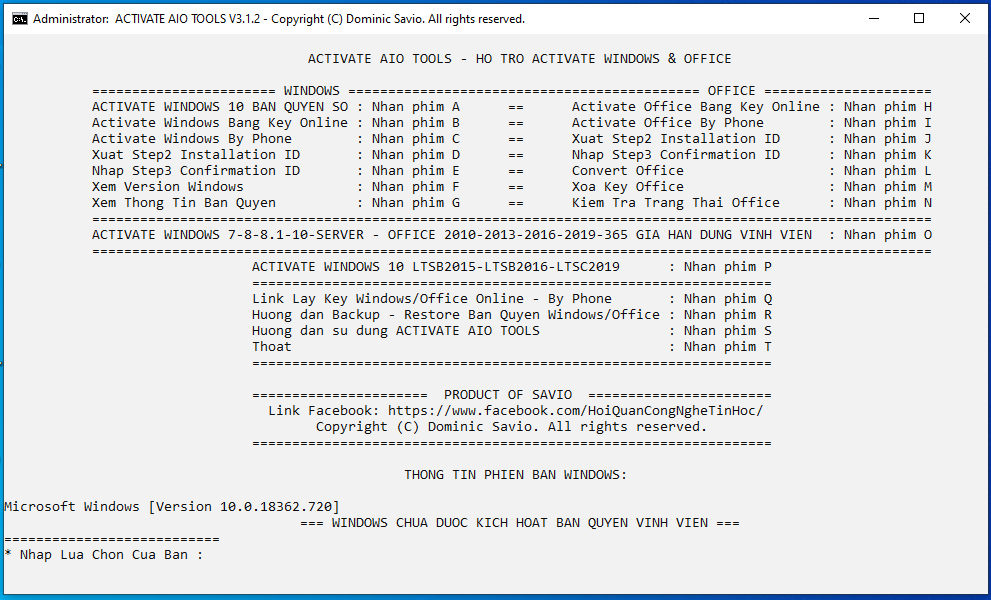
<p><strong>B1/</strong>&nbsp;Click phải chuột vào file:&nbsp;<strong>Activate AIO Tools v3.1.2 by Savio</strong>&nbsp;&gt;&nbsp;<strong>Run as administrator</strong></p>

<div class="image-center"><img alt="Crack Office vs Window vĩnh viễn" height="500" src="https://tuanquynh.net/source/TinTuc/CrackMS/b1.PNG?1584708312584" title="Crack Office vs Window vĩnh viễn" width="826" /></div>

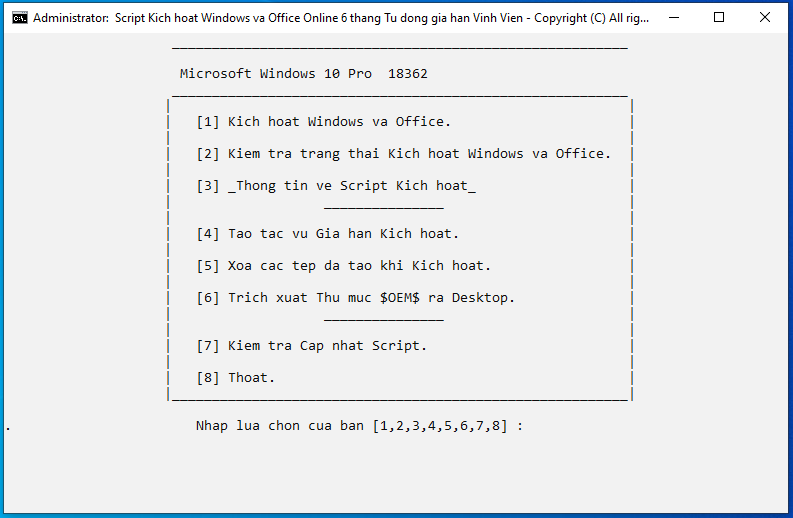
<p><strong>B2/&nbsp;</strong>Tiếp theo&nbsp;<strong>nhấn phím O&nbsp;</strong>để tiến hành crack nhé</p>

<div class="image-center"><img alt="Crack Office vs Window vĩnh viễn" height="518" src="https://tuanquynh.net/source/TinTuc/CrackMS/b2.PNG?1584708397732" title="Crack Office vs Window vĩnh viễn" width="793" /></div>

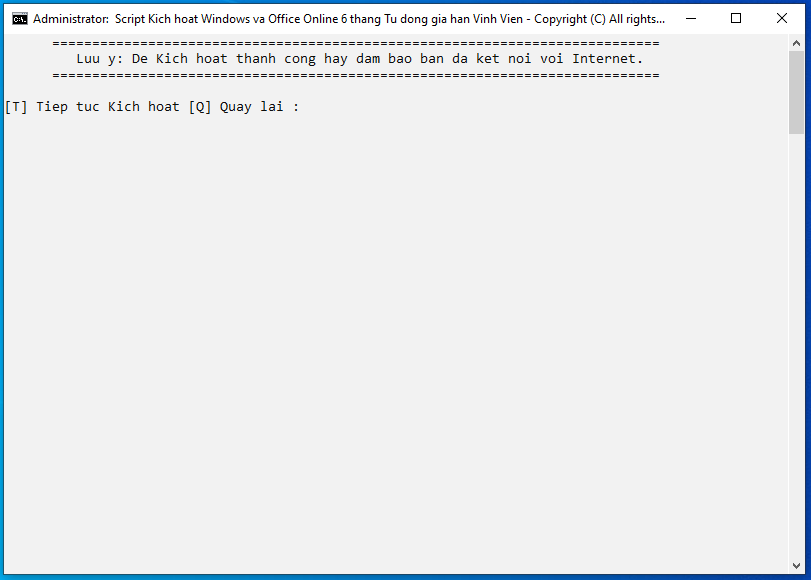
<p><strong>B3/</strong>&nbsp;Bước này các bạn chọn&nbsp;<strong>&#91;1&#93;&nbsp;&nbsp;</strong>sau đó nhấn phím<strong>&nbsp;&#91;T&#93;&nbsp;</strong>để tiếp tục&nbsp;rồi chờ cho phần mềm tự động crack</p>

<div class="image-center"><img alt="b3" src="https://tuanquynh.net/source/TinTuc/CrackMS/b3.PNG?1584708420138" /></div>

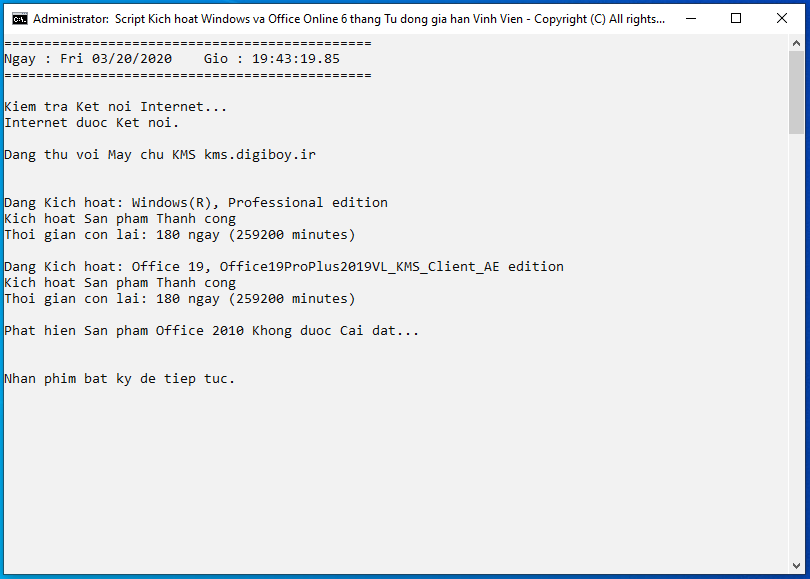
<p>Phần mềm thông báo crack thành công</p>

<div class="image-center"><img alt="Crack Office vs Window vĩnh viễn" height="579" src="https://tuanquynh.net/source/TinTuc/CrackMS/b4.PNG?1584708503324" title="Crack Office vs Window vĩnh viễn" width="810" /></div>

<p><strong>Chú ý:</strong>&nbsp;Đối với&nbsp;<strong>Office 2019</strong>&nbsp;các bạn làm thêm 1 bước sau</p>

<p>- Ở&nbsp;B1 bạn&nbsp;<strong>nhấn phím L&nbsp;</strong>để chuyển đổi sang Office volumn. Sau khi chuyển đổi xong các bạn làm theo tuần tự các bước như trên nhé</p>

<p>Vậy là đã hoàn tất công tác bẻ khóa nhé. Chúc các bạn thành công<br />
Phatthanhdat.com</p>

<h1>SỬA CHỮA MÁY TÍNH TẠI NHÀ Ở&nbsp;HÓC MÔN</h1>
SỬA CHỮA MÁY TÍNH TẠI NHÀ Ở HỒ CHÍ MINH

<p>Với dịch vụ sửa máy tính tại nhà ở Hóc Môn và dịch vụ sửa máy tính tại nhà ở TP.HCM, Công ty Phát Thành Đạt&nbsp;sẽ luôn đem lại sự hài lòng nhất tới cho bạn, dịch vụ sửa chữa máy tính tại nhà luôn đồng hành cùng bạn từ (8h tới 17h trong ngày). Bảo trì định kỳ mỗi tháng (vệ sinh máy tính, update virus, tối ưu hệ thống...). Liên hệ Hotline 0908.554.558 - Info@phatthanhdat.com</p>

<p>Chúc bạn thực hiện thành công!</p>
Hiện tại trang web <a href="http://Phatthanhdat.com">Phát Thành Đạt</a>&nbsp;hoạt động với kinh phí tự chủ (nghĩa là các bạn tham gia không phải đóng bất kì một khoản phí nào) tất cả đều do Công ty Phát Thành Đạt tài trợ hoàn toàn.<br />
<br />
Rất mong nhận được nhiều sự đóng góp cũng như chia sẽ của các bạn<br />
Kính chúc các bạn một năm thật vui tươi và thành công.<br />
<span style="font-size:13pt"><span style="text-justify:inter-ideograph"><span style="line-height:107%"><span style="font-family:&#039;Times New Roman&#039;,serif"><span style="font-size:12.5pt"><span style="background:white"><span style="line-height:107%"><span style="color:rgb(29, 33, 41);">Hotline : 0908 554 558</span></span></span></span></span></span></span></span><br />
Công ty Phát Thành Đạt<br />
Địa chỉ Công ty Phát Thành Đạt
<p style="text-align: center;"><iframe allow="autoplay" allowfullscreen="" height="100%" loading="lazy" sandbox="allow-scripts allow-same-origin allow-forms allow-presentation allow-popups" src="https://www.google.com/maps/embed?pb=!1m18!1m12!1m3!1d3918.2253492625778!2d106.54134491480151!3d10.870457492257794!2m3!1f0!2f0!3f0!3m2!1i1024!2i768!4f13.1!3m3!1m2!1s0x0%3A0xfb2da864bb689232!2zQ8O0bmcgdHkgVE5ISCBUaMawxqFuZyBN4bqhaSBE4buLY2ggVuG7pSBU4buVbmcgSOG7o3AgUGjDoXQgVGjDoG5oIMSQ4bqhdA!5e0!3m2!1svi!2s!4v1633240519763!5m2!1svi!2s" style="border:0;" width="100%"></iframe></p>

<p><a href="https://goo.gl/maps/Zfjj4va5aXkywvJL7">Địa chỉ đường đi</a></p>
		</div>
	</div>
	<div id="footer" class="clearfix">
		<div id="url">
			<strong>URL của bản tin này: </strong><a href="https://phatthanhdat.com/index.php/savefile/tien-ich/microsoft-office-2019-60.html" title="Microsoft Office 2019">https://phatthanhdat.com/index.php/savefile/tien-ich/microsoft-office-2019-60.html</a>

		</div>
		<div class="clear"></div>
		<div class="copyright">
			&copy; Phát Thành Đạt - Dịch vụ sửa chữa máy tính hóc môn
		</div>
		<div id="contact">
			<a href="mailto:info@phatthanhdat.com">info@phatthanhdat.com</a>
		</div>
	</div>
</div>
        <div id="timeoutsess" class="chromeframe">
            Bạn đã không sử dụng Site, <a onclick="timeoutsesscancel();" href="https://phatthanhdat.com/#">Bấm vào đây để duy trì trạng thái đăng nhập</a>. Thời gian chờ: <span id="secField"> 60 </span> giây
        </div>
        <div id="openidResult" class="nv-alert" style="display:none"></div>
        <div id="openidBt" data-result="" data-redirect=""></div>
<script src="https://phatthanhdat.com/assets/js/jquery/jquery.min.js"></script>
<script>var nv_base_siteurl="/",nv_lang_data="vi",nv_lang_interface="vi",nv_name_variable="nv",nv_fc_variable="op",nv_lang_variable="language",nv_module_name="news",nv_func_name="savefile",nv_is_user=0, nv_my_ofs=-4,nv_my_abbr="EDT",nv_cookie_prefix="nv4",nv_check_pass_mstime=1738000,nv_area_admin=0,nv_safemode=0,theme_responsive=0,nv_recaptcha_ver=2,nv_recaptcha_sitekey="",nv_recaptcha_type="image",XSSsanitize=1;</script>
<script src="https://phatthanhdat.com/assets/js/language/vi.js"></script>
<script src="https://phatthanhdat.com/assets/js/DOMPurify/purify3.js"></script>
<script src="https://phatthanhdat.com/assets/js/global.js"></script>
<script src="https://phatthanhdat.com/assets/js/site.js"></script>
<script src="https://phatthanhdat.com/themes/default/js/news.js"></script>
<script src="https://phatthanhdat.com/themes/default/js/main.js"></script>
<script src="https://phatthanhdat.com/themes/default/js/custom.js"></script>
<script type="application/ld+json">
        {
            "@context": "https://schema.org",
            "@type": "Organization",
            "url": "https://phatthanhdat.com",
            "logo": "https://phatthanhdat.com/uploads/about/logonho.png"
        }
        </script>
<script async custom-element="amp-ad" src="https://cdn.ampproject.org/v0/amp-ad-0.1.js"></script>
<script>
     (adsbygoogle = window.adsbygoogle || []).push({});
</script>
<script>(function(w,d,s,l,i){w[l]=w[l]||[];w[l].push({'gtm.start':
new Date().getTime(),event:'gtm.js'});var f=d.getElementsByTagName(s)[0],
j=d.createElement(s),dl=l!='dataLayer'?'&l='+l:'';j.async=true;j.src=
'https://www.googletagmanager.com/gtm.js?id='+i+dl;f.parentNode.insertBefore(j,f);
})(window,document,'script','dataLayer','GTM-KRZZ2CK');</script>
<script>
!function(f,b,e,v,n,t,s)
{if(f.fbq)return;n=f.fbq=function(){n.callMethod?
n.callMethod.apply(n,arguments):n.queue.push(arguments)};
if(!f._fbq)f._fbq=n;n.push=n;n.loaded=!0;n.version='2.0';
n.queue=[];t=b.createElement(e);t.async=!0;
t.src=v;s=b.getElementsByTagName(e)[0];
s.parentNode.insertBefore(t,s)}(window, document,'script',
'https://connect.facebook.net/en_US/fbevents.js');
fbq('init', '219812430112623');
fbq('track', 'PageView');
</script>
<script async src="https://pagead2.googlesyndication.com/pagead/js/adsbygoogle.js?client=ca-pub-3722185033130810" crossorigin="anonymous"></script>
<script>
      var chatbox = document.getElementById('fb-customer-chat');
      chatbox.setAttribute("page_id", "244380242794992");
      chatbox.setAttribute("attribution", "biz_inbox");

      window.fbAsyncInit = function() {
        FB.init({
          xfbml            : true,
          version          : 'v11.0'
        });
      };

      (function(d, s, id) {
        var js, fjs = d.getElementsByTagName(s)[0];
        if (d.getElementById(id)) return;
        js = d.createElement(s); js.id = id;
        js.src = 'https://connect.facebook.net/vi_VN/sdk/xfbml.customerchat.js';
        fjs.parentNode.insertBefore(js, fjs);
      }(document, 'script', 'facebook-jssdk'));
    </script>
<script src="https://sp.zalo.me/plugins/sdk.js"></script>
<script>
     (adsbygoogle = window.adsbygoogle || []).push({});
</script>
<script src="https://phatthanhdat.com/themes/default/js/bootstrap.min.js"></script>
</body>
</html>