<!DOCTYPE html>
    <html lang="vi" xmlns="http://www.w3.org/1999/xhtml" prefix="og: http://ogp.me/ns#">
    <head>
<title>Phát Thành Đạt Tải và cài đặt MiniTool Partition Wizard 12.8 Pro Ultimate Full</title>
<meta name="description" content="Tải và cài đặt MiniTool Partition Wizard 12.8 Pro Ultimate Full - Savefile - Tin Tức -...">
<meta name="author" content="Phát Thành Đạt - Dịch vụ sửa chữa máy tính hóc môn">
<meta name="copyright" content="Phát Thành Đạt - Dịch vụ sửa chữa máy tính hóc môn [info@phatthanhdat.com]">
<meta name="generator" content="NukeViet v4.5">
<meta name="facebook-domain-verification" content="nv4brgbtr5jrhsej2o63m6qx7nz5ek">
<meta http-equiv="Content-Type" content="text/html; charset=utf-8">
<meta property="og:title" content="Tải và cài đặt MiniTool Partition Wizard 12.8 Pro Ultimate Full">
<meta property="og:type" content="website">
<meta property="og:description" content="Savefile - Tin Tức - https&#x3A;&#x002F;&#x002F;phatthanhdat.com&#x002F;index.php&#x002F;savefile&#x002F;tien-ich&#x002F;tai-va-cai-dat-minitool-partition-wizard-12-8-pro-ultimate-full-199.html">
<meta property="og:site_name" content="Phát Thành Đạt - Dịch vụ sửa chữa máy tính hóc môn">
<meta property="og:url" content="https://phatthanhdat.com/index.php/savefile/tien-ich/tai-va-cai-dat-minitool-partition-wizard-12-8-pro-ultimate-full-199.html">
<link rel="shortcut icon" href="https://phatthanhdat.com/uploads/about/logonho.png">
<link rel="canonical" href="https://phatthanhdat.com/index.php/savefile/tien-ich/tai-va-cai-dat-minitool-partition-wizard-12-8-pro-ultimate-full-199.html">
<link rel="alternate" href="https://phatthanhdat.com/index.php/rss/" title="Tin Tức" type="application/rss+xml">
<link rel="alternate" href="https://phatthanhdat.com/index.php/rss/quan-tri-mang/" title="Tin Tức - Quản Trị Mạng" type="application/rss+xml">
<link rel="alternate" href="https://phatthanhdat.com/index.php/rss/windows-server/" title="Tin Tức - Windows Server" type="application/rss+xml">
<link rel="alternate" href="https://phatthanhdat.com/index.php/rss/active-windows/" title="Tin Tức - Active Windows" type="application/rss+xml">
<link rel="alternate" href="https://phatthanhdat.com/index.php/rss/mang-may-tinh/" title="Tin Tức - Mạng Máy Tính" type="application/rss+xml">
<link rel="alternate" href="https://phatthanhdat.com/index.php/rss/quan-tri-mail-server/" title="Tin Tức - Quản Trị Mail Server" type="application/rss+xml">
<link rel="alternate" href="https://phatthanhdat.com/index.php/rss/y-nghia-cuoc-song/" title="Tin Tức - Ý nghĩa cuộc sống" type="application/rss+xml">
<link rel="alternate" href="https://phatthanhdat.com/index.php/rss/tien-ich/" title="Tin Tức - Tiện Ích" type="application/rss+xml">
<link rel="alternate" href="https://phatthanhdat.com/index.php/rss/facebook-add/" title="Tin Tức - Facebook Add" type="application/rss+xml">
<link rel="alternate" href="https://phatthanhdat.com/index.php/rss/nong-tren-mang/" title="Tin Tức - Nóng Trên Mạng" type="application/rss+xml">
<link rel="alternate" href="https://phatthanhdat.com/index.php/rss/covid-19/" title="Tin Tức - Covid 19" type="application/rss+xml">
<link rel="alternate" href="https://phatthanhdat.com/index.php/rss/hoc-duong/" title="Tin Tức - Học Đường" type="application/rss+xml">
<link rel="alternate" href="https://phatthanhdat.com/index.php/rss/tin-tuc-thi-truong/" title="Tin Tức - Tin Tức Thị Trường" type="application/rss+xml">
<link rel="alternate" href="https://phatthanhdat.com/index.php/rss/code-hay/" title="Tin Tức - Code hay" type="application/rss+xml">
<link rel="alternate" href="https://phatthanhdat.com/index.php/rss/kho-hang/" title="Tin Tức - Kho Hàng" type="application/rss+xml">
<link rel="alternate" href="https://phatthanhdat.com/index.php/rss/ai-tri-tue-nhan-tao/" title="Tin Tức - AI Trí Tuệ Nhân Tạo" type="application/rss+xml">
<link rel="alternate" href="https://phatthanhdat.com/index.php/rss/do-hoa/" title="Tin Tức - Đồ Hoạ" type="application/rss+xml">
<link rel="stylesheet" href="https://phatthanhdat.com/assets/css/font-awesome.min.css">
<link rel="stylesheet" href="https://phatthanhdat.com/themes/default/css/bootstrap.non-responsive.css">
<link rel="stylesheet" href="https://phatthanhdat.com/themes/default/css/style.css">
<link rel="stylesheet" href="https://phatthanhdat.com/themes/default/css/style.non-responsive.css">
<link rel="StyleSheet" href="https://phatthanhdat.com/themes/default/css/news.css">
<link rel="stylesheet" href="https://phatthanhdat.com/themes/default/css/custom.css">
<style type="text/css">
	body{background: #fff;}
</style>
<!-- Google Tag Manager -->
<!-- End Google Tag Manager -->

<!-- Facebook Pixel Code -->
<noscript><img height="1" width="1" style="display:none"
src="https://www.facebook.com/tr?id=219812430112623&ev=PageView&noscript=1"
/></noscript>
<!-- End Facebook Pixel Code -->
<!-- Messenger Plugin chat Code -->
    <div id="fb-root"></div>

    <!-- Your Plugin chat code -->
    <div id="fb-customer-chat" class="fb-customerchat">
    </div>
<script>(function(i,s,o,g,r,a,m){i['GoogleAnalyticsObject']=r;i[r]=i[r]||function(){
(i[r].q=i[r].q||[]).push(arguments)},i[r].l=1*new Date();a=s.createElement(o),
m=s.getElementsByTagName(o)[0];a.async=1;a.src=g;m.parentNode.insertBefore(a,m)
})(window,document,'script','https://www.google-analytics.com/analytics.js','ga');
ga('create', 'UA-133543348-1', '.phatthanhdat.com');
ga('send', 'pageview');
</script>
</head>
    <body>
<div class="zalo-chat-widget" data-oaid="1354977264109400055" data-welcome-message="R&#7845;t vui khi &#273;&#432;&#7907;c h&#7895; tr&#7907; b&#7841;n!" data-autopopup="0" data-width="" data-height=""></div>
<amp-ad width="100vw" height="320"
     type="adsense"
     data-ad-client="ca-pub-3722185033130810"
     data-ad-slot="5396409404"
     data-auto-format="rspv"
     data-full-width="">
  <div overflow=""></div>
</amp-ad>
<!-- Google Tag Manager (noscript) -->
<noscript><iframe src="https://www.googletagmanager.com/ns.html?id=GTM-KRZZ2CK"
height="0" width="0" style="display:none;visibility:hidden"></iframe></noscript>
<!-- End Google Tag Manager (noscript) -->
<div class="gcse-searchbox-only"></div>
<div id="print">
	<div id="hd_print">
		<h2 class="pull-left">Phát Thành Đạt - Dịch vụ sửa chữa máy tính hóc môn</h2>
		<p class="pull-right"><a title="Phát Thành Đạt - Dịch vụ sửa chữa máy tính hóc môn" href="https://phatthanhdat.com/">https://phatthanhdat.com</a></p>
	</div>
	<div class="clear"></div>
	<hr />
	<div id="content">
		<h1>Tải và cài đặt MiniTool Partition Wizard 12.8 Pro Ultimate Full</h1>
		<ul class="list-inline">
			<li>Thứ tư - 13/08/2025 09:44</li>
			<li class="hidden-print txtrequired"><em class="fa fa-print">&nbsp;</em><a title="In ra" href="javascript:;" onclick="window.print()">In ra</a></li>
			<li class="hidden-print txtrequired"><em class="fa fa-power-off">&nbsp;</em><a title="Đóng cửa sổ này" href="javascript:;" onclick="window.close()">Đóng cửa sổ này</a></li>
		</ul>
		<div class="clear"></div>
		<div id="hometext">
			<h3 id="MiniTool_Partition_Wizard_là_gì?">MiniTool Partition Wizard là gì?<br />
Là một trình chỉnh sửa phân vùng mạnh mẽ và dễ sử dụng, được thiết kế để khôi phục tất cả các phân vùng đã xóa, bị mất hoặc không thể truy cập được trong Windows. Đặc biệt phần mềm có dung lượng khá nhẹ, chạy mọi hệ điều hành từ<b>&nbsp;Windows XP đến 11</b>. Trong WinPE mình coi là phần mềm quan trọng và không thể thiếu khi làm việc với phân vùng ổ cứng.</h3>
		</div>
		<div id="bodytext" class="clearfix">
			<h3 id="Tải_MiniTool_Partition_Wizard_12.8_Pro_Ultimate">Tải MiniTool Partition Wizard 12.8 Pro Ultimate</h3>
Mọi người tải phần mềm, mình để link dưới đây (không cần tắt diệt virus). Nếu không cần cài đặt, bạn có thể dùng 2 bản Portable mình để link dưới (giải nén ra chạy luôn).<br />
<a href="https://www.mediafire.com/file/edcx6oxln2kd6j1/MiniTool_Partition_Wizard_Pro_Ultimate_12.8.zip/file" target="_blank">MediaFire</a>&nbsp;<a href="https://app.box.com/s/2fmnalzastrmlwtg5qp5jm6xfghfhhqt" target="_blank">Box</a><br />
Tên File:&nbsp;<b>MiniTool Partition Wizard Pro Ultimate 12.8.zip</b>&nbsp;- mật khẩu:&nbsp;<b>quanghuyblog</b><br />
<a href="https://www.mediafire.com/file/obb7nhd8cf8pq6z/MiniToolPartitionWizard127.rar/file" target="_blank">MiniToolPartitionWizard127.rar</a>&nbsp;<a href="https://www.mediafire.com/file/chtvrrseyqp6riq/MiniToolPartitionWizard128.rar/file" target="_blank">MiniToolPartitionWizard128.rar</a><br />
<img alt="minitool127" src="https://blogger.googleusercontent.com/img/b/R29vZ2xl/AVvXsEhCJmImvrNsEtT8L198PUeQbHReCBJEWv10NwIikO_GUZeB3m4REWhuTe8fDY44wOQldzg-pyHtHfqPdr94XqccfPDj1fJUiqHXIR7T2ucz86y-BajjaH4_OVHaFtzi1noriUR61D_cGDNo6Lvlt5uRbsfjwG1p6zzGwZ54sx78GK2S7WE/s1600-rw/minitool127.jpg" />
<h3 id="Cài_đặt_và_Active_Full_MiniTool_Partition_Wizard_12.8_Pro_Ultimate">Cài đặt và Active Full MiniTool Partition Wizard 12.8 Pro Ultimate</h3>

<h4 id="Cài_đặt">Cài đặt</h4>

<ol>
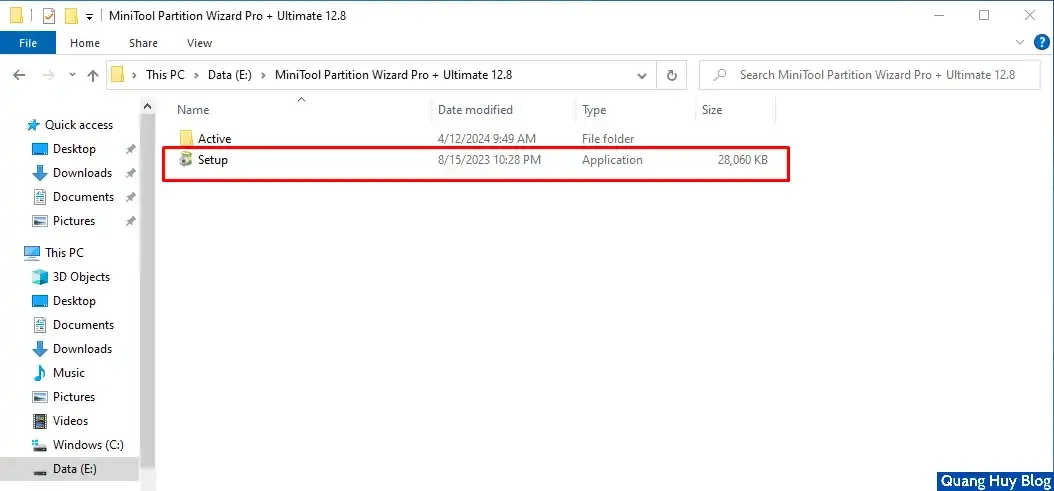
	<li><a href="https://www.quanghuyblog.net/2023/01/cach-nen-va-giai-nen-tren-may-tinh.html" target="_blank">Giải nén file</a>&nbsp;vừa tải xuống, chạy file&nbsp;<b>Setup.exe</b>.<br />
	<img alt="setup_minitool" src="https://blogger.googleusercontent.com/img/b/R29vZ2xl/AVvXsEgSemgJ6cgQuzvBJxzaRZvTEUn-AOupKX4KtOX6vTSuXoeVBKlruSkkLNXLehPy_sfIKQfHph4YjY5yyHL6bxZ3Un5qcD1ftASveFythpFitZ1vvhDCTh1TiRQ4zIgmHeXxfA0debngnmYaMmttWByvNsaEVitZDlTJz7kRI6mVswcu12C6hWzwgVCmhGXo/s1600-rw/setup_minitool.webp" /></li>
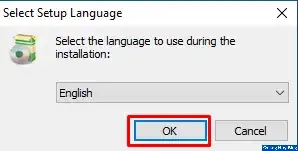
	<li>Chọn ngôn ngữ, nhấn&nbsp;<b>OK</b>.<br />
	<img alt="Chon_ngon_ngu_minitool" src="https://blogger.googleusercontent.com/img/b/R29vZ2xl/AVvXsEhr4wOe7EBzS_bvk_JfMRijjwAUxQH3ibD69HuP7KUrOs0CsSuEKFtdqLu84fA2sxWj1mQYw6kkzA83S9_PxViPxZhdP7d2J1ar-ygI9rrDLLmAlRTHjzjFIM_MxHWG79WraWY6Seo2q46vIpJFgW3y_gZWG01p7Q76MTrY4U_1CH7dPcI/s1600-rw/Chon_ngon_ngu_minitool.webp" /></li>
	<li>Chọn&nbsp;<b>I accept</b>&nbsp;và click&nbsp;<b>Next</b>.<br />
	<img alt="Tich_dong_y_minitool" src="https://blogger.googleusercontent.com/img/b/R29vZ2xl/AVvXsEhxv0nUHhBP8dprc0FKkkUAQHJB44B_xeQdb03mZTojTPLwz-kuq-PSBHzyOPZU_hmCtQ3FUUi338x3RKENybI42VpgyvMpoWyMWvVkKb1UuNvZ50D5jh0EBBrVpmMvTOp-ApycNndVdgblYfHlXoftRjyGW5L-odmMvniwgFrELldGRPM/s1600-rw/Tich_dong_y_minitool.webp" /></li>
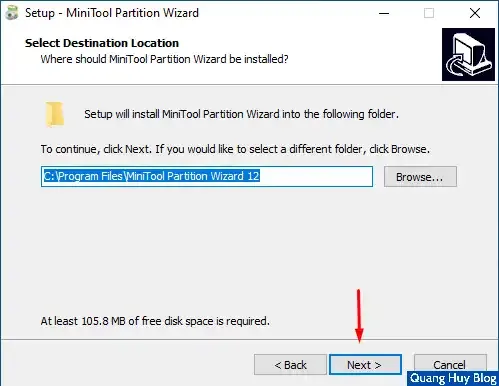
	<li>Nhấn&nbsp;<b>Next</b>.<br />
	<img alt="Vi_tri_cai_dat_minitool" src="https://blogger.googleusercontent.com/img/b/R29vZ2xl/AVvXsEhmc03qnymJpc_fzDhjYYAHCqSjuZrQ7QeyypqBcg9-pZtQBkdT86sYZ2-F3JFWFl_x9jUveRkOIRHkN0RSOqtPcsh36kWBDEauamdoVvMmD3SthADhtG3SUDMWq0_horFE32hyphenhyphenj3kjR9A8WUDnN89_Hoi7dqRLdpVC6ZbWRIfq2vAMydw/s1600-rw/Vi_tri_cai_dat_minitool.webp" /><br />
	<img alt="Ten_thu_muc_minitool" src="https://blogger.googleusercontent.com/img/b/R29vZ2xl/AVvXsEhdRtjIl8PB6e2lJ-c7-kXmLB-9esiWObbBSc75BXECFOUIK-D5m5Yey5bPn2EVs3Li0U1jsHwhwUV2Mz3ilQ0vpRnJ5ANnsz7RxXy0lrJIcr__P_Lu9qNjn7o11MQAZY_GDTwWErvcy6fQHEVCf8Q4ylT-YJVdH1q1YZw6d-Trkm74bXg/s1600-rw/Ten_thu_muc_minitool.webp" /></li>
	<li>Bỏ tick ô như ảnh dưới và nhấn&nbsp;<b>Next</b>.<br />
	<img alt="Tao_shortcut_minitool" src="https://blogger.googleusercontent.com/img/b/R29vZ2xl/AVvXsEjCf-EBiZmD4Uo5TV3qQ-WqYs8ny0V5nXcvZ15ScW7PLMwmwN-4Wi3j0zKKQrauA5LNSAnUb1Z-BzArg6iCYHq7YRws4vF2N0rNhPzxZFxWElbNGm91Q-znF7XYN1y9HZRSmwcvstcgJfjFQtGEqg84qnVcC4KxLzfBdQ8vjwRP3fsDWHM/s1600-rw/Tao_shortcut_minitool.webp" /></li>
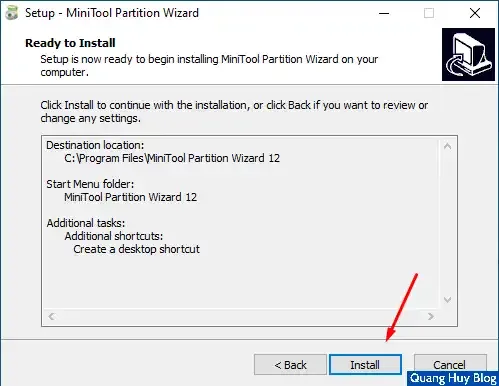
	<li>Nhấn&nbsp;<b>Install</b>&nbsp;để cài đặt.<br />
	<img alt="Xac_nhan_cai_dat_minitool" src="https://blogger.googleusercontent.com/img/b/R29vZ2xl/AVvXsEgf698ljWKeVE0VMy3lP7Q5bQCMJuO5zwiOCd-vuTBsZ0UoHsEoKTCah8q_RdxqEvitBwa2shMCXR7R9KsoT8oeXlhCKj7V13cOkI_mG0PZr_BTSCimgWy6i3L9JAOVDWfzmivPnQIzVVa2gp4DxTLzwmGy2YZ3rwRhnILWaSy37Z23cec/s1600-rw/Xac_nhan_cai_dat_minitool.webp" /></li>
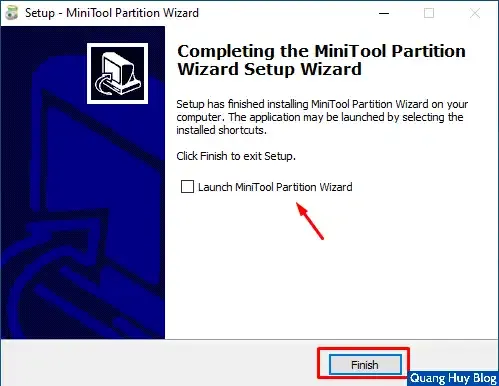
	<li>Cài đặt xong, ta bỏ tick như hình dưới và ấn&nbsp;<b>Finish</b>.<br />
	<img alt="Hoan_thanh_cai_dat_minitool" src="https://blogger.googleusercontent.com/img/b/R29vZ2xl/AVvXsEjiMoDfsawycytq_SGmQS8A1xU1RLQ0vM0IK2p5VymJr_Er21xfwSmc4D9ifAok1iCMbP6OqDmHZgqf7BEFjW_hRqgQQ5AoJPUGoCfT2Lgw39WSpPfyEHUbA6p4RwLlCFFvGonHEurHqIsxVDA0f2wDOsq5BPgP0GKKifHVTQYaUzlm7mo/s1600-rw/Hoan_thanh_cai_dat_minitool.webp" /></li>
</ol>

<h4 id="Active_Full_(Pro_Ultimate)">Active Full (Pro Ultimate)</h4>

<ol>
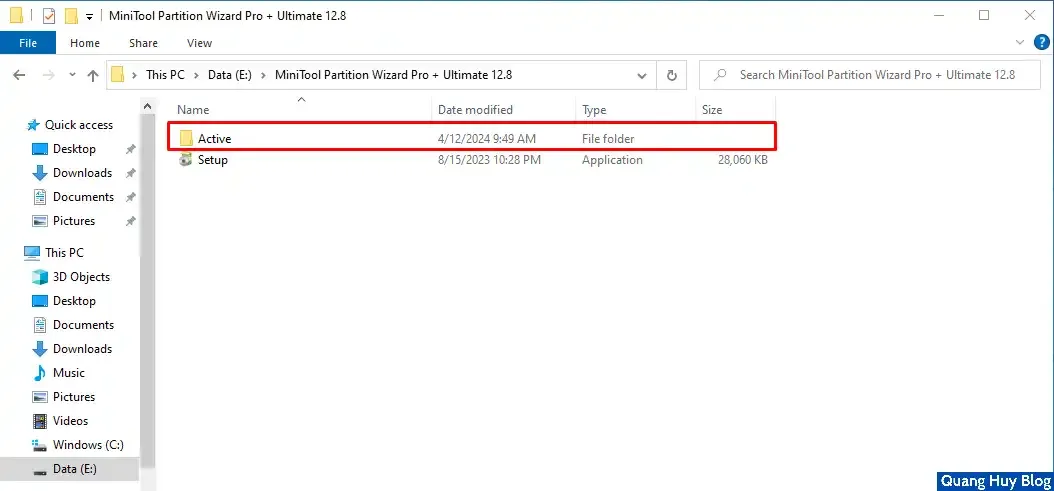
	<li>Các bạn mở thư mục&nbsp;<b>Active</b>&nbsp;có trong bộ cài đặt.<br />
	<img alt="active_minitool" src="https://blogger.googleusercontent.com/img/b/R29vZ2xl/AVvXsEgqkdvOVcI6lFFFlnhD4LqRcAPd6I1aQx_ws_RJUiGeifJbjK9GNrUBBsVIb_RNqLMbCuNM08KiUYAQgpJTICiRpVqW75cYq3Vns8yhGN76oPYxZi9-0wfPWlZyHQrVJTtKQPBaF5NNpDAQ3Ma56GwuNemMVhv3bWGHsthMKCui0YJjFQY/s1600-rw/active_minitool.webp" /></li>
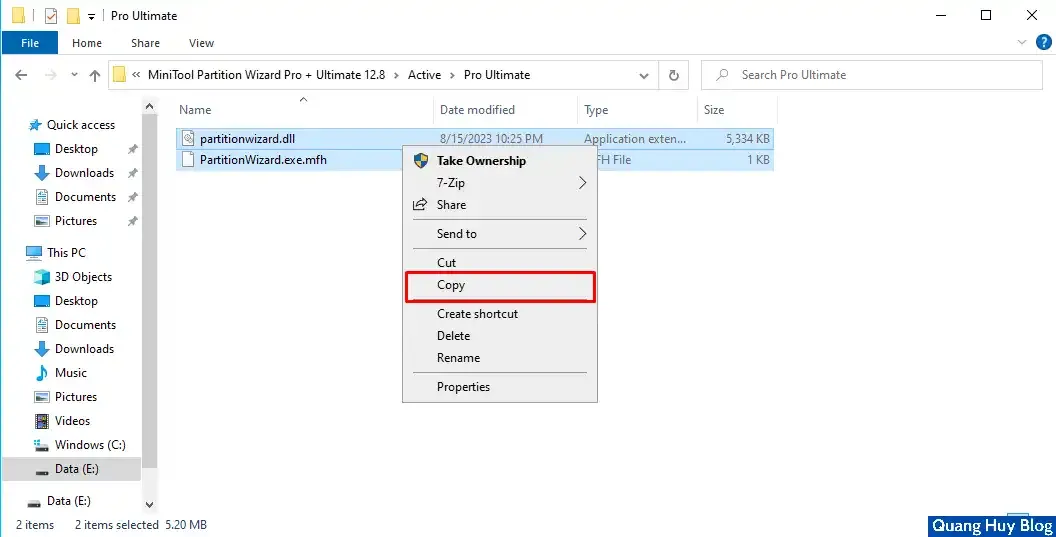
	<li>Có 2 file trong thư mục đó, bạn chọn cái nào cũng được. Sau đó mở thư mục đấy ra, copy 2 file active vào thư mục cài đặt chương trình.
	<pre>
C:\Program Files\MiniTool Partition Wizard 12</pre>
	Sao chép vào bảng nhớ tạm<br />
	<img alt="Copy_file_active" src="https://blogger.googleusercontent.com/img/b/R29vZ2xl/AVvXsEhWqyXIvYExcfZL12al5ATXXqWdd0iazfesRZfuAECukF9XHzzlxkjKkEk6BuXQMIbUcB4BZWYki-LrTsvF6V_k3zYPraNmpqS8EZK_BTotRmDW9z2kC9PIFyePl1YQmnbnyAmQKXha204bETuQEHE7Q6DSTV6PTf1XZkzpJd4vXP8colw/s1600-rw/Copy_file_active.webp" /></li>
	<li>Bạn nhấn&nbsp;<b>Replace the files...</b>, tích vào ô&nbsp;<b>Do this for all current items &gt; Continue</b>.<br />
	<img alt="Thay_the_tep_minitool" src="https://blogger.googleusercontent.com/img/b/R29vZ2xl/AVvXsEgUtM-ZnuH8pdxJO_wUeEMLd1cjHklt1g1HN4GbiW5EKOmx56YPYB5BYMjqGvmMG0RMEz0b3oCsKx_9BVqgp08r7fNi0FytE4QxFkX6_0XXgQ_yZcE9dfF5Vo_mIHWd3PWINeTiRvY_ubtOIIDI54SVesGiEmC3sjJM7ZtDwcZv0gVbPm0/s1600-rw/Thay_the_tep_minitool.webp" /></li>
	<li>Khởi động phần mềm lên ngoài desktop và tận hưởng thành quả nhé.</li>
</ol>

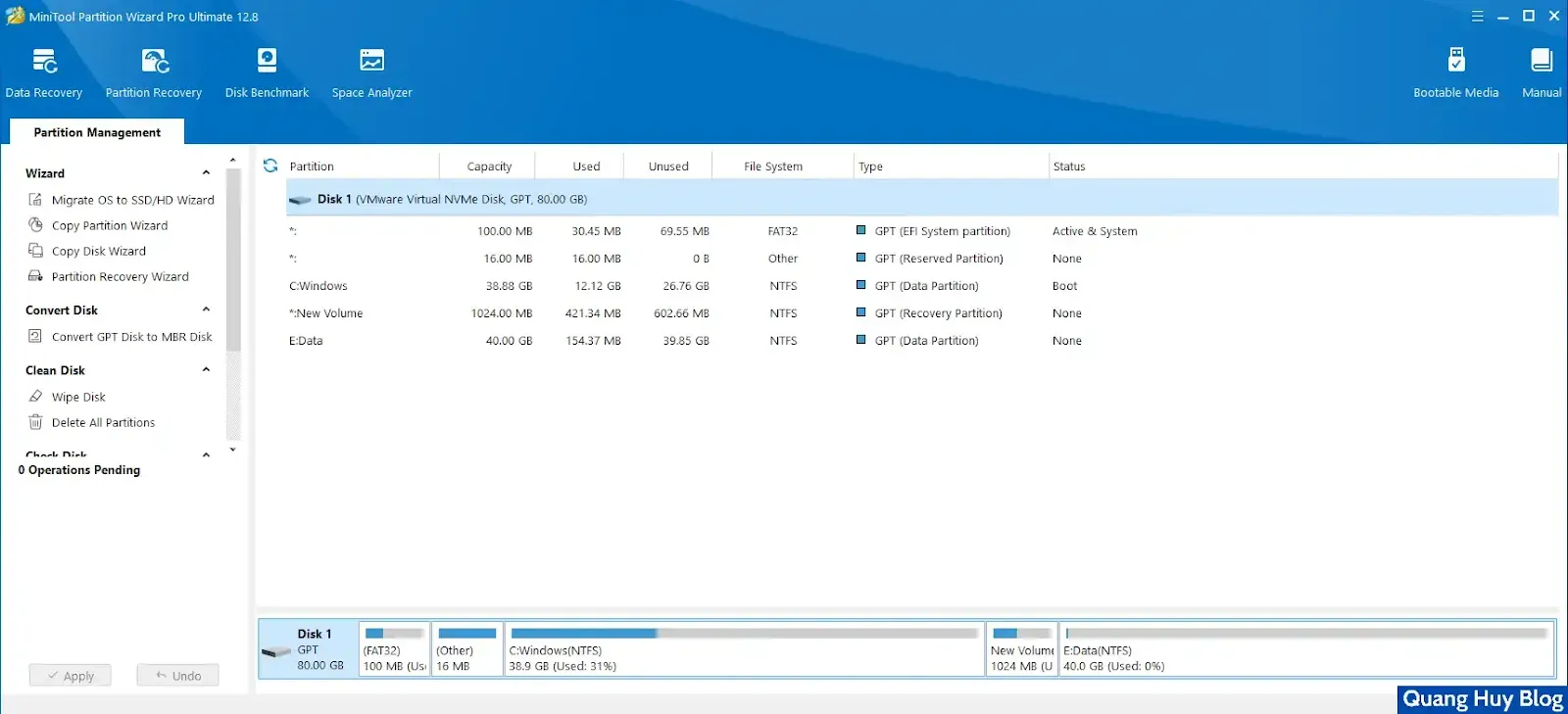
<p>Đó là tất cả những gì mình chia sẻ về&nbsp;<b>Cách tải và cài đặt MiniTool Partition Wizard 12.8 Pro Ultimate Full</b>. Cảm ơn bạn đã đọc bài viết. Nếu có thắc mắc gì hãy để lại dưới phần&nbsp;<b>Comment</b>&nbsp;hoặc nhắn tin tới&nbsp;<b>Zalo/Fanpage</b>&nbsp;nhé! Dưới là giao diện khi cài thành công nhé.</p>
<img alt="Giao_dien_minitool" src="https://blogger.googleusercontent.com/img/b/R29vZ2xl/AVvXsEgeI0FpIoMg5M1_AM-1V5xo-dNaKd6zZC1ekLLsNs_RsDAnpwDVmCv7ZTwC-whSZXFzbQQBTdomzffIt9YHgK1Ur1iAdxwU4KgRcu2pSvuJOmXKfRTFFLbjaoxlq8xSjejETm1s1z2PFlhS1DQkjKzYaLCeHvtfsZP1GYdZoWADdPSCfCg/s1600-rw/Giao_dien_minitool.webp" />
		</div>
				<div id="author">
						<p>
				<strong>Tác giả:</strong>
				<a href="https://phatthanhdat.com/index.php/author/luuhongphuc/">luuhongphuc</a>
			</p>
		</div>
	</div>
	<div id="footer" class="clearfix">
		<div id="url">
			<strong>URL của bản tin này: </strong><a href="https://phatthanhdat.com/index.php/savefile/tien-ich/tai-va-cai-dat-minitool-partition-wizard-12-8-pro-ultimate-full-199.html" title="Tải và cài đặt MiniTool Partition Wizard 12.8 Pro Ultimate Full">https://phatthanhdat.com/index.php/savefile/tien-ich/tai-va-cai-dat-minitool-partition-wizard-12-8-pro-ultimate-full-199.html</a>

		</div>
		<div class="clear"></div>
		<div class="copyright">
			&copy; Phát Thành Đạt - Dịch vụ sửa chữa máy tính hóc môn
		</div>
		<div id="contact">
			<a href="mailto:info@phatthanhdat.com">info@phatthanhdat.com</a>
		</div>
	</div>
</div>
        <div id="timeoutsess" class="chromeframe">
            Bạn đã không sử dụng Site, <a onclick="timeoutsesscancel();" href="https://phatthanhdat.com/#">Bấm vào đây để duy trì trạng thái đăng nhập</a>. Thời gian chờ: <span id="secField"> 60 </span> giây
        </div>
        <div id="openidResult" class="nv-alert" style="display:none"></div>
        <div id="openidBt" data-result="" data-redirect=""></div>
<script src="https://phatthanhdat.com/assets/js/jquery/jquery.min.js"></script>
<script>var nv_base_siteurl="/",nv_lang_data="vi",nv_lang_interface="vi",nv_name_variable="nv",nv_fc_variable="op",nv_lang_variable="language",nv_module_name="news",nv_func_name="savefile",nv_is_user=0, nv_my_ofs=-4,nv_my_abbr="EDT",nv_cookie_prefix="nv4",nv_check_pass_mstime=1738000,nv_area_admin=0,nv_safemode=0,theme_responsive=0,nv_recaptcha_ver=2,nv_recaptcha_sitekey="",nv_recaptcha_type="image",XSSsanitize=1;</script>
<script src="https://phatthanhdat.com/assets/js/language/vi.js"></script>
<script src="https://phatthanhdat.com/assets/js/DOMPurify/purify3.js"></script>
<script src="https://phatthanhdat.com/assets/js/global.js"></script>
<script src="https://phatthanhdat.com/assets/js/site.js"></script>
<script src="https://phatthanhdat.com/themes/default/js/news.js"></script>
<script src="https://phatthanhdat.com/themes/default/js/main.js"></script>
<script src="https://phatthanhdat.com/themes/default/js/custom.js"></script>
<script type="application/ld+json">
        {
            "@context": "https://schema.org",
            "@type": "Organization",
            "url": "https://phatthanhdat.com",
            "logo": "https://phatthanhdat.com/uploads/about/logonho.png"
        }
        </script>
<script async custom-element="amp-ad" src="https://cdn.ampproject.org/v0/amp-ad-0.1.js"></script>
<script>
     (adsbygoogle = window.adsbygoogle || []).push({});
</script>
<script>(function(w,d,s,l,i){w[l]=w[l]||[];w[l].push({'gtm.start':
new Date().getTime(),event:'gtm.js'});var f=d.getElementsByTagName(s)[0],
j=d.createElement(s),dl=l!='dataLayer'?'&l='+l:'';j.async=true;j.src=
'https://www.googletagmanager.com/gtm.js?id='+i+dl;f.parentNode.insertBefore(j,f);
})(window,document,'script','dataLayer','GTM-KRZZ2CK');</script>
<script>
!function(f,b,e,v,n,t,s)
{if(f.fbq)return;n=f.fbq=function(){n.callMethod?
n.callMethod.apply(n,arguments):n.queue.push(arguments)};
if(!f._fbq)f._fbq=n;n.push=n;n.loaded=!0;n.version='2.0';
n.queue=[];t=b.createElement(e);t.async=!0;
t.src=v;s=b.getElementsByTagName(e)[0];
s.parentNode.insertBefore(t,s)}(window, document,'script',
'https://connect.facebook.net/en_US/fbevents.js');
fbq('init', '219812430112623');
fbq('track', 'PageView');
</script>
<script async src="https://pagead2.googlesyndication.com/pagead/js/adsbygoogle.js?client=ca-pub-3722185033130810" crossorigin="anonymous"></script>
<script>
      var chatbox = document.getElementById('fb-customer-chat');
      chatbox.setAttribute("page_id", "244380242794992");
      chatbox.setAttribute("attribution", "biz_inbox");

      window.fbAsyncInit = function() {
        FB.init({
          xfbml            : true,
          version          : 'v11.0'
        });
      };

      (function(d, s, id) {
        var js, fjs = d.getElementsByTagName(s)[0];
        if (d.getElementById(id)) return;
        js = d.createElement(s); js.id = id;
        js.src = 'https://connect.facebook.net/vi_VN/sdk/xfbml.customerchat.js';
        fjs.parentNode.insertBefore(js, fjs);
      }(document, 'script', 'facebook-jssdk'));
    </script>
<script src="https://sp.zalo.me/plugins/sdk.js"></script>
<script>
     (adsbygoogle = window.adsbygoogle || []).push({});
</script>
<script src="https://phatthanhdat.com/themes/default/js/bootstrap.min.js"></script>
</body>
</html>